Algodocs

Intelligent AI-Powered Bank Statement OCR With 99% Accuracy

  • Process statements of any format (native or scanned PDFs, images, screenshots) in seconds.
  • Extracted fields such as bank name, account holder, masked account/IBAN, statement period, opening/closing/available balances, and full transactions (date, description, reference, debit/credit, running balance, currency) etc. Multi levels of validation: automated checks plus manual review for low-confidence data.
  • Improve review time and costs by up to 80% with our self-learning AI engine, including balance reconciliation and duplicate detection.
ISO 27001 Certified GDPR Compliant HIPAA Compliant
Bank Statement OCR Automation
99%+Accuracy
80%Cost Savings
AISelf-learning

Trusted by customers across the globe

Solution – AI bank statement ocr

Extract Clean Transaction Data from Bank Statements Using AI

Automate data extraction from Bank statements with 99% accuracy using Algodocs’ pre-built AI bank Statement OCR model…

📥

Document Import

Import scanned/text PDFs Bank statements from email, cloud, and 100+ integrations.

đź§ 

Intelligent Processing

AI & GenAI models capture every field accurately.

📤

Data Export

Export to Excel, CSV, JSON, XML — or via API & Webhooks.

LIVE DEMO

Upload bank statements to test Algodocs’ enterprise-grade Bank Statement OCR solution Today

Supported file types: JPG, PNG, PDF (maximum 5 pages)
Maximum file size: 5MB
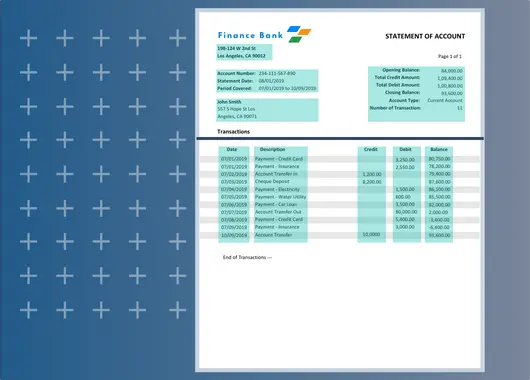
FieldValue
bank_nameAwesome Bank
bank_address198-124 W 2nd St Los Angeles, CA 90012
account_number111-234-567-890
statement_date04/01/2019
opening_balance175800
closing_balance652600
account_holder_nameJohn Smith
account_holder_address557 S Hope St Los Angeles, CA 90071
account_typeCurrent Account
Col1Col2Col3Col4Col5
DateDescriptionCreditDebitBalance
03/01/2019Payment - Credit Card5,400.00170,400.00
03/01/2019Payment - Insurance3,000.00167,400.00
03/02/2019Account Transfer In500,000.00667,400.00
03/03/2019Cheque Deposite10,000.00677,400.00
03/04/2019Payment - Electricity1,500.00675,900.00
03/05/2019Payment - Water Utility600.00675,300.00
03/06/2019Payment - Car Loan3,500.00671,800.00
03/07/2019Account Transfer Out80,000.00591,800.00
03/08/2019Payment - Credit Card5,400.00586,400.00
03/09/2019Payment - Insurance3,000.00583,400.00
03/10/2019Account Transfer In5,000.00588,400.00
03/11/2019Cheque Deposite1,000.00589,400.00
03/12/2019Payment - Electricity1,500.00587,900.00
03/13/2019Payment - Water Utility600.00587,300.00
03/14/2019Payment - Car Loan3,500.00583,800.00
03/15/2019Account Transfer Out8,000.00575,800.00
03/16/2019Payment - Credit Card5,400.00570,400.00
03/17/2019Payment - Insurance3,000.00567,400.00
03/18/2019Account Transfer In50,000.00617,400.00
03/19/2019Cheque Deposite10,000.00627,400.00
03/20/2019Payment - Electricity1,500.00625,900.00
03/21/2019Payment - Water Utility600.00625,300.00
03/22/2019Payment - Car Loan3,500.00621,800.00
03/23/2019Account Transfer Out800.00621,000.00
03/24/2019Payment - Credit Card5,400.00615,600.00
03/25/2019Payment - Insurance3,000.00612,600.00
03/26/2019Account Transfer In30,000.00642,600.00
03/27/2019Cheque Deposite10,000.00652,600.00
03/28/2019Payment - Electricity1,500.00651,100.00
03/29/2019Payment - Water Utility600.00650,500.00
03/30/2019Payment - Car Loan3,500.00647,000.00
03/31/2019Account Transfer Out15,000.00632,000.00

Data security & confidentiality is our top priority
Your data is SSL-encrypted and secured on Microsoft Azure and Google Cloud. As a testament to our commitment, we adhere to stringent compliance standards, including ISO27001, GDPR and HIPAA.
Privacy Policy
Extract Fields from Bank Statements

Extract Fields from Bank Statements

Automate data extraction from bank statements with 99.0% accuracy and 10X speed. Instantly capture key fields from any layout, such as bank name, account holder, account number (masked), statement period, opening/closing/available balances, and full transaction tables (date, description, reference, debit/credit, running balance, currency) without training AI models or setting up templates.

With Algodocs’ pre-trained models, you can process statements quickly, securely, and at scale, delivering high accuracy at an affordable cost. Low-confidence fields can be flagged for review, so you maintain both speed and control.

âś… Key Benefits

  • 99%+ accuracy in bank statement extraction
  • Works with scans, photos, native & password-protected PDFs (single or multi-page)
  • Reconstructs line-item transactions (date, description, reference/cheque, debit, credit, balance)
  • No setup or training required — ready to use instantly
  • Multi-currency support & regional formats (dates, decimals)
  • Dual validation options (automated checks + optional human review)
  • Built-in quality rules (duplicate detection, total/balance reconciliation)
  • Export to CSV/Excel/JSON/OFX or push via API & webhooks
  • Optional PII redaction to help protect sensitive data
Captured Fields with Pre-Trained AI — Bank Statements

Captured Fields with Pre-Trained AI

Algodocs’ pre-trained Bank Statement OCR captures a wide variety of fields from statements of any layout (retail/consumer, business, e-statements, scanned PDFs). For specific use cases, you can fine-tune the extractor in minutes to meet your requirements.

Captured fields include:

  • Bank Name & Logo
  • Account Holder / Company Name
  • Account Number (masked), IBAN
  • Routing/Sort Code, SWIFT/BIC
  • Account Type & Currency
  • Statement Period (from/to)
  • Issue Date
  • Opening, Closing & Available Balances
  • Branch Details (address/phone) if present
  • Statement/Document ID, Page Numbers

Transaction table (line items):

  • Booking Date & Value Date
  • Description / Narrative / Counterparty
  • Reference / Cheque No. / Transfer ID
  • Debit, Credit, Running Balance
  • Fees & Charges, Interest
  • FX rate / Currency (for foreign transactions)
  • Channel (ATM, POS, ACH, SEPA) when present

Quality & validation (optional):

  • Duplicate detection & gap checks
  • Balance reconciliation (opens → debits/credits → closes)
  • Low-confidence flagging for human review

Export & Integration

Export structured data in your preferred format or connect Algodocs directly with your systems to power end-to-end automation.

  • Export to CSV, Excel, JSON, XML
  • Integrations with ERP, CRM, Databases, APIs
  • Supports cloud storage like Google Drive, S3, SharePoint
  • Enterprise-grade security (GDPR, HIPAA, ISO)
FAQ

Frequently Asked Questions

Everything you need to know about extracting bank statement data with Algodocs.

What is Algodocs Bank Statement OCR?

Algodocs Bank Statement OCR is an AI tool that reads bank statements and turns the account details and transactions into structured data. It uses pretrained models, so you can upload a statement and get the fields back without building templates or training anything.

What data can Algodocs extract from a bank statement?

It captures the bank name, account holder or company name, masked account number, IBAN, routing or sort code, SWIFT or BIC, account type, and currency. It also reads the statement period, issue date, opening, closing, and available balances, branch details, and the statement ID and page numbers.

Can it extract the full transaction table?

Yes. Algodocs rebuilds each transaction line, including the booking date, value date, description or counterparty, reference or cheque number, debit, credit, and running balance. It also picks up fees, charges, interest, foreign exchange rates, and the channel used, such as ATM, POS, ACH, or SEPA, when they appear on the statement.

What types of bank statements does it support?

Algodocs supports various types of bank statements and financial documents, such as checks, transaction histories, and other financial documents. Regardless of the layout or format, Algodocs AI models can detect, summarize, and extract data from these documents effortlessly.

What file types can I upload?

Algodocs supports scanned images, native PDFs, and handwritten notes as well. You can upload files up to 5 MB in size.

How accurate is the extraction?

Algodocs can process and extract data from bank statements with up to 99% accuracy, depending on the file quality. With the help of AI and ML, Algodocs can process low-quality, blurry, and skewed scanned images, as well as handwritten notes.

Does Algodocs check the numbers for errors?

Yes. Optional quality rules include balance reconciliation, which follows the opening balance through all debits and credits to the closing balance. Duplicate detection and gap checks are also available, so errors are easier to catch before the data reaches your systems.

Does it support multiple currencies and regional formats?

Yes. Algodocs supports multiple currencies and regional formats for dates and decimals.

Do I need to train the AI or set up templates?

No. The pretrained models are ready to use as soon as you sign up. If your use case needs something specific, you can fine tune the extractor in minutes to match your requirements.

What formats can I export the extracted data in?

You can export to CSV, Excel, JSON, XML, or OFX. You can also send the data to other systems through the API and webhooks.

Can Algodocs connect to my existing systems?

Yes. It integrates with ERP and CRM platforms, databases, and APIs. It also supports cloud storage such as Google Drive, S3, and SharePoint, and you can import statements from email, cloud storage, and more than 100 integrations.

Is my financial data secure?

Your files are encrypted with SSL and stored securely on Microsoft Azure and Google Cloud. Algodocs is ISO 27001 certified and complies with GDPR and HIPAA. Optional PII redaction is also available to help protect sensitive information.

Can I try Algodocs for free?

Yes. You can test it with the live demo on the page, or sign up for a free account and process 50 pages for free every month.

Extract clean Bank Statement data in seconds—seamlessly and securely

Extract data from low-quality bank statement scans and PDFs in seconds with AI-powered bank statement OCR. No setup, training, or complex configuration required. Just upload and extract with confidence.

Scroll to Top