
Receive Extracted Data Using Webhooks
Webhooks allow you to send extracted data from your documents to the URL you provide.
After your webhook is created extracted data will be sent to the specififed URL right after the extraction process is completed. You can activate/deactivate your webhook or alter it any time you need.
How to Set Up Webhooks in Algodocs
Follow these steps to automatically send your extracted data to a specific URL using Webhooks.
Step 1: Access Webhook Settings
Log in to your Algodocs account. From the main dashboard, navigate to the Integrations section in the side menu and select Webhooks.
Step 2: Create a New Webhook
Click on the “Create New Webhook” button. A configuration window will appear.
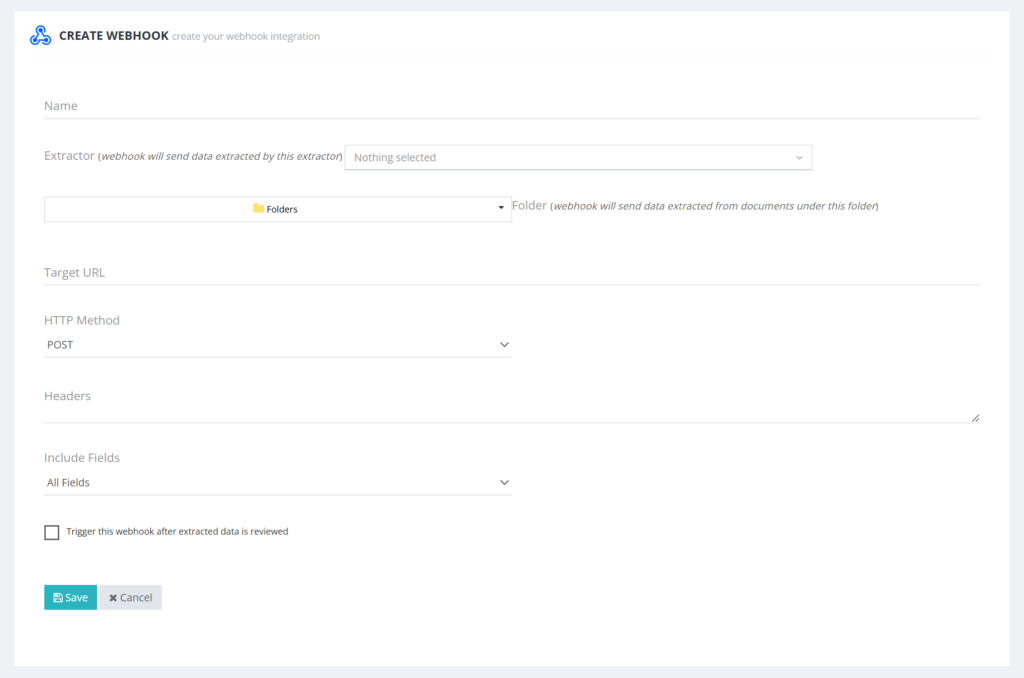
Step 3: Basic Configuration
Name: Give your webhook a descriptive name so you can easily identify it later.
Select Extractor: Choose the specific extractor you want this webhook to work with.
Select Folders: Select the folder(s) where the uploaded documents should trigger the webhook.
Step 4: Set the Destination
Target URL: Enter the destination URL where the extracted data should be sent.
Step 5: Filter Fields (Optional)
If you do not want to send all the extracted data, use the Include Fields section. Here, you can select only the specific fields you want to be transmitted to your Target URL.
Step 6: Save and Test
Once all details are filled in, click Save. You can then use the test option to ensure that the connection is working correctly and your data is being delivered as expected.
If you would like to read more about these or try making the first move toward improving your operations, do not hesitate to contact us today! Follow this link to schedule a demo and sign up.
Get a personalized walkthrough of document ingestion, auto-classification, and 99%+ accurate AI extraction. We’ll map the demo to your workflows and answer anything you need.
- ✓ Tailored to your document types
- ✓ ROI & accuracy breakdown for your use-case
- ✓ On-prem & cloud deployment options
Ready to accelerate your document operations?
Pick a time—see real results in minutes.
Book a Demo