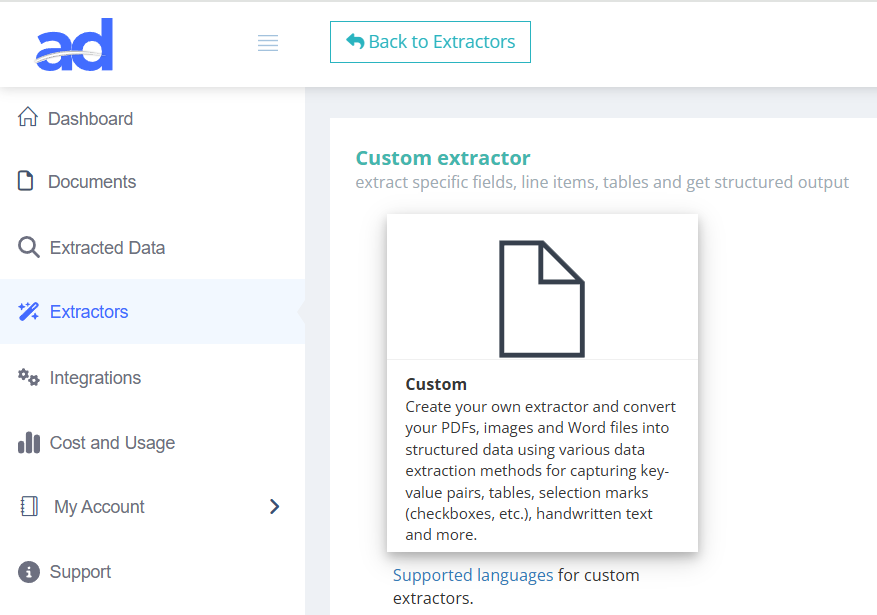
Create a new extractor
After signing in to your Algodocs account navigate to Extractors section. Create a new extractor by choosing “Custom” option.
Train on your documents
Build an extractor using custom models tailored to your own layouts — no complex setup. Start from a template or from scratch, label a few samples with our visual editor, then train, version, and deploy in minutes. Add validation rules, enable human-in-the-loop review, and ship results through exports or the API. Your data stays private and governed end-to-end.

Train in minutes: Start from a template or blank, upload a few samples, label visually, and kick off training—no MLOps required.
Versioning: each training run creates a version you can A/B compare, promote, or roll back instantly.
Zero-code tuning: adjust fields, add rules, and retrain without leaving the editor.
Any layout, any format: PDFs, scans, images—single or multi-page—multi-language text supported.
Label faster: hotkeys, bulk selection, table capture, and pre-fill suggestions speed up annotation.
Privacy-first: projects are isolated; your data and models stay within your tenant with audit trails.
High throughput: batch queues, async webhooks, and autoscaling workers for peak volumes.
Reliability: idempotent requests, retries, and per-field confidence thresholds to control acceptance.
Complex docs: tables, stamps, mixed layouts, and rotated scans handled with stable accuracy.
Human-in-the-loop: route low-confidence fields to reviewers with source highlights—approve or fix in one click.
Guardrails: regex checks, math validation, date/amount normalization, and custom business rules.
Feedback loop: corrections feed back into training sets to improve the next version.
Ship anywhere: export CSV/Excel/JSON or push via REST API & webhooks.
Integrations: map fields to your ERP/CRM/AP system; reuse mappings per destination.
Governance: ISO 27001 practices, GDPR alignment, HIPAA-friendly options; audit logs for every run.
| Field | Value |
| invoice_number | 11223344 |
| invoice_date | 6/30/2024 |
| vendor_name | algodocs |
| vendor_address | 435 Columbus Ave, San Francisco, CA 94133 |
| vendor_state | CA |
| vendor_city | San Francisco |
| vendor_zip_code | 94133 |
| customer_name | John Doe |
| customer_address | 600 Montgomery St, San Francisco, CA 94111 |
| customer_state | CA |
| customer_city | San Francisco |
| customer_zip_code | 94111 |
| subtotal | 1130 |
| tax_rate | 18% |
| invoice_total | 1333.4 |
| Col1 | Col2 | Col3 | Col4 |
| description | quantity | unit_price | amount |
| Service description 1 | 2 | 115 | 230 |
| Service description 2 | 1 | 375 | 375 |
| Service description 3 | 3 | 175 | 525 |




After signing in to your Algodocs account navigate to Extractors section. Create a new extractor by choosing “Custom” option.

Go to extractor editor by clicking on “Manage” button of the newly created extractor. In the extractor editor click on “Add” to choose the data extraction method for adding fields or tables to extract. Choose Custom AI Model data extraction method. This will take you to the Custom AI Model editor.

In order to train your own Custom AI Models, you need to label at least 10 documents. Upload files by clicking on the “Upload files” button.

Labelling is the first step in custom models. To label fields, first create the fields you need to capture from your documents. You can create fields, tables, or selection marks. After creating fields, label them on every uploaded document by clicking on the document text associated with the corresponding field.

Labelling tables is super easy in Algodocs custom models. All tables are auto-detected and can be automatically labelled. Click on the table icon next to a table in the document to open a popup, then select the columns and rows you need to extract.

After carefully labelling all documents, initiate training of a custom model from the “Training” tab. Choose a training option: Single-Layout (documents share the same layout) or Multi-Layout (same data to extract across different layouts). Train, then review and promote the best version.
We are very happy with the service Algodocs have provided. Each query gets actioned almost immediately. Extractors can be tricky but with the support they are set up quick and easy. Great price and would highly recommend.
This performance of Algodocs looks amazing! Accuracy is 100%. Well done Algodocs team. And your customer service is incredible. Really appreciate your team's hard work on this stuff.
Algodocs was exactly the program our firm was looking for to process thousands of pages of data. Their customer service is unparalleled and they go the extra mile to meet the customer's needs.
We were attempting to index and extract data from over 10,000 pages within a short time frame for litigation. A 2 person 100 hour project was handled in less than a few hours. Truly amazing service that I will absolutely use again in the future!
Processing around 5K documents per day was a headache that our customers had. Our partnership with Algodocs played a vital role in addressing this problem. With on-premise solution of Algodocs and its flexible extracting rules we believe Algodocs is a leader in document data extraction.
Get a personalized walkthrough of document ingestion, auto-classification, and 99%+ accurate AI extraction. We’ll map the demo to your workflows and answer anything you need.
Pick a time—see real results in minutes.
Book a Demo