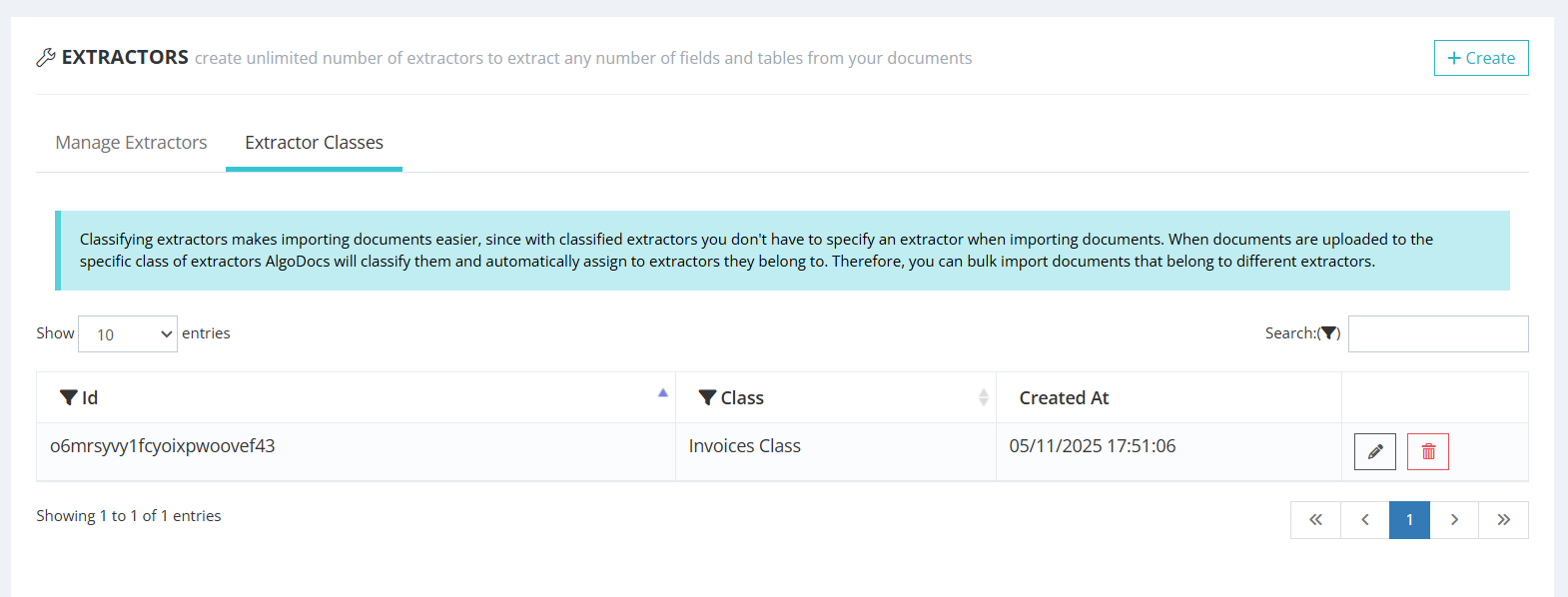
Create a Class
After signing in to your Algodocs account, navigate to Extractors and open the Extractor Classes tab. Create a new class.
Route mixed documents automatically
Import a mixture of invoices, POs, IDs, and forms—Algodocs auto-classifies each file and assigns the right extractor instantly. Use classes and unique regex rules to boost precision, then apply confidence thresholds, review overrides, and audit trails for governance. Export results to CSV, Excel, JSON or push via the REST API.

Create a class: In Extractors → Extractor Classes, add a new class to group similar document types (e.g., “Invoices”, “POs”, “IDs”).
Purpose: classes let Algodocs quickly decide which extractor family a document belongs to before detailed extraction.
Tip: keep names meaningful to your downstream teams (Finance, Logistics, KYC, etc.).
Bind extractors to a class: open an extractor’s settings and choose a class from the dropdown.
Unique regex: add a distinct regular expression that reliably appears only in that doc type (e.g., algodocs\.com if only that invoice layout contains this string).
Why regex: improves precision so mixed uploads are classified and routed to the correct extractor instantly.
Upload into a class: drop files to the class and Algodocs will auto-classify and auto-assign to the correct extractor.
Flow: immediately after upload the file shows the class name; once classified it switches to its exact extractor automatically.
Mixed batches: safely upload invoices, POs, and forms together—classification handles the routing.
Confidence thresholds: set minimum scores for classification; below-threshold docs can be flagged for review.
Overrides: allow manual re-classify to a different extractor and save that feedback to improve future routing.
Guardrails: add quick checks (e.g., regex, amount/date presence) before extraction proceeds.
Track performance: monitor per-class volumes, top regex hits, misroutes, and manual overrides.
Exports & webhooks: push classification results to your DMS/RPA via API; include class & extractor metadata.
Compliance: change logs and audit trails record who re-classified what and when.
| Field | Value |
| invoice_number | 11223344 |
| invoice_date | 6/30/2024 |
| vendor_name | algodocs |
| vendor_address | 435 Columbus Ave, San Francisco, CA 94133 |
| vendor_state | CA |
| vendor_city | San Francisco |
| vendor_zip_code | 94133 |
| customer_name | John Doe |
| customer_address | 600 Montgomery St, San Francisco, CA 94111 |
| customer_state | CA |
| customer_city | San Francisco |
| customer_zip_code | 94111 |
| subtotal | 1130 |
| tax_rate | 18% |
| invoice_total | 1333.4 |
| Col1 | Col2 | Col3 | Col4 |
| description | quantity | unit_price | amount |
| Service description 1 | 2 | 115 | 230 |
| Service description 2 | 1 | 375 | 375 |
| Service description 3 | 3 | 175 | 525 |



Auto-classify your documents before sending them to extractors. Algodocs offers an auto-classification feature that helps you process mixed document sets with ease. Import a mixture of documents and let Algodocs decide which extractor should be assigned to each file.

After signing in to your Algodocs account, navigate to Extractors and open the Extractor Classes tab. Create a new class.
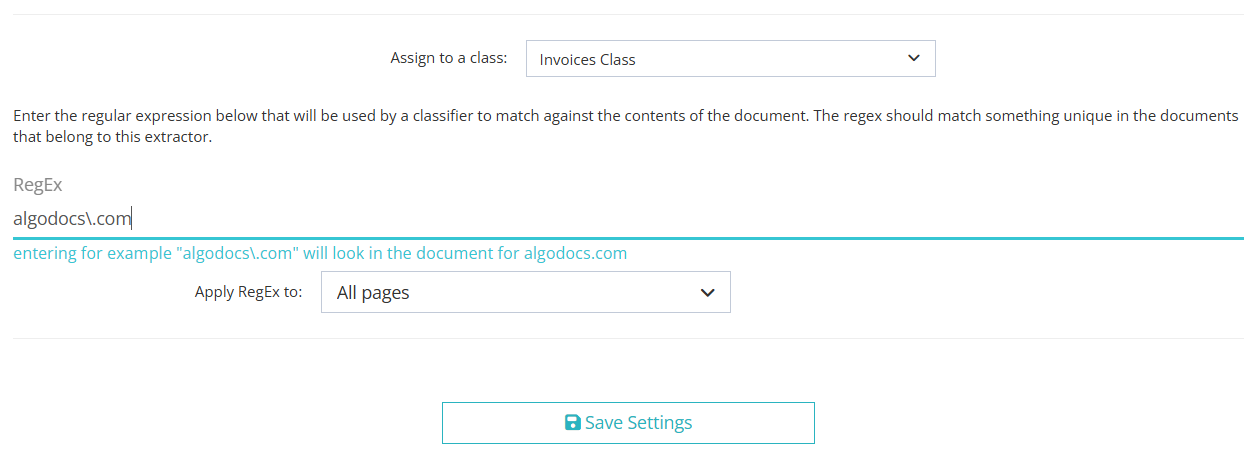
Go to Extractors → open the extractor’s settings. Select a class from the dropdown to
assign it. Then enter a unique regular expression that matches only this extractor’s
document type (e.g., use algodocs\.com if only Algodocs invoices contain that text).
Save your settings.

Upload files into the class. They’re auto-classified and routed to the corresponding extractors. Immediately after upload, the extractor is set to the class name; once classification finishes, it’s switched to the exact extractor automatically.
We are very happy with the service Algodocs have provided. Each query gets actioned almost immediately. Extractors can be tricky but with the support they are set up quick and easy. Great price and would highly recommend.
This performance of Algodocs looks amazing! Accuracy is 100%. Well done Algodocs team. And your customer service is incredible. Really appreciate your team's hard work on this stuff.
Algodocs was exactly the program our firm was looking for to process thousands of pages of data. Their customer service is unparalleled and they go the extra mile to meet the customer's needs.
We were attempting to index and extract data from over 10,000 pages within a short time frame for litigation. A 2 person 100 hour project was handled in less than a few hours. Truly amazing service that I will absolutely use again in the future!
Processing around 5K documents per day was a headache that our customers had. Our partnership with AlgoDocs played a vital role in addressing this problem. With on-premise solution of Algodocs and its flexible extracting rules we believe Algodocs is a leader in document data extraction.
Get a personalized walkthrough of document ingestion, auto-classification, and 99%+ accurate AI extraction. We’ll map the demo to your workflows and answer anything you need.
Pick a time—see real results in minutes.
Book a Demo