How to Automate Patient Chart Data Extraction and Streamline Healthcare Data Processing Using AI and IDP
Healthcare organizations deal with huge amounts of patient information every day. The majority of this information is stored in physical documents, PDFs, scanned images, or handwritten notes. These documents include intake forms, medical reports, lab reports, prescriptions, insurance documents, clinical notes, scanned records, and, most importantly, patient charts.
A recent study shows that 80% of healthcare data is stored in an unstructured format, and processing data from these documents using legacy EHR platforms (Electronic Health Record) can be challenging.
A patient record can be a manually filled document or may arrive in PDF, scanned image, fax, photograph, or Word document format. Staff members often have to manually read these documents, find important information, type it into another system, and check it for errors. This process takes time and can create unnecessary work for healthcare teams. But modern AI-based data extraction tools, such as intelligent document processing, Optical Character Recognition (OCR), Large Language Models (LLMs), and Artificial Intelligence can streamline healthcare and patient chart data extraction processing.
This article explains how patient chart data extraction works, why traditional methods create problems, how AI and IDP improve the process, and how organizations can build a reliable healthcare document processing workflow.
TL;DR
AI-powered patient chart data extraction can help healthcare organizations:
- Extract patient and contact information
- Capture medical history, medications, and allergies
- Identify diagnosis and procedure information
- Extract insurance details
- Process lab reports and test results
- Handle scanned documents, images, and handwritten forms
- Reduce manual data entry
- Improve data consistency
- Connect extracted information with EHRs and other systems
- Process large document volumes faster
A modern healthcare extraction workflow typically combines OCR, document classification, AI, LLMs, validation, human review, and system integration. The goal is not simply to read healthcare documents. It is to convert them into reliable structured data that can support real healthcare workflows.
What Is a Patient Care Document?
A patient care document is a healthcare record that is used to capture information about a patient's identity, medical history, treatment, diagnosis, and other details during the course of care.
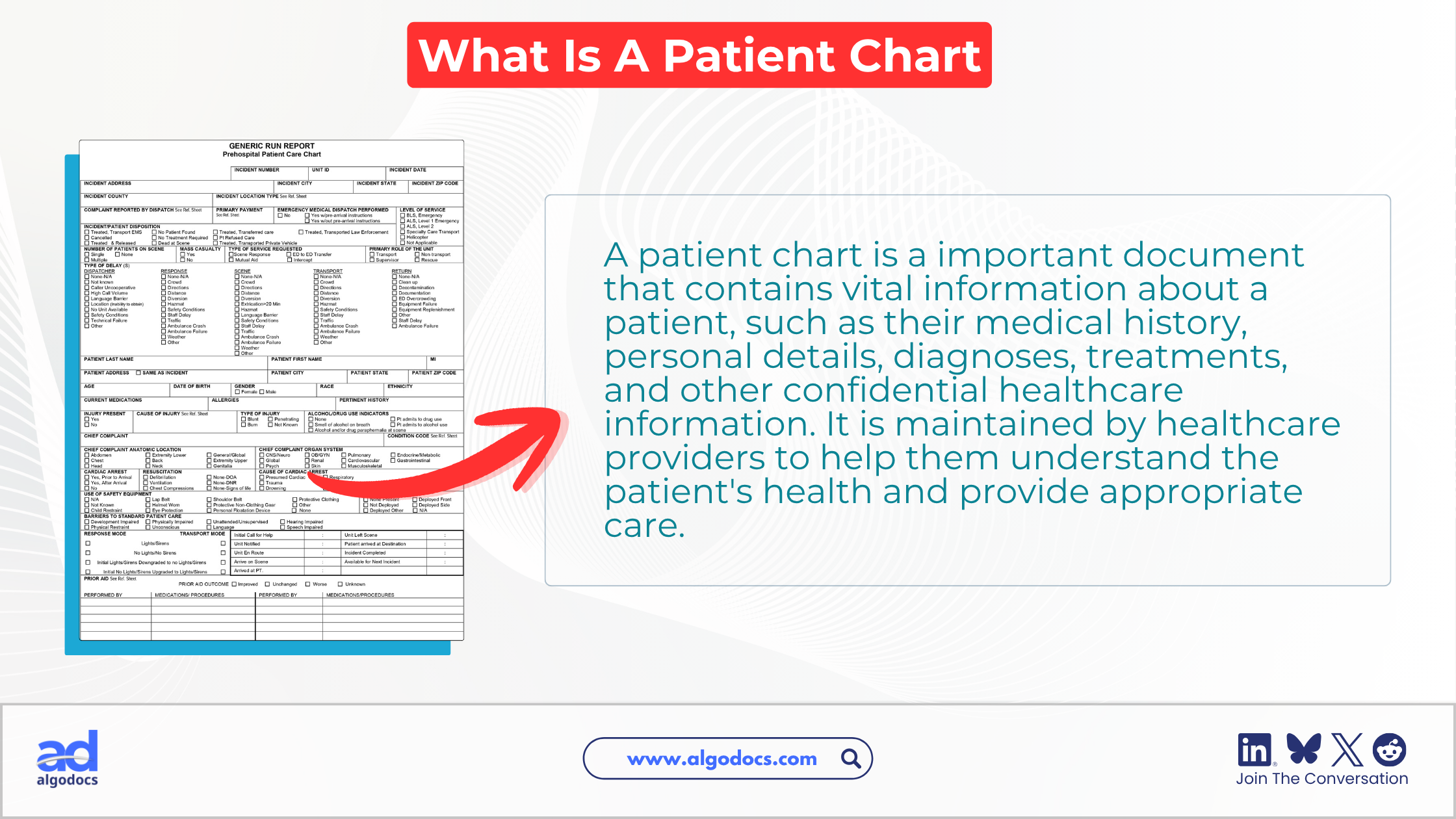
Common examples include:
- Patient intake and medical history forms
- Clinical notes and discharge summaries
- Lab and diagnostic reports
- Prescription and referral forms
- Insurance documents and medical bills
These documents may be printed, scanned, digitally created, or contain selectable text. They can also include tables, checkboxes, signatures, stamps, and handwritten notes.
For example, a patient intake form may contain:
Patient information: Name, date of birth, gender, address, phone number, and email.
Medical information: Existing conditions, previous surgeries, allergies, medications, and family history.
Insurance information: Provider, member ID, group number, and policy number.
Patient care document data extraction uses automated technologies to identify this information and convert it into structured data for healthcare applications and workflows.
What Is Patient Chart Data Extraction?
Patient chart data extraction means the process of extracting data from patient care documents using automated data extraction technologies to improve healthcare workflow. This extracted information can include patient details, medical history, medications, allergies, diagnoses, lab results, insurance information, and other clinical or administrative data.
Data extraction technologies such as IDP, OCR, AI, and ML can automate this process across PDFs, scanned documents, images, forms, and other healthcare records.
Challenges With Patient Chart Data Extraction
Healthcare documents are more complex than standard business forms. They can contain different layouts, scanned text, handwriting, tables, medical terminology, and sensitive patient information. Extracting data from a patient chart or any other health document can come with the following challenges:
- Multiple formats: A patient chart or any other health document can be a PDF, scan, image, fax, Word file, or handwritten form.
- Different layouts: These documents can have different layouts and structures, as every hospital has its own document layout.
- Poor scan quality: Patient charts can sometimes be blurry, skewed, have shadows, or have low resolution, which can affect data extraction accuracy.
- Medical terminology: Abbreviations, drug names, codes, measurements, and clinical terms require contextual understanding.
- Accuracy: Extracted information needs validation, with uncertain records sent for human review.
- Data security: Patient information must be processed and stored using appropriate security and privacy controls.
Manual vs. Automated Patient Chart Data Extraction Pros & Cons
Manual data extraction requires hospital staff to read healthcare documents, identify relevant fields, and enter the information into another application.
This method is only reliable if the number of documents is low, but as the workload increases, the document volume grows. Extracting data from 1,000 or 10,000 patient charts becomes difficult manually. But an AI-powered HIPAA-compliant data extraction tool can automate this process instantly.
Here is the difference between manual and automated patient chart data extraction:
| Factor | Manual Extraction | AI and IDP Extraction |
| Processing speed | Slow | Fast |
| Data entry | Human-driven | Automated |
| Scalability | Limited | High |
| Format handling | Depends on staff | Supports varied layouts |
| Validation | Manual | Automated plus human review |
| Data output | Manually entered | Structured automatically |
| Integration | Often manual | API and workflow-based |
| Staff effort | High | Lower |
With automation and AI, the automated data extraction method also uses a human-in-the-loop approach so that data accuracy and authenticity can be improved during the extraction process. A strong workflow combines automated extraction with validation and human review for uncertain or high-risk records.
How to Extract Data from Patient Chart Documents
Now, the patient chart data extraction workflow can be multi-step, depending on the tools or method an organization chooses. But this is a recommended and reliable patient chart data extraction workflow a healthcare organization should use.
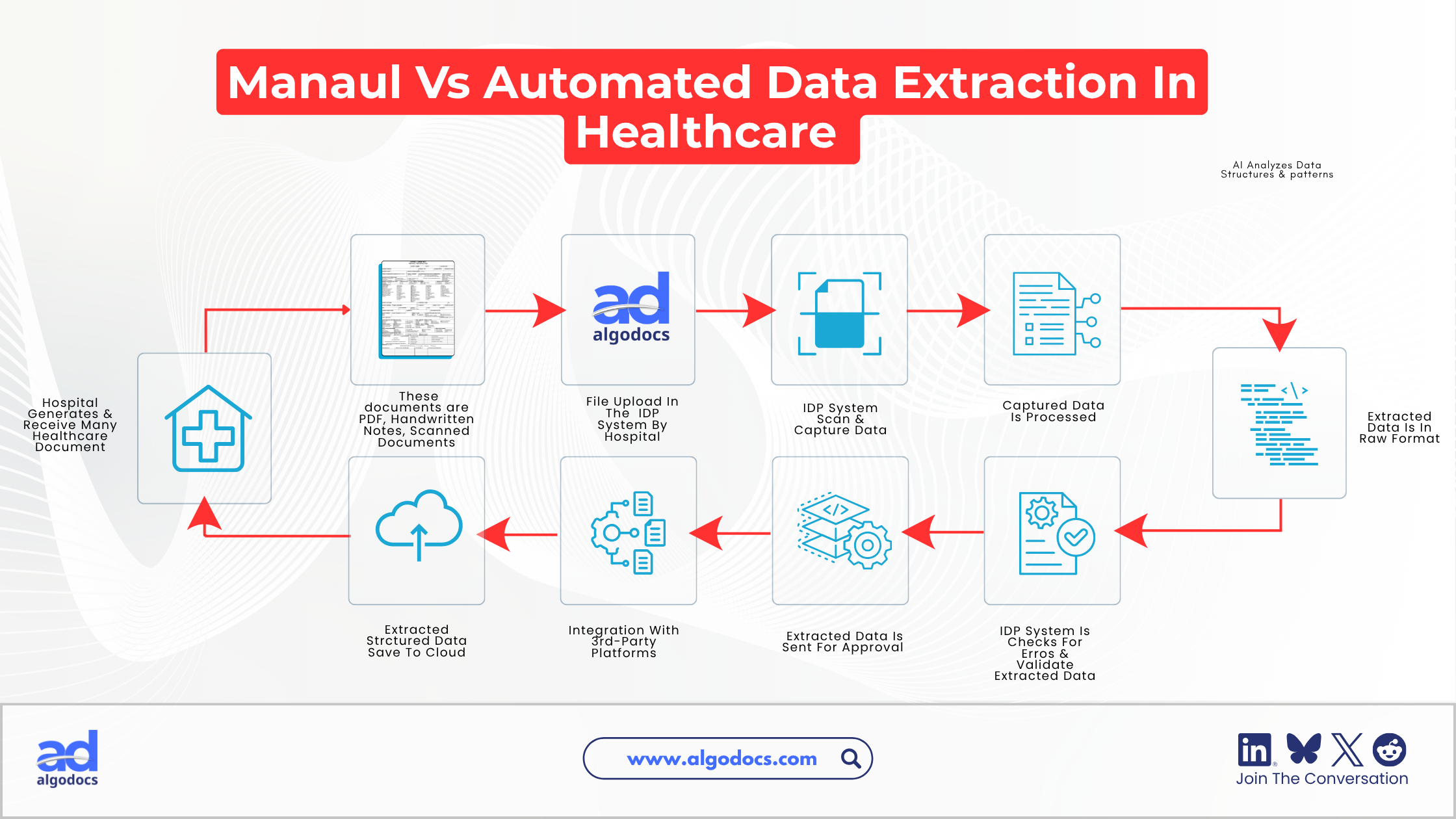
1. Collect Patient Documents
A hospital or any other healthcare organization collects various types of health records. These documents may come from scanners, email attachments, EHR exports, shared folders, fax systems, cloud storage, or other sources. These files should first be brought into a controlled processing environment.
2. Uploading Data to IDP System
Once a healthcare organization has gathered the documents, these documents are uploaded to an IDP system or internal third-party tools already connected to the IDP system.
3. Classify the Documents
Once the IDP system receives the documents, it starts by identifying the document type, such as a patient intake form, lab report, prescription, insurance form, etc. This classification process helps determine which extraction process should be applied.
4. Apply OCR When Required
For scanned documents and images, OCR converts visual content into machine-readable text.
For example:
If a patient Name: Richard Paul can become: patient_name: Richard Paul.
OCR is essential for scanned PDFs, photographs, and faxed documents.
5. Understand the Document Structure
AI and Machine Learning (ML) can identify relationships between labels, values, tables, sections, and paragraphs.
For example, in Date of Birth: 25-04-1978, the system needs to understand that the date belongs to the patient's date-of-birth field.
6. Define the Required Fields (Human In the Loop)
An expert or employee can instruct the IDP system to pick specific fields from the uploaded document. These can be:
- Patient ID
- Contact information
- Insurance provider
- Medical conditions
- Medications
- Allergies
Defining clear fields or rows can help the system return consistent structured data.
7. Extract the Information
The AI model identifies the requested information and returns it in the defined structure.
For example:
{
  "patient_name": "Richard Paul",
  "date_of_birth": "25-4-1978",
  "allergies": ["Penicillin"],
  "medications": ["Metformin"],
  "insurance_provider": "ABC Health"
}
The fields and output structure can be adapted to the specific healthcare workflow.
8. Validate the Data
Validation of the extracted data is an important part of patient chart data extraction. The system can check whether required fields are present, dates are valid, numbers follow expected formats, policy numbers match expected patterns, and duplicate records exist.
9. Review Uncertain Records (Human-in-the-loop)
Not every document should be treated in the same way. High-confidence records can move directly to the next workflow. Medium-confidence records can undergo additional validation, while low-confidence records can be sent to a human reviewer or sometimes rejected due to discrepancies.
This human-in-the-loop approach also provides a practical balance between automation and accuracy.
10. Export Structured Data
The final extracted data can be sent to internal EHR systems, billing software, databases, data warehouses, insurance systems, analytics platforms, or custom applications. Organizations can also export this extracted structured data in Excel, JSON, CSV, or other file formats.
APIs and webhooks can connect extraction workflows with existing healthcare systems and make this process smoother and more productive.
How AI and IDP Improve Patient Chart Data Extraction
Traditional OCR is mainly designed to recognize and convert text from scanned documents and images. Intelligent Document Processing (IDP) goes further by combining OCR with AI, machine learning, natural language processing, document classification, data extraction, validation, and workflow automation.
For patient chart data extraction, this combination allows healthcare organizations to process documents that may contain different layouts, tables, handwritten information, medical terminology, and multiple pages. AI can understand the context of information rather than simply recognizing individual words or fixed positions on a page.
| AI and IDP Capability | How It Improves Patient Chart Data Extraction |
| Unstructured document processing | Identifies relevant information even when fields appear in different locations or document layouts. |
| Contextual understanding | Understands the relationship between medical terms, values, labels, and clinical information. |
| Table extraction | Converts lab results, test values, and other document tables into structured data. |
| Multi-page processing | Processes large patient charts and identifies relevant information across multiple pages. |
| Automated extraction | Reduces repetitive manual data entry and transfers extracted information into structured formats. |
| Validation and review | Helps identify uncertain results and route them for human verification before they enter downstream systems. |
| Structured data generation | Converts information from unstructured patient documents into data that can be searched, analyzed, and transferred to other applications. |
For example, AI can interpret "Patient reports allergy to penicillin" as Allergy: Penicillin, rather than simply extracting the word "penicillin." This contextual understanding helps process clinical notes, prescriptions, lab reports, and patient charts more accurately.
By combining document recognition, contextual extraction, validation, and structured output, AI and IDP make patient chart data extraction faster, more consistent, and easier to integrate with healthcare systems.
How Algodocs Can Improve Patient Chart Data Extraction
Algodocs provides AI-powered document data extraction capabilities that can support HIPAA-compliant healthcare data extraction from patient charts and other healthcare documents.
It supports multiple extraction approaches, including pre-trained models, custom data extractors, AI prompt data extraction, key-value extraction, and table extraction from various types of documents.
For healthcare teams, these capabilities can provide a flexible approach to extracting information from different types of patient documents:
Extract patient information: Capture fields such as patient name, date of birth, insurance details, medications, allergies, diagnoses, and lab values.
Use generative AI: Extract information from documents that do not follow fixed templates using natural language prompts.
Process different layouts: Handle varying document formats and extract structured information from medical tables.
Integrate with healthcare systems: APIs can send extracted data to EHRs, databases, and other applications.
Factors to Consider Before Choosing the Right Patient Chart Document Extraction Tool
Implementing AI alone does not guarantee a successful healthcare document workflow. Organizations should design the process around accuracy, security, usability, and business requirements.
Accuracy
Accuracy in data extraction is essential, whether you are extracting patient chart data or any healthcare data. Inaccurately extracted data can mean a wrong diagnosis for a patient or a delay in patient care. This can prove fatal, and such types of errors should not happen in a healthcare setting. That is why data extraction tool accuracy is one of the crucial things to consider.
Speed
Data extraction speed can also make a great difference in the overall patient care process. If extracted important information is not shared with the relevant department on time, this can lead to serious consequences. So, a patient chart data extraction tool must be able to extract data at a faster speed. Tools such as the Algodocs healthcare data extraction tool offer rapid data extraction speed from various types of documents.
Cost & ROI
Tool cost is another factor that should be considered before choosing a data extraction tool for patient charts and other health documents. A large enterprise can afford to spend millions on high-cost tools, but small and medium healthcare businesses do not need to handle millions of pages. They might have 1,000 to a couple of thousand healthcare documents to process. Unnecessary expensive tools can hurt financial growth and lower the overall ROI.
Customization
Even if a data extraction tool offers a variety of features, healthcare businesses have some specific requirements when it comes to using a data extraction tool for their organization. Customized features and third-party integration are must-have options that should be taken into consideration before choosing a patient chart data extraction tool.
Data Privacy
One of the most important factors that is essential for choosing a reliable and trustworthy data extraction tool is data privacy and security. A patient's personal and health data is very sensitive, and unauthorized access to data can lead to serious financial and compliance issues. That is why choosing a HIPAA compliant data extraction tool can ensure the safety and security of patients' personal data.
Conclusion
Data such as patient charts or other health documents plays an important role in providing quality healthcare services to patients. AI-based data extraction tools, such as intelligent document processing tools, are great tools for automating data extraction from various types of health documents.
Solutions such as Algodocs offer a great platform to automate data extraction from healthcare documents using AI and IDP, which can improve medical document workflow efficiency.
As healthcare continues to adopt digital and AI-powered workflows, automated patient chart data extraction can become an important part of building faster, more connected, and more efficient healthcare operations.
Frequently Asked Questions About Patient Chart Data Extraction
What is patient chart data extraction?
Patient chart data extraction is the process of extracting important information such as patient personal details, diagnosis history, and other information from patient charts and other health documents using IDP, AI, OCR, NLP, and LLM technologies.
Can AI extract data from scanned patient charts?
Yes. AI-based document processing systems (IDP) can convert scanned documents into machine-readable information and then use AI to identify and structure required fields.
Key Takeaways
- AI and IDP can automate patient chart data extraction from PDFs, scans, images, forms, and handwritten records.
- A reliable workflow combines OCR, document classification, AI extraction, validation, and human review.
- Automation reduces manual data entry, improves consistency, and helps healthcare teams process large document volumes faster.
- Human-in-the-loop validation remains important for uncertain or high-risk records.
- Extracted data can be structured and integrated with EHRs, databases, billing systems, and other healthcare applications.
- When choosing a solution, prioritize accuracy, speed, security, customization, integration, and ROI.