Algodocs

Author name: staging_algodocs

Algodocs

SMB Document Automation & Processing Using IDP and AI

Growing a business in today’s hyper-competitive world can be a real challenge for small and medium enterprises (SMEs). One of the reasons that hinders their progress is the lack of resources to invest in essential services. One of these essential and important services is processing data from various types of documents, which can come in the form of invoices, bills, receipts, contacts, etc. While larger corporations often have solid resources to invest in extensive digital transformation initiatives, many SMBs feel left behind, struggling with manual processes that drain valuable time and resources from the organization. But what if there were a way to scale your business beyond the grips of manual data entry and unlock the true potential of your information? Yes, it is possible with an AI-powered Intelligent Document Processing (IDP) platform. IDP is emerging as a game-changer for SMBs, offering a powerful blend of artificial intelligence (AI), machine learning (ML), and optical character recognition (OCR) to transform how documents are processed. In this blog, we will delve deep into the world of IDP, exploring its mechanics, its immense benefits for SMBs, the challenges it addresses, and what to consider when choosing the right solution to propel your business forward. What is Intelligent Document Processing (IDP)? At its core, Intelligent Document Processing (IDP) is an AI- and ML-based data extraction tool that helps automate data extraction from various types of documents. It can classify, extract, validate, and organize data from both structured and unstructured documents. These documents can be invoices, bills, HR forms, medical bills, shipping documents, etc. Unlike traditional OCR, which merely converts standard images or documents into machine-readable formats, IDP goes beyond basic data extraction. It leverages advanced technologies such as AI and ML algorithms to understand the context of the information, identify relevant data fields, and even handle variations in document layouts and formats. Think of it as a computer program that has the ability to “read” and “understand” documents in a way that mimics human cognition, but at a speed and accuracy level far beyond human capabilities. This means it can process everything from standardized forms and invoices (structured data) to emails, contracts, and even handwritten notes (unstructured and semi-structured data) with 10 times more speed and accuracy. One of the major advantages of intelligent document processing tools is that they can be integrated with desired third-party platforms and business apps. This makes data exchange and processing smooth and saves time. IDP’s automation capability makes repetitive tasks more productive and cost-effective for the organization. How Intelligent Document Processing Works Intelligent document processing is a multistep process, from capturing, processing, and classifying to extracting the final data. We have written a detailed blog on how intelligent document processing works Meanwhile, you can learn how intelligent document processing works: Benefits of Intelligent Document Processing for Small and Medium Enterprises Small and Medium size business can greatly benefit from intelligent document processing as it give more power to small scale business owners to do more with versatile IDP tool. Previously these benefits were limited to large cash enable enterprises. For SMBs, the benefits of implementing an IDP solution are not just incremental; they are transformational. These advantages directly address many of the pain points that commonly hinder growth and profitability in smaller organizations. How it Can Improve Business IDP doesn’t just offer isolated benefits; it fundamentally improves how an SMB operates across various departments and functions: Challenges for SMBs for Data Extraction Despite the clear advantages of efficient data handling, SMBs often face unique and formidable challenges when it comes to data extraction from documents: How IDP Solves It Intelligent Document Processing directly tackles these pervasive challenges, offering robust solutions that empower SMBs to overcome their data extraction hurdles: Challenges Associated with IDP for SMB Businesses While the benefits are compelling, SMBs should also be aware of potential challenges when adopting IDP solutions. Understanding these can help in effective planning and implementation: What to Look for Before Choosing an IDP Tool for SMB Selecting the right IDP tool is a critical decision that can determine the success of your digital transformation efforts. For SMBs, it’s not just about features, but about finding a solution that aligns with their unique constraints and growth aspirations. Here’s what to look for: How Algodocs Can Be a Great Intelligent Document Processing Tool for Small and Medium Size Businesses For small and medium-sized businesses navigating the complex world of document processing, Algodocs stands out as a powerful and intuitive Intelligent Document Processing solution designed to address their specific needs. It recognizes that SMBs require robust functionality without the exorbitant costs or overwhelming complexity often associated with enterprise-grade solutions. Here’s how Algodocs can be a great IDP tool for your business: 1. Unmatched Simplicity and Rapid Deployment: Algodocs prioritizes ease of use. Its highly intuitive, user-friendly interface means that even team members without extensive technical backgrounds can quickly learn to set up and manage document processing workflows. With its low-code/no-code approach, SMBs can configure extraction fields and validation rules with minimal effort, significantly reducing the time from implementation to tangible results. This rapid deployment capability allows your business to start realizing benefits almost immediately. 2. AI-Powered Accuracy for All Document Types: At its core, Algodocs leverages cutting-edge AI and Machine Learning, combined with advanced OCR, to deliver exceptional data extraction accuracy. Whether you’re dealing with clean, structured forms, or messy, semi-structured invoices from various vendors, Algodocs intelligently identifies and extracts the relevant data points. Its continuous learning algorithms ensure that with every document processed, the system gets smarter, adapting to variations and improving accuracy over time, minimizing the need for manual review. 3. Seamless Integration with Your Existing Ecosystem: Algodocs understands that SMBs operate within a pre-existing technology stack. That’s why it offers robust integration capabilities through flexible APIs and pre-built connectors to popular accounting software, CRM systems, ERP platforms, and document management solutions. This ensures that the extracted data flows effortlessly into your core business applications, eliminating data silos and creating a unified, efficient workflow across your organization.
Algodocs

How To Extract Handwriting Data With Handwritten Notes OCR

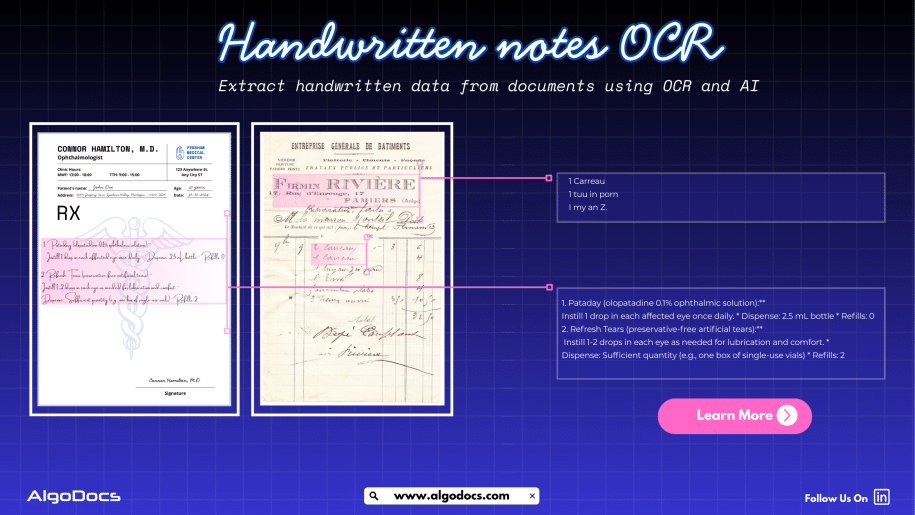
Handwritten notes capture some of our most important ideas, such as meeting minutes, classroom assignments, diary entries, handwritten invoices, medical forms, and much more. But when these valuable insights are trapped on paper, sharing, searching, or analyzing them can be a major challenge. But what if we could instantly turn stacks of handwritten sheets, sticky notes, or scanned handwritten image documents into searchable, editable data? It would surely make our work much easier and more productive. All this can be achieved with the technology called handwritten notes OCR, an advanced data extraction technology that brings the power of optical character recognition (OCR) with AI and ML to process handwritten data from various types of documents with accuracy. In this blog, you will discover how handwritten notes OCR works, why it is now more powerful than ever thanks to AI and machine learning, how modern handwritten notes OCR technology such as intelligent document processing revolutionizes data extraction, and practical tips for digitizing handwritten information in your business or personal life What Is Handwritten Notes OCR? Handwritten notes OCR is a specialized form of optical character recognition designed to capture, convert, and extract handwritten text from various types of documents. These documents are either in scanned image formats or can be PDF documents as well. Handwritten notes OCR turns document data into a digital, machine-readable format. Unlike standard OCR, which works well on clear, formatted images or document data, handwritten notes OCR can recognize the complex and unique nature of individual handwriting styles, even when the text is messy, faded, or uses old-fashioned scripts. With a high-performing handwritten notes OCR tool, you can:• Scan and digitize handwritten assignments, meeting notes, and personal memos.• Preserve historical letters, diaries, and legacy records for research and genealogy.• Archive and search medical forms, receipts, or contracts with handwritten details.• Export transcribed data to systems like Excel, Word, or your business platform — all in seconds. Handwriting vs. Traditional OCR: Why Is It Hard? Older OCR systems struggled to read handwriting, often failing to produce useful results. Anyone who has tried to scan a doctor’s prescription knows the frustration. This is where advanced handwritten notes OCR solutions powered by artificial intelligence come in. How Handwritten Notes OCR Works Modern handwritten notes OCR combines several powerful technologies to capture and convert handwriting into text: Intelligent Document Processing: Putting AI and ML to Work Today, OCR for handwritten notes is supercharged by intelligent document processing (IDP), a blend of AI, machine learning (ML), computer vision, and NLP that turns “just text” into actionable data. Here is what makes IDP so powerful:• Automates data entry from scanned forms, notes, contracts, and even sticky notes.• Learns and adapts to new handwriting styles, layouts, and languages over time.• Classifies documents by type and context, not just by keywords or layout.• Extracts unstructured data, even from non-standard or messy notes.• Reduces manual work, errors, and operational costs, in some cases by up to 32 percent. For example, a handwritten meeting note attached to a scanned invoice is not just digitized for archiving. AI-powered IDP can link the note to the correct customer record and make the content searchable for everyone on your team in seconds. AI and ML: Raising the Bar in Handwritten Notes Data Extraction Artificial intelligence and machine learning have transformed handwritten notes OCR:• Machine Learning Models: By training on thousands or even millions of handwriting samples, these models can recognize a wider variety of writing styles, languages, and scripts.• Neural Networks: Mimicking how human brains read, deep learning models adapt over time, improving accuracy as they process more documents.• Large Language Models (LLMs): When OCR struggles with a word or phrase, LLMs use context clues to predict the correct transcription, boosting results beyond basic pattern matching.• Document Layout Analysis: Advanced IDP tools understand page layouts, tables, forms, and structures, allowing even heavily formatted notes to be converted accurately.• Continuous Learning: Every correction or manual review helps the system improve for the next time. Practical Use Cases and Benefits of Handwritten Notes OCR: • Education: Teachers and students can archive and search assignment notes, grade papers faster, and collaborate on shared materials.• Healthcare: Transcribe doctors’ handwritten notes, prescriptions, and patient forms for secure digital records.• Finance & Legal: Convert contracts, receipts, and case notes into searchable, compliant formats.• Business Operations: Make meeting notes, idea sketches, and legacy documents accessible across the company.• Historical Research: Preserve and analyze old letters, diaries, and census records for genealogy or academic studies. Digitized handwritten notes are easier to search, analyze, share, and back up, making your organization more agile and data-driven. How to Digitize Handwritten Notes: Simple Steps Overcoming Common Challenges Handwriting OCR still faces challenges such as unusual scripts, messy writing, mixed sketches and text, or multi-language notes. Fortunately, AI-based systems continue to improve, with newer tools boasting word error rates below 1 percent and supporting hundreds of languages. If your notes include diagrams, tables, or special formatting, choose platforms that offer layout analysis and form recognition. Training your own AI model, as supported by platforms like Algodocs, can further boost accuracy for specific use cases. Future Trends: Where Is Handwritten Notes OCR Headed? Innovations in AI continue to advance handwritten notes OCR:• Hybrid Models: Combining OCR, ICR (Intelligent Character Recognition), and LLMs for greater context and human-like understanding.• Integration with Workflow Automation: Linking data directly to business processes for instant action, such as triggering approvals, sending alerts, or updating records.• Mobile-first Solutions: Smartphone apps offering real-time digitization and on-the-go accessibility.• Historical Document Support: Advanced models that can read faded, old, or non-standard scripts for research and preservation projects.• Universal Language Support: Systems capable of handling hundreds of languages and dialects for seamless global collaboration. Key Takeaways • Handwritten notes OCR makes it easy to digitize and utilize handwritten information.• AI-based OCR, intelligent document processing, and ML have made handwriting recognition more accurate, fast, and scalable.• Businesses, schools, healthcare, and researchers all benefit from digitized handwritten notes.• Getting started is simple. With the right tool and a few steps, you can transform notes, memos, and archives into digital gold. Conclusion The latest handwritten notes OCR solutions, such as Algodocs, are designed to be intuitive for all users, regardless of technical skill. Whether

Scroll to Top