Algodocs

Algodocs

Product guides, step-by-step tutorials and real-world use cases for AlgoDocs. See how teams set up document types, define extraction rules without writing code, and send clean data straight to Excel, their accounting software or their own systems through the API.
Agentic AI Document Processing
Algodocs, Data Extraction

Agentic AI Document Processing: How To Automate Data Extraction Smartly With Agentic AI In 2026

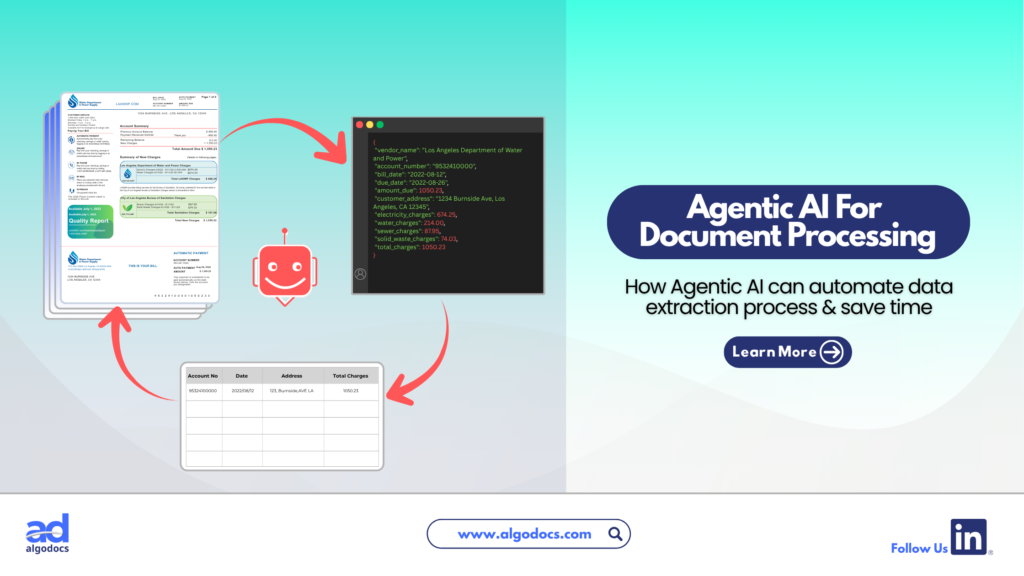
Back to Blog Table of contents On this page Agentic AI Document Processing: How To Automate Data Extraction Smartly With Agentic AI In 2026 Home › Blog › Algodocs › Agentic AI Document Processing: How To Automate Data Extraction Smartly With Agentic AI In 2026 Categories Algodocs Data Extraction Tags agentic ai ai platform for data extraction data extraction By Shubhankar Biswas Published June 26, 2026, 04:09 Updated July 10, 2026, 06:04 When it comes to extracting and processing data from documents, there is no match for sophisticated, computer-powered tools like an Intelligent Document Processing (IDP) tool. Even traditional methods like OCR are effective for basic data extraction. However, in the age of AI, information moves faster than ever and older technologies like OCR are quickly becoming outdated in the face of emerging AI data extraction tools. These modern tools handle all the data extraction work with little or no human intervention. We are talking about Agentic AI, the new standard for automating data extraction from documents compared to older methods. Let us explore exactly what Agentic AI document processing is, how it works, and why it matters for your business. What is Agentic AI? Agentic AI is an autonomous tool able to plan and execute specific tasks with little or no human intervention. Unlike standard AI tools that are only good at providing specific answers to questions, Agentic AI goes further. It can find answers, plan entire workflows according to set goals, follow instructions, manage, organize, and filter data efficiently. In simple terms, Agentic AI tools can plan and execute tasks to achieve goals with minimal human help. So how does Agentic AI work in the document processing and data extraction space? Let us explore. How Agentic AI Works in Document Processing Agentic AI in document processing works when you provide specific instructions to AI agents. These agents can perform tasks like image preprocessing, layout adjustments, data capturing, and data filtration. Large Language Models are only able to perform one task at a time, and you always need human intervention. Agentic AI can perform all these tasks by itself. It only requires a few instructions or goals in the beginning, and the Document Agentic AI tool takes care of the rest. One of the biggest differences between an LLM based data extraction approach and an Agentic AI based approach is autonomy. Agentic AI can perform tasks from start to finish, while LLM extraction is limited to single, specific tasks. Document Ingestion and Preprocessing: The AI agent automatically ingests files from emails, folders, or APIs. It enhances image quality, fixes skewed angles, and readies the file for reading. Layout and Context Analysis: Instead of just reading flat text, specialized vision agents look at the document structure. They map out tables, headers, signatures, and charts to understand the visual context. Semantic Data Extraction: Agents pull out the exact data you need, like an invoice total or patient ID. They do this by understanding the meaning of the words instead of just their location. Validation and Action: The agent cross checks the extracted data against your company databases to ensure accuracy. If everything is correct, it automatically pushes the data into your ERP or CRM system without a human pressing a button. Difference Between Agentic AI Data Extraction and LLM Based Extraction (IDP) To truly understand Agentic AI document processing, we need to see how it compares to older LLM based Intelligent Document Processing (IDP) systems. Key Features Agentic AI Based Data Extraction LLM Based Data Extraction (IDP) Autonomy Fully autonomous. Plans and executes end to end workflows. Requires human prompts and step by step guidance. Handling Complex Layouts Understands charts, nested tables, and complex formats easily. Struggles with anything outside of a standard text template. System Integration Can log into your ERP, check data, and trigger actions on its own. Usually extracts data into a file like a CSV and waits for a human. Exception Handling Reasons through errors and searches for context in past documents. Flags errors and stops the process until a human fixes it. Scale and Speed Multiple specialized AI agents work together as a team at the same time. A single model processes one task at a time sequentially. Benefits of Agentic AI Based Document Processing Traditional data extraction methods are slow and prone to errors. A business that processes over 10000 documents a day cannot rely on manual data extraction. Manual methods lack speed, contain human errors, lack automation, and require continuous monitoring. An Agentic AI document processing system changes the game entirely. Research indicates that Agentic AI could create nearly $450 billion in value for organizations by 2028. Here is why this technology is so beneficial: Zero Template Flexibility: Older OCR tools break if a vendor changes their invoice layout. Agentic AI document processing does not rely on rigid templates. Because it understands the meaning of the document, it can read a completely new layout perfectly on the first try. True Automation: Traditional systems extract data and drop it into a spreadsheet. Agentic AI takes action. If it reads an invoice, it can automatically log into your accounting software, match the invoice to a purchase order, and schedule the payment. Multi Modal Understanding: Today documents are messy. They contain text, handwritten notes, barcodes, and charts. Agentic systems use multiple specialized agents working together. One reads the text, another analyzes the charts, and another verifies the handwriting. Massive Cost Savings: By shifting from a human driven process to a fully autonomous AI workforce, businesses can scale up their document processing overnight without needing to hire more staff. Humans only step in to handle highly strategic decisions. How AlgoDocs Agentic AI Processes Documents and Data Extraction When looking at real world platforms, AlgoDocs is a powerful example of how modern data extraction works. AlgoDocs uses a blend of optical character recognition (OCR), machine learning, and advanced AI models to turn messy documents into structured, usable data. With Agentic AI document processing, AlgoDocs acts like a versatile
Algodocs, Data Extraction, Image Data Extraction

How to Extract Handwritten Data from PDFs with Algodocs?

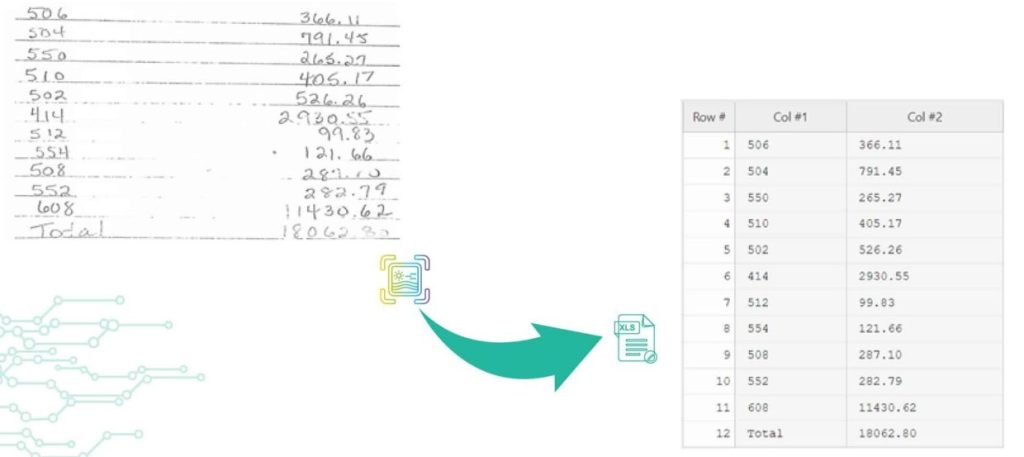
Back to Blog Table of contents On this page How to Extract Handwritten Data from PDFs with Algodocs? Home › Blog › Algodocs › How to Extract Handwritten Data from PDFs with Algodocs? Categories Algodocs Data Extraction Image Data Extraction Tags ai platform for data extraction algodocs character recognition data extraction from images handwritten pdf How to Extract Handwritten Data from PDFs web-based ai platform for data extraction By Shubhankar Biswas Published October 13, 2025, 12:19 Updated July 23, 2026, 07:36 Want to learn how to extract handwritten data from PDFs easily for your business documents? Algodocs is a powerful AI platform developed based on the latest technologies to streamline your processes and free your team from annoying and error-prone manual data entry by offering fast, secure, and accurate document data extraction. It helps you get rid of your workforce from repetitive, time-consuming, and error-prone manual data entry tasks such as extracting handwritten data. With its AI capabilities, Algodocs gives one of, if not the best, user experiences and interfaces. Areas and applications of Algodocs include extracting handwriting, tables, key-value pairs, marks, and signatures from PDFs and image files. Algodocs offers a forever free subscription, with 50 pages processed every month. What is OCR? Optical Character Recognition (OCR) engines are primarily focused on machine-printed text and may produce low accuracy for handwritten text. Intelligent Character Recognition (ICR) is an advanced recognition system that is used to recognize handwritten text. This allows the automatic conversion of text in an image into letter codes that are usable within computer and text-processing applications. Although many processes involve computer-based operations and are implemented in a digital environment, paper is still widely used across most core business processes such as mortgage origination, order fulfillment, contracts, and other documents that usually require handwritten input and signatures. Nowadays, the digitalization of paper documents plays an important role, and deciding on the right data capture software is critical since handwriting recognition, unlike printed text recognition is a more complex task that usually involves advanced deep learning algorithms. How Does Algodocs Do It? Handwritten data extraction from PDFs is implemented by converting handwritten text into machine-printed text with high accuracy. With the Intelligent Character Recognition (ICR) of Algodocs, you can automate your document processing workflow and get rid of manual data entry. Scan your paper documents with handwritten text and let Algodocs automatically extract data and convert it to Excel or JSON. Let’s consider the following portion of a scanned document, which contains a table of five columns filled with handwritten numbers. If you upload this image to your account at Algodocs, you will see the following output, which has 100% accuracy. Algodocs uses advanced ICR engines trained with Artificial Intelligence algorithms and Deep Learning. Extracting data from various document formats could be a challenging task, especially when it comes to the necessity to extract specific data sets from files containing different types of documents that span across multiple pages. In these quick materials, we will list key features that are available in Algodocs, and which will help you to extract data from your documents using the Algodocs advanced AI engine without relying on templates or even labeling and training your files. What Are the Supported File Formats for Data Extraction? You may upload to Algodocs different types of files of different Image formats for data recognition and data extraction: Portable Document Format (PDF) Joint Photographic Experts Group (JPEG) Portable Graphics Format (PNG) Tagged Image File Format (TIFF) What Are the Supported Languages for Data Recognition? Algodocs supports data extraction from documents with Arabic, Armenian, Belorussian, Bulgarian, Catalan, Chinese, Croatian, Czech, Danish, Dutch, English, Estonian, Filipino, Finnish, French, German, Greek, Hebrew, Hindi, Icelandic, Indonesian, Italian, Japanese, Korean, Lao, Latvian, Lithuanian, Macedonian, Nepali, Norwegian, Persian, Polish, Portuguese, Russian, Serbian, Slovak, Slovenian, Spanish, Swedish, Telugu, Thai, Turkish, Ukrainian, Vietnamese, and many other up to 200 languages. How to Extract Handwritten Data from PDFs Using Algodocs Step 1: Log in to your Algodocs account and go to the home page which is the Dashboard. Step 2: Click on the Extractors tab, where you can see the Create button on the top right side, click on it. Step 3: Choose the Custom Extractor, for getting structured data from your documents as you need it. Step 4: A pop-up window will appear, upload your sample file to extract data from. Click on the Choose file, to locate the document from your device storage folder, then assign a name to the extractor. Once done, click on the Create Extractor button. It will populate under Extractors as below; in this article, our example is called “Sample1.” Step 5: Click on the blue button labeled “Manage”, to create the data to be extracted. Step 6: Click on Add to choose what type of extraction method you want, here, you may use rule-based and AI extraction. In this example, we will choose the AI extraction method, “Form Data Extraction.” After clicking on “Form data extraction”, the page that you want to extract data from will appear on a new page. On the Top Right corner click on” Continue”. Step 7:  The raw data from your document is displayed. Now use available filters to select certain data, and update, or format the extracted data as you like. Once done, write the Field/Table name on the Left side inside the blank text box, and click the SAVE button on the right side. Step 8:  Now go to the extracted date and choose the extractor name, from the first drop-down menu. The extractor will populate the extracted date information. To view the extracted data, click on the Rows, and the data will populate as below.  Then choose to download the data as Excel, JSON, or XML Final Thoughts As we can see Algodocs performs well in handwritten text extraction from scanned documents. Feel free to start a free subscription right now and test your handwritten scanned documents. You can use Algodocs for free forever, and you will have 50 pages per month. If you need to process a higher number of pages, then please see our affordable pricing plans. Please contact

Algodocs

Extract handwritten text from scanned PDFs and images

Back to Blog Table of contents On this page Extract handwritten text from scanned PDFs and images Home › Blog › Algodocs › Extract handwritten text from scanned PDFs and images Categories Algodocs Tags ai platform for data extraction algodocs character recognition data extraction from images deep learning export extracted data to excel invoice process machine learning ocr api web-based ai platform for data extraction By Shubhankar Biswas Published October 13, 2025, 11:56 Updated November 10, 2025, 13:34 Optical Character Recognition (OCR) engines are primarily focused on machine-printed text and may produce low accuracy for handwritten text. Intelligent Character Recognition (ICR) is an advanced recognition system that is used to recognize handwritten text. This allows the automatic conversion of text in an image into letter codes that are usable within computer and text-processing applications. Although many processes involve computer-based operations and are implemented in a digital environment, paper is still vastly used across most core business processes such as mortgage origination, order fulfillment, contracts, and other documents that usually require handwritten input and signatures. Nowadays, the digitalization of paper documents plays an important role, and deciding on the right data capture software is critical since handwriting recognition unlike printed text recognition is a more complex task that usually involves advanced deep learning algorithms. Algodocs: Deep Learning Handwriting Recognizer Algodocs is capable of converting handwritten text into machine-printed text with high accuracy. With the ICR of Algodocs, you can automate your document processing workflow and get rid of manual data entry. Scan your paper documents with handwritten text and let Algodocs automatically extract data and convert it to Excel or JSON. Let’s consider the following portion of a scanned document, which contains a table of two columns filled with handwritten numbers. If you upload this image to your account at Algodocs, you will see the following output, which has 100% accuracy. Algodocs uses advanced ICR engines trained with Artificial Intelligence algorithms and Deep Learning. The above example includes mostly digits. Another example with characters is given below. The following is the extracted text by Algodocs from the above image. As we can see Algodocs performs well in handwritten text extraction from scanned documents. Feel free to start a free subscription right now and test your handwritten scanned documents. You can use Algodocs free forever with 50 pages per month. If you need to process a higher number of pages, then please see our affordable pricing plans. If you have specific requirements and need a custom solution, please contact us. You Might Also Like How to Extract Handwritten Data from PDFs with Algodocs? Table of Contents Want to learn how to extract handwritten data from PDFs easily for your business documents? Algodocs is a powerful AI platform… Shubhankar Biswas October 13, 2025 Conquer Multilingual Data Extraction: A Step-by-Step Guide with Algodocs Introduction Sick of spending hours manually extracting data from multilingual PDFs and images? It could be more efficient, prone to mistakes, and,… Shubhankar Biswas October 12, 2025 Why convert PDF to Word on MacBook (Mac)? Picture this: You have a PDF file that needs to be revised or a scanned document that you wish to convert into an editable format like an MS Word… Shubhankar Biswas October 12, 2025 Start extracting your data today No credit card required. Process up to 50 pages per month on the Forever Free plan. Book a Demo Get Started for Free

Algodocs

Conquer Multilingual Data Extraction: A Step-by-Step Guide with Algodocs

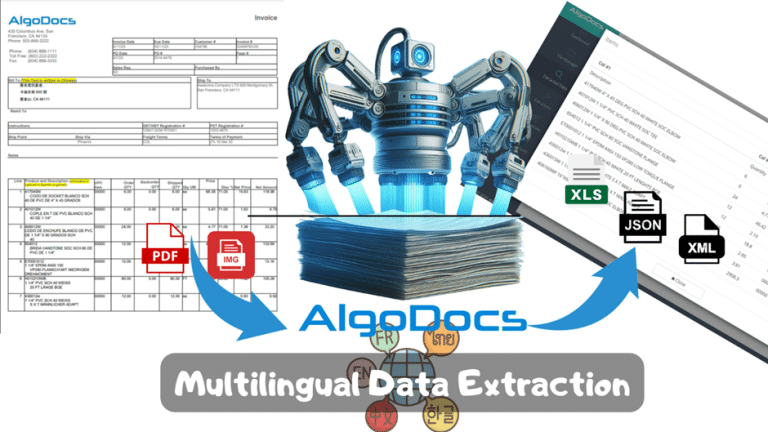
Back to Blog Table of contents On this page Conquer Multilingual Data Extraction: A Step-by-Step Guide with Algodocs Home › Blog › Algodocs › Conquer Multilingual Data Extraction: A Step-by-Step Guide with Algodocs Categories Algodocs By Shubhankar Biswas Published October 12, 2025, 20:18 Updated July 23, 2026, 06:33 Introduction Sick of spending hours manually extracting data from multilingual PDFs and images? It could be more efficient, prone to mistakes, and, more to the point, tedious. Imagine having a helping tool that instantly extracts this information for you. You could save hours of your time! AI-based tools like Algodocs are the perfect helping hand if you want multilingual data extraction done quickly and accurately. Here, we shall demystify the process of multilingual data extraction and help you understand how Algodocs can transform your working process. What is Multilingual Data Extraction? Multilingual Data extraction is the ability to automatically extract wanted/essential information from scanned documents like PDFs, images, Word files, etc., and export the extracted data into a format that one can use comfortably. Consider it as turning a messy pile of papers into a neat spreadsheet. This could range from pulling out information such as critical values and dates to even tables spread across multiple pages. Say goodbye to manual data entry! How Does Data Extraction Work? OCR Technology: OCR (Optical Character Recognition) is still central to data extraction tools. It captures text and transforms it into an electronic form of text data that can be editable, processed, shared, etc. AI-Powered Enhancement: These top multilingual data extraction tools include AI components such as NLP, ML, and others. This enables them to address complex layouts, multilingual documents, or even low-quality scans. Choosing the Right Tool There are many multilingual data extraction tools these days with many different features and prices. When picking a tool, look for the following: Features: Does this tool meet the data types and format used in the extraction? Pricing: Does the price plan you picked match your budget? Data Security: How does the tool keep your data safe? Ease of Use: Can you use this tool without needing help from IT experts, or is it too difficult for regular users? Integrations: Is it compatible, or can it be integrated with other applications utilized in the firm? Considering the above factors can help you find the most suitable data extraction tool, which can significantly improve your performance. Algodocs: Your AI-Powered Multilingual Data Extraction Solution Algodocs answers your need for software that will extract data from multilingual PDFs and images into editable data. Handwriting, tables, key-value pairs, marks, signatures – Fire away! It is compatible with any kind of file: contracts, invoices, bank statements, HR forms and payrolls, sales and purchases, price lists, orders, receipts, balance sheets, income statements, cash flow statements, etc. You can export your results to whatever format is needed, like Excel, CSV, XML, etc., or connect it with other business software through API. In addition, Zapier allows Algodocs to work with over 2000 apps. It’s the best option, even for someone who doesn’t know how to code. Try Algodocs for free today and extract up to 50 monthly pages free! Algodocs Features: Algodocs can easily extract data from all types of files, such as payment vouchers, invoices, receipts, etc. Some of Algodocs’ Features are: Table recognition from PDF/Image: quick, efficient, and remarkably accurate, even when processing complex and multipage tables. Multilingual Support: Unlike most data extraction tools, which can process single-language documents, Algodocs easily extracts information from documents in multiple languages. It supports about 200 languages ​​, including English, Arabic, Chinese, Japanese, and Spanish. Key-value pairs Extraction: Identify and extract key-value pairs from unstructured text (e.g., “Invoice Number: 12345”) to capture specific data points efficiently. Pattern-Based Extraction: Users can also specify their pattern or regular expressions to extract special formats not supported by default extractors. Customizable Extraction Templates/models: It’s also possible to define reusable extraction rules for users and even train one’s copy of the model for specific document types or data needs. Why Businesses Love Algodocs Accuracy: Up to 99% of the accuracy of multilingual data extraction, which reduces the level of errors and contributes to time optimization. Integration: Use a powerful API to connect Algodocs to the apps you use daily, or use Zapier to connect to over 2000 web services, such as Google Drive and OneDrive, Email platforms, etc. Cloud Storage: Besides easy access, you can safely save your data in the cloud whenever needed. Affordable Pricing: The software offers flexible pricing; it includes a forever free plan that allows you to process up to 50 pages monthly and paid plans based on your organization’s needs. Exceptional Support: There is no reason to fret; you can always contact Algodocs’ customer support. Experience the power of AI-driven document processing. Start using Algodocs for free today! Alternative Multilingual Data Extraction Tools Even though Algodocs is top-notch, let’s see what other solutions have to offer in the market: Docsumo: Web-based document scanning and file conversion through a web interface and a dedicated mobile app for Android. Nanonets: This is another web-based data extraction tool and mobile application that allows receipt and expense scanning and processing. Rossum: The application can recognize texts in PDFs and images through OCR and export them to different formats. Why Algodocs Stands Out Algodocs stands out because of the following qualities: Powerful AI Capabilities: It can extract data from multilingual PDFs that have even low-quality with highly accurate results. User-Friendly Interface: Extremely easy to use. Any person can use the software with ease, and it does not require any technical skills. Also, one may find a lot of guides on how to use this tool. Competitive Pricing: Algodocs offers several affordable packages. The basic package is forever free and suitable for small and big organizations. Extract Data from Multilingual PDFs using Algodocs: A Step-by-Step Guide The following video shows how to effortlessly extract data from any multilingual PDF using Algodocs. For this demonstration, the following multilanguage document was selected, and the

Algodocs

Why convert PDF to Word on MacBook (Mac)?

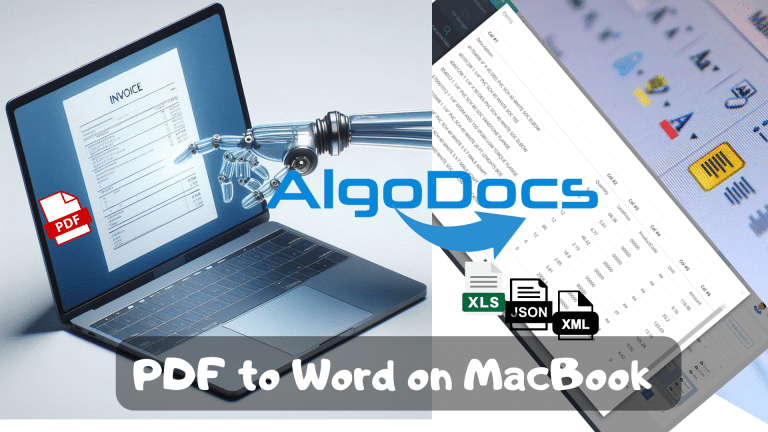
Back to Blog Table of contents On this page Why convert PDF to Word on MacBook (Mac)? Home › Blog › Algodocs › Why convert PDF to Word on MacBook (Mac)? Categories Algodocs By Shubhankar Biswas Published October 12, 2025, 19:49 Updated July 20, 2026, 07:02 Picture this: You have a PDF file that needs to be revised or a scanned document that you wish to convert into an editable format like an MS Word document. Perhaps you have to work on a task and receive source files that cannot be changed and are saved in PDF or image format. Frustrating, right? That is when the miracles of converting PDF to Word come into existence. Yes, it is like taking your boring PDFs and probably turning them into lively and easily manageable Word docs. Converting PDFs to Word opens a new world of possibilities. Features include text editing, table editing or adding, and even the modification of images within the official document. Further, it creates the basis for exporting extracted data directly into other used tools like accounting ones so that everyone is in sync (metaphorically speaking!). Accessibility is another factor. Converting files from PDF to Word lets more people, including decision-makers, access the content. AI data extraction adds another layer of awesomeness to your PDF to Word conversion. You can pull out tables, key-value pairs, marks, figures, and even handwritten notes. Therefore, no matter whether you are a financer, a student, a worker in any data-driven field, or an ordinary user who is trying to simplify your digital life. We provide you with some tools that provide accurate results regardless of the device and OS used. As a case study, this article will discuss in detail how to convert PDF to Word on MacBook (Mac). This is where AI comes in and helps you take it up a notch. Built-in Mac Tools for PDF to Word Conversion Mac users, rejoice! You have a couple of tools integrated into your operating system. These tools effectively convert PDF to Word. First on the list is the Preview which is your go-to basic PDF viewer. This is not only a viewer for PDFs, you can also convert them to Word using it! Just launch the PDF in Preview, go up to the ‘File’ header, click on ‘Export,’ and select, ‘Word’ under the format. Boom, you’re done! Pages is next – it is a word processor developed by Apple Inc. PDF to Word conversion isn’t very popular. However, it’s a secret weapon in this area. The Open button brings you back to the menus. From there, go to ‘File,’ then ‘Open,’ and select the PDF you want. Pages will attempt to translate the PDF into editable Word format. But these built-in tools, may find it difficult to work with complicated PDFs and images. They certainly are not the best solution when trying to extract tables, handwritten, and processing multilanguage documents. To clarify, don’t think that you’re doomed to use these options for eternity; in the next sections, more sophisticated tools are presented. Free Online PDF to Word Converters Alright, okay, let’s assume you are interested in a quick-fix solution and you don’t want to download anything onto your computer. That is where free online PDF to Word converters come in helpful. Fortunately, there are many tools available today, all of which have their advantages and nuances. Some tools you can use are Smallpdf, PDF Candy, and Online2PDF. These tools let you upload your PDFs and a Word file for download format will be ready. It’s convenient and perfect for those one-off conversions. Still, free online converters are not without their perks. They might struggle with preserving complex formatting or handling large files. Plus, their data extraction capabilities can be limited. If you need to pull specific information from your PDF, like tables, key value pairs, or images, you might have to manually copying the wanted data. If you’re looking for more advanced data extraction capabilities, consider exploring AI-powered alternatives like Algodocs. This platform not only converts PDFs to Word but also intelligently extracts data like tables, handwriting, and key-value pairs. We’ll dive deeper into AI-powered solutions later in this guide. Paid PDF to Word Converter Software for Mac If you are looking to work with PDFs locally without accessing the Internet, purchasing PDF to Word conversion software will be useful. Such tools provide additional features like powerful editing and OCR data extraction. Adobe Acrobat Pro is the undisputed champion in the PDF world. It’s the best tool for PDF reading and editing. It offers a free trial to convert PDFs into Word format. Additionally, it comes with sophisticated OCR functions for importing and updating scanned PDFs. Well, Adobe Acrobat Pro is not the only way to make life easier; PDFelement and PDFpenPro offer similar features for an affordable price. The tools mentioned above work well for basic editing and conversion. However, they can’t handle multipage tables, handwritten, low-quality, or multi-language documents. If you’re looking for a solution beyond basic conversion, you might want to try AI-powered PDF to Word tools like Algodocs. They use artificial intelligence to improve precision, address complications with structure, and even specific data from your scanned files like PDFs and images. It feels like having a professional secretary for your document conversion needs. Unleashing the Power of AI Data Extraction for PDF Conversion Let’s face it—not all PDFs are the same. Some might contain only plain text, while others may contain lots of tables, figures, diagrams, handwriting, etc. Converting such files leads to formatting issues and lost data. That’s where the magic of AI data extraction comes in. But AI doesn’t stop there. It can even recognize handwritten text and extract data from the most complicated tables. Introducing Algodocs If you’re looking for a powerful AI-powered PDF conversion and data extraction solution, look no further than Algodocs. This web-based platform harnesses the latest technologies to deliver exceptional results. Algodocs can extract a wide range of data from your

Algodocs

Top 5 Data Extraction Tools for 2025: Streamline Your Document Processing With AI

Back to Blog Table of contents On this page Top 5 Data Extraction Tools for 2025: Streamline Your Document Processing With AI Home › Blog › Algodocs › Top 5 Data Extraction Tools for 2025: Streamline Your Document Processing With AI Categories Algodocs Tags ai platform for data extraction algodocs data extraction from images invoice process ocr api By Shubhankar Biswas Published October 12, 2025, 18:57 Updated July 20, 2026, 04:07 Harnessing Advanced Technologies for Efficient Data Management Data processing is the backbone of modern businesses. As companies adopt cutting-edge technologies to boost efficiency, data extraction and storage become crucial in shaping their future. Whether you’re a large enterprise or a small business, handling substantial data is inevitable. Relying on manual methods is not only slow but also prone to errors, which can significantly impact your business’s efficiency and lead to potential losses. Thankfully, advancements in technology, particularly OCR (Optical Character Recognition) applications, have made data extraction much simpler and more accurate. The rise of artificial intelligence and machine learning has further enhanced OCR capabilities, making it incredibly easy to extract data from a wide range of documents, including blurry invoices and bills. In this blog post, we’ll explore the top 5 data extraction tools of 2025 that can help you efficiently manage your document data. Algodocs Best Data Extraction tool Algodocs is an advanced AI-powered data extraction platform designed to automate data extraction from PDFs, scanned images, and handwritten notes. When discussing the most reliable data extraction tools of 2025, Algodocs tops the chart With Algodocs, you can extract data from BOL documents, invoices, passports, ID cards, medical bills, or any type of document easily. Built with intelligent AI and ML algorithms, Algodocs can capture and extract data from blurry images, unstructured documents, and complex handwritten notes at 10X faster speed compared to any traditional or modern OCR apps.  The prebuilt extractors enable users to extract data from documents without any complex and lengthy setup. You don’t need any technical knowledge to use the Algodocs app. With a very intuitive and easy UI, Algodocs can be used by anyone from any background.  The seamless third-party app integration with Algodocs makes it one of the best choices for businesses to use as an AI tool. You can integrate Algodocs with Zapier, Google Docs, FTP, and other platforms for data integration.  Pros of Algodocs  High Accuracy: Algodocs utilizes advanced AI & ML algorithms to achieve over 99.99% accuracy in data extraction. This precision ensures minimal errors and reliable data processing, making it ideal for handling critical documents.  Ease of Use: The platform offers an intuitive and user-friendly interface, making it accessible even for non-technical users. The prebuilt extractor makes it super easy to use Algodocs for document processing. You don’t need extensive coding knowledge to create an extractor in Algodocs. With just a few clicks, you can extract data from a document easily.  Versatility: Algodocs supports a wide range of document types, including PDFs, Word documents, images, and handwritten notes. This versatility allows businesses to streamline various document processing tasks with a single tool.  API Integration: Algodocs offers a straightforward API for seamless integration with existing business systems and workflows. This integration capability enhances efficiency and eliminates the need for manual data entry. You can easily integrate Algodocs with third-party tools such as Zapier, SharePoint, Dropbox, REST API, and other services without paying extra costs.  Customer Support: Algodocs provides excellent customer support, assisting users in every possible way, even for small bundles. This support is invaluable for troubleshooting and learning best practices.  Affordable Pricing: Algodocs comes with very affordable and flexible pricing plans so that every business segment can utilize Algodocs features. Our basic plan starts at $23 USD per month and includes 300 monthly credits. You have access to all the integrations and other benefits in the plan, so you don’t need to pay extra for any integration or add-on services. You can also customize a plan as per your requirements. With lots of features and benefits, we can say that Algodocs is a great tool for the list of top data extraction tools of 2025. Cons of Algodocs Algodocs is a powerful tool for businesses looking to automate their document processing and improve efficiency. However, it’s essential to consider the potential drawbacks and evaluate whether it meets your specific needs and budget.  Docparser Docparser is an ideal document processing tool for converting PDFs and extracting data from various types of documents. It can be a great platform for medium and large businesses looking for data extraction and automation solutions. Pros Docparser excels in its ability to extract data accurately from documents. It is a great tool for all types of data extraction tasks, including processing different types of documents and invoices. The app’s accuracy is excellent, and the platform offers pre-built extractor options, allowing users to easily set up and extract data from documents. Additional add-ons such as parsing assistance, multi-factor account authentication, version control, and other features make it a highly capable data extraction product. Cons While Docparser offers excellent features, one of its biggest drawbacks is pricing. The basic plan starts at $30 USD, which can be expensive for some users. Additionally, extra charges apply for using any additional add-ons or features, which further increases the cost and could be a significant downside for the platform. Docsumo Docsumo is a powerful data extraction tool that allows you to easily extract information from documents and invoices. It includes features like automatic document classification, analytics, and batch processing, enabling efficient data capture and extraction from a wide range of document types. Pros One of the most highlighted features of Docsumo is its batch processing and accuracy in data extraction. With its robust capabilities, Docsumo is an excellent option for large businesses looking for reliable document processing solutions. Cons One of the biggest drawbacks of Docsumo is its pricing model. The pricing starts at $299 USD per month, which only includes 1,000 credits per month. This limitation can be a significant disadvantage for businesses with higher processing needs. Nanonets Nanonets is a feature-rich document

Algodocs

What Is Intelligent Document Processing (IDP) and How Can It Revolutionize Your Business in 2026?

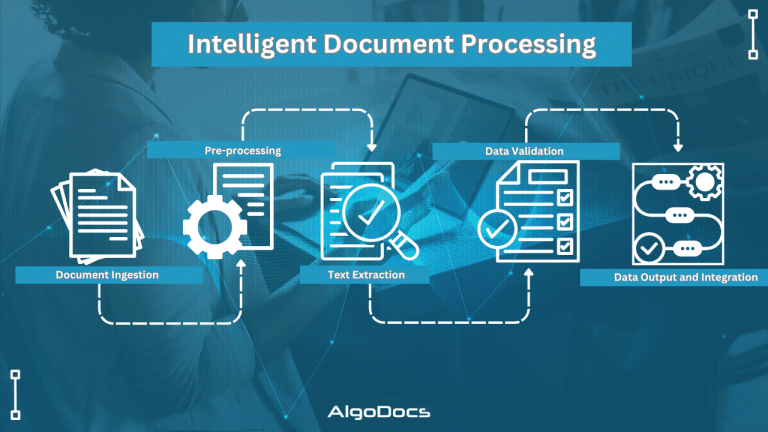
Back to Blog Table of contents On this page What Is Intelligent Document Processing (IDP) and How Can It Revolutionize Your Business in 2026? Home › Blog › Algodocs › What Is Intelligent Document Processing (IDP) and How Can It Revolutionize Your Business in 2026? Categories Algodocs Tags ai platform for data extraction algodocs deep learning guide IDP intelligent document processing machine learning ocr api By Shubhankar Biswas Published October 12, 2025, 18:51 Updated July 13, 2026, 06:16 In today’s digital age, data is crucial for every organization. However, a significant portion of this data resides within unstructured documents, such as contracts, invoices, forms, emails, and more. Manually processing data from these documents is time-consuming, error-prone, and costly for any business. Intelligent Document Processing (IDP) has emerged as a game-changing solution by leveraging the power of artificial intelligence (AI) and machine learning (ML). Document workflows and data extraction from these unstructured documents have become very easy. This comprehensive guide will explore the landscape of IDP platforms, their benefits, how they can be applied across various industries, key considerations for choosing an IDP solution, emerging trends, and how Algodocs can empower your business. What is Intelligent Document Processing (IDP)? A Deep Dive The IDP (Intelligent Document Processing) market is expected to reach $46.59 billion USD by the end of 2035, according to a report. As businesses heavily rely on, extraction, sorting, and managing data. These types of operations require a robust and reliable tool to that can provide useful insights about business metrics. That’s why the need for intelligent document processing tools is rising day by day. So, what is intelligent document processing? IDP is a sophisticated technology that automates the extraction, classification, and processing of data from various document types, regardless of format or structure. It achieves this by combining several core technologies: Optical Character Recognition (OCR): OCR converts images of text into machine-readable text. Modern OCR, often referred to as Intelligent Character Recognition (ICR), goes beyond basic character recognition by using deep learning models like Convolutional Neural Networks (CNNs) and Recurrent Neural Networks (RNNs). This allows it to handle complex layouts, handwritten text, low-quality images, multiple languages, and specialized fonts used in industries like healthcare (medical prescriptions) and law (legal documents). Accuracy is often measured using metrics like character error rate (CER) and word error rate (WER), with advanced systems achieving very low error rates. Natural Language Processing (NLP): NLP analyzes the extracted text to understand its meaning and context. It employs techniques like tokenization (breaking text into individual words or phrases), stemming and lemmatization (reducing words to their root form), Named Entity Recognition (NER) (identifying specific entities like names, dates, and locations), Part-of-Speech (POS) tagging (identifying the grammatical role of each word), sentiment analysis (determining the emotional tone of the text), topic modelling (discovering underlying topics within a collection of documents), text summarization (creating concise summaries of longer texts), relationship extraction (identifying relationships between entities), and semantic analysis (understanding the meaning of words and phrases in context). Machine Learning (ML): ML is the engine that drives IDP’s adaptability and continuous improvement. Supervised learning involves training the system on labelled data to recognize specific document types and extract relevant fields. Unsupervised learning helps discover patterns and structures in unlabelled data for improved classification and clustering. Reinforcement learning allows the system to learn through feedback and iterative improvement. Training data quality and quantity are crucial for model accuracy. Techniques like cross-validation and hyperparameter tuning are used to optimize model performance. Active learning allows the system to request human input for ambiguous cases, further improving its accuracy over time. Computer Vision: Computer vision enables IDP to “see” and interpret visual elements within documents. Techniques like image classification (categorizing images), object detection (identifying specific objects within images), image segmentation (dividing an image into multiple segments), table and form extraction (accurately extracting data from structured tables and forms), barcode and QR code recognition (automating data capture from barcodes and QR codes), signature verification (authenticating signatures), and logo detection (identifying company logos) are used. Robotic Process Automation (RPA): RPA acts as the orchestrator for IDP workflows, automating downstream processes based on the extracted data. It integrates IDP with other enterprise systems like CRM, ERP, and ECM, automating data validation, routing documents to appropriate departments, and triggering subsequent actions. IDP Workflow: A Detailed Breakdown: Document Ingestion: Documents are ingested through various channels: scanning, uploading files, APIs, email attachments, and more. Pre-processing: Images are optimized for OCR through techniques like noise reduction, skew correction, and image enhancement. OCR and Text Extraction: OCR extracts text from the document. NLP and Data Understanding: NLP analyzes the extracted text. Data Extraction and Validation: Relevant data is extracted and validated against predefined rules or databases. Human-in-the-Loop (HITL): Human reviewers handle exceptions and complex cases where the system has low confidence. Data Output and Integration: Extracted data is delivered in structured formats (CSV, JSON, XML) or directly integrated into business applications. The Benefits of IDP: Quantifiable Impacts Efficiency Gains: IDP can dramatically reduce document processing time, often by up to 90%. For example, processing hundreds of invoices that previously took several days can be completed in just a few minutes or hours. This increased throughput allows businesses to handle higher volumes of documents without increasing staffing. Cost Reduction: By eliminating manual data entry and reducing errors, IDP can lower operational costs by up to 70%. Reduced rework, fewer errors requiring correction, and optimized resource utilization contribute to significant cost savings. Accuracy Improvement: IDP achieves data extraction accuracy rates of 99% or higher, significantly minimizing data entry errors and improving data quality and consistency. This reduces costly downstream errors and improves compliance. Enhanced Security and Compliance: IDP systems offer robust security features like data encryption, access control, and audit trails, ensuring compliance with data privacy regulations like GDPR, HIPAA, and others. Improved Customer Experience: Faster processing times translate to quicker service delivery, leading to improved customer satisfaction. For example, faster loan approvals or insurance claims processing can significantly enhance the customer

Algodocs

OCR vs IDP: Which one is better? How to choose the right technology to elevate your business.

Back to Blog Table of contents On this page OCR vs IDP: Which one is better? How to choose the right technology to elevate your business. Home › Blog › Algodocs › OCR vs IDP: Which one is better? How to choose the right technology to elevate your business. Categories Algodocs Tags AI ai platform for data extraction algodocs IDP ML OCR By Shubhankar Biswas Published October 12, 2025, 18:41 Updated July 13, 2026, 08:04 The debate OCR VS IDP—often sparks conflicting opinions, as the choice depends on the specific needs and nature of the technology required. Both technologies serve the purpose of extracting data from various types of documents for business and personal use. In today’s data-driven world, businesses face the challenge of managing vast amounts of information stored in physical and digital documents. Efficient and accurate data extraction has become essential for streamlining operations, enhancing decision-making, and maintaining a competitive edge. Two technologies are leading this data extraction revolution: Optical Character Recognition (OCR) and Intelligent Document Processing (IDP). Although often used interchangeably, these technologies offer distinct capabilities and serve different purposes. This comprehensive guide will explore the key differences between OCR and IDP, their ideal use cases, and how to determine the right solution for your business needs. What is OCR? Optical Character Recognition (OCR) is a technology that converts images into machine-readable text data. These documents can be handwritten notes, typed, or printed in the form of PDFs, word documents, or image files. It works by analyzing the visual patterns of characters and comparing them to stored character sets. Once recognized, the text can be edited, searched, and stored electronically. Think of it as a digital eye that scans a document and translates visual characters into a digital language that computers can understand. OCR technology helps save time, reduce human errors during data extraction, and lower operational costs. Although OCR technology has been around for a long time, it has gained significant traction in recent years. Businesses increasingly rely on OCR-based tools for various data extraction and document processing tasks, driven by the growing need to manage and extract large volumes of data efficiently. What is IDP? Intelligent Document Processing (IDP) is a revolutionary advancement that leverages Artificial Intelligence (AI) and Machine Learning (ML) to enhance document processing workflows. Unlike OCR, which is limited to reading and extracting text from documents, IDP takes things a step further by analyzing, filtering, sorting, and automating data extraction from a variety of sources, including emails and other digital platforms. IDP builds on OCR by integrating AI and ML to automate the entire document processing lifecycle. It doesn’t just recognize characters; it understands the context and meaning of the extracted information. IDP systems can classify documents, extract specific data fields (such as names, dates, or invoice numbers), validate the data, and seamlessly integrate with other business systems. Think of it as a digital assistant that not only reads documents but also comprehends their purpose and extracts the most relevant information, making your workflows smarter and more efficient. Key Differences Between OCR Vs IDP The fundamental difference lies in their level of intelligence and automation. OCR focuses solely on character recognition, while IDP handles the entire document processing lifecycle. Here’s a breakdown: Feature OCR IDP Core Function Converts images of text to machine-readable text Automates the entire document processing workflow, including classification, data extraction, validation, and integration. Intelligence Basic character recognition Advanced AI and ML algorithms for context understanding, data validation, and learning from new document types. Automation Limited to text extraction High level of automation, capable of handling complex document layouts and variations. Data Extraction Extracts all text present in the image Extracts specific data points based on predefined rules or machine learning models. Document Types Simple, structured documents with consistent layouts Complex, semi-structured, and unstructured documents with varying layouts and formats. Error Handling Prone to errors with low-quality images or complex layouts More robust error handling through data validation and human-in-the-loop verification. Scalability Limited scalability for complex document processing Highly scalable for large volumes of diverse documents. When is OCR a Good Choice? OCR is a suitable solution when dealing with: Simple, structured documents: Forms, scanned letters, or printed reports with consistent layouts. High-quality images: Clear, well-scanned documents with minimal noise or distortion. Basic text extraction: When the primary goal is to convert images to searchable text without the need for specific data extraction. Low document volume: When processing a small number of documents. When is IDP a Good Choice? IDP is the preferred choice for: Complex, semi-structured, and unstructured documents: Invoices, contracts, medical records, passports, and other documents with varying layouts and formats. Specific data extraction: When extracting key information like dates, names, addresses, or financial figures is crucial. High document volume: When processing large quantities of diverse documents. Automated workflows: When integrating document processing into existing business systems. Improved accuracy: When high accuracy is essential due to the use of AI and ML. Types of Documents Can Be Processed by OCR OCR excels at processing: Scanned documents Printed reports Typed letters Simple forms Images containing text Types of Documents Can Be Processed By IDP IDP can handle a wider range of documents, including: Invoices Purchase orders Contracts Medical records Financial statements Legal documents Emails Handwritten notes (with varying accuracy) Industries Benefiting from OCR Industries that can benefit from OCR include: Libraries and archives: Digitizing historical documents. Publishing: Converting printed books and articles into digital formats. Data entry: Automating basic data entry tasks. Industries Benefiting from IDP IDP offers significant advantages to industries dealing with large volumes of complex documents: Finance: Automating invoice processing, loan applications, and KYC (Know Your Customer) procedures. Healthcare: Managing patient records, processing insurance claims, and extracting data from medical reports. Legal: Reviewing contracts, managing legal documents, and conducting e-discovery. Insurance: Processing claims, managing policy documents, and automating underwriting. Logistics: Processing shipping documents, tracking shipments, and automating customs clearance. How To Choosing Between OCR Vs IDP Confusion The choice between OCR and IDP depends on your specific business needs and document processing requirements. OCR is a suitable option for small businesses that handle a

Algodocs

Top 5 Challenges in Document Data Extraction and How to Overcome Them With Algodocs

Back to Blog Table of contents On this page Top 5 Challenges in Document Data Extraction and How to Overcome Them With Algodocs Home › Blog › Algodocs › Top 5 Challenges in Document Data Extraction and How to Overcome Them With Algodocs Categories Algodocs Tags AI Data Extraction ai platform for data extraction algodocs data extraction Document Automation IDP OCR By Shubhankar Biswas Published October 12, 2025, 18:32 Updated July 13, 2026, 06:37 In today’s fast-paced digital world, document data extraction has become an essential process for businesses across various industries. Whether it’s extracting data from invoices, medical records, contracts, or financial reports, the need for efficient and accurate document processing has never been greater. As the need for data in business grows, so does the requirement for intelligent document processing platforms and other AI technologies for document data extraction. However, the path to seamless document data extraction is not without its challenges. In this blog, we will explore the top five challenges in document data extraction and how Algodocs can help overcome them. By the end, you’ll gain a comprehensive understanding of how to streamline your workflows and achieve better efficiency. What is Document Data Extraction? Document data extraction refers to the process of extracting structured or unstructured data from various document formats, such as PDFs, scanned images, or handwritten forms. This data is often critical for making business decisions, automating workflows, or maintaining accurate records. With advancements in technology, many organizations rely on automated tools for data extraction. However, the complexity of handling diverse document formats and ensuring data accuracy remains a significant hurdle. Before we dive into the top challenges faced by businesses in this domain, we need to understand the two major types of data extraction from documents. Types of Document Data Extraction: Manual Vs Automated Extracting data from documents is a complex task with both advantages and disadvantages. In recent years, the advent of artificial intelligence and machine learning has made data extraction smoother and more accurate. When it comes to data extraction, you have two options: manual data extraction and automated data extraction. Manual Document Data Extraction: In manual document data extraction, we copy and paste data from one document to another file. This basic method is considered very time-consuming and prone to errors. Manual data extraction is limited to a few document types and cannot process data from a variety of document formats. Automated Document Data Extraction: Automated document data extraction uses technologies such as OCR and Intelligent Document Processing (IDP) to automate the extraction of data from various types of documents and data sources. This method employs advanced technologies such as AI, ML, and NLP to capture and process data from both structured and unstructured document types. One key feature of automated data extraction is the speed and accuracy of the technology, and it can be scaled according to operational needs. Algodocs is an excellent example of an automated data extraction tool that allows you to extract data from both structured and unstructured documents. The Top 5 Challenges in Document Data Extraction Diverse Document Formats: Businesses deal with a wide range of document types, including PDFs, images, scanned forms, and handwritten notes. Each document format comes with its own set of challenges. For example: PDFs may contain hidden text layers or embedded images that are difficult to extract. The complexity of PDFs can vary greatly depending on how they were created, making it challenging to extract data accurately. Scanned documents often suffer from poor quality or inconsistent alignment. Issues such as low resolution, skewed scans, and variations in lighting can all affect the accuracy of data extraction from scanned documents. Handwritten documents pose significant challenges due to varying handwriting styles and legibility. The diversity in handwriting can lead to errors in recognizing characters and extracting correct information. These issues make it difficult to standardize data extraction processes and require tools that can adapt to diverse formats. Advanced technologies like AI and Machine Learning are essential to handle these variations effectively, ensuring that the extracted data is accurate and reliable. Solution: Algodocs’ AI-powered algorithms are designed to handle diverse document formats seamlessly. It uses Artificial Intelligence (AI) and Machine Learning to extract text from images and scanned documents while maintaining high accuracy. The platform’s adaptability ensures that even complex documents are processed efficiently. 2. Data Accuracy and Consistency Accuracy is paramount in document data extraction, especially when dealing with critical information like medical records, financial statements, or legal documents. Errors in data extraction can lead to serious consequences, including financial loss or compliance issues. While manual data extraction is one of the most common methods prone to data inaccuracies, basic OCR extraction tools sometimes fail to extract data accurately, leading to various operational issues. Common causes of inaccuracy include: Poor Document Quality: Poor document quality, such as smudged or faded text, often creates issues when scanned documents are in PDF or image formats. Scanning documents with scanners frequently results in blurry images, making data extraction from these documents a significant challenge.   Misinterpretation of Symbols, Fonts, or Layouts: Misinterpretation of symbols, fonts, or layouts in documents is one of the reasons why inaccuracies in data extraction occur. OCR technology or manual data extraction methods sometimes can’t read and understand these complex symbols or fonts, leading to errors. Variations in Document Templates and Structure: Variations in document templates and structure can also create issues with data extraction accuracy and consistency. Different formats such as PDF, Image, and Word documents offer different layouts, and extracting data from these varying layouts can sometimes cause accuracy issues. Maintaining consistency across multiple documents or batches is another challenge. Without a reliable system, errors can propagate and undermine data integrity. Solution: Algodocs employs advanced machine learning models that continuously improve accuracy by learning from data patterns. Its robust validation features allow users to cross-check extracted data against predefined templates, ensuring consistency and reliability. 3. Dealing with Unstructured Data One of the major challenges businesses face when extracting data from documents is dealing with unstructured

ID Card Data Extraction
Algodocs

ID Card Data Extraction: Transforming Identity Verification with AI and OCR In 2025

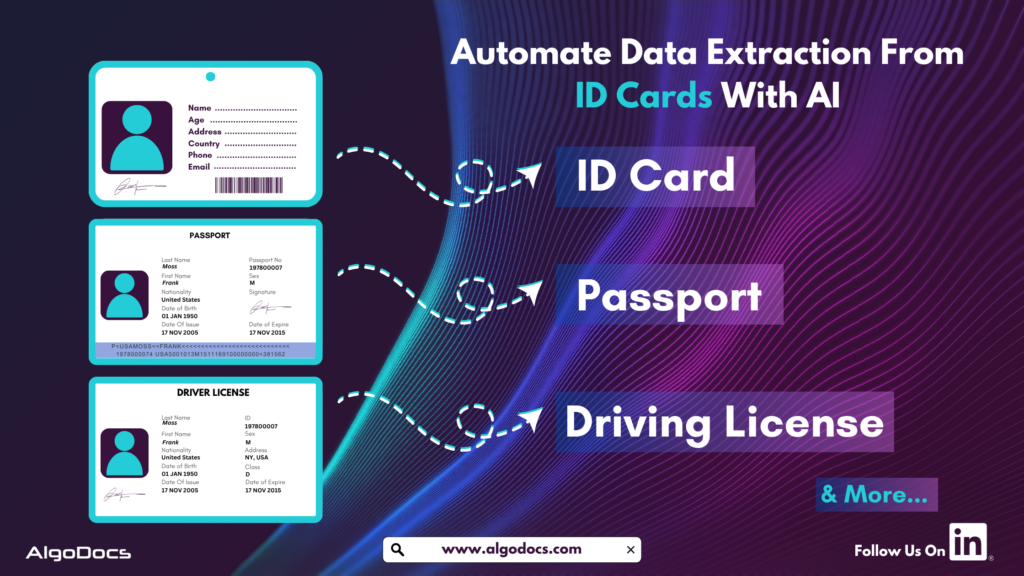
Back to Blog Table of contents On this page ID Card Data Extraction: Transforming Identity Verification with AI and OCR In 2025 Home › Blog › Algodocs › ID Card Data Extraction: Transforming Identity Verification with AI and OCR In 2025 Categories Algodocs Tags ai platform for data extraction algodocs character recognition data extraction from images id card data extraction machine learning ocr api By Shubhankar Biswas Published September 1, 2025, 09:46 Updated July 10, 2026, 11:57 ID cards are crucial for individuals and corporate organizations for various reasons. In today’s fast-paced digital world, businesses and organizations need efficient ways to extract data from various types of identity cards for KYC, security, compliance, and customer onboarding. However, manual data entry is slow and prone to errors. This is where Artificial Intelligence (AI) and Optical Character Recognition (OCR) come into play, making the process faster, more accurate, and seamless across different industries. This blog explores the essentials of ID card data extraction, how it works, the technologies behind it, its real-world applications, challenges, and how Algodocs AI is leading the way in intelligent data extraction. What is ID Card Data Extraction? ID card data extraction involves capturing and extracting information from various types of identity documents, such as passports, driver’s licenses, national ID cards, employee badges, and student IDs. These extracted data are later used for identity verification, KYC (Know Your Customer), automated form-filling, and record management in different organizations. Businesses use ID card data extraction to enhance security, improve and streamline customer interactions, and boost operational efficiency. Some of the key data points extracted from an ID card include: Full Name Date of Birth Address Identification Number Expiry Date Issuing Authority Signature QR Codes or Barcodes Biometric Data (such as Photos) ID card data extraction is a multi-step process designed to deliver accurate and efficient results. It begins with capturing a clear image of the ID card using a scanner, smartphone camera, or document upload. Next, AI enhances the image through preprocessing by improving contrast, reducing noise, and correcting any distortions or angles. OCR technology then detects and extracts the text from the image, followed by AI-powered algorithms that organize the extracted text into structured fields like name, date of birth, and ID number. The data is then verified by cross-checking it against predefined parameters to ensure accuracy. Finally, the structured data is securely stored or seamlessly integrated into business applications, making it readily available for use with precision and reliability. What Types of ID Card and what types of data Can Be Extracted with AI and OCR? You can extract data from passports, driving licenses, and corporate ID cards using AI OCR apps. The following information can be extracted with ID card OCR apps, including: Personal Details: Full name, gender, date of birth. Document Information: ID number, issue and expiry date. Address Information: Residential or office address. Biometric Data: Signatures and photos. Security Features: Watermarks, holograms, QR codes, and barcodes. Organizational Details: Employer name, student ID, and membership numbers. Signup for Algodocs AI free ID card data extraction app today and access all the paid features for free. Sign Up Now Extracting these details helps businesses with verification, compliance, fraud prevention, and automated onboarding. Technology Behind ID Card Data Extraction: OCR & AI To achieve high accuracy and efficiency, ID card data extraction relies on a combination of Optical Character Recognition (OCR) and Artificial Intelligence (AI). These technologies work together to automate the process of identifying, extracting, and digitizing data from ID cards, eliminating the need for manual data entry and reducing human errors. How OCR Works for ID Card Data Extraction Optical Character Recognition (OCR) is a sophisticated technology designed to scan and convert printed or handwritten text into machine-readable digital data. It is the backbone of ID card data extraction, enabling businesses, financial institutions, and government agencies to streamline identity verification and document processing. The OCR Process for ID Card Data Extraction OCR follows a structured workflow to ensure accurate and efficient extraction of text from ID cards. The process involves multiple steps, as outlined below: Capturing an Image of the ID Card The process begins with scanning or photographing the ID card using a scanner, mobile camera, or document imaging device. High-quality images with proper lighting and minimal glare improve OCR accuracy. Image preprocessing techniques, such as noise reduction, contrast enhancement, and skew correction, are applied to improve readability. Detecting Text Regions Using AI AI-powered OCR systems analyze the scanned image to identify and segment text areas from graphical elements such as logos, watermarks, and holograms. Machine learning models help differentiate between text and non-text elements, ensuring only relevant data is extracted. Recognizing Character Patterns & Extracting Data OCR algorithms process each text segment, identifying individual characters, numbers, and symbols. AI-powered pattern recognition improves accuracy, allowing the system to recognize different fonts, languages, and even stylized text. Some advanced OCR solutions incorporate Intelligent Character Recognition (ICR), enabling the extraction of handwritten text. Converting the Text into a Structured Digital Format The extracted text is converted into structured digital formats such as JSON, CSV, XML, or databases. This allows businesses to easily integrate ID card data with customer management systems, banking applications, HR platforms, and other databases. Validating Extracted Data for Accuracy AI-powered post-processing techniques are used to validate and correct any potential errors in the extracted text. This step ensures that information such as names, ID numbers, and expiration dates are correctly interpreted and formatted. AI models compare extracted data with predefined templates, helping detect discrepancies or inconsistencies. Capabilities of Modern OCR Solutions With the rapid advancements in AI and machine learning, modern OCR solutions have evolved to offer greater accuracy and versatility. Some key capabilities include: Multi-Language Recognition: OCR can extract data from ID cards in various languages, including complex scripts such as Arabic, Chinese, and Cyrillic. Support for Different Fonts & Formats: Advanced OCR models can handle various font styles, text orientations, and formatting styles commonly found in global ID cards. Handwriting Recognition (ICR): Intelligent Character Recognition (ICR) enables the extraction of handwritten details, such as signatures or handwritten notes on IDs. Fraud Detection & Security Enhancements: AI-driven OCR can detect altered or fraudulent

Scroll to Top