
Algodocs

handwritten notes extraction

Turning handwriting into editable text. Guides on extracting handwritten notes from scanned PDFs and images, how modern OCR copes with messy or inconsistent writing, and how to export the results to Word or Excel.
handwritten notes extraction

How to Convert Handwritten PDF to Text in 2026

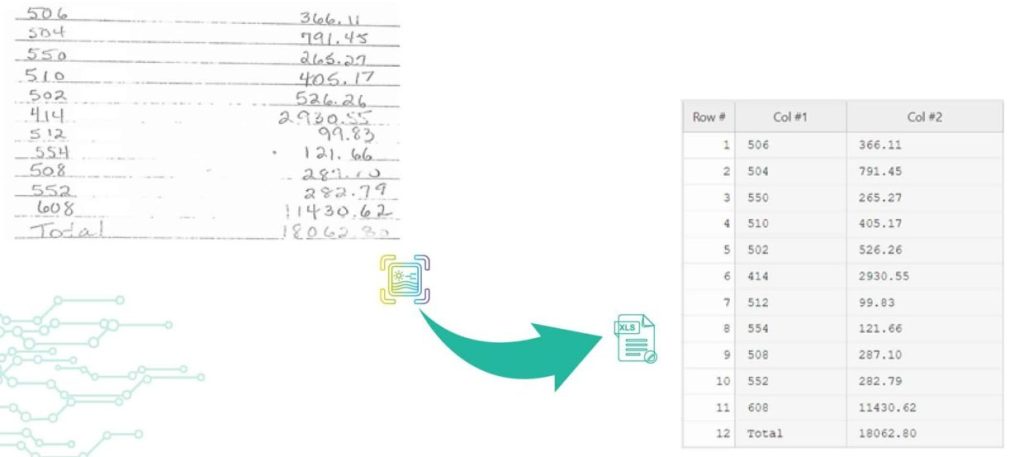
Back to Blog Table of contents On this page How to Convert Handwritten PDF to Text in 2026 Home › Blog › handwritten notes extraction › How to Convert Handwritten PDF to Text in 2026 Categories handwritten notes extraction Tags ai powered tools algodocs convert handwritten to text data extraction digital transformation free online tools handwriting recognition handwritten pdf machine learning ocr technology pdf to text converter text recognition accuracy By Shubhankar Biswas Published October 13, 2025, 12:13 Updated July 23, 2026, 07:38 Digitization enables ease in handling documents to save, share, and access material. However, converting handwritten PDFs to text is still a big challenge. Old methods of digitization are not precise enough in the conversion of handwriting to editable and machine-printed text because they lead to errors and confusion. In the current era of advanced technology, many tools and techniques are very helpful to handle this challenge. The tools to convert handwritten PDFs to text use OCR technology and transform them into editable text within seconds. Such tools make it easier to organize and share your words in that document. To know how to convert scanned files with handwritten text, we will discuss free options that will simplify your conversion of handwritten PDFs. These tools also make digitization and data extraction more manageable. Challenges in Handwriting data extraction There are many challenges in handwriting data extraction due to several reasons. The process of handwriting data extraction includes digitization. It converts handwritten documents into that digital format. This step is easy and straightforward. The real and noteworthy challenges in handwriting data extraction arise when we have to turn these scanned images into editable text. Here we will see some valid challenges in the extraction of data from handwritten scanned images; 1. Irregularities in handwriting styles The primary challenge is the irregularities in handwriting styles. People generally write in many different ways. They use different angles, forms, and sizes of letters. These irregularities make text recognition a complicated process. In this case, machine learning algorithms are very useful to improve accuracy, but sometimes, they also struggle with chaotic or unreadable handwriting. 2.  Transcription The second most important challenge is transcription. It can also be problematic, especially when you are dealing with older documents where liquid ink is faded or scanned image paper has worsened. In these situations, the conversion of scanned PDF images into editable text can produce errors. These errors lead to inappropriate data extraction. 3.  Context The third important challenge is context. It plays a crucial role in precise data extraction. Sometimes, handwriting recognition systems misinterpret numbers or letters. They interpret wrongly, especially when there is high uncertainty or misplaced information. Addressing this challenge needs cutting-edge technology and advanced Machine Learning Algorithms. Such technologies ensure correct transcription and reliable Data extraction. What are the main methods or tools for Automated Handwriting data extraction? For automated handwriting data extraction, there are numerous primary techniques or tools available. However, a few noteworthy and useful ones are as follows: 1.    Optical Character Recognition The most common method for converting handwritten PDFs into editable text is Optical Character Recognition. It works by examining the scanned images of documents and identifying the shapes and patterns of individual characters. Optical Character Recognition tools can help in extracting text from native PDFs. However, its performance decreases when used for extracting handwritten. 2.    Intelligent Character Recognition The second most common method is Intelligent Character Recognition. It is considered for Handwriting recognition text. This Automated Handwriting data extraction method uses machine learning algorithms to understand several styles of handwriting. Intelligent Character Recognition is particularly convenient when you need to convert handwritten PDFs to text. The main reason behind this is that it can; Handle different handwriting styles Produce editable text with greater accuracy Intelligent Character Recognition is far more flexible than in print fonts. 3.    Free Online Tools Many free online tools can help you convert handwritten PDFs to text. These online tools often use both OCR and ICR technologies for the conversion of PDF to text. Some prominent and helpful tools are; Google Drive with Google Docs Microsoft OneNote OnlineOCR.net i2OCR Algodocs Users can upload their handwritten PDFs to these online services. These tools process the documents to extract text. The best part of these tools is that you can download the resulting editable text or copy it for further use. These free online tools offer a suitable way to convert handwritten PDFs to text. Algodocs, on the other hand, is an excellent choice if you’re searching for a more specialized tool that enables you to extract not just handwritten data but also any kind of data, including tables and structured data. Algodocs offers a forever free subscription, with 50 pages processed every month. Handwriting to Text: Easily Convert Handwriting to Text using Algodocs The best way to convert handwritten pdf to text is by using Algodocs. It is a convenient and amazing tool for converting handwriting to text online for free. It streamlines the process of digitization by providing an easy platform for usage. You can convert scanned handwritten documents and convert into editable text. Algodocs is equipped with advanced text recognition and machine learning algorithms. It guarantees high accuracy even with several handwriting styles. How to extract handwritten data using Algodocs Step 1: Log in to your Algodocs account and go to the home page, which is the Dashboard. Step 2: Click on the Extractors tab, where you can see the Create button on the top right side, and click on it. Step 3: Choose the custom extractor for getting structured data from your documents as you need it. Step 4: A pop-up window will come out, and this is where you upload your sample file to extract data from. Click on the Choose file to locate the document from your device storage folder, then assign a name to the extractor. Once done, click on the Create Extractor button. It will populate under Extractors as below; in this article, our example is called “Sample 1.” Step 5: Click on the blue button labeled “Manage”, to create the data to
handwritten notes extraction

Automate Handwritten Data Extraction to Word/Excel online

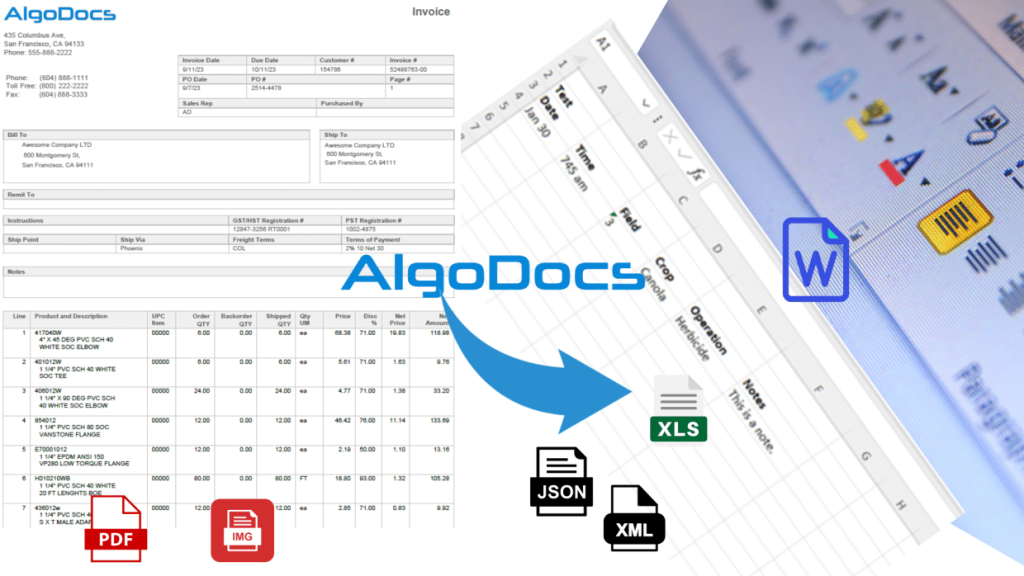
Back to Blog Table of contents On this page Automate Handwritten Data Extraction to Word/Excel online Home › Blog › handwritten notes extraction › Automate Handwritten Data Extraction to Word/Excel online Categories handwritten notes extraction By Shubhankar Biswas Published October 13, 2025, 09:04 Updated July 20, 2026, 05:53 The Challenges of Manual Handwritten Data Entry It is high time we admit that working with handwritten information is not always as easy and pleasant as it may seem. Welcome to the digital era; unfortunately, paper forms, handwriting, and even scribbled invoices persist as business as usual. Imagine typing all that data into Word or Excel all over again—it epitomizes boredom for me. It takes time, creates more opportunities for mistakes, and, to be quite frank, is uninteresting. Whether you work in finance to handle invoices, sort out notes and other shopping bills and receipts, interpret patient forms in healthcare, or seek an editable form of lecture notes and summaries in education, manual data entry is a curse we all share. It’s not just time waste; human entry errors lead to questionable money and opportunity loss. But what if there was a different way? The only way to streamline this slow, tedious, and error-prone task is to save your precious time. Presenting AI-powered handwritten data extraction– the superhero that your workflow requires! The Power of AI-Based Handwritten Data Extraction Imagine a world where you no longer need to sort through those piles of papers—let the AI do the work. That’s how handwritten data extraction functions with the help of modern technologies such as artificial intelligence. It’s like having a secretary who specializes in deciphering handwritten notes and typing them clean on Word or Excel documents. But how does it work? In its simplest form, methods of handwriting text and data recognition using AI involve two key processes: OCR and artificial intelligence. OCR acts like vision, recognizing individual letters and symbols, while machine learning works to understand and interpret the textual input. This dynamic pair of tools powerfully converts complicated handwritten text into well-ordered and retrievable data. The benefits are undeniable. You will significantly reduce data entry time, almost eliminate human error, and make your team work on more meaningful tasks. Plus, the efficiency gains are massive—no more wasting hours on data entry, for example. This means you can direct those resources to other important business segments. One of the most promising tools in this realm is Algodocs—an easy-to-use AI-based software that operates on the web and makes the process of extracting handwritten data very efficient. But more on that later. Top AI-Powered Tools for Handwritten Data Extraction Now, let’s dive into AI-based extraction tools—tools that, trust me, make your life easier. There are many pretty good choices available, and some have specific areas of focus. Algodocs: Your AI-Powered Data Extraction Ally Algodocs is a great solution if you need a powerful tool that the majority of users can use with ease. This web-based platform uses the latest AI to decipher handwritten with high precision. Let’s break down what makes Algodocs so special: Forever Free Plan: Algodocs understands that not all businesses handle vast piles of papers daily, but no business is immune to paper jams. That is why they offer a lifetime free plan with up to 50 monthly pages. It is a brilliant opportunity to get acquainted with AI platforms for data extraction without spending too much money. Intuitive Interface: Algodocs is not complicated to use and does not require an IT expert to operate. This is why it features a user-friendly interface that allows anyone to easily upload documents, select the data they want to extract, and export documents and selected data. Accurate Extraction: When it comes to extracting different types of data, Algodocs impresses with its accuracy handling, as mentioned before, all data such as handwriting, tables, key-value pairs, marks, and signatures. Whether dealing with invoices, forms, bank statements, HR forms & payrolls, and many more, you will find Algodocs very useful. Seamless Integration: Do you need to get that extracted data into other business systems, such as your CRM or accounting software? Algodocs makes this easy through several integrations. For example, you can download extracted data in Word, Excel, JSON, XML, etc., or use the available API or Zapier to transfer the extracted data directly to the targeted business app. Data Security and Privacy: At Algodocs, data security and privacy are paramount concerns. They take proper measures to ensure that your valuable secrets remain safe and cannot be disclosed to other parties without your knowledge or consent by standard legal and ethical practices. They are ISO27001 (Information Security Management System) and ISO9001 (Quality Management System) certified and GDPR-ready. Other Notable AI-Powered Tools While Algodocs is a fantastic option, there are a couple of other players in the field worth mentioning: Nanonets: Although this platform only provides AI-based data extraction, it offers many features and services related to data extraction, such as the possibility of training a model according to the client’s needs for a specific project. Rossum: Focused solely on invoicing, Rossum employs artificial intelligence for data extraction as well as invoice validation. Choosing the Right AI-Powered Data Extraction Solution Choosing the right tool that harnesses the power of Artificial Intelligence in data extraction is critical to make the most out of your investment and align with your business objectives. So now it is a question of opportunity; this service type is versatile, and you need to define what kind of services you need the most and in what specific context. Accuracy: For handwritten or printed documents, the extraction of data must be done accurately. Look for tools with precise accuracy levels that can handle different kinds of data along with the document’s peculiarities. Speed: Everyone knows that time means money. You may also want to assess the tools based on how fast they process your documents, especially if you have to go through hundreds of papers. Cost: Timing and budget are always factors. The good news is that there are free, freemium, paid, and enterprise-level options for every

Scroll to Top