
Algodocs

Optical Character Recognition

How OCR actually works, and where its limits are. Plain-language explanations of the technology behind text recognition, including zonal OCR, template-based capture and why accuracy varies so much between documents.
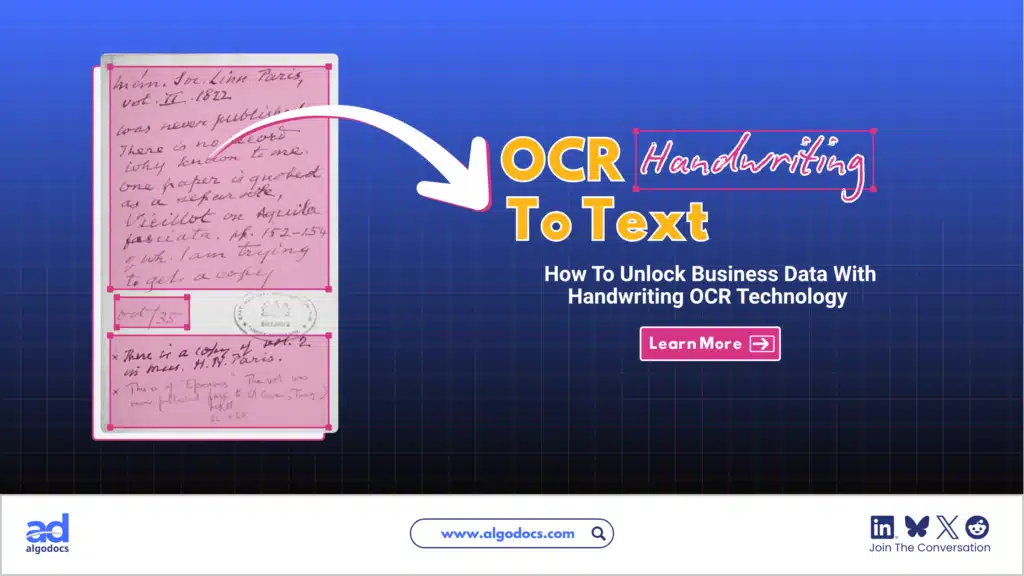
OCR Handwriting To Text
Optical Character Recognition

OCR Handwriting To Text: A Complete Guide For Unlocking Valuable Data.

Back to Blog Table of contents On this page OCR Handwriting To Text: A Complete Guide For Unlocking Valuable Data Home › Blog › Optical Character Recognition › OCR Handwriting To Text: A Complete Guide For Unlocking Valuable Data Categories Optical Character Recognition Tags Hand Writing Data Extraction OCR Handwriting Recognition By Shubhankar Biswas Published September 21, 2026, 10:15 Handwritten invoices, delivery notes, forms, ledgers and field reports still reach businesses every day. The information inside them is valuable, but it is stuck on paper, and someone has to type it out before software can use it. That is slow, costly and easy to get wrong. OCR handwriting to text solves this. It reads handwriting from a photo or scan and converts it into editable, searchable digital text. Writing styles vary a lot, from neat block letters to fast, joined-up cursive, so results vary too. Some tools handle neat writing well, while others are built for messy cursive or for structured business documents. In this guide, you will learn what OCR handwriting to text is, how it works, how accurate it really is, which tools are worth considering and how to choose the right one for your documents. TL;DR Summary What it is: OCR handwriting to text uses AI and machine learning to read handwriting from images or scanned PDFs and convert it into editable text or structured data such as Excel or JSON. The problem it solves: Handwritten documents cannot be searched, edited, shared or fed into business software without slow, error-prone retyping. Realistic accuracy: Neat handwriting converts well. Cursive, rushed writing, mixed languages and poor scans still need human review. Measure accuracy on your own documents, not on vendor claims. Tools covered: Algodocs and Docsumo (business document processing), Handwriting OCR (online conversion), Transkribus (historical handwriting), DeepSeek OCR (open source), Google Lens and OneNote (free options) and cloud APIs from Microsoft, Google and Amazon. How to choose: Match the tool to your document type, handwriting style, language, volume, output format, privacy needs and budget. Then test two or three tools on 30 to 50 of your own documents. What Is OCR Handwriting to Text? OCR handwriting to text is the process of using optical character recognition (OCR) and machine learning to convert handwritten content in images or scanned PDFs into editable, searchable text. The result can be plain text, a searchable PDF, a Word file, a spreadsheet row or structured data such as JSON. Several terms describe this technology, and they are often mixed up: Term What it means Best suited to OCR (optical character recognition) Reads printed text from images Typed documents, books, printed forms ICR (intelligent character recognition) OCR extended to recognize handwritten characters Handwritten digits and block letters on forms HTR (handwritten text recognition) AI models that read whole lines of handwriting, including cursive Letters, notes, manuscripts and archives IDP (intelligent document processing) OCR plus AI to classify, extract, validate and export fields Invoices, claims, delivery notes and other business documents Traditional OCR only turns a text image into an editable file. It works well on clean print but often struggles with handwriting. Modern tools add AI, machine learning and natural language processing (NLP) on top of OCR. IDP platforms go one step further by cleaning, validating and organizing the extracted data, even from irregular layouts. Why Is Handwriting Extraction Harder Than Printed Text Extraction? Printed text is uniform. The same letter looks almost identical every time, so OCR on a clean printed page is highly reliable. Handwriting is different in several ways: Letter shapes change from person to person and even within a single sentence. Letters connect, slant and overlap, so it is hard to tell where one character ends and the next begins. Ink fades, paper creases and phone photos arrive with shadows and tilted angles. There is no machine-readable font. A handwritten page is only a picture. It has no Unicode or ASCII characters behind it, so software has to interpret the shapes. A tool that performs well on a typed page can struggle badly with a page of cursive notes. That is why handwriting needs models trained specifically on handwriting, not only on printed fonts. How OCR Handwriting to Text Works Converting handwriting to text is a multi-step process. It starts with capturing an image and ends with exporting clean, usable data. Image capture: The handwritten content is provided as an image (.jpg, .png) or a scanned PDF and uploaded to the OCR system. Preprocessing: The software straightens the page, removes noise and adjusts contrast to improve image quality. Segmentation and text detection: The system finds the text areas and breaks the page into lines, words and, in some tools, individual characters. Text recognition: AI models read the detected lines and predict the most likely letters and words. Modern engines look at whole lines and surrounding context, which helps them read unclear letters the way a person would. Post-processing: The software cleans the output, fixes obvious errors and assigns confidence scores. Low-confidence words or fields can be flagged for human review. Export: The final data is exported as plain text, Word, .xls, .csv, .json, searchable PDF or another format, or sent directly to other software through an API. Note: To learn more about the basics, see our detailed guide on how OCR works. Problems With Handwritten Notes and Why OCR Handwriting to Text Helps Most handwritten documents exist only as images or scanned PDFs. They have no fixed font or layout, which makes data capture difficult. The common problems are: They cannot be searched. In a typed PDF or Word file, you can find a name, date or amount in seconds. In a handwritten image, the computer sees only pixels. They are hard to edit, copy and share. To change anything, you have to retype it. They can be hard to read. Writing style, irregular spacing and messy layouts make handwriting difficult for both people and machines. They cannot feed business systems. Invoices, delivery challans, bills of lading, customs forms and
Data Extraction, Optical Character Recognition

What Is Zonal OCR? An Easy Guide to Understanding Zonal OCR and How It Works.

Back to Blog Table of contents On this page What Is Zonal OCR? An Easy Guide to Understanding Zonal OCR and How It Works. Home › Blog › Data Extraction › What Is Zonal OCR? An Easy Guide to Understanding Zonal OCR and How It Works. Categories Data Extraction Optical Character Recognition Tags character recognition ocr api By Shubhankar Biswas Published September 1, 2025, 07:27 Updated July 20, 2026, 11:11   Processing data from bulk documents can be an annoying and time-consuming task if you have to extract this data manually. But with the help of modern technology such as optical character recognition, you can extract data from these documents easily. There is another part of OCR technology known as zonal OCR, which lets you extract specific data from specific sections of a PDF or scanned image. That is known as zonal OCR. So, what is Zonal OCR, and how does it work? We will discuss more in detail below. Understanding the Basics: OCR VS Zonal OCR? Before we explain what zonal OCR is, we first need to understand what OCR technology is and how it works.OCR stands for Optical Character Recognition. It was developed in the late 70s and started to gain traction in the late 80s. One of the main reasons it gained popularity in the 80s was because it started to be used by banks to extract data from various types of documents, which helped them save time and improve data extraction quality. Later, OCR was adopted in business, marketing, and other industries all around the world.The main function of traditional OCR technology is to convert different types of documents such as scanned paper documents, PDFs, or images into editable and searchable data. An OCR tool “reads” text on an image and turns it into digital letters that are editable on a computer. For example, if you scan a printed invoice and use OCR software, the software can pull out the name, address, and price from that scanned image and turn it into usable text. But classic OCR tools extract all the presented data in a document, and you can’t control what to extract and what not to—that’s where zonal OCR comes into play. What Is Zonal OCR? Now that we know what OCR is, let’s answer the main question—what is zonal OCR?Zonal OCR is a more focused and intelligent version of regular OCR. Instead of scanning an entire document and pulling out all the text, zonal OCR extracts data from specific areas or “zones” of a document. That’s why it is called zonal OCR or is known as template OCR as well. These zones are predefined sections where certain types of information always appear.Think of it like this: if every invoice you receive has the “Invoice Number” in the top right corner, Zonal OCR can be trained to look at just that area and pull the number out automatically. It ignores everything else and goes straight to the point. That makes it incredibly efficient and reliable for high-volume document processing. One of the major highlights of zonal OCR is that it is more accurate compared to traditional OCR. So, How Does Zonal OCR Work? Let’s break down how Zonal OCR works in a step-by-step process: Template Definition: First, you define zones on a document template. These zones are rectangular areas where key data lives—like names, dates, invoice numbers, etc. Document Scanning: When a new document comes in, it is scanned or uploaded to the system. Zone Detection: The Zonal OCR engine locates the defined zones on the document. Data Extraction: The engine reads the text from those zones and extracts it into a structured format like CSV, JSON, or directly into a database. Post-Processing: Extracted data can be validated, verified, or even pushed into downstream workflows like CRMs, ERPs, or RPA systems. Features of Zonal OCR What makes zonal OCR so powerful is its accuracy. Traditional OCR might pick up irrelevant text or make errors when faced with complex layouts. But zonal OCR knows exactly where to look because we have already defined the zone from where data needs to be picked and extracted. That means fewer errors, faster processing, and smoother workflows. Real-World Example: Zonal OCR For Medical Billing Imagine a hospital that receives thousands of medical bills every month. These documents have patient names, billing codes, diagnosis details, health insurance info, and payment terms.Using zonal OCR, the hospital can define zones on its standard bill layout:• Top left for patient name• Top right for bill number• Centre zone for treatment codes and costs• Bottom section for insurance informationEach incoming bill gets processed automatically. The software reads just those parts and enters the data into the hospital’s billing system. No manual typing. No human errors. Just fast, accurate data extraction. Where Zonal OCR Is Used Zonal OCR is widely used in different industries that handle large volumes of documents with structured layouts. Here are some common use cases:• Healthcare: Extracting patient data, diagnosis reports, medical codes, and insurance details from forms and bills.• Finance: Pulling out transaction info, invoice numbers, and payment dates from bank statements or receipts.• Logistics: Reading shipping labels, barcodes, and delivery addresses.• Legal: Extracting case numbers, parties involved, or dates from legal filings.• Retail: Processing receipts and purchase orders for inventory management. Why Businesses Need Zonal OCR Now that you understand what zonal OCR is, let’s explore why it’s such a vital tool for modern businesses.Saves TimeManual data entry is slow and expensive. Zonal OCR does in seconds what might take a person several minutes or hours.Reduces ErrorsHumans make mistakes, especially when tired or rushed. Zonal OCR provides consistent and accurate results.Scales EasilyWhether you process 10 or 10,000 documents a day, zonal OCR can handle it. It grows with your needs.Easy IntegrationMost zonal OCR systems can plug right into your existing software—like CRMs, ERP tools, or cloud databases.Improves ComplianceAccurate document processing means better audit trails, stronger recordkeeping, and improved compliance with industry regulations. Zonal OCR vs Full-Page OCR You might be wondering, “Why not just use

Scroll to Top