What Is Intelligent Document Processing (IDP) and How Can It Revolutionize Your Business in 2026?
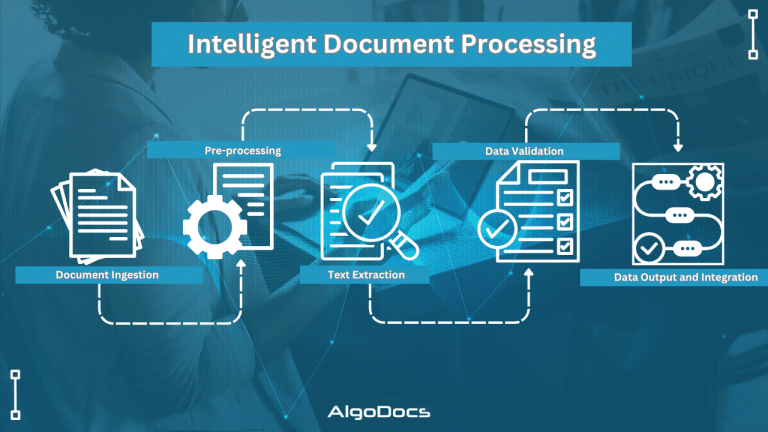
Back to Blog Table of contents On this page What Is Intelligent Document Processing (IDP) and How Can It Revolutionize Your Business in 2026? Home › Blog › Algodocs › What Is Intelligent Document Processing (IDP) and How Can It Revolutionize Your Business in 2026? Categories Algodocs Tags ai platform for data extraction algodocs deep learning guide IDP intelligent document processing machine learning ocr api By Shubhankar Biswas Published October 12, 2025, 18:51 Updated July 13, 2026, 06:16 In today’s digital age, data is crucial for every organization. However, a significant portion of this data resides within unstructured documents, such as contracts, invoices, forms, emails, and more. Manually processing data from these documents is time-consuming, error-prone, and costly for any business. Intelligent Document Processing (IDP) has emerged as a game-changing solution by leveraging the power of artificial intelligence (AI) and machine learning (ML). Document workflows and data extraction from these unstructured documents have become very easy. This comprehensive guide will explore the landscape of IDP platforms, their benefits, how they can be applied across various industries, key considerations for choosing an IDP solution, emerging trends, and how Algodocs can empower your business. What is Intelligent Document Processing (IDP)? A Deep Dive The IDP (Intelligent Document Processing) market is expected to reach $46.59 billion USD by the end of 2035, according to a report. As businesses heavily rely on, extraction, sorting, and managing data. These types of operations require a robust and reliable tool to that can provide useful insights about business metrics. That’s why the need for intelligent document processing tools is rising day by day. So, what is intelligent document processing? IDP is a sophisticated technology that automates the extraction, classification, and processing of data from various document types, regardless of format or structure. It achieves this by combining several core technologies: Optical Character Recognition (OCR): OCR converts images of text into machine-readable text. Modern OCR, often referred to as Intelligent Character Recognition (ICR), goes beyond basic character recognition by using deep learning models like Convolutional Neural Networks (CNNs) and Recurrent Neural Networks (RNNs). This allows it to handle complex layouts, handwritten text, low-quality images, multiple languages, and specialized fonts used in industries like healthcare (medical prescriptions) and law (legal documents). Accuracy is often measured using metrics like character error rate (CER) and word error rate (WER), with advanced systems achieving very low error rates. Natural Language Processing (NLP): NLP analyzes the extracted text to understand its meaning and context. It employs techniques like tokenization (breaking text into individual words or phrases), stemming and lemmatization (reducing words to their root form), Named Entity Recognition (NER) (identifying specific entities like names, dates, and locations), Part-of-Speech (POS) tagging (identifying the grammatical role of each word), sentiment analysis (determining the emotional tone of the text), topic modelling (discovering underlying topics within a collection of documents), text summarization (creating concise summaries of longer texts), relationship extraction (identifying relationships between entities), and semantic analysis (understanding the meaning of words and phrases in context). Machine Learning (ML): ML is the engine that drives IDP’s adaptability and continuous improvement. Supervised learning involves training the system on labelled data to recognize specific document types and extract relevant fields. Unsupervised learning helps discover patterns and structures in unlabelled data for improved classification and clustering. Reinforcement learning allows the system to learn through feedback and iterative improvement. Training data quality and quantity are crucial for model accuracy. Techniques like cross-validation and hyperparameter tuning are used to optimize model performance. Active learning allows the system to request human input for ambiguous cases, further improving its accuracy over time. Computer Vision: Computer vision enables IDP to “see” and interpret visual elements within documents. Techniques like image classification (categorizing images), object detection (identifying specific objects within images), image segmentation (dividing an image into multiple segments), table and form extraction (accurately extracting data from structured tables and forms), barcode and QR code recognition (automating data capture from barcodes and QR codes), signature verification (authenticating signatures), and logo detection (identifying company logos) are used. Robotic Process Automation (RPA): RPA acts as the orchestrator for IDP workflows, automating downstream processes based on the extracted data. It integrates IDP with other enterprise systems like CRM, ERP, and ECM, automating data validation, routing documents to appropriate departments, and triggering subsequent actions. IDP Workflow: A Detailed Breakdown: Document Ingestion: Documents are ingested through various channels: scanning, uploading files, APIs, email attachments, and more. Pre-processing: Images are optimized for OCR through techniques like noise reduction, skew correction, and image enhancement. OCR and Text Extraction: OCR extracts text from the document. NLP and Data Understanding: NLP analyzes the extracted text. Data Extraction and Validation: Relevant data is extracted and validated against predefined rules or databases. Human-in-the-Loop (HITL): Human reviewers handle exceptions and complex cases where the system has low confidence. Data Output and Integration: Extracted data is delivered in structured formats (CSV, JSON, XML) or directly integrated into business applications. The Benefits of IDP: Quantifiable Impacts Efficiency Gains: IDP can dramatically reduce document processing time, often by up to 90%. For example, processing hundreds of invoices that previously took several days can be completed in just a few minutes or hours. This increased throughput allows businesses to handle higher volumes of documents without increasing staffing. Cost Reduction: By eliminating manual data entry and reducing errors, IDP can lower operational costs by up to 70%. Reduced rework, fewer errors requiring correction, and optimized resource utilization contribute to significant cost savings. Accuracy Improvement: IDP achieves data extraction accuracy rates of 99% or higher, significantly minimizing data entry errors and improving data quality and consistency. This reduces costly downstream errors and improves compliance. Enhanced Security and Compliance: IDP systems offer robust security features like data encryption, access control, and audit trails, ensuring compliance with data privacy regulations like GDPR, HIPAA, and others. Improved Customer Experience: Faster processing times translate to quicker service delivery, leading to improved customer satisfaction. For example, faster loan approvals or insurance claims processing can significantly enhance the customer