OCR Handwriting To Text: A Complete Guide For Unlocking Valuable Data
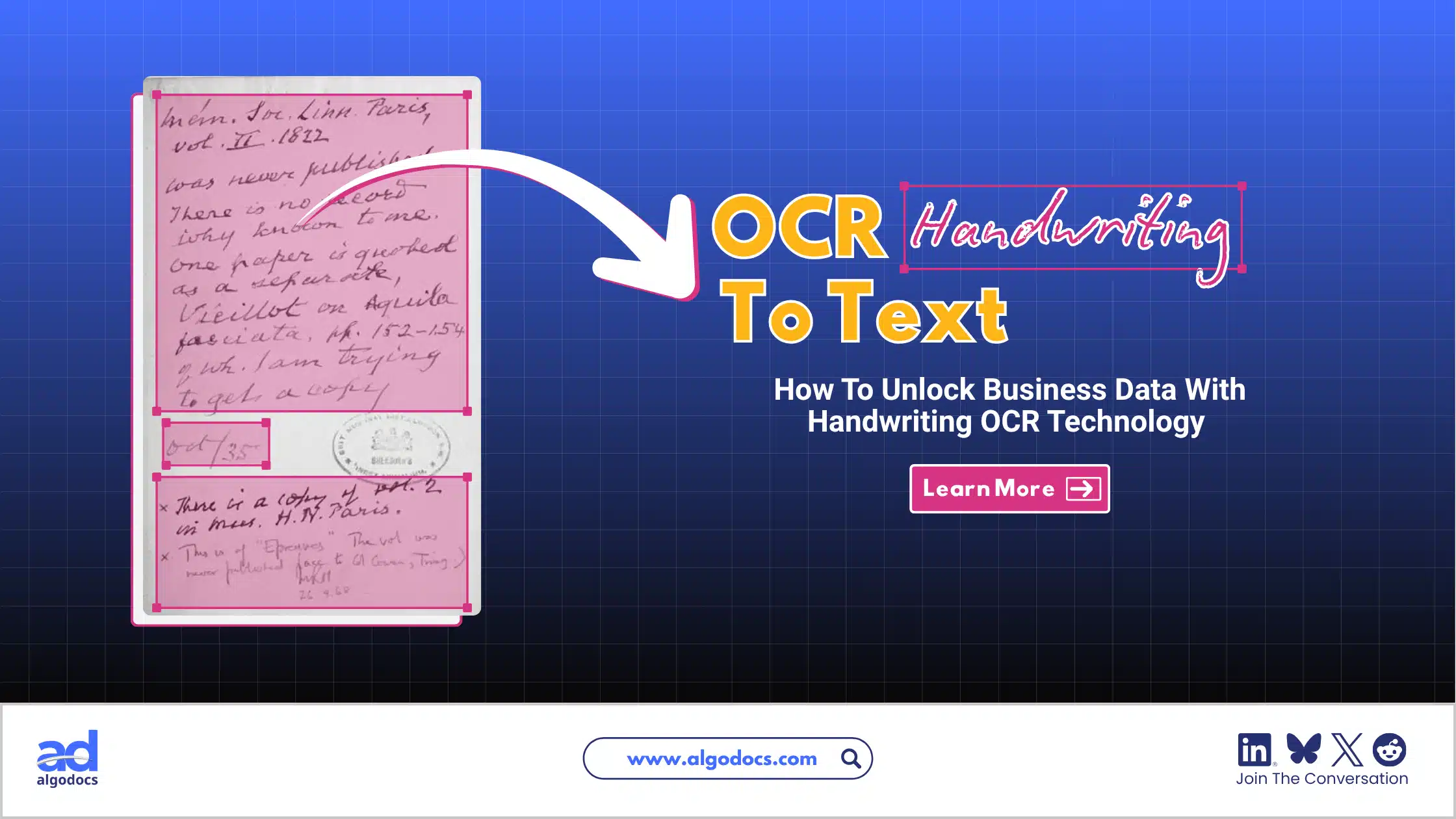
Handwritten invoices, delivery notes, forms, ledgers and field reports still reach businesses every day. The information inside them is valuable, but it is stuck on paper, and someone has to type it out before software can use it. That is slow, costly and easy to get wrong.
OCR handwriting to text solves this. It reads handwriting from a photo or scan and converts it into editable, searchable digital text. Writing styles vary a lot, from neat block letters to fast, joined-up cursive, so results vary too. Some tools handle neat writing well, while others are built for messy cursive or for structured business documents.
In this guide, you will learn what OCR handwriting to text is, how it works, how accurate it really is, which tools are worth considering and how to choose the right one for your documents.
TL;DR Summary
- What it is: OCR handwriting to text uses AI and machine learning to read handwriting from images or scanned PDFs and convert it into editable text or structured data such as Excel or JSON.
- The problem it solves: Handwritten documents cannot be searched, edited, shared or fed into business software without slow, error-prone retyping.
- Realistic accuracy: Neat handwriting converts well. Cursive, rushed writing, mixed languages and poor scans still need human review. Measure accuracy on your own documents, not on vendor claims.
- Tools covered: Algodocs and Docsumo (business document processing), Handwriting OCR (online conversion), Transkribus (historical handwriting), DeepSeek OCR (open source), Google Lens and OneNote (free options) and cloud APIs from Microsoft, Google and Amazon.
- How to choose: Match the tool to your document type, handwriting style, language, volume, output format, privacy needs and budget. Then test two or three tools on 30 to 50 of your own documents.
What Is OCR Handwriting to Text?
OCR handwriting to text is the process of using optical character recognition (OCR) and machine learning to convert handwritten content in images or scanned PDFs into editable, searchable text. The result can be plain text, a searchable PDF, a Word file, a spreadsheet row or structured data such as JSON.
Several terms describe this technology, and they are often mixed up:
| Term | What it means | Best suited to |
| OCR (optical character recognition) | Reads printed text from images | Typed documents, books, printed forms |
| ICR (intelligent character recognition) | OCR extended to recognize handwritten characters | Handwritten digits and block letters on forms |
| HTR (handwritten text recognition) | AI models that read whole lines of handwriting, including cursive | Letters, notes, manuscripts and archives |
| IDP (intelligent document processing) | OCR plus AI to classify, extract, validate and export fields | Invoices, claims, delivery notes and other business documents |
Traditional OCR only turns a text image into an editable file. It works well on clean print but often struggles with handwriting. Modern tools add AI, machine learning and natural language processing (NLP) on top of OCR. IDP platforms go one step further by cleaning, validating and organizing the extracted data, even from irregular layouts.
Why Is Handwriting Extraction Harder Than Printed Text Extraction?
Printed text is uniform. The same letter looks almost identical every time, so OCR on a clean printed page is highly reliable. Handwriting is different in several ways:
- Letter shapes change from person to person and even within a single sentence.
- Letters connect, slant and overlap, so it is hard to tell where one character ends and the next begins.
- Ink fades, paper creases and phone photos arrive with shadows and tilted angles.
- There is no machine-readable font. A handwritten page is only a picture. It has no Unicode or ASCII characters behind it, so software has to interpret the shapes.
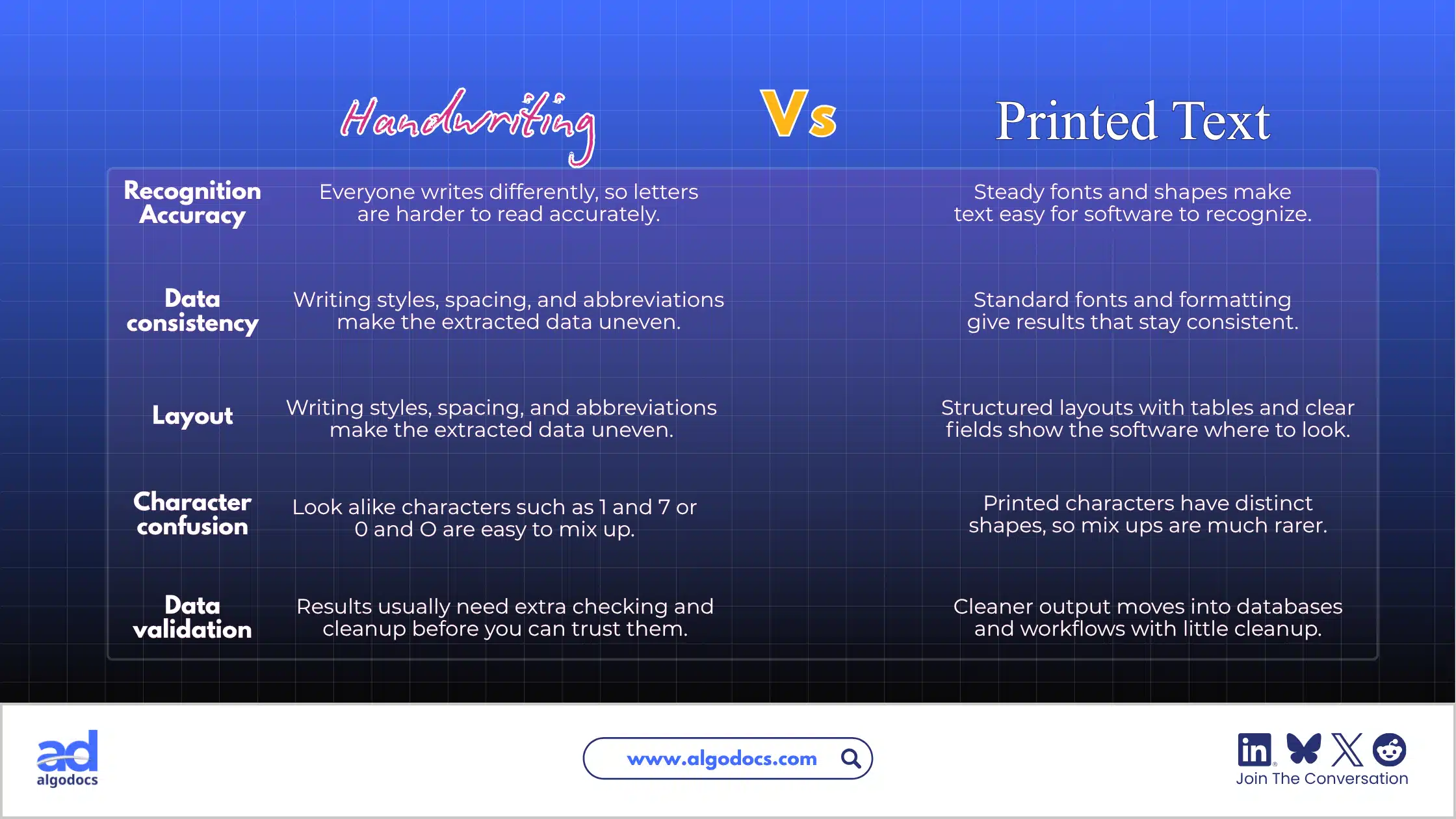
A tool that performs well on a typed page can struggle badly with a page of cursive notes. That is why handwriting needs models trained specifically on handwriting, not only on printed fonts.
How OCR Handwriting to Text Works
Converting handwriting to text is a multi-step process. It starts with capturing an image and ends with exporting clean, usable data.
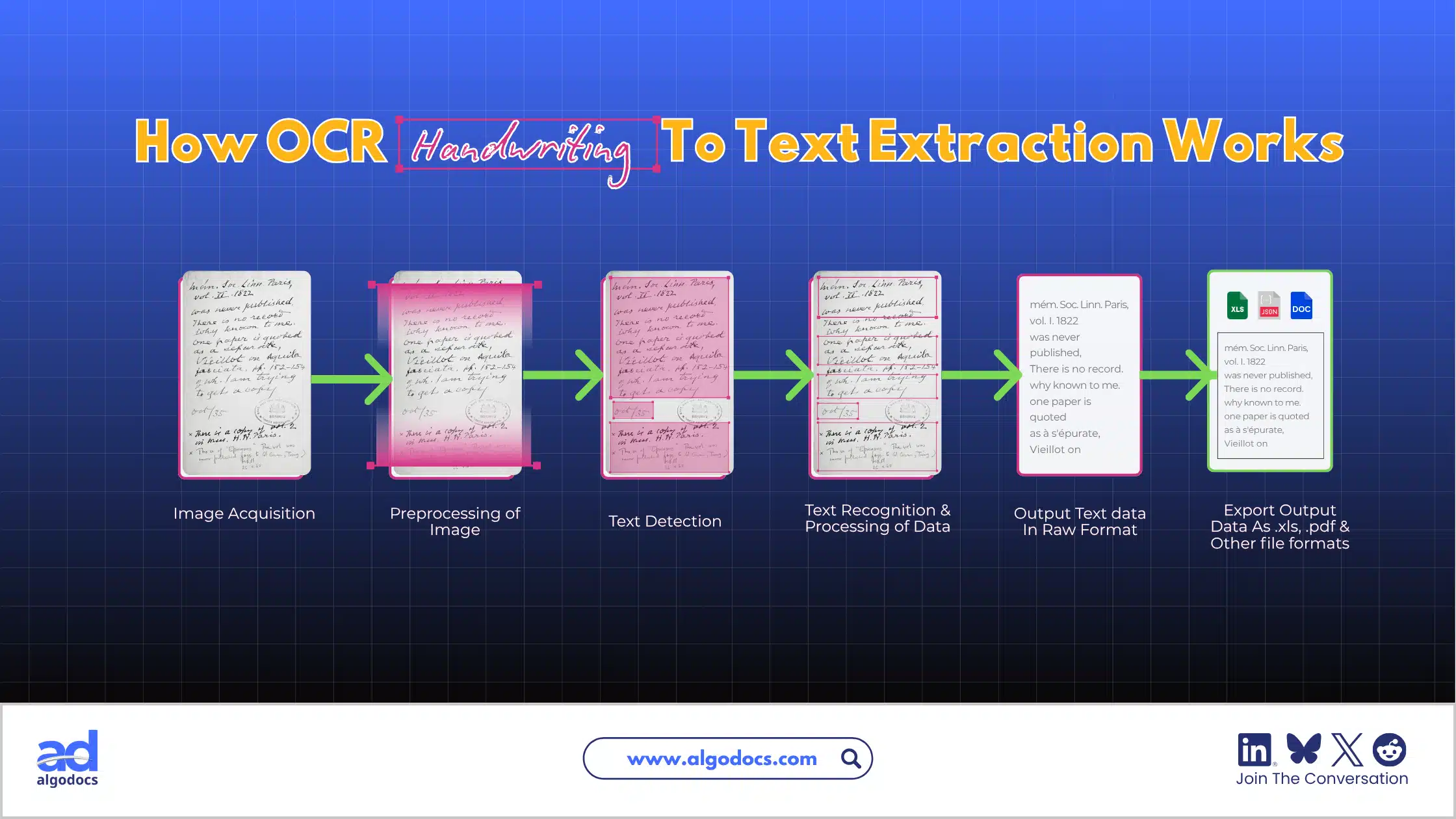
- Image capture: The handwritten content is provided as an image (.jpg, .png) or a scanned PDF and uploaded to the OCR system.
- Preprocessing: The software straightens the page, removes noise and adjusts contrast to improve image quality.
- Segmentation and text detection: The system finds the text areas and breaks the page into lines, words and, in some tools, individual characters.
- Text recognition: AI models read the detected lines and predict the most likely letters and words. Modern engines look at whole lines and surrounding context, which helps them read unclear letters the way a person would.
- Post-processing: The software cleans the output, fixes obvious errors and assigns confidence scores. Low-confidence words or fields can be flagged for human review.
- Export: The final data is exported as plain text, Word, .xls, .csv, .json, searchable PDF or another format, or sent directly to other software through an API.
Note: To learn more about the basics, see our detailed guide on how OCR works.
Problems With Handwritten Notes and Why OCR Handwriting to Text Helps
Most handwritten documents exist only as images or scanned PDFs. They have no fixed font or layout, which makes data capture difficult. The common problems are:
- They cannot be searched. In a typed PDF or Word file, you can find a name, date or amount in seconds. In a handwritten image, the computer sees only pixels.
- They are hard to edit, copy and share. To change anything, you have to retype it.
- They can be hard to read. Writing style, irregular spacing and messy layouts make handwriting difficult for both people and machines.
- They cannot feed business systems. Invoices, delivery challans, bills of lading, customs forms and surveys contain data that accounting, ERP and CRM tools need. Errors in this data can lead to financial loss and legal disputes.
- Storage and compliance are harder. Paper records take up space, can be lost or damaged and are difficult to audit.
How OCR Handwriting to Text Solves These Problems
| Problem with handwriting | How OCR solves it |
| Cannot search notes | Converts pages into searchable text, so a keyword finds the right note in seconds |
| Hard to edit or share | Produces editable text, Word files and searchable PDFs |
| Difficult to read | Gives a clean typed version, with the original image kept for checking |
| Easy to lose or damage | Creates digital copies that can be backed up in several places |
| Slow retyping | Reads a page in seconds, so only a quick review is needed |
| Data trapped on paper | Extracts fields into structured data for ERP, accounting or CRM tools |
| Weak audit trail | Stores source images, extracted values, confidence scores and reviewer changes |
OCR does not remove people from the process. It moves them from typing everything to checking only what the software is unsure about. That shift is where the savings come from.
Benefits of OCR Handwriting to Text
- Saves time. A page that takes minutes to retype can be read in seconds. For a team handling hundreds of handwritten documents a week, this changes how many people the process needs.
- Reduces cost and rework. Manual entry costs operator time, correction time and the cost of acting on wrong data. Measure your cost per document before you start, then compare after a pilot.
- Improves accuracy where it matters. Low-confidence fields are flagged for a person to confirm, so errors are caught before they reach your systems.
- Makes notes searchable. Old notebooks, meeting minutes and field reports become a knowledge base you can actually use.
- Speeds up business processes. Faster data capture means faster approvals and payments, and fewer delays caused by data errors.
- Supports collaboration and compliance. Teams can share and version digital text, and auditors can trace each value back to its source image.
How Accurate Is OCR Handwriting to Text?
Accuracy depends on the writer, the document, the language and the image quality. No tool is accurate on every kind of handwriting, so treat any single percentage with caution.
Accuracy is usually measured in two ways:
- Character error rate (CER): the share of characters that are wrong, missing or added. A CER of 5% means about 5 errors in every 100 characters.
- Word error rate (WER): the share of words that contain at least one error. WER is always higher than CER, because one wrong letter makes the whole word wrong. Transkribus documentation notes that WER is typically three to four times the CER, and describes a CER of no more than 5% as the mark of a good handwriting model.
WER matters most if you plan to search the text later, because a search succeeds only when the whole word is right.
| Handwriting type | What to expect |
| Neat block letters on a clean scan | Often very good, and sometimes close to typed-text quality |
| Mixed print and cursive | Good, with some corrections needed |
| Fast cursive or messy writing | Lower accuracy, with heavy review needed |
| Faded ink, creased paper, shadows | Accuracy drops, even for neat writers |
| Less common languages and scripts | Varies widely by tool, so test before you commit |
Be careful with vendor claims such as "99% accuracy". These numbers usually come from clean test sets, and many are vendor-run. Independent comparisons also disagree with each other, because they use different documents and methods. The only reliable number is the one you measure yourself, by comparing the tool's output with a human-checked version of your own documents.
Best Tools for OCR Handwriting to Text
No single tool is best for every job. The right choice depends on whether you are converting a few personal notes, a large archive of historical letters or thousands of business documents. The details below were checked in October 2026. Plans change often, so confirm before you buy.
Algodocs
Algodocs is an AI-powered intelligent document processing tool that used OCR with machine learning and generative AI to extract data from handwritten notes, scanned PDFs, images, invoice, bills, purchase orders and other types of documents. You can export the results to Excel or JSON and connect Algodocs to other business tools through its API and integrations.
- Price: Free plan with up to 50 pages per month. Paid plans start at about $35 per month.Check algodocs pricing page for more details
- Languages and security: The vendor states support for more than 200 languages and lists GDPR compliance and ISO 27001/9001 certification.
- Accuracy: The vendor claims 99%+ accuracy for structured data extraction. Treat this as a claim to test on your own documents.
- Best for: Invoices, forms, medical records and logistics documents where you need fields (not just text) sent to other systems.
- Less suited to: Historical manuscripts and very retro document layouts and styles.
Extract Handwritten Text Faster with Algodocs Handwriting OCR. Signup For A Free Account Today
Docsumo
Docsumo is an AI-based intelligent document processing platform built mainly for structured business documents such as invoices, bank statements and tax forms. It offers OCR, data extraction, classification and review features.
- Price: Custom, based on document volume and users. A free trial is available. Check Docsumo pricing page.
- Best for: Finance and operations teams processing high volumes of structured documents that contain some handwriting.
- Less suited to: Pages that are mostly freehand writing, such as journals, letters or notes. Its handwriting capabilities are more limited than those of specialist tools.
Handwriting OCR
Handwriting OCR is an online service focused on converting handwritten documents into digital text. You upload a photo or PDF and export the result as plain text, Word or Excel. It is a simple option for notes, forms and records without a complex setup.
- Price: Credit-based. Third-party listings show pay-as-you-go pricing of about $15 per 100 pages and monthly plans from about $19, with free trial credits on sign-up. Check Handwriting OCR pricing page.
- Best for: Individuals, students, teachers and small teams that need quick conversion of notes and forms.
- Less suited to: Teams that need deep ERP or accounting workflows.
Transkribus
Transkribus is a handwritten text recognition platform built for historical and archival documents. It lets you train custom models on a specific handwriting style, which makes it useful for manuscripts, parish records and research collections.
- Price: A free plan includes 50 credits per month, and paid subscriptions and on-demand credits are available. Handwritten text recognition uses credits per page. See the pricing page for current plans.
- Best for: Archives, libraries, historians, genealogists and researchers.
- Less suited to: Quick, one-click conversion of everyday notes. It is a powerful tool, but it takes some learning.
DeepSeek OCR
DeepSeek OCR is an open-source vision-language model released by DeepSeek in October 2025 under the MIT license. It turns document images into text and markdown, and a newer DeepSeek-OCR 2 followed in January 2026. You run it yourself, so there are no per-page fees, and no data has to leave your own infrastructure.
- Price: Free to use. You pay for your own hardware or cloud GPUs.
- Best for: Developers and technical teams who want a self-hosted pipeline and full control over their data.
- Less suited to: Non-technical users. Independent reviews note that handwriting and poor scans can still degrade its output, so test it carefully.
Free options: Google Lens and Microsoft OneNote
For a few pages, you may not need a paid tool at all. Google Lens can read handwriting through your phone camera and copy the text to your computer if both devices use the same Google account and Chrome. Microsoft OneNote can convert handwriting written with a stylus into typed text. Both work best with neat writing and are not built for bulk or business use.
Cloud APIs: Microsoft, Google and Amazon
Developers who want to build handwriting recognition into their own software often use Microsoft Azure AI Document Intelligence, Document AI or Amazon Textract . These services process pages at scale and return text with positions and confidence scores. They suit teams with engineering resources rather than non-technical users.
Tool Comparison Table
| Tool | Type | Best for | Free option | Technical skill needed |
| Algodocs | IDP platform | Complex handwritten layouts, invoice, bill etc | Yes, 50 pages per month | Low |
| Docsumo | IDP platform | High-volume structured business documents | Free trial | Low to medium |
| Handwriting OCR | Online tool | Notes, forms and quick conversion | Free trial credits | Low |
| Transkribus | HTR platform | Historical and archival handwriting | Yes, 50 credits per month | Medium |
| DeepSeek OCR | Open-source model | Self-hosted, developer-led pipelines | Free (own hardware) | High |
| Google Lens / OneNote | Consumer apps | A few pages of neat notes | Yes | Very low |
| Cloud APIs | Developer services | Custom software at scale | Limited free tiers | High |
How to Choose the Right Handwriting OCR Tool
Use these questions to narrow your options:
- Document type: Are you converting simple notes, historical manuscripts or business documents such as invoices and forms? Business documents need field extraction. Archives need a tool built for historical handwriting.
- Handwriting and language: Check that the tool supports your language and script, and that it can handle your writing style, whether neat print or cursive.
- Volume: A few pages a month suits a free or low-cost tool. Hundreds of documents a week call for an automated platform.
- Output and integrations: Decide whether you need plain text, searchable PDFs, spreadsheets or structured data synced to ERP, accounting or CRM tools.
- Technical skills: Open-source models are free but need setup and maintenance.
- Privacy and budget: Review how each vendor stores and uses your data, and compare pricing against the time you expect to save.
| If you are... | Start with... |
| A student or individual with a few pages | Google Lens, OneNote or a free trial of an online tool |
| A small team with notes and forms | Handwriting OCR or Algodocs' free plan |
| A finance or logistics team with handwritten invoices and delivery notes | An IDP platform such as Algodocs or Docsumo |
| A researcher or archivist | Transkribus |
| A developer with strict data control needs | DeepSeek OCR or a cloud API |
Finally, test your shortlisted tools on 30 to 50 of your own documents and measure field-level accuracy before you commit.
Practical Examples of OCR Handwriting to Text
Example 1: Handwritten invoices and delivery notes
A logistics company receives hundreds of handwritten delivery notes each week. Staff used to retype the invoice number, date, items and totals into an accounting system. With an IDP tool, they upload the scans, and the software extracts those fields into a spreadsheet or ERP. Staff then review only the fields marked low-confidence. The work shifts from typing to checking.
Example 2: Historical letters and archives
A local history society has boxes of handwritten letters from the early 1900s. They use a handwriting recognition platform, correct a sample of pages by hand and then train a model on that writer's style. The model reads the remaining pages with far fewer errors, and the whole collection becomes searchable.
Example 3: Student and meeting notes
A student photographs a page of lecture notes with a phone and copies the text into a document using a free app. The notes are neat and well lit, so only a few words need fixing. The same method fails on a rushed scribble taken in poor light, which shows why capture quality matters.
How to Convert Handwriting to Text Step by Step
- Prepare the page. Place it flat on a plain background in even light. Avoid shadows and glare.
- Capture or scan it. Scan at 300 DPI or higher. With a phone, hold it parallel to the page and fill the frame.
- Choose your tool. Pick one that suits your document type, language and volume.
- Select the language and output format. Choose the correct language and your preferred export, such as Word, Excel or JSON.
- Upload and process. Most tools return results within seconds or a minute per page.
- Review the output. Check names, dates, numbers and anything flagged as uncertain against the original image.
- Export and store. Save the text and keep the original image as your source of truth.
Best Practices for Better Results
- Scan at 300 DPI or higher. Low resolution measurably reduces recognition accuracy.
- Keep pages flat and straight. Tilted or curved pages cause avoidable errors.
- Use good lighting and contrast. Dark ink on light paper reads best.
- Select the right language. Wrong language settings produce wrong words.
- Write clearly where you can. Block letters and spaced lines help, especially for forms.
- Set review rules. Send low-confidence fields to a person automatically.
- Keep the original images. They are your audit trail and your fallback.
- Pilot before you scale. Test on real documents and measure results.
Common Mistakes to Avoid
- Trusting accuracy claims without testing. Vendor numbers rarely match your documents.
- Skipping human review for invoices, medical records and legal documents, where one wrong digit can be costly.
- Using printed-text OCR on cursive. Choose a tool built for handwriting.
- Uploading poor images. Blurry, dark or skewed photos reduce results more than any tool setting.
- Ignoring privacy. Handwritten records often contain personal or financial data. Check where data is stored, who can see it and whether it is used to train models.
- Choosing on price alone. A cheap tool that needs heavy correction can cost more in staff time.
Expert Tips
- Test with your worst pages as well as your best. Average samples hide the failures that cause problems.
- Measure field-level accuracy for business documents. A tool can read most words correctly and still get the invoice total wrong.
- Check how errors are shown. Confidence scores and side-by-side image views make review much faster.
- For archives, plan to train a model. Historical writing often needs a custom model rather than a general one.
- Ask about data retention. Know how long uploads are kept and how to delete them.
- Re-test periodically. AI models improve quickly, and the best tool today may not be the best next year.
Languages and Privacy: Two Questions to Settle Early
Languages. Support for English handwriting is usually the strongest. Other languages and scripts, including Hindi and other Indian languages, vary widely by tool. Some vendors state broad language support, but that does not guarantee good handwriting accuracy in every script. Always test samples in your own language.
Privacy. Look for encryption, clear data-retention policies, compliance certifications such as GDPR and ISO 27001 where relevant and options to delete your data. If your documents are highly sensitive, a self-hosted model or private cloud deployment may be safer than a public online tool.
Frequently Asked Questions
What is OCR handwriting to text?
OCR handwriting to text is a technology that reads handwritten characters from a scan or photo and converts them into editable, searchable digital text. Modern tools use AI models that read whole lines of writing, not just isolated letters.
How accurate is OCR for handwritten notes?
It depends on the writing and the image. Clean printed text can exceed 99% accuracy, while handwriting varies widely. Neat hand printing converts well, and messy cursive may need heavy correction. Measure character and word error rates on your own samples before choosing a tool.
What is the best tool to convert handwriting to text?
It depends on your needs. Algodocs supports complex handwritten text notes, scanned images, invoice, bills and other business documents. Handwriting OCR works well for simple notes. Transkribus is built for historical manuscripts, and DeepSeek OCR is a free option for technical users. Compare two or three tools on the same sample pages.
Is there a free handwriting OCR tool?
Yes. Algodocs and Transkribus offer free plans with monthly limits, and Handwriting OCR provides free trial credits. Google Lens and Microsoft OneNote are free for neat notes. DeepSeek OCR is free as an open-source model but needs technical setup and your own hardware.
Conclusion
OCR handwriting to text turns paper-trapped information into text you can search, edit, share and process. The technology is useful today, but it is not magic. Handwriting variety, image quality and language still decide the results.
Start by identifying what you need to convert and why. Choose a tool that matches your handwriting, language, volume and output needs. Set image capture standards, add a human review step for uncertain fields and test on your own documents before you commit. Individuals can begin with free tools like Google Lens or a free plan. Finance, logistics and operations teams that handle handwritten invoices, delivery notes and forms will get more from an AI-powered platform such as Algodocs, which joins recognition, extraction, review and integration in one workflow.
Key Takeaways
- OCR handwriting to text makes handwritten documents searchable, editable, shareable and ready for business software.
- It is harder than printed-text OCR, so accuracy varies by writer, image quality and language.
- Accuracy is measured with character error rate (CER) and word error rate (WER). Measure both on your own documents instead of relying on vendor claims.
- The main benefits are saved time, fewer errors, better access to information and faster business processes.
- Tool types include IDP platforms (Algodocs, Docsumo), online tools (Handwriting OCR), historical-document platforms (Transkribus), open-source models (DeepSeek OCR), free apps and cloud APIs.
- Choose by document type, handwriting style, language, volume, output format, integrations, privacy and cost.
- Pilot any tool on 30 to 50 of your own documents and measure field-level accuracy.
- Scan at 300 DPI or higher, keep a human review step for important data and always keep the original images.