Algodocs

handwriting recognition

handwritten notes extraction

How to Convert Handwritten PDF to Text in 2026

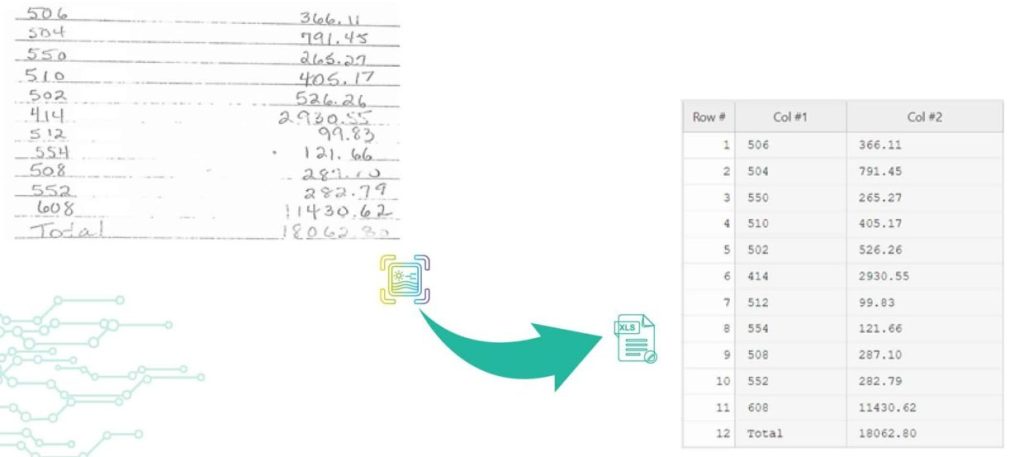
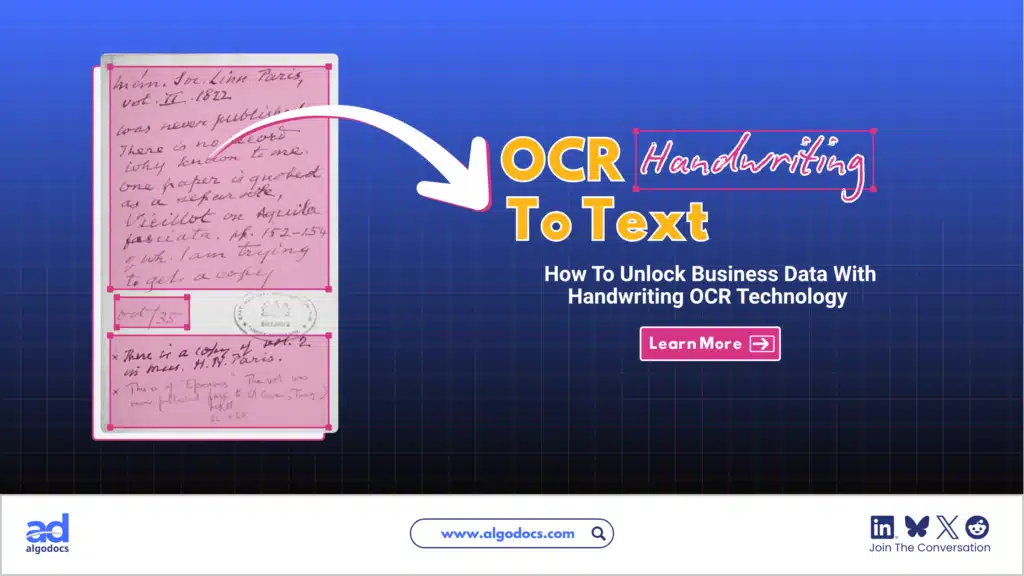
Back to Blog Table of contents On this page How to Convert Handwritten PDF to Text in 2026 Home › Blog › handwritten notes extraction › How to Convert Handwritten PDF to Text in 2026 Categories handwritten notes extraction Tags ai powered tools algodocs convert handwritten to text data extraction digital transformation free online tools handwriting recognition handwritten pdf machine learning ocr technology pdf to text converter text recognition accuracy By Shubhankar Biswas Published October 13, 2025, 12:13 Updated July 23, 2026, 07:38 Digitization enables ease in handling documents to save, share, and access material. However, converting handwritten PDFs to text is still a big challenge. Old methods of digitization are not precise enough in the conversion of handwriting to editable and machine-printed text because they lead to errors and confusion. In the current era of advanced technology, many tools and techniques are very helpful to handle this challenge. The tools to convert handwritten PDFs to text use OCR technology and transform them into editable text within seconds. Such tools make it easier to organize and share your words in that document. To know how to convert scanned files with handwritten text, we will discuss free options that will simplify your conversion of handwritten PDFs. These tools also make digitization and data extraction more manageable. Challenges in Handwriting data extraction There are many challenges in handwriting data extraction due to several reasons. The process of handwriting data extraction includes digitization. It converts handwritten documents into that digital format. This step is easy and straightforward. The real and noteworthy challenges in handwriting data extraction arise when we have to turn these scanned images into editable text. Here we will see some valid challenges in the extraction of data from handwritten scanned images; 1. Irregularities in handwriting styles The primary challenge is the irregularities in handwriting styles. People generally write in many different ways. They use different angles, forms, and sizes of letters. These irregularities make text recognition a complicated process. In this case, machine learning algorithms are very useful to improve accuracy, but sometimes, they also struggle with chaotic or unreadable handwriting. 2.  Transcription The second most important challenge is transcription. It can also be problematic, especially when you are dealing with older documents where liquid ink is faded or scanned image paper has worsened. In these situations, the conversion of scanned PDF images into editable text can produce errors. These errors lead to inappropriate data extraction. 3.  Context The third important challenge is context. It plays a crucial role in precise data extraction. Sometimes, handwriting recognition systems misinterpret numbers or letters. They interpret wrongly, especially when there is high uncertainty or misplaced information. Addressing this challenge needs cutting-edge technology and advanced Machine Learning Algorithms. Such technologies ensure correct transcription and reliable Data extraction. What are the main methods or tools for Automated Handwriting data extraction? For automated handwriting data extraction, there are numerous primary techniques or tools available. However, a few noteworthy and useful ones are as follows: 1.    Optical Character Recognition The most common method for converting handwritten PDFs into editable text is Optical Character Recognition. It works by examining the scanned images of documents and identifying the shapes and patterns of individual characters. Optical Character Recognition tools can help in extracting text from native PDFs. However, its performance decreases when used for extracting handwritten. 2.    Intelligent Character Recognition The second most common method is Intelligent Character Recognition. It is considered for Handwriting recognition text. This Automated Handwriting data extraction method uses machine learning algorithms to understand several styles of handwriting. Intelligent Character Recognition is particularly convenient when you need to convert handwritten PDFs to text. The main reason behind this is that it can; Handle different handwriting styles Produce editable text with greater accuracy Intelligent Character Recognition is far more flexible than in print fonts. 3.    Free Online Tools Many free online tools can help you convert handwritten PDFs to text. These online tools often use both OCR and ICR technologies for the conversion of PDF to text. Some prominent and helpful tools are; Google Drive with Google Docs Microsoft OneNote OnlineOCR.net i2OCR Algodocs Users can upload their handwritten PDFs to these online services. These tools process the documents to extract text. The best part of these tools is that you can download the resulting editable text or copy it for further use. These free online tools offer a suitable way to convert handwritten PDFs to text. Algodocs, on the other hand, is an excellent choice if you’re searching for a more specialized tool that enables you to extract not just handwritten data but also any kind of data, including tables and structured data. Algodocs offers a forever free subscription, with 50 pages processed every month. Handwriting to Text: Easily Convert Handwriting to Text using Algodocs The best way to convert handwritten pdf to text is by using Algodocs. It is a convenient and amazing tool for converting handwriting to text online for free. It streamlines the process of digitization by providing an easy platform for usage. You can convert scanned handwritten documents and convert into editable text. Algodocs is equipped with advanced text recognition and machine learning algorithms. It guarantees high accuracy even with several handwriting styles. How to extract handwritten data using Algodocs Step 1: Log in to your Algodocs account and go to the home page, which is the Dashboard. Step 2: Click on the Extractors tab, where you can see the Create button on the top right side, and click on it. Step 3: Choose the custom extractor for getting structured data from your documents as you need it. Step 4: A pop-up window will come out, and this is where you upload your sample file to extract data from. Click on the Choose file to locate the document from your device storage folder, then assign a name to the extractor. Once done, click on the Create Extractor button. It will populate under Extractors as below; in this article, our example is called “Sample 1.” Step 5: Click on the blue button labeled “Manage”, to create the data to

Data Extraction, PDF

PDF Data Extraction: The Best Tool and Techniques

Back to Blog Table of contents On this page PDF Data Extraction: The Best Tool and Techniques Home › Blog › Data Extraction › PDF Data Extraction: The Best Tool and Techniques Categories Data Extraction PDF Tags ai powered tools algodocs convert handwritten to text data extraction digital transformation free online tools handwriting recognition handwritten pdf machine learning ocr technology pdf to text converter text recognition accuracy By Shubhankar Biswas Published October 13, 2025, 12:09 Updated July 21, 2026, 04:09 PDFs are ubiquitous in every organization, serving as the go-to format for sharing and exchanging business data. However, extracting, editing, or parsing data from these files can be a lot of work to do. In today’s data-driven world, efficiently extracting information from PDF documents is essential. This article talks about the problems with getting data from PDFs and shows how to extract data from PDFs to Excel online. Whether you need to get text, and tables, or make PDFs searchable, we’ll cover solutions that are fast, accurate, and easy to use. Challenges in PDF Data Extraction: Let’s explore some of the key challenges encountered in PDF data extraction, shedding light on why what may seem like a simple task can often become quite complex. Manual PDF text extraction requires meticulous attention to detail, making it a time-consuming endeavor. A slight error can lead to inefficiencies and potential errors. Human errors are common in manual extraction, potentially impacting the accuracy of the extracted data. Unlike other document formats like DOC, XLS, or CSV, editing PDF data is not straightforward, hindering customization according to specific requirements. Extracting data from tables in PDFs often results in the loss of original formatting, making it challenging to maintain data integrity. How to Extract Data from PDF Files in 2024: Extracting data from PDFs used to be a lot of work when the technology hadn’t advanced back in the days. However, now, with the advent of AI, OCR, and NLP, you don’t have to spend hours on manually extracting the data. All you need is an efficient tool like Algodocs that does the job for you accurately and easily. Let’s look at different PDF data extraction methods in 2024: Do it Manually While not the preferred method in 2024, manual data extraction remains a necessity for startups or beginners who are not ready to invest in good PDF data extraction software or are new to technology. Whether handling school documents, business reports, medical records, or any other file type, manual extraction is still widely utilized, although it is considered a less refined approach. Use Adobe Acrobat For more professional-grade PDF page extraction, Adobe Acrobat is a solid option. Although it’s not free, you can try it out with a 7-day free trial. Adobe Acrobat offers various plans, with Acrobat Pro starting at $19.99/month. This plan includes a range of features to streamline your document management process. Adobe Acrobat retains all interactive components of the PDF, including hyperlinks, comments, and forms. It allows you to extract any number of pages and save them as separate files or split the PDF into multiple PDFs, but all at a cost. You wouldn’t think it’s free, right? While Adobe Acrobat is a well-established tool for working with PDFs, it lacks the advanced data extraction capabilities of automated data extraction tools like Algodocs. Such a tool utilizes the latest technology to extract a wide range of information from PDFs and images, including handwriting, tables, and key-value pairs. This extracted data can then be exported into usable formats like CSV or Excel, making it ideal for integrating with accounting software or further analysis. In contrast, Adobe Acrobat offers limited data extraction functionalities. Automate Data Extraction with AI-powered OCR Technology What if you need to extract pages based on their content? Consider a scenario where you need to extract and analyze all invoices or pages containing specific key values such as names, dates, emails, total, address, etc. In such cases, an AI-powered OCR (Optical Character Recognition) tool can be invaluable. One important and powerful tool is Algodocs which we’re going to discuss in detail later in the article. It is the easiest way to get data from PDFs to Excel. Automated PDF Data Extraction: Algodocs Experience the power of Algodocs, an innovative AI data extraction platform designed to streamline your document processing workflow. With Algodocs, you can effortlessly extract valuable information from scanned files, including images, PDFs, Word, and Excel files. Whether these are HR forms, bank statements, purchase lists, or sales invoices, Algodocs handles them all with high accuracy. Gone are the days of manual data extraction. Algodocs empowers you to access and extract editable data effortlessly. Now get rid of the tedious tasks and say hello to editable formats like Excel, JSON, and XML, and seamless integrations with other software such as accounting or databases. Best of all, Algodocs offers a forever free subscription plan, allowing you to process up to 50 pages per month without any cost, so you can extract data from PDFs for free! Key Features of Algodocs PDF Extraction: Algodocs automates the extraction of tables from scanned files, including handwritten tables and those spanning multiple pages. The advanced AI-powered OCR engine can handle low-quality scanned PDFs and images at as low as 75 dpi. Using Intelligent Character Recognition (ICR) functions, Algodocs can extract handwritten text and convert it into machine-printed text. Algodocs can extract data, fields, and tables from native and scanned documents and save them as Excel, JSON, or XML files. Get Started in Minutes: The screencast video below shows how to quickly convert PDF files and photos into editable formats like Microsoft Word, Excel, PowerPoint, Text, or RTF. Moreover, a summary of the steps required for transforming a PDF into an editable Excel file is provided below. Convert PDF files and images into editable files in less than a minute. Step 1: Log in to your Algodocs account. Step 2: From the Dashboard, click on the File Manager tab  Step 3: Right-click on the root , and a drop-down menu will pop up showing available options

Algodocs

How To Extract Handwriting Data With Handwritten Notes OCR

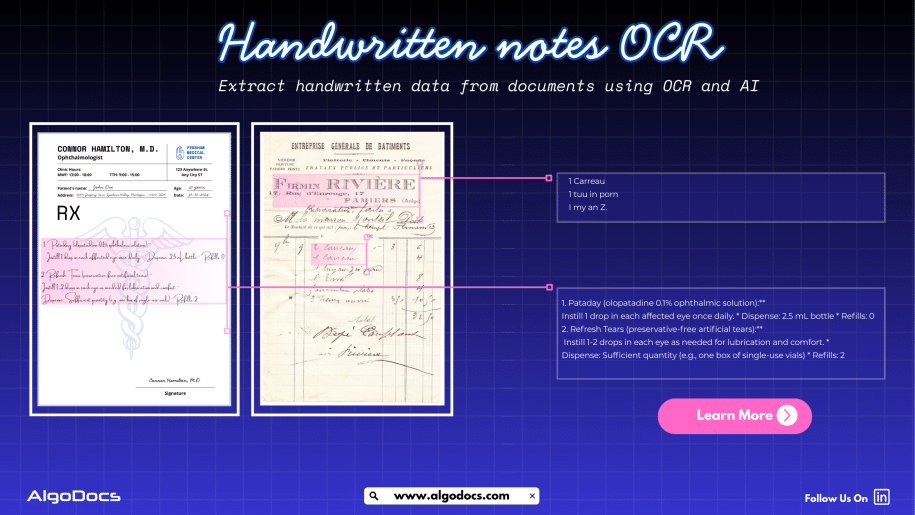
Back to Blog Table of contents On this page How To Extract Handwriting Data With Handwritten Notes OCR Home › Blog › Algodocs › How To Extract Handwriting Data With Handwritten Notes OCR Categories Algodocs Tags algodocs data extraction deep learning Handwriting data extraction handwriting recognition machine learning OCR ocr api By Shubhankar Biswas Published August 31, 2025, 18:20 Updated July 13, 2026, 07:16 Handwritten notes capture some of our most important ideas, such as meeting minutes, classroom assignments, diary entries, handwritten invoices, medical forms, and much more. But when these valuable insights are trapped on paper, sharing, searching, or analyzing them can be a major challenge. But what if we could instantly turn stacks of handwritten sheets, sticky notes, or scanned handwritten image documents into searchable, editable data? It would surely make our work much easier and more productive. All this can be achieved with the technology called handwritten notes OCR, an advanced data extraction technology that brings the power of optical character recognition (OCR) with AI and ML to process handwritten data from various types of documents with accuracy. In this blog, you will discover how handwritten notes OCR works, why it is now more powerful than ever thanks to AI and machine learning, how modern handwritten notes OCR technology such as intelligent document processing revolutionizes data extraction, and practical tips for digitizing handwritten information in your business or personal life What Is Handwritten Notes OCR? Handwritten notes OCR is a specialized form of optical character recognition designed to capture, convert, and extract handwritten text from various types of documents. These documents are either in scanned image formats or can be PDF documents as well. Handwritten notes OCR turns document data into a digital, machine-readable format. Unlike standard OCR, which works well on clear, formatted images or document data, handwritten notes OCR can recognize the complex and unique nature of individual handwriting styles, even when the text is messy, faded, or uses old-fashioned scripts. With a high-performing handwritten notes OCR tool, you can:• Scan and digitize handwritten assignments, meeting notes, and personal memos.• Preserve historical letters, diaries, and legacy records for research and genealogy.• Archive and search medical forms, receipts, or contracts with handwritten details.• Export transcribed data to systems like Excel, Word, or your business platform — all in seconds. Handwriting vs. Traditional OCR: Why Is It Hard? Older OCR systems struggled to read handwriting, often failing to produce useful results. Anyone who has tried to scan a doctor’s prescription knows the frustration. This is where advanced handwritten notes OCR solutions powered by artificial intelligence come in. How Handwritten Notes OCR Works Modern handwritten notes OCR combines several powerful technologies to capture and convert handwriting into text: Image CaptureThe process starts with a scanned image or photo of your handwritten document — anything from a notebook scan to a smartphone snapshot of a meeting agenda. PreprocessingTo enhance recognition accuracy, the system may adjust brightness and contrast, remove background noise, and straighten text lines. Character RecognitionAI-based OCR analyzes each character, word, and phrase using machine learning models trained on countless samples of handwritten text. Unlike rigid, template-based systems, these models can identify even highly variable writing. Context UnderstandingNewer systems use natural language processing (NLP) and large language models (LLMs) to predict words and recognize context when text is unclear, filling in gaps with intelligent guesses. Data ExportFinally, the transcribed text is exported to your chosen software, converted into a searchable PDF, or sent directly to a database or document management system. Intelligent Document Processing: Putting AI and ML to Work Today, OCR for handwritten notes is supercharged by intelligent document processing (IDP), a blend of AI, machine learning (ML), computer vision, and NLP that turns “just text” into actionable data. Here is what makes IDP so powerful:• Automates data entry from scanned forms, notes, contracts, and even sticky notes.• Learns and adapts to new handwriting styles, layouts, and languages over time.• Classifies documents by type and context, not just by keywords or layout.• Extracts unstructured data, even from non-standard or messy notes.• Reduces manual work, errors, and operational costs, in some cases by up to 32 percent. For example, a handwritten meeting note attached to a scanned invoice is not just digitized for archiving. AI-powered IDP can link the note to the correct customer record and make the content searchable for everyone on your team in seconds. AI and ML: Raising the Bar in Handwritten Notes Data Extraction Artificial intelligence and machine learning have transformed handwritten notes OCR:• Machine Learning Models: By training on thousands or even millions of handwriting samples, these models can recognize a wider variety of writing styles, languages, and scripts.• Neural Networks: Mimicking how human brains read, deep learning models adapt over time, improving accuracy as they process more documents.• Large Language Models (LLMs): When OCR struggles with a word or phrase, LLMs use context clues to predict the correct transcription, boosting results beyond basic pattern matching.• Document Layout Analysis: Advanced IDP tools understand page layouts, tables, forms, and structures, allowing even heavily formatted notes to be converted accurately.• Continuous Learning: Every correction or manual review helps the system improve for the next time. Practical Use Cases and Benefits of Handwritten Notes OCR: • Education: Teachers and students can archive and search assignment notes, grade papers faster, and collaborate on shared materials.• Healthcare: Transcribe doctors’ handwritten notes, prescriptions, and patient forms for secure digital records.• Finance & Legal: Convert contracts, receipts, and case notes into searchable, compliant formats.• Business Operations: Make meeting notes, idea sketches, and legacy documents accessible across the company.• Historical Research: Preserve and analyze old letters, diaries, and census records for genealogy or academic studies. Digitized handwritten notes are easier to search, analyze, share, and back up, making your organization more agile and data-driven. How to Digitize Handwritten Notes: Simple Steps Choose the Right OCR ToolLook for systems that advertise dedicated handwritten notes OCR, ideally with AI-powered data extraction. Platforms such as Algodocs, Transkribus, Adobe Scan, and Google Document AI offer specialized handwriting recognition features. Scan or Photograph Your NotesUse a smartphone, scanner, or dedicated app to capture images of your handwritten documents. Clear, well-lit images with straight lines

Scroll to Top