
Algodocs

loan forms

Algodocs

AI Data Extraction Checklist: Transform Business with Algodocs

What is AI Data Extraction? Let’s discuss data – a lot of data. Modern-day businesses are losing themselves in the sea of information. Whether it is an invoice, a contract, a weekly report, or a form, paper documents are still part of everyday life. Extracting data from such documents is a tedious, repetitive, and painful process if done manually. This is where AI data extraction comes to the rescue. It is a game-changer for anyone who has to work with several papers. Incorporating AI means data entry activities are done efficiently and there’s an increase in the accuracy and productivity of your business. Algodocs is a perfect example of an AI data extraction tool. Why? Let’s find out. Understanding Your Data: The Foundation for Successful AI Data Extraction Before you set loose the AI on your documents, I thought it’s best to discuss a little about your data. It is essential to know what type of data you are going to extract and what the process is going to be like. Identify Your Data Sources First things first: where do you store your data? The first action plan is to identify this source. Is it hidden in files and papers or dispersed in different online sites as in virtual archives? You’ll find your data in various forms: Assessing Data Quality Data quality is super essential for accuracy in the extraction process. Ensure that you go through your assembled data to determine whether it meets the standard of completeness, consistency, and accuracy. Dedicating time to data preparation will enable laying down the key fundamentals of an AI data extraction project. Optimizing the extraction results of Algodocs, the company provides you with tools for evaluating data quality and detecting potential problems. Choosing the Right AI Data Extraction Tool Picking the right tool to extract AI data is critical to the success of any AI project. As we have seen, there are numerous strategies out there; that is why it is crucial to define your requirements precisely and compare tools based on the crucial factors. Critical Considerations for Tool Selection Accuracy: The whole idea of training an AI in the first place is to increase accuracy, isn’t it? Search for the tool with favorable accuracy characteristics, especially in the case of processing intricate and diversely formatted documents. Don’t forget about tables, crazy handwriting, or low-quality pictures. Speed: It’s important, especially in dealing with large numbers of documents that are prevalent in the modern organization. However, time translates to costs, more so when handling big data at hand or any other business. Having a fast and efficient tool can save hours, if not days off of your time. Flexibility is very important, especially for those industries that anticipate expansion. Scalability: The tool should be designed for growth which includes a higher amount of input data and scalability of business over time. Document Types: Think about the countless supported document types with your tool (PDFs, images, Word, Excel, and more). Data Formats: Verify that the tool can export information according to your preferred choice format (CSV, XML, JSON, etc.). Integrations: This is very important as technology should be compatible with the current systems and applications. In other words, a single tool could essentially serve the purpose. But if a tool can integrate with other existing systems, then that’s ideal. It integrates with frequently used business applications such as CRMs, ERPs, and data warehouses. Pricing: Analyze cost distribution for various pricing structures considering your estimated budget. Customer Support: Customer support should be reliable and available for providing technical support and answering questions at all times. Types of AI Data Extraction Tools Cloud-Based Tools AI data extraction in cloud-based is also beneficial since it is scalable, easily accessible, and mostly cheaper. These tools are stored at service providers’ central servers, and users only need an Internet connection to use them. Examples: Google Cloud Document AI, Amazon Textract, ABBYY Cloud OCR, and Algodocs. On-Premise Tools On-premise solutions allow necessary control over infrastructure, but they can be more expensive. These tools are deployed and run on the organization’s own IT systems and infrastructure. It is worth mentioning that Algodocs is a web-based tool; however, it can also be used On-premise. Examples: Kofax, OpenText, and Algodocs. Open-Source Tools Using and adapting open-source AI data extraction tools is more flexible and customizable, but implementing these tools requires technical skills. Examples: Tesseract OCR, OpenCV Mobile Apps Mobile applications usually reside on document capture and basic data mining capabilities. This is perfect for small data snippets or impromptu snapshots of information gathering. However, such tools may not work well when a large quantity of structured content, such as tables, is involved. Not to forget that handwriting style and layout complexities can cause the accuracy of such tools to drop. Examples: Google Lens or Microsoft Office Lens can scan your document and convert the text into a digital format. Making an Informed Decision Considering the following aspects and your organization’s requirements, you can choose the right AI data extraction tool for your organization. Feature Cloud-Based On-Premise Open-Source Mobile Apps Accuracy High High Varies Varies Speed High High Varies High Cost Low High Low Low to Medium Scalability High Medium Medium Low Integrations High Medium Low Varies Security High High Medium Varies Support High High Low Varies Accessibility High Low Medium High Algodocs: Your AI-Powered Data Extraction Partner Algodocs is an AI-powered web application to helps you extract data from PDFs and images with ease. Our main strength is identifying and converting handwriting, tables, key-value pairs, marks, and signatures. After the extraction process, data can be exported into CSV, XML, or Excel formats. You can also start extracting data for free, but you are limited to processing 50 pages per month. We have created an efficient and easy-to-navigate system that helps you achieve the desired outcomes. Utilizing the latest AI technology, our application efficiently processes your documents and retrieves the required data without delay. Algodocs is more than a tool; it’s your data extraction partner. Experience the Algodocs difference: It has an impressive accuracy of 99% of data

Algodocs

The Ultimate FAQ: Mastering AI Data Extraction for Efficient Document Processing

As technologies advance in this vast world, information is abundant around us. Data is everywhere: from invoices, bank statements, HR forms, sales orders, contracts, and social media to customer feedback. That brings the question, how can we handle this flood of information around us? This is where data extraction tools pops in. AI data extraction is like a smart digital assistant rummaging through piles of documents, emails, and images to pick out what you need. It’s like having employees working round the clock, with no strikes and no coffee break arguments. In its simplest form, AI data extraction uses machine learning and natural language processing to ‘think’ in a language just as you and I do. It uses this capability to recognize data like tables and handwritten and then extract information. Subsequently, it converts unstructured data into structured form that is easy to work with. But why is this so important? Data extraction can unravel the hidden riches embedded deep within your data. It is time-saving, error-free, and enables individuals to make the right decisions that may prove beneficial to any business. It identifies patterns, filters data, and transforms complex data structures into easily analyzable formats. How AI Data Extraction Works Data Extraction involves using complex technologies such as Optical Character Recognition (OCR), Natural Language Processing (NLP), and Computer Vision. OCR is the system’s eyes that read documents and images to input text. NLP understands text meaning and context, while Computer Vision interprets visual elements like table borders, brand names, warranties, signatures, etc. The process typically starts with data preprocessing, cleaning, and preparing the raw data for extraction. Then, AI-based models, such as Algodocs trained on vast amounts of data, swing into action. They identify patterns and extract relevant/required entities like names, dates, amounts, tables, marks, signatures, etc. Next, Algodocs allows users to export the extracted data directly into their software or structured formats like spreadsheets, XML, or JSON. It’s like teaching a computer to read, understand, and extract wanted/essential info, just like you would with a book or an article. AI data extraction tools like Algodocs handle massive data volumes in seconds or minutes instead of hours or days. Types of Data That Can Be Extracted with AI AI data extraction isn’t limited to just plain text on a page. It’s like a versatile detective, capable of uncovering clues hidden within various data types. Besides, it is imperative to note that Algodocs is the leading AI platform for unlocking rich information from PDFs and images. We have no time for manual data entry anymore! You can easily export your data as Excel, Word, JSON, XML, etc. In addition, a powerful API is available to export extracted data to your apps directly. Furthermore, Zapier lets you connect 2,000+ other web services and set them up in minutes without coding. It also provides a forever-free plan where you can process up to 50 pages every month! Affordable plans are available if you need to process more pages. Use Cases for AI Data Extraction AI data extraction is no longer an idea – it has become an essential tool that is revolutionizing businesses in many industries. Let’s delve into some compelling use cases: Invoice Processing and Accounts Payable Automation: No more manually inputting data and dealing with piles of papers containing invoices. This can involve extracting meaningful information from invoices, such as the vendor details, the invoice number, and the items purchased, thereby saving you a lot of time and effort when it comes to your accounts payable. Experience the Algodocs feature for free, and start automating your invoices today! Streamlining Data Entry and Document Digitization: Irrespective of whether your company processes customer forms, HR records, or legal documents, AI data extraction can turn your data into digital assets in no time. Enhancing Customer Onboarding and KYC Processes: Institutional KYC (Know Your Customer) checks are essential for fraud prevention in financial institutions, but the paperwork can be cumbersome. AI data extraction can help collect client data from ID documents, accelerating the onboarding process and decreasing compliance issues. Contract Analysis and Legal Document Review: Legal documents generally exhibit complexity and require long reading and analysis times. Here, AI data extraction can help recognize keywords such as clause, date, and obligation, thus freeing professionals for more important matters. Empowering Market Research and Competitive Intelligence: Sometimes, data collection of market trends and competitors could be a challenge. AI data extraction can assist in data gathering and analysis. Revolutionizing Healthcare Data Extraction and Analysis: The healthcare industry is saturated with patient information, clinical documents, and trial results. From such documents, AI data extraction can extract useful information to aid in diagnosis and treatment and as a reference for research. Benefits of AI Data Extraction That is why it is necessary to discuss the potential advantages of AI data extraction, for which various application cases have been described above. It’s not just about fancy new technologies but about the tangible benefits that could take your operations to the next level and your wallet to new heights. Increased efficiency and productivity through automation: Copying data manually is a slow and tedious process that can also lead to mistakes. AI data extraction handles these chores, eliminating the need for you to spend time and effort on them. Just think about the added efficiency when your team stops copying and pasting information from invoices or contracts! Cost reduction and improved ROI: We know that time is money, and using AI data extraction can save both. Out of all the savings possible in an organization, using automation to eliminate manual work is one of the most effective ways of cutting costs, especially labor costs. Moreover, processing data at a faster rate ultimately results in faster decision-making, which can lead to increased revenues. Enhanced accuracy and data quality: It is usual for humans to make mistakes. AI data extraction negates errors, ensuring maximum accuracy in the data you extract and collect. This makes the insight more credible and improves the decision-making process, thus enhancing business

Algodocs

Automating Loan Document Data Extraction with Intelligent Document Processing: A Case Study

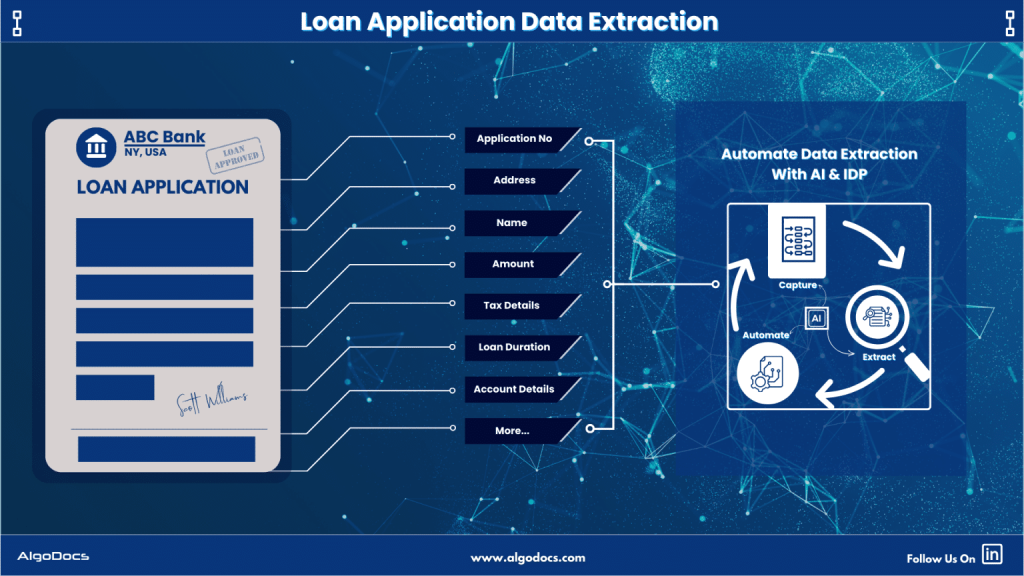
The process of applying for a home loan, car loan, education loan, or any type of personal or business loan is a lengthy one. It involves extensive documentation, verification, validation, screening, and ultimately, loan approval. Numerous documents are essential in this process, such as loan forms, identity documents, tax forms, and more. However, capturing, extracting, and organizing data from each individual form presents a significant challenge. Manually extracting data from diverse document types and formats, then effectively sorting, refining, and applying that data for real business tasks, is an additional hurdle. Thankfully, AI and Intelligent Document Processing have made these tasks more accessible, accurate, and efficient for various financial institutions that offer different types of loan services to their customers. In this blog, we will explore how banks and financial institutions can leverage Artificial Intelligence and Intelligent Document Processing to enhance the speed and accuracy of loan document data extraction. We will also discuss why modern businesses are increasingly investing in these technologies to automate data extraction for loan documents. Before diving into the main topic, let’s first understand what a loan document is, the types of loans, the documents involved in processing a loan, the types of data businesses need to extract from these documents, and then we will delve into the core topic. Understanding Loan Document Data Extraction In 1959, when Barclays Bank in Britain first used a computer for banking purposes, computer technology has since made significant strides in various types of banking and financial activities. Among these, loans and mortgages are some of the financial activities that have seen complete transformation. Loan document data extraction is a critical part of modern banking where computers, Artificial Intelligence, and Intelligent Document Processing are enhancing the efficiency of this process. Essentially, loan document data extraction refers to the process of identifying and capturing relevant information from financial documents. These documents come in various formats, including PDFs, scanned images, and handwritten notes. Manually extracting crucial details such as borrower information, loan amounts, interest rates, repayment terms, and supporting financial data can be difficult due to human errors, lack of speed, inaccuracy, and slow processing times. However, with the rise of AI-driven IDP solutions, businesses can now automate this process, reducing manual effort and improving data accuracy. By utilizing technologies such as Optical Character Recognition (OCR), Natural Language Processing (NLP), and Machine Learning (ML), IDP tools can extract both structured and unstructured data, validate it, and integrate it seamlessly into loan processing systems. The Role of Intelligent Document Processing in Loan Data Extraction Intelligent Document Processing (IDP) is revolutionizing how financial institutions handle loan documents and extract data from them. IDP combines AI and ML with traditional data extraction techniques such as OCR to extract, classify, and validate data in real-time from a loan document. Here’s how IDP enhances loan document data extraction: Automated Data Capture: IDP eliminates the need for manual entry by automatically capturing key data fields from loan documents. This results in increased work efficiency, saving both time and cost. Additionally, you can integrate IDP with third-party platforms to make loan data extraction even more useful. Improved Accuracy: Advanced AI and ML algorithms reduce errors that occur in manual processing, ensuring higher data integrity. In manual data extraction, reliance on humans for evaluation and extraction of data often leads to errors. In contrast, automated AI-based IDP tools make fewer or no errors in data extraction. Faster Loan Processing: Automation accelerates document verification, reducing approval times and enhancing customer experience. On the other hand, manual document verification and processing take more time, eventually hampering the customer experience. Compliance and Security: IDP solutions ensure adherence to financial regulations and protect sensitive customer information. Manual data extraction, however, exposes valuable data to unauthorized access, which can lead to serious data breaches. Scalability: Businesses can process large volumes of loan documents efficiently without increasing operational costs. In contrast, manual data extraction requires more manpower to extract data from loan documents, resulting in higher operational costs and limited scalability. Challenges in Manual Loan Document Data Extraction Manual loan document data extraction presents several challenges that hinder efficiency, speed, accuracy, and cost for data extraction. Some of the key challenges include: Benefits of Automating Loan Document Data Extraction with IDP Implementing IDP solutions for loan document data extraction offers numerous benefits which can greatly improve loan processing, verification, and approval timeline. Below are the benefits of IDP for loan document data extraction: Try Algodocs AI for extracting data from any loan documents and achieve 10x speed and accuracy with our app. Try For Free Types of Loan Documents Used by Financial Institutions Financial institutions such as banks, insurance companies, and personal finance institutions use different types of loan documents that provide essential information about the borrower’s financial standing and the terms of the loan. Key loan document types include: Implementing IDP Solutions for Loan Document Data Extraction Implementing Intelligent Document Processing (IDP) solutions for extracting data from loan documents is a systematic process that requires careful planning and execution. Here’s a more detailed explanation of each step involved: Monitoring and Optimization: After the IDP solution is deployed, continuously monitor its performance to ensure it is meeting the desired outcomes. Track key performance indicators (KPIs) such as extraction accuracy, processing time, and error rates. Based on the insights gained from monitoring, make necessary adjustments and optimizations to improve the solution’s efficiency. Regularly updating the IDP tool and retraining the machine learning models will help in maintaining high performance and accuracy. By following these steps, financial institutions can successfully implement IDP solutions to streamline and enhance the process of loan document data extraction, leading to increased efficiency, accuracy, and overall operational excellence. Loan Document Data Extraction With Algodocs Algodocs offers comprehensive data extraction tools that can effectively extract data from loan documents with higher accuracy and faster speed. Here are a few features of Algodocs that make it a perfect tool for financial institutions for data extraction: Practical Tips for Successful Implementation Implementing an IDP solution for loan document data extraction requires careful planning and execution. Here are

Uncategorized

How to Convert Handwriting to Excel for Free: Best Free Online Tools

People quite often write notes, and when it is time to sort all that information, they spend hours transferring handwritten notes into Excel spreadsheets. No matter if you are working with your company papers, studying, or just note-taking, being able to enter handwritten data into Excel is essential. Now the question comes: How to Convert Handwriting to Excel for Free? Keep reading to discover the best practices and tools for optimizing data conversion. How to Convert Handwriting to Excel Spreadsheets: When reading ‘How to Convert Handwriting to Excel Free’ might sound interesting but the procedure may not be very easy. Nonetheless, due to modern technological elements, it has become easier. There are several methods and tools you can use to achieve this: Manual Data Entry Let’s talk about the most common approach, which is typing in the data from handwritten sources into Excel sheets. This method is very time-consuming and error-prone. This is best used for short documents. Top OCR Software for Converting Handwriting to Excel OCR technology has made significant improvements in automated data extraction. Your handwritten notes are immediately captured and evaluated by OCR, and from there, the text is converted to a format that is understandable to the machines. Best Mobile Apps for Handwriting to Excel Conversion There are multiple mobile apps available in the market for converting handwriting to Excel. These apps are handy and good for some basic operations. Some of the mobile apps are: The use of mobile apps has also boosted handwriting recognition in the following ways: Practical Web-Based Tools for Handwriting to Excel It is also possible to find several online tools that transcribe handwriting to Excel for those who do not want to download and use any extra software: Still, all aforementioned Handwriting to Excel systems, except AlgoDocs, have some problems with Why AlgoDocs is the Best Choice for Converting Handwriting to Excel AlgoDocs, an efficient web-based AI tool, is a dream for anyone who does not enjoy data entry. This tool is best for converting handwritten documents and notes into Excel by extracting data for PDFs and images. It minimizes errors and is very efficient, which saves you a lot of time and energy since it employs sophisticated Artificial Intelligence. Accuracy and Efficiency This platform best utilizes AI and machine learning technologies to scan and recognize handwritten items extremely accurately. This builds confidence in your data as it guarantees that all the converted Excel spreadsheets are error-free and can be used immediately. User-Friendly Interface Not only is the idea of AlgoDocs powerful, but the tool is also developed to be as friendly as possible. This makes it easily understandable and usable by users with many different kinds of experiences. You do not have to be a tech guy to be able to use it. What sets this tool apart is that you can work with it in comfort. Versatility As for using the platform efficiently, the service is not restricted to the digitizing of handwriting only. It can handle different document types and forms, making it possible for you to use it to extract data of any type. The User Benefits of AlgoDocs As shown above, it has many advantages, which make it the best tool for converting handwriting to Excel online for free. Forever Free Subscription Join the AlgoDocs today and make use of all the incredible features the software has to offer with a chance to get a Forever Free Subscription! You can submit as many documents as you need per month and get free document parsing for the first 50 pages. Explore our cost-effective pricing options if your document needs exceed this limit. AlgoDocs Goes Beyond Handwritten It should be noted that it is capable of extracting information from a considerable number of document types, not only handwritten. These include typed documents such as Word docs, images, PDFs, and many others. For this reason, this tool can be considered an all-in-one solution for all your extraction requirements. Extract Your Data in Various Formats AlgoDocs enables one to export data in different formats, including XML, JSON, CSV, or Excel, making it easier to feed the data into spreadsheets and other tools. In addition, with Zapier integration, you enable the use of over 2000 other web services with it, further increasing its capabilities. Furthermore, the available API enhances this functionality by allowing developers to incorporate data extraction features into their own software solutions seamlessly. Use Cases The tool is useful to a broad audience because it benefits every type of user. How to Convert Handwriting to Excel Spreadsheets using AlgoDocs: Step-by-Step Guide Sample Document Step 1: Log in to your account and go to the dashboard, which is the home page. Step 2: Click on the Extractor tab. On the right side of the Extractor tab, you will notice a populated option for choosing what kind of extractor you want to create. Step 3: Click Custom, and a new window to name the extractor will appear. Step 4: Upload the sample PDF file and click Create Extractor. The Window will close, and you will be able to see your extractor in the folder as below, Step 5: From the above window, click on the Manage tab to go to the field/table creation page. Step 6: Click on the +Add to show the extraction methods options. Step 7: As shown in the above screen, click on Form Data Extraction. This will launch a new window in which you can preview the sample PDF document you uploaded. Step 8: Click on Continue. This will open a new window with all the key-value pairs detected by AlgoDocs advanced OCR. Step 9: To format the extracted data further, use some of the available filters from Add Filter. For example, you can add a filter to convert the structure into a tabular form. In addition,  you can add new table headers of your choice using the header filter under Alter Column. Step 10: Click SAVE and Go to the Extracted Data tab to

Algodocs

Ultimate Guide: How to Extract Tables from PDFs Effortlessly

Ultimate Guide: How to Extract Tables from PDFs Effortlessly Introduction Are you struggling to extract tables from PDFs? If you feel trapped in a text-based jungle, hacking your way through dense PDFs to snag a specific table, you’re not alone. PDFs, while fantastic for preserving document formatting, can be a nightmare when you need to liberate the precious data trapped within their tables. Fear not, fellow data warriors! This guide will equip you with the knowledge and tools to transform those PDFs from unruly beasts into neat, organized spreadsheets. How to Extract Tables from PDFs There are two main approaches to conquering the PDF table extraction challenge: manual and automated. Each method has pros and cons, which can help you choose the right approach for your needs. Manual vs. Automated Extraction Manual Extraction The manual approach involves selecting the table in your PDF viewer and painstakingly copying and pasting each cell into a spreadsheet. While this method is straightforward, it comes with several drawbacks. Pros of Manual Extraction: Cons of Manual Extraction: Automated Extraction Automated extraction utilizes software to identify and extract tables from PDFs, significantly reducing the time and effort required. Pros of Automated Extraction: Cons of Automated Extraction: Extracting Tables from PDFs: A Guide to Automated Methods Extracting tables from PDFs can be a tedious task. This section explores several popular automated table extraction methods and their strengths and weaknesses to help you choose the right solution for your needs. Common Automated Table Extraction Methods Built-in PDF Export Tools: Most PDF viewers offer a primary “export to Excel” functionality. This can be convenient for occasional use with simple tables. However, accuracy can be unreliable for complex formatting or merged cells. The exported data might also lack structure, requiring further cleaning and organization. Free Online Tools: Several free web-based tools, such as Tabula and Camelot, tackle essential table extraction. While they offer a step up from manual methods, accuracy can be inconsistent, and limitations often exist regarding file size (e.g., maximum 10MB) or processing volume. OCR (Optical Character Recognition) Software: OCR software is a technology that can convert scanned PDFs with non-machine-readable text into searchable text. It works by analyzing the shapes and patterns of characters and matching them to a known character database. However, OCR accuracy can vary depending on the scanned image quality, and tables might require additional formatting adjustments after conversion. OCR also struggles with handwritten documents. Paid PDF Editing Software: High-end PDF editing software like Adobe Acrobat Pro DC offers table extraction features. While effective, these programs often have a hefty price tag and require a learning curve to master their functionalities. AlgoDocs: Automated Extraction Powerhouse Among these methods, AlgoDocs excels at efficient and user-friendly table extraction. Here’s why it stands out: Effortless Automation This web-based tool automates the entire process, eliminating the need for manual selection or wrestling with complex software. Upload your PDF, and the advanced algorithms will intelligently identify and extract tables, ensuring exceptional accuracy. Unmatched Accuracy Powered by advanced algorithms, our tool prioritizes reliable data extraction. You can be confident your extracted tables are ready for further analysis without worrying about errors. Flexibility for All Needs AlgoDocs caters to users of all levels. The Forever Free plan allows you to explore its capabilities at no cost, with a limit of 50 monthly pages. This plan is ideal for small-scale or occasional users. For high-volume needs, we offer affordable paid plans with increased processing capabilities. Seamless Integration Extract your data in various formats like XML, JSON, CSV, or Excel for effortless integration with your existing spreadsheets and data analysis tools. A robust API is also available, allowing developers to programmatically integrate table extraction functionalities into their workflows for a truly automated experience. Cloud-Based Convenience No software downloads or installations are necessary. It can be accessed from any device with an internet connection, making it a perfect choice for on-the-go data analysis. By leveraging this data extraction tool’s automated prowess, you can reclaim your valuable time and ensure the accuracy of your extracted data. Let this tool be your trusted companion in the world of PDF table extraction! Detailed Guide on Using AlgoDocs Let’s delve into the automated PDF table extraction world using our user-friendly and powerful tool. How to Extract Tables from PDFs: Step-by-Step Instructions Step 1: Log in to your account and go to the dashboard, which is the home page. Step 2: Click on the Extractor tab. On the right side of the Extractor tab, you will notice a populated option for choosing what kind of extractor you want to create. Step 3: Click Custom Extractor, and a new window to name the extractor will appear. Step 4: Now, it’s time to upload your sample PDF file. Once you’ve done that, click ‘Create Extractor ‘. The window will close, and you’ll find your newly created extractor in the folder as shown below. Step 5: Click on Manage next to your newly created extractor to go to the field/table creation page. Step 6: Click on the +Add to show the extraction methods options. Step 7: Click on TABLE EXTRACTION. This will launch a new window in which you can preview the sample PDF document you uploaded. Step 8: Click on Continue. This will open your space to manipulate the detected data and structure it according to your own preference. Based on the uploaded sample PDF, the system detected multiple tables. Step 9: Select the table option for Manual selection. This page also shows multiple options that can be used to format the extracted table(s) are available, such as “Merge table.” Step 10: The next step is to select the page number of the table you want by selecting “Select tables.” After that, click Apply Filter, and the table will reproduce as per the image below. Step 11:  You can apply the available filters to structure the table in your desired format. Step 12:  For example, you can select which section of the table you want to keep using the KEEP

PDF Text Extraction
Algodocs

PDF Text Extraction: Our Comprehensive Guide 2024

PDF Text Extraction: Our Comprehensive Guide 2024 In a society filled with advanced technology, Portable Document Formats or PDFs are considered supreme. They retain the structure as well as the format, including graphics and charts of the documents. However, conversion of data from PDF to another format that requires analysis or editing is not easy. Apart from exploring the most vital topic of PDF text extraction, this detailed blog also enables you to learn more about enhancing content through text extraction. Types of PDFs The two primary types of PDFs have a very important distinction that directly impacts how you process texts. Searchable PDFs: These PDFs have text embedded in them. This makes copying, pasting, and searching within a document very simple and hassle-free. Examples of such objects include reports, eBooks, and other documents created in a digital environment. Scanned PDFs: These include electronic images of the actual paper-based documents. They have no text layer and thus must be processed further with Optical Character Recognition technology. Optical Character Recognition (OCR) Optical Character Recognition (OCR) simply translates scanned PDFs into forms you can edit. It is a technology that scans the PDF and carefully analyzes the image data it contains, breaks characters into individual segments, and decrypts them to form a machine-readable text. The degree of variation in OCR technology depends greatly on the readability or quality of the source document scanned. Aspects such as the type of font used, the quality of the image, and whether there are large chunks of text with a complicated layout will affect the OCR outputs. The current generation of OCR engines has become very complex and can handle various kinds of inputs and provide high accuracy rates, which builds up confidence in using the tool. Step-by-Step Functions of OCR: A Multifaceted Approach: Exploring Text Extraction Methods Now that you understand the different types of PDFs and the role of OCR. Let’s explore the various methods available for extracting text: Manual Copy and Paste (Limited Use): This method is capable of extracting a few words from a searchable PDF. Right-click the arrow placed near the desired text passage and click on copy, unlock your word processing software, and paste. This technique is quite useful, but for really big documents, it becomes incredibly tedious and highly impractical. Built-in PDF Reader Export (Searchable PDFs Only): All typical PDF viewers, like Adobe Acrobat Reader, contain the native “Export” feature. This enables you to convert the searchable PDF into a file format you may wish to edit further, such as Word format (.docx). It is ideal for fast conversion of PDFs that are already easily searchable, but for scanned PDFs, it is useless. Online PDF to Text Conversion Tools (Flexibility and Convenience): Many sites on the World Wide Web offer PDF-to-text conversion services. These are online OCR tools that work more like PDF text extraction. You upload your PDF, click on the Convert button, and receive a downloadable text file. Here are some benefits of online PDF to Text conversion tools: Offline PDF Text Extraction Software (Advanced Features): For users who want to extract text from PDFs without an online interface, there are many offline text extraction applications. These programs offer a more comprehensive range of features compared to traditional tools, such as: However, there are also some drawbacks to consider: How to Choose the Right Text Extraction Method The optimal method for text extraction depends on several factors: Volume of PDFs Basic tools that come with MS Office, like the PDF reader export, might be enough if one only occasionally needs to sign several documents. However, if you are likely to process dozens of documents, for example, consider online tools that support batch processing or offline tools with good batch capabilities. Document Type Many methods can parse basic PDF documents with few formatting features. However, if the text layout is complicated or if high precision is needed, one can use stand-alone programs with additional functions, such as OCR, or use online tools that allow for customization. Security Concerns While working with sensitive documents, it is better to search for software that can use data protection principles such as encryption and compliance with industry standards. Budget There is abundant freeware available on the Internet, but certain constraints may limit the number of files processed or the number of features available. The free versions are generally less downloadable and have fewer options than the paid versions. Finding the Perfect Fit: Popular Text Extraction Solutions As mentioned before, extracting text from PDF can be done in many ways and with different levels of effectiveness: Online Text Extraction Tools: For those who may need advanced and high accuracy while processing simple or even advanced scanned files such as the ones with handwritten or tables, there are online applications such as AlgoDocs. Because of their interfaces and the availability of features, they are one of the best choices. Let’s look at the famous tool in detail. AlgoDocs: A Powerful and Secure PDF Text Extraction Tool Those who consider getting a more progressive and quite efficient product can use this advanced web based automated data extraction tool. It is an application designed for different categories of people. The Forever Free plan is more suitable for individuals as well as small companies. It enables one to scrape text from as many as 50 pages per month. This tool is efficient as well for large document libraries since it can process hundreds, if not thousands, of files at a time. How to Use AlgoDocs? Simply open the program and drag and drop the PDF into the tool, or open the file from Google Drive or Dropbox. The rest is done by our tool as it uses its advanced Optical Character Recognition OCR to translate documents into a usable text format. In the following screencast video, AlgoDocs demonstrates steps for extracting data from PDF and image documents in less than a minute. Benefits of Using This PDF Text Extraction Tool Unmatched Accuracy: This handy tool uses

Algodocs

Extract Tables from Images with AlgoDocs

One might find themselves overwhelmed by a deluge of paperwork—orders, checks, articles—all containing valuable data locked up in tables. Extracting this information manually is like looking for a needle in a haystack. What if there was a way to free this data with some simple mouse movements? This is where image to table conversion becomes essential, transforming images into usable data. At AlgoDocs, we pride ourselves on making this process seamless. Sit tight and let the journey to efficient table extraction from images begin! How We Extract Tables from Images (and How Others Do It Too) There are specialized programs that help extract table information from scanned files like images and PDFs. But how does this happen? The All-Seeing Eye of OCR: At the center is Optical Character Recognition (OCR) technology. It functions like a digital magnifying glass, identifying text within the images frame by frame. The Mastermind of Layout Analysis: Sophisticated calculations dissect the layout of the image to understand patterns or lines that form the tables’ structure. AlgoDocs and the Gang: We are not the only entities in this data extraction game, are we? Why Choose AlgoDocs? Here’s Your Ticket to Data Freedom While these options exist, this AI-based software stands out as the data extraction champion. Here’s why: Simplicity We prioritize user-friendliness. Table extraction requires little or no effort from the user because our interface is user-friendly regardless of the user’s technical level. Saves Time Data extraction manually is very time-consuming and tiresome. That’s why our tool automates the entire process, freeing you to focus on more strategic tasks. Easy Workflow This tool comes as a feature in your tool chests and is naturally added to your day-to-day approaches seamlessly— Its seamless integration with existing tools and workflows ensures a smooth transition into your data management routine—no more data juggling across different platforms. You can trust our tool to adapt to your needs. Efficiently Extracts Data Designed for various professional fields, it can save hundreds and possibly thousands of hours for researchers, students, and home users. This relieves them from the burden of having to spend hours manipulating data to achieve the required outcome, freeing them up to practice concepts. A Feature-Packed Extraction Powerhouse We offer a robust suite of features designed to streamline your data extraction process and ensure exceptional results: • Cutting-Edge AI Technology: This is why we can state that when it comes to such tasks as tables’ extraction, AI contributes to the process, and therefore, we assure you of high results and fast, profound processing. • Seamless API Integration: It has intrinsic API incorporated, which means that one has the independent power to start them effortlessly with other APIs, and this lays down all the power in the extraction segment. In addition, Zapier allows you to link AlgoDocs to over 2,000 different web services. Automated connections known as Zaps, which can be set up in minutes with no coding, can automate your daily tasks and create workflows between apps that would otherwise be impossible. • Effortless Batch Processing: From thousands of images to many more thousands on a daily basis, or even millions weekly, it can assist you. As for this task, our batch processing capabilities should have no trouble managing it: they work on large sets as a matter of course. • Flexible File Format Support: As for supported file formats we accept images of varying formats and PDF files and are happy to be considered as your ultimate resource for extracting data. • Real-Time Data Access: Wish waiting can be scrapped off as one of the things that has no place in this fashion tale. It is online, which is why our system promptly pulls the tables and gives you access to your important data. • Unmatched Accuracy: We respect data and we strive to make sure that it remains closed to any alterations. Our system has high accuracy rates that it provides documents filled with complete and thorough results for the customers. • Forever Free Forever: It is our firm conviction that all should be able to get hands on some highly efficient data extraction solutions. This is why we provide users with a forever free subscription that enables you to convert up to 50 pages every month- for free! Advanced Functionalities: Conquering Toughest Tables Here’s how AlgoDocs tackles even the most challenging scenarios: Taming Handwritten Challenges: Of course, while writing on paper, people make different mistakes – that’s why we can recognize even the most complex handwritten tables with great success. Conventionally, handwriting oftentimes comes in different forms and our smart AI engine comes ready to deal with all these forms making it easier to convert reports, historical documents among others into usable data. Bye-bye Watermarks and Background Woes: Effectively erases overlays, watermarks, and elaborate backgrounds using sophisticated image pre-processing algorithms. This ensures that regardless of the shapes and forms that the input image came in, the data extracted is easy to manipulate and usable. Security Like Fort Knox: We do appreciate the need to ensure that the data collected and stored in this database is secure at all times. We have adequate security measures that protect the input data as well as the data that is in the course of being uploaded, processed, or stored. This means that we respect data privacy laws very much to ensure that your confidential data remains highly protected from any unauthorized access. Use Cases: Unleashing the Power of Extracted Data It has a wide range of applicability for cases where it is necessary to convert an image to a table. Conclusion It is equally beneficial in extracting necessary information in today’s environment where images are used vastly. Many people give up great ideas because of messy tables. AlgoDocs gives you the ability to turn on what is hidden in your data. Sign up now, and grab 50-page monthly conversions along with our forever free trial and unleash the power of seamless data extraction. Frequently Asked Questions Do I need to train

Algodocs

Extract Invoice Data from PDF with AI: How to Automate Data Extraction

An efficient methods of handling Invoices should be applied in the current techniques of business and especially in bureaucratic organizations. AI invoice data extraction is not just about automating data extraction but it is more of an immense power of deriving useful insights for effective financial decision making. Conceive a process where the extraction of data from invoices is efficient and at the same time puts less effort and has better quality. The above is the glimpse of AI in formally extracting data from invoices – the solution that could revolutionize your business. What is Invoice Data Extraction? Invoice data extraction is the capability of operate and render the data correlated to invoices in a form that can be better analyzed. This entails tasks such as the identification of invoice numbers, dates, amounts, vendor details, and lines on paper and electronic invoices. Ideally, it should be in a form that could be input directly into the accounting software, the ERP, or any other system. Common Invoice Data Extraction Methods Some of the widely used techniques for invoice data extraction are discussed below: Manual Data Entry: Picture the tedious process of having to look at each invoice individually and then re-enter the information from it by using a keyboard. However, this method is applicable for only several invoices and very time-consuming, and I am likely to make mistakes when doing this. Thus, it may lead to inaccurate decisions as well as mistakes in financial decisions and, therefore, is inefficient. Automated Data Extraction: Methods, including OCR and AI, accelerate the capturing and processing of invoice data at an incredibly rapid pace. This also saves time and energy and brings convenience in handling the many invoices while at the same time offsetting the workloads of personnel in the department of finance and accounts. With this, they can plan on more significant things, having a sense of power and control over the time and tools they use. Benefits of Extract Invoice Data Boost your invoice processing with AlgoDocs, an AI-powered one-stop solution. If PDF is causing you grief, AlgoDocs, specializing in invoice parsing, uses AI and OCR to make light work of parsing data in this format, as well as scanned and handwritten text. This invoice data extraction software works like a charm since it has a well-developed user interface that will allow even a new user to perform most operations. Batch processing and automatic transmission of data also further increase the speed and ease of data conversion over manual processing. It is time to migrate to a smarter automatic invoice procurement system that operates on Artificial Intelligence technology. As seen, employing this tool to extract data from an invoice involves a few easy steps. Step-By-Step Guide: Step 1: Log in to your account and go to the home page, which is the Dashboard. Step 2: Click on the Extractor tab. On the right side of the Extractor tab, you will notice a populated option for choosing what kind of extractor you want to create. Step 3: Click on Invoices from the above screen, and it will pop up a new window to name the extractor. Step 4: After you have named the extractor, click on Create Extractor . The Window will close, and you will be able to see your extractor in the folder as below, Step 5: Click on the File Manager tab , and you will notice just on the right side of the File Manage tab, there is an icon labeled root. Step 6: Right-click on the root , and it will pop up a drop-down menu with different actions. Step 7: Click on Upload files for Data Extraction , this will launch a new window that you can use to upload your PDF document from your device. Step 8: Click on the blue button labeled + Choose files . This will open your device files folder, where you can find and select the exact document. Step 9: Select the Extractor from the drop-down menu. Step 10: The next step is to select the Upload button at the bottom of the pop-up window. By doing this, this AI invoice processing tool starts to process the invoice for data extraction. Step 11: To see the output, go to Extracted Data and select the extractor from the drop-down Menu. Step 12: This will show all the invoices that have been processed using the extractor. You can see which invoice is in particular by looking at the document name. Step 13: Once you are satisfied with the data, scroll to the end of the last column. You will see an option in the Icon form to export the extracted data to Excel, XML, or JSON. For example, if you choose Excel, the output will look as follows. If you want to choose particular fields and not show all the extracted fields, you can do that by going back to the Extractor tab and selecting the Fields/Tables icon. A new window will populate, which allows you to edit, rename, or delete the fields you do not want to be displayed. Once you have selected the field you want, go back to the extracted date and check the output. If you are satisfied, you can go ahead and export the file to Excel, XML, or JSON. Here is the output to Excel after editing the fields. To Sum Up Invoice data extraction is an important task regardless of the type of company, whether big or small. This process can be done with the help of AI, hence the term advanced Optical Character Recognition; it takes less time and helps determine the accuracy level and valuable insights out of invoice data. Regardless of the nature and size of the company or enterprise, using AI-based advanced data extraction, such as AlgoDocs, can yield important improvements in productivity, accuracy, and even financial management. FAQs 1. Is AI data extraction completely accurate? Despite realizing high levels of accuracy in its operations, it is pertinent to mention that AI

Scroll to Top