Data Parser Explained: How It Works & Why Your Business Needs One
Most companies don't have a data problem. They have a document problem. Invoices, purchase orders, bills of lading, and warehouse receipts still arrive as PDFs, scanned images, and occasionally handwritten paper. None of that is directly usable by an ERP, a WMS, or a BI dashboard. Someone has to read each document and retype the numbers, and every time a human retypes a number, there's a real chance it comes out wrong. Published benchmarks put manual data entry error rates at roughly 1% to 5% of fields under normal conditions, and seminal by Professor Raymond Panko on human cognitive error in spreadsheets and documents has demonstrated that cell and field error probabilities routinely climb to 18–40% under time pressure, lack of validation, or with messy source material.
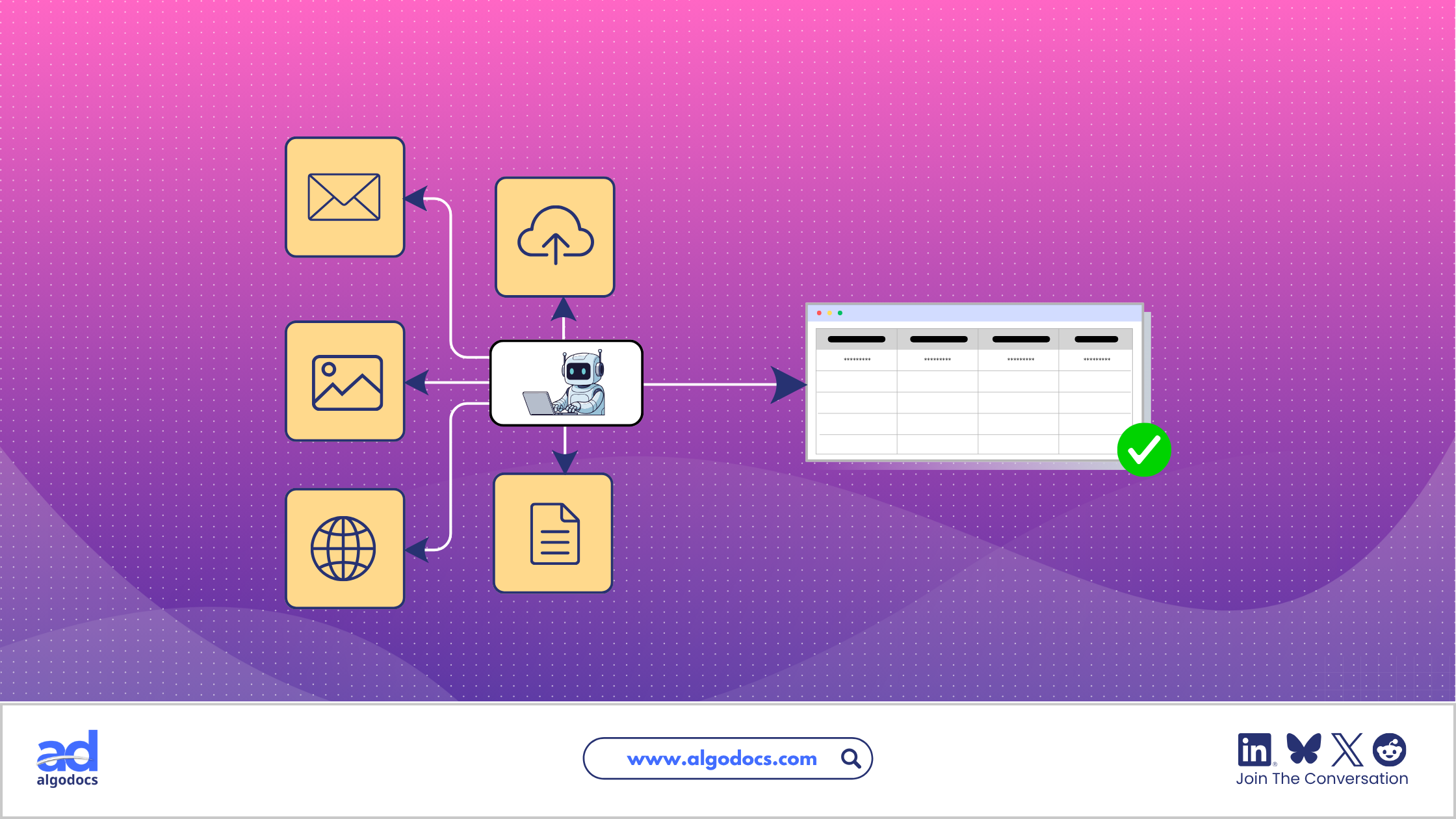
A data parser is the software that removes that step. It reads a raw document, identifies the fields that matter, and outputs clean, structured data your systems can use immediately, with no retyping required.
This guide explains what a data parser actually does, how it's different from OCR and data extraction, the main parsing methods in use today, and how the technology plays out in a specific high-friction workflow: warehouse receipt data extraction. Real benchmarks and sources are cited throughout so you can verify the numbers yourself.
TL;DR Summary
- Core Function: A data parser converts unstructured or semi-structured content (PDFs, scans, emails, web pages) into structured formats like JSON, CSV, or XML.
- Separation of Concerns: Parsing is distinct from OCR (which makes text machine-readable) and extraction (which pulls specific values). Most modern platforms combine all three.
- Human Error Risk: Manual data entry error rates typically run 1–5% of fields and can spike to 18–40% on complex documents, according to Panko’s human error research.
- Accuracy Leap: Modern AI-based parsers report 99–99.9% accuracy on structured fields in production, compared with roughly 80–85% real-world accuracy for legacy rule-based OCR.
- Cost & Time Savings: Automating extraction cuts per-document processing cost from an estimated $5–$25 down to roughly $2.88–$4 (a 60–80% reduction) and cuts processing time by 60–70%.
- Market Expansion: The intelligent document processing (IDP) market is growing fast: estimates benchmark the sector at ~$2.30 billion in 2024 according to Grand View Research and Precedence Research, climbing to over $10–$13 billion per Fortune Business Insights, with forecasts projecting a 25–34% CAGR through the early 2030s.
- High-ROI Use Case: Warehouse receipt data extraction removes manual re-keying from inventory reconciliation and prevents downstream shipping and ledger discrepancies.
What Is a Data Parser?
A data parser is a software or data parsing tool that extracts raw, unstructured data from websites, documents, multimedia, databases, and other sources. There is a difference between data extraction and data parsing. People often get confused between a data parser and a data extraction tool, but both are completely different.
A data parser is specifically designed to extract data from various sources, particularly webpages, databases, and other sources such as website code, PDFs, images, videos, libraries, and other data sources. However, it does not convert this unstructured data into a structured data format.
For example, a data parser can be used to extract data from an ecommerce website. Users can define the fields and rows, such as product prices, product descriptions, metadata, and other details, from the website and save the extracted data for later use in their work tasks.
How Does a Data Parser Work?
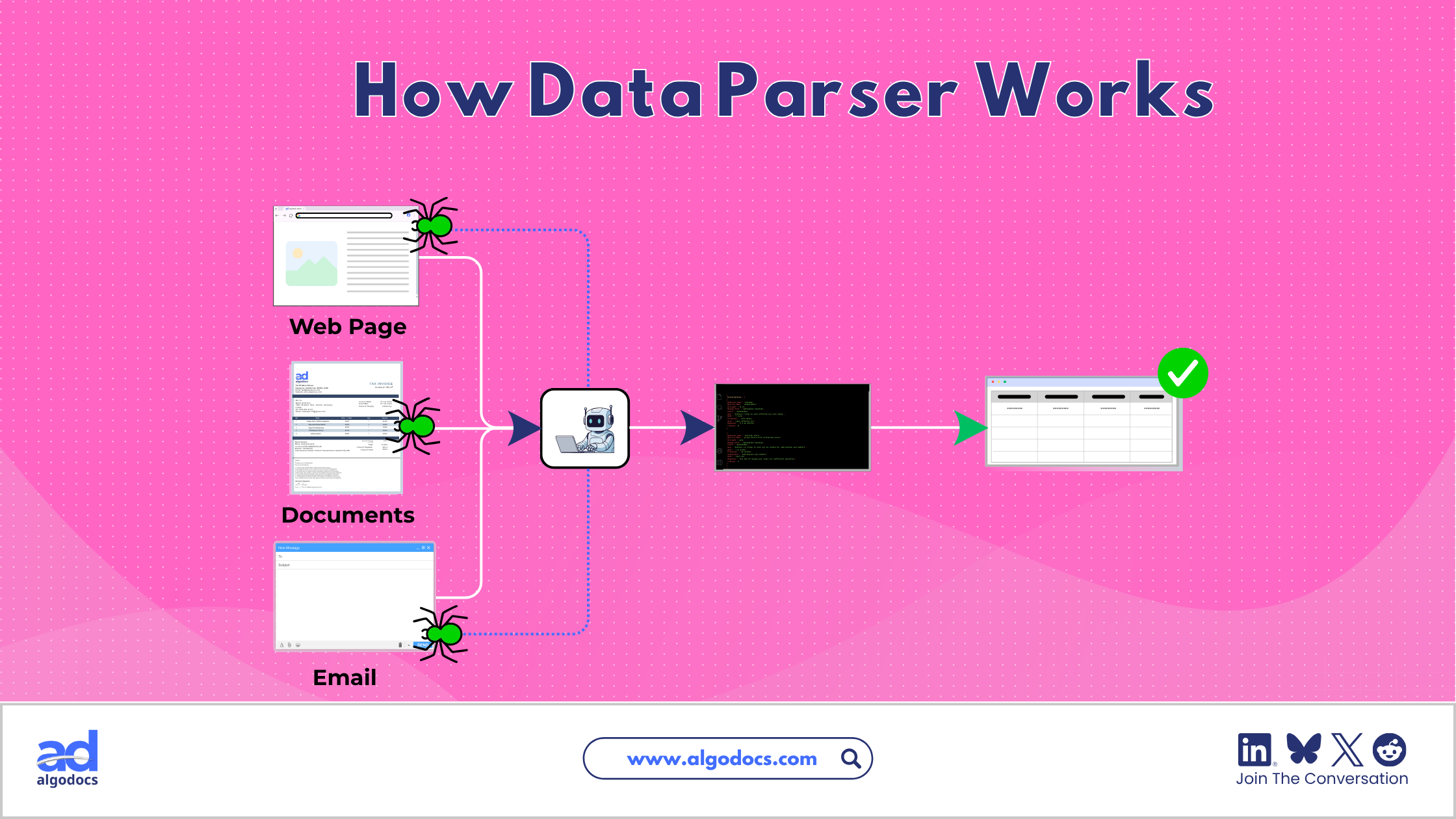
Most data parsers (rule-based, machine-learning-based, or hybrid) follow a similar four-stage pipeline:
Step 1: Input and Document Classification
The parser ingests a file: a PDF, scanned image, email, or web page. It typically classifies the document type first (invoice, bill of lading, warehouse receipt) because different document types need different extraction logic. Modern systems use trained classifiers for this step rather than relying on the user to tag every file manually.
Step 2: Preprocessing
Raw input is rarely clean. Scanned documents may be skewed, low-resolution, or faded; HTML pages are cluttered with navigation and ads. For scanned or photographed documents, optical character recognition (OCR) converts the image into machine-readable text at this stage. Preprocessing quality has an outsized effect on final accuracy: a blurry or skewed scan degrades every step that follows.
Step 3: Parsing and Field Extraction
This is where the actual interpretation happens, using one of three approaches: rule-based, machine-learning-based, or hybrid. The output of this step is a set of identified fields (supplier name, invoice number, line-item quantities) mapped to their values.
Step 4: Structuring and Output
The extracted fields are formatted into a structured output (JSON, CSV, XML, or a direct database write) and delivered to the target system, whether that's an ERP, WMS, CRM, or analytics platform. A process that would take a person several minutes per document typically completes in seconds.
Data Parsing vs. Data Extraction vs. OCR
These three terms get used interchangeably, but they describe different jobs in the same pipeline.
| Term | What It Does | Analogy |
| OCR | Converts an image of text into machine-readable characters | Turning a photograph of a page into typed text |
| Data Extraction | Locates and pulls out specific values from that text (a date, a total, a name) | Underlining the important numbers on the page |
| Data Parsing | Interprets the structure of extracted content and organizes it into usable fields | Filing those underlined numbers into the correct labeled boxes on a form |
In short: OCR makes text readable, extraction finds the data, and parsing gives that data structure. A complete intelligent document processing (IDP) system uses all three together, and most commercial platforms now bundle them into a single workflow.
Types of Data Parsing
Not every document needs the same parsing approach. The right method depends on how consistent your documents are.
- Rule-Based Parsing: Applies fixed patterns—for example, "the invoice number always follows the label 'Invoice No.' and is eight digits long." It works well when documents follow a single, unchanging template.
Strengths: Fast, precise, cheap to run.
Weaknesses: Brittle. A layout change from a supplier breaks the rule and requires manual reconfiguration. - Machine-Learning / NLP-Based Parsing: Rather than fixed patterns, machine-learning parsers learn from labeled examples and generalize to new layouts. This is essential for documents that vary by supplier, region, or format, which describes most real-world logistics paperwork, including warehouse receipts.
Strengths: Adapts to layout variation; handles semi-structured and unstructured text.
Weaknesses: Needs training data; can be less transparent about why it made a particular extraction decision. - Hybrid Parsing: Hybrid systems apply rules to predictable fields and machine learning to variable ones. Most modern commercial IDP platforms default to this approach because it balances accuracy with flexibility across a mixed document set.
- Streaming Parsing: Streaming parsers process data continuously as it arrives, used for live transaction feeds, sensor telemetry, or real-time inventory events rather than static document batches. This matters for use cases like fraud detection or live stock tracking, where waiting for a batch job isn't acceptable.
Why Data Parsing Matters for Modern Businesses
It Closes the Trust Gap in Business Data
Confidence in company data is a documented, ongoing problem, not just a technical inconvenience. In executive research published in Talend's Data Health Barometer, only 40% of business leaders reported that they always trust the data they work with, and more than a third admitted they struggle to rely on data for critical operational decisions.
Separately, BlackLine's Global CFO and Finance Leader Survey revealed that 37% to 42% of finance leaders do not completely trust the accuracy of their organization's financial data, with nearly half expressing active concern that decisions are being made on inaccurate or out-of-date information. Bad data at the point of entry is a primary driver of this discrepancy; parsing addresses the problem at the intake phase before bad records pollute reporting pipelines.
It Cuts Cost and Processing Time
Industry benchmarking across enterprise automation reports confirms that manual document processing costs roughly $5–$25 per document, while automated extraction drives expenses down to $2.88–$4 (a 60–80% reduction), alongside a 60–70% reduction in processing cycle time.
It Scales Without Adding Headcount
Document volume grows with transaction volume; parsing allows throughput to scale linearly without proportional back-office hiring, processing incoming batches continuously in seconds rather than days.
It Improves Supply Chain Relationships
Faster, more accurate document turnaround means suppliers get paid on time, customers receive correct confirmations, and reconciliation-driven disputes disappear.
Data Parsing Use Cases Across Industries
Logistics and Supply Chain: Warehouse Receipt Data Extraction
Logistics operations generate a constant stream of paperwork, including bills of lading, packing lists, customs forms, and warehouse receipts. A warehouse receipt confirms that specific goods were received and stored, and typically contains a receipt number, date, supplier, item descriptions, quantities, and a signature.
Warehouse receipt data extraction is a high-value application of parsing because these documents are:
- High-volume,
- Inconsistent in layout between suppliers, and
- Frequently handwritten in part.
Automating extraction here lets logistics teams update inventory systems in near-real time, reconcile shipments automatically, and catch discrepancies before they cause downstream financial or fulfillment problems.
Finance and Accounting
Automated parsing of invoices, purchase orders, and bank statements extracts invoice numbers, totals, tax fields, and payment terms, speeding up accounts payable/receivable cycles and reducing fraud exposure from manually altered documents.
Healthcare
Parsing digitizes patient intake forms, insurance claims, and lab reports, supporting billing accuracy and regulatory recordkeeping.
Human Resources
Resume and application parsing extracts candidate qualifications and work history, speeding up early-stage recruiting screens.
Retail and Ecommerce
Order confirmations, shipping labels, and supplier invoices get parsed to keep stock levels and payment reconciliation current.
Practical Example: A Warehouse Receipt End to End
- A supplier emails a scanned PDF warehouse receipt with a handwritten quantity correction.
- The parser classifies the document as a "warehouse receipt" and runs OCR on the scanned image.
- Rule-based logic extracts the receipt number and date (consistent fields across this supplier's template); a machine-learning model reads the handwritten quantity correction and the item description block, which vary in position.
- Extracted fields are validated—for example, checking that the sum of line-item quantities matches a stated total, and automatically flagging the record for human review if it doesn't.
- Structured JSON is pushed directly into the warehouse management system, updating inventory counts within seconds of the email arriving.
Challenges in Data Parsing
- Document variability: Layouts differ even within one document type across suppliers, which is why pure rule-based systems struggle at scale.
- Poor-quality scans: Blurry, skewed, or low-resolution scans degrade OCR text quality before parsing algorithms ever execute.
- Handwritten text: Handwriting recognition remains noticeably harder than printed-text recognition; accuracy on handwritten notes (such as receiving slip adjustments) trails printed text, necessitating human-in-the-loop validation.
- Unstructured free text: Unstructured emails and contractual notes do not follow tabular or key-value layouts, requiring NLP models rather than positional extractors.
- Build and maintenance cost: In-house parsers require continuous engineering effort, ongoing annotation, and schema refactoring whenever vendor templates shift.
Comparison: Rule-Based vs. Machine Learning vs. Hybrid Parsing
| Factor | Rule-Based | Machine Learning | Hybrid |
| Best for | Fixed, single-template documents | Variable, semi-structured documents | Mixed document sets |
| Setup effort | Low initially, high ongoing maintenance | Higher initial training, lower ongoing maintenance | Moderate |
| Handles new layouts | Poorly; requires manual rule updates | Well; generalizes from learned patterns | Well |
| Transparency | High; deterministic rules | Lower; probabilistic model inference | Mixed |
| Typical accuracy on structured fields | High if template is static | High and layout-resilient | Highest overall |
Building vs. Buying a Data Parser
Building in-house offers total governance over model architecture and proprietary data, but demands a dedicated ML/data engineering team, continuous annotation pipelines, and regular maintenance whenever formats drift—a total cost of ownership (TCO) that often dwarfs initial estimates.
Buying a platform delivers production-grade extraction immediately, shifting the burden of model retraining, layout handling, and OCR upgrades to the vendor. For mid-market organizations and SMBs, modern template-free AI IDP software offers the fastest path to measurable ROI without dedicated engineering overhead.
Best Practices for Effective Data Parsing
- Match the tool to your document mix: Use deterministic rules for identical recurring forms, and ML/hybrid tools for multi-vendor documents.
- Invest in clean input: Preprocessing routines (deskewing, contrast normalization, binarization) directly determine parsing fidelity.
- Validate programmatically: Enforce mathematical checksums (e.g., matching line-item totals to header totals) and flag low confidence scores for human verification.
- Track field drift: Monitor which fields or supplier layouts trigger the highest exception rates, and use edge cases to retrain models.
- Integrate end-to-end: Parsing delivers little value if the output remains in an isolated CSV; pipe structured data straight into your ERP or WMS via REST APIs or webhooks.
Common Mistakes to Avoid
- Treating all documents as a uniform problem: Enforcing rigid templates on documents that vary across suppliers guarantees brittle pipelines.
- Skipping validation checks: Even systems operating at 99% accuracy will produce exceptions at enterprise scale; critical numerical values need automated arithmetic reconciliation.
- Ignoring ingestion quality: No NLP or parsing engine can reliably extract text that was degraded by extreme downsampling or motion blur.
- Underestimating maintenance overhead: Custom in-house parsers carry hidden ongoing costs as vendor document formats evolve.
- Leaving parsed data siloed: Failing to automate the final integration step forces staff back into manual copy-pasting.
Expert Tips
- Target high-volume, high-friction documents first: Invoices, bills of lading, and warehouse receipts offer the clearest baseline for proving ROI.
- Keep humans in the loop for handwriting: Design validation workflows where ambiguous handwritten notes are routed to operators for single-click verification.
- Demand representative benchmarks: When evaluating platforms, test against your messiest real-world scans rather than sanitized vendor sample datasets.
- Build an active feedback loop: Set up extraction workflows so that human manual corrections are captured to continuously fine-tune models over time.
The Future of Data Parsing
- Multimodal Large Language Models (LLMs): Extending extraction into genuinely unstructured text and complex visual layouts without requiring explicit bounding-box coordinates.
- Zero-Shot / Few-Shot Extraction: Modern foundational models can extract bespoke fields on novel layouts without requiring hundreds of pre-annotated samples.
- No-Code / Low-Code Interfaces: Allowing operational and logistics teams to configure custom extraction schemas without developer involvement.
- Real-Time Streaming Pipelines: Processing receipt and sensor data on the fly to support instant inventory visibility and fraud detection.
How Big Is the Intelligent Document Processing Market?
Market sizing reports from Grand View Research and Precedence Research peg the IDP market at roughly $2.30 to $2.41 billion, with long-term forecasts from Fortune Business Insights projecting rapid double-digit CAGR growth toward enterprise-wide adoption.
Conclusion
A data parser is the connective layer between the messy documents businesses receive every day and the structured data their systems actually need. From invoices to warehouse receipts, parsing turns raw content into a usable, auditable record, and the accuracy and cost gap between manual entry and automated extraction is well documented, not just a vendor talking point.
As AI models keep improving at handling unstructured and handwritten content, the practical case for automating document-heavy workflows keeps getting stronger. The organizations that adopt it early gain a measurable edge in processing speed, cost per document, and, perhaps most importantly, trust in their own data.
Frequently Asked Questions
What is the difference between a data parser and a data extractor?
A data extractor pulls raw strings or values out of a document. A data parser interprets the relational structure of those strings and maps them into a schema (e.g., JSON) ready for system ingestion.
Can data parsing handle handwritten documents, like warehouse receipts?
Yes, modern IDP platforms use neural handwriting models (Intelligent Character Recognition, or ICR), though critical numerical fields should still feature automated validation checks and human-in-the-loop review.
Is data parsing the same as web scraping?
No. Web scraping retrieves raw HTML or unstructured content from web servers; parsing organizes that retrieved content into clean, structured records.
How accurate is automated data parsing?
Modern machine-learning IDP platforms regularly hit 99–99.9% field-level accuracy on standard structured and semi-structured documents, compared to 80–85% for legacy template-only OCR.
Do I need technical skills to use a data parser?
Not necessarily. Most modern SaaS platforms provide visual schema builders and no-code connectors for common ERP and accounting software.