
Algodocs

Algodocs

Algodocs

What Is Zonal OCR? An Easy Guide to Understanding Zonal OCR and How It Works.

    Processing data from bulk documents can be an annoying and time-consuming task if you have to extract this data manually. But with the help of modern technology such as optical character recognition, you can extract data from these documents easily. There is another part of OCR technology known as zonal OCR, which lets you extract specific data from specific sections of a PDF or scanned image. That is known as zonal OCR. So, what is Zonal OCR, and how does it work? We will discuss more in detail below. Understanding the Basics: OCR VS Zonal OCR? Before we explain what zonal OCR is, we first need to understand what OCR technology is and how it works.OCR stands for Optical Character Recognition. It was developed in the late 70s and started to gain traction in the late 80s. One of the main reasons it gained popularity in the 80s was because it started to be used by banks to extract data from various types of documents, which helped them save time and improve data extraction quality. Later, OCR was adopted in business, marketing, and other industries all around the world.The main function of traditional OCR technology is to convert different types of documents such as scanned paper documents, PDFs, or images into editable and searchable data. An OCR tool “reads” text on an image and turns it into digital letters that are editable on a computer. For example, if you scan a printed invoice and use OCR software, the software can pull out the name, address, and price from that scanned image and turn it into usable text. But classic OCR tools extract all the presented data in a document, and you can’t control what to extract and what not to—that’s where zonal OCR comes into play. What Is Zonal OCR? Now that we know what OCR is, let’s answer the main question—what is zonal OCR?Zonal OCR is a more focused and intelligent version of regular OCR. Instead of scanning an entire document and pulling out all the text, zonal OCR extracts data from specific areas or “zones” of a document. That’s why it is called zonal OCR or is known as template OCR as well. These zones are predefined sections where certain types of information always appear.Think of it like this: if every invoice you receive has the “Invoice Number” in the top right corner, Zonal OCR can be trained to look at just that area and pull the number out automatically. It ignores everything else and goes straight to the point. That makes it incredibly efficient and reliable for high-volume document processing. One of the major highlights of zonal OCR is that it is more accurate compared to traditional OCR. So, How Does Zonal OCR Work? Let’s break down how Zonal OCR works in a step-by-step process: Features of Zonal OCR What makes zonal OCR so powerful is its accuracy. Traditional OCR might pick up irrelevant text or make errors when faced with complex layouts. But zonal OCR knows exactly where to look because we have already defined the zone from where data needs to be picked and extracted. That means fewer errors, faster processing, and smoother workflows. Real-World Example: Zonal OCR For Medical Billing Imagine a hospital that receives thousands of medical bills every month. These documents have patient names, billing codes, diagnosis details, health insurance info, and payment terms.Using zonal OCR, the hospital can define zones on its standard bill layout:• Top left for patient name• Top right for bill number• Centre zone for treatment codes and costs• Bottom section for insurance informationEach incoming bill gets processed automatically. The software reads just those parts and enters the data into the hospital’s billing system. No manual typing. No human errors. Just fast, accurate data extraction. Where Zonal OCR Is Used Zonal OCR is widely used in different industries that handle large volumes of documents with structured layouts. Here are some common use cases:• Healthcare: Extracting patient data, diagnosis reports, medical codes, and insurance details from forms and bills.• Finance: Pulling out transaction info, invoice numbers, and payment dates from bank statements or receipts.• Logistics: Reading shipping labels, barcodes, and delivery addresses.• Legal: Extracting case numbers, parties involved, or dates from legal filings.• Retail: Processing receipts and purchase orders for inventory management. Why Businesses Need Zonal OCR Now that you understand what zonal OCR is, let’s explore why it’s such a vital tool for modern businesses.Saves TimeManual data entry is slow and expensive. Zonal OCR does in seconds what might take a person several minutes or hours.Reduces ErrorsHumans make mistakes, especially when tired or rushed. Zonal OCR provides consistent and accurate results.Scales EasilyWhether you process 10 or 10,000 documents a day, zonal OCR can handle it. It grows with your needs.Easy IntegrationMost zonal OCR systems can plug right into your existing software—like CRMs, ERP tools, or cloud databases.Improves ComplianceAccurate document processing means better audit trails, stronger recordkeeping, and improved compliance with industry regulations. Zonal OCR vs Full-Page OCR You might be wondering, “Why not just use full-page OCR?” Good question!Full-page OCR is great when you want to capture everything from a document, especially if the layout changes often. But it’s not as accurate when you’re looking for specific data.Zonal OCR, on the other hand, works best for structured documents—forms, invoices, claims, or any document where data always appears in the same place.In short:• Full-page OCR = wide net• Zonal OCR = laser focus Intelligent Document Processing (IDP) and Zonal OCR Zonal OCR is often part of a larger automation ecosystem called Intelligent Document Processing (IDP). IDP combines OCR with AI, NLP (Natural Language Processing), machine learning, and workflow automation to fully digitize document handling.In an IDP system:• Zonal OCR extracts the key fields.• NLP understands the context.• Machine learning adapts to new layouts over time.• Automation tools push the data into your systems.This is how modern organizations achieve end-to-end document automation—saving costs, improving accuracy, and speeding up operations. Challenges of Zonal OCR (and How to Overcome Them) While zonal OCR is incredibly


Algodocs

OCR In Healthcare: Revolutionizing Medical Document Processing for Better Patient Care

  Imagine working at a hospital and having to extract and organize data from various types of hospital and healthcare documents such as patient forms, health insurance documents, lab reports, etc. How will you do it? Not manually, for sure. That’s where OCR for healthcare comes in. These important documents can be in the form of PDFs, scanned images, docs, or handwritten notes. Extracting data from these manually can be challenging for human eyes. Also, extracting data from a document manually is a slow process and full of errors. But with the help of healthcare OCR technologies, we can improve the healthcare document workflow and provide better healthcare service to patients. In this article, we will discuss the benefits of OCR for the healthcare industry, how OCR and AI are improving healthcare document processing and serving the patients in real-time, the challenges with manually extracting data from healthcare documents, and how AI is improving the healthcare document workflow with OCR technologies. So, before we jump into OCR for healthcare, we need to understand what OCR is. So, what is OCR? Optical Character Recognition or OCR is a technology that extracts data and converts it into machine-readable format so that computers can understand it. Simply put, it converts data from PDFs, scanned images, and docs to editable formats. OCR technology is a very old technology that has been used by many different industries for different purposes. One of the main advantages of using OCR technology for data extraction is that it can extract data from PDFs, scanned images, and documents with great speed and higher accuracy compared to the manual data extraction approach. The old manual data extraction approach is slow and full of human errors, which oftentimes leads to data discrepancies and high error rates. But on the other hand, OCR eliminates these challenges by providing data extraction with greater precision and faster speed from documents. What is OCR in Healthcare? We have covered what OCR technology is—now let’s talk about what OCR in healthcare means. OCR in healthcare is a technology that extracts data from healthcare documents such as patient forms, medical prescriptions, insurance documents, lab reports, and other healthcare documents. We can refer to this as a customized OCR tool that is specifically fine-tuned to automate and extract data from healthcare documents.The benefit of healthcare OCR tools is that they automate data extraction from documents with great speed and accuracy, which isn’t possible with manual data extraction approaches. This eventually improves document workflow efficiency, staff productivity, and serves patients in a more efficient and timely manner. Why OCR Technology is Essential for Healthcare We all understand the importance of data accuracy and time when it comes to serving a patient with greater care. Doctors, pathologists, labs, and other hospital departments need to access data in a very timely manner. But if we go with the manual data approach, delays in data extraction and collaboration can be fatal for a patient’s life. One of the main advantages of OCR for the healthcare industry is: Ultimately, OCR in healthcare empowers organizations to focus more on patient care and less on paperwork. Core Use Cases of OCR for Healthcare Key Benefits of Using OCR in Healthcare Try Algodocs Free Healthcare OCR app to automate data extraction for patient forms, lab report, dignosis report and other healthcare documents for free. How OCR Works in a Healthcare Setting The typical OCR process in healthcare includes: Advanced AI-driven OCR tools also incorporate Natural Language Processing (NLP) and Machine Learning (ML) to better understand complex medical documents and terminologies How NLP and AI Elevate Healthcare OCR Capabilities One of the challenges with traditional OCR is that it can only recognize text from very clear and high-quality scanned documents. But it fails to extract data from blurry and skewed documents. For example, patient forms are mostly handwritten, and traditional OCR technology is not very good at extracting data from such types of documents. But AI-powered OCR understands context and extracts data from blurry and complex layouts easily, and this has proven to be a game-changer in healthcare. By using NLP and AI, modern OCR tools can easily: This intelligent automation enables healthcare organizations to build smarter workflows, improving both efficiency and care quality. Challenges of Implementing OCR for Healthcare Now we all know that there are multiple benefits of OCR for the healthcare industry, but there are a few challenges in the healthcare space: Best Practices for Successfully Adopting OCR in Healthcare The Future of OCR in Healthcare The future of OCR in the healthcare space looks promising as new emerging technologies have improved data extraction capabilities for hospitals and healthcare sectors. Artificial Intelligence and NLP have improved data extraction capabilities. Now hospitals can automate data extraction from low-quality documents with advanced AI OCR healthcare tools. RPA and automation tools have improved data quality, and data can now be shared and accessed remotely. Why Algodocs is the Ideal OCR Solution for Healthcare One of the important questions that comes to mind is: which is the best healthcare OCR tool available in the market? Well, there are many, but one tool offers great features that are essential for healthcare and hospitals—Algodocs.Algodocs is an AI-based OCR for the healthcare space, offering features that make it a perfect choice for the healthcare industry. With Algodocs, healthcare providers benefit from: Whether your goal is to digitize patient forms, streamline claims processing, or automate complex healthcare documentation workflows, Algodocs is designed to help you achieve it efficiently and securely. Final Thoughts OCR for healthcare isn’t just about converting paper into pixels—it’s about unlocking new possibilities for better patient care, operational efficiency, and data-driven decisions.By embracing powerful, AI-enabled platforms like Algodocs, healthcare providers can future-proof their operations, reduce administrative burdens, and elevate the overall patient experience.Now is the perfect time to move beyond manual processes and harness the full potential of OCR and intelligent document automation. What is OCR in Healthcare? OCR in healthcare means to extract data from patient forms, insurance documents, lab reports

LLM models for document processing and automation
Algodocs

Best LLM Models for Document Processing in 2025

  Modern businesses run on data. And when it comes to extracting valuable data from PDFs, scanned images, handwritten notes, etc., the task becomes harder. However, with the evolution of technologies like OCR, LLM and intelligent document processing, this task has become faster and more accurate. LLM models for document processing and automation has not only improved the quality of data extracted but also streamlined the entire process with your existing business tools. While enterprise-level data extraction solutions already exist, there’s one new technology that is also emerging and gaining attention in document processing: AI (Artificial Intelligence) and LLMs (Large Language Models). One of the most popular LLMs is ChatGPT, developed by OpenAI, which has inspired several other companies to launch their own LLMs for public use. But when it comes to document processing and extracting data from various formats such as PDFs, scanned images, handwritten notes, invoices, bills, or even personal notes, do these models actually stand up to the hype? In this blog, we’ll talk about the top commercially available LLM models you can use for document processing, the types of documents they support, and what kind of data they can extract. We’ll also go through the pros and cons of using LLMs for document processing and how they compare with OCR and IDP technologies. But before we jump to the best LLMs for document processing, let’s understand what an LLM is. What is an LLM model? An LLM, or Large Language Model, is an artificial intelligence program that is trained on huge datasets to generate text, create images, write code, and automate various tasks. LLMs are built using neural networks that learn patterns in language and data to understand, predict, and perform specific actions. In simple terms, you can think of LLMs as bots that can automate tasks like document processing and data extraction. However, they do have limitations and are not always reliable when it comes to complex or robust data extraction tasks, which we’ll cover in detail in this blog. What is an LLM for Document Processing? LLM for document processing refers to using large language models to extract data from various types of documents such as invoice, bills, insurance documents, purchase orders etc.  There are no LLMs tools built specifically for document processing, but several commercial models such as ChatGPT, Gemini and others have decent capabilities when it comes to extracting data from structured and basic document layouts. Why Use an LLM for Document Processing? LLMs available commercially can be useful when you want to extract data from simple document layouts or if the number of documents is small. For example, if you want to use a tool like ChatGPT, Claude, Gemini, or any other LLM platform available to the public, you can easily use them to perform light document processing tasks. They can help summarize PDF documents or extract specific data from the file. However, the main drawback is that LLMs don’t perform well when it comes to structured, unstructured, or complex documents. Compared to native document processing tools, LLMs offer limited features and flexibility. Top LLM Models for Document Processing in 2025 The answer depends on your specific requirements. Some of the most commonly available commercial LLM models for document processing include ChatGPT, Gemini, Copilot, Claude, Gork, and Llama 3. However, there are several other large language models in the market that can also be used for document processing. Let’s break down the features, pros, and cons of these LLM models for document processing. 1. OpenAI GPT-4 Turbo GPT-4 by OpenAI (ChatGPT) is one of the most widely used commercial LLMs for document processing. Its accuracy, speed, and ease of use make it a strong contender. OpenAI provides both free and paid versions depending on the type of data you want to extract from the document. Features: Pros: Cons: Pricing: $20/month, Free Plan Available 2. Claude 3 by Anthropic   Claude is another LLM that performs well when it comes to extracting data from documents. However, it is not as powerful as ChatGPT. It supports PDFs, DOCs, and TXT files but does not support data extraction from image-based PDFs. Features: Pros: Cons: Pricing: $17/month, Free Trial Available 3. Google Gemini Pro Gemini by Google (formerly Bard) is another promising LLM you can use for document processing. Features: Pros: Cons: Pricing: Starts at $22/month, Free Plan Available 4. LLaMA 3 by Meta LLaMA is an open-source LLM developed by Meta and released in 2023. It can handle PDFs, DOCs, and scanned files fairly well. However, it still struggles with complex layouts and blurry images. Features: Pros: Cons: Pricing: Available for free How to Choose the Right LLM for Document Processing There are several LLMs that you can choose from. Make sure to check the following parameters: 1. Document Type and ComplexityStructured documents are easy for LLMs to extract data from. However, scanned PDFs and complex layouts like medical bills or invoices are still difficult. Most LLMs are not tuned to handle such cases. 2. Volume and ScalabilityFree LLMs come with limitations. Also, most LLMs are not scalable for high-volume data extraction needs. 3. Accuracy RequirementsInaccurate data extraction can cause serious problems in your business workflow. LLMs are great for simple documents but not reliable for blurry, complex, or unstructured layouts. 4. Cost and InfrastructureFree versions don’t offer the features you need for business use. To achieve better accuracy and speed, you’ll need robust infrastructure. This increases cost. 5. Integration CapabilitiesBusinesses need LLMs that can integrate with their internal tools to handle large volumes. Uploading files manually into LLM platforms is not scalable without integration options. 6. Security and ComplianceSecurity is crucial in data extraction. Make sure the LLM you choose complies with security standards to protect business and customer data. Common Challenges with LLMs for Document Processing Best Alternatives to LLMs for Document Processing Despite their ease of use, cost-effectiveness, and popularity, LLMs still don’t hold up against native data extraction technologies such as OCR, IDP, and ICR. If you’re a business that needs to process data from thousands of documents—whether PDFs,

Algodocs

Cargo Manifest Data Extraction Using AI and Intelligent Document Processing: 2025 Gudie

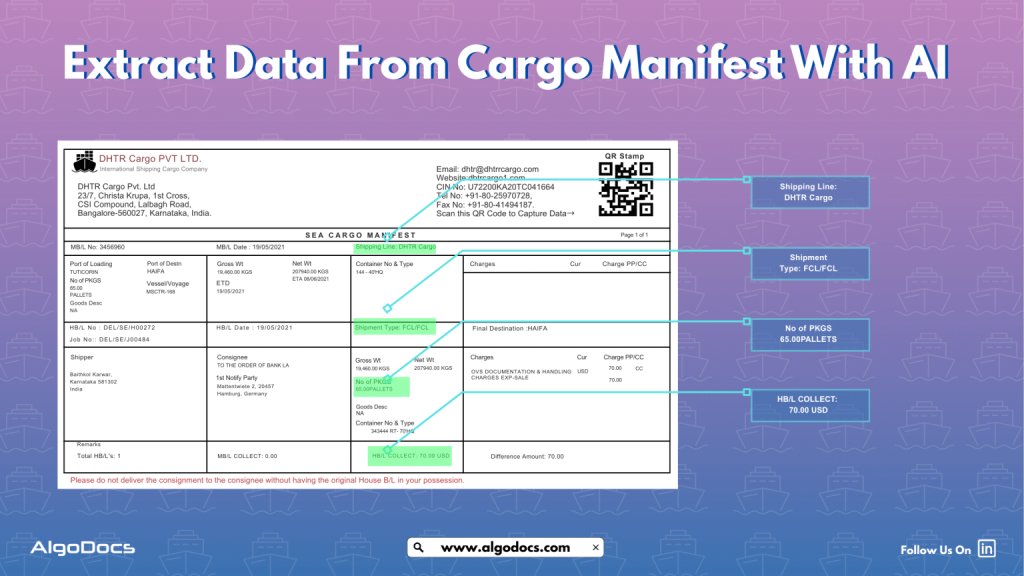
  In the fast-paced world of global trade and the logistics industry, efficiency and accuracy are key components for success. A widely used document in the logistics chain is the cargo manifest, which details the goods loaded onto a vessel. Extracting and automating valuable data from this document can help streamline operations, improve compliance, and ensure faster turnaround times for businesses. With advancements in AI, machine learning, and intelligent document processing (IDP) tools, organizations can now automate cargo manifest data extraction, which can greatly reduce manual labour, data errors, and improve document workflows. This article delves into how to efficiently extract data from a cargo manifest using modern technology, with a focus on cargo manifest data extraction and cargo manifest OCR. What is a Cargo Manifest? A cargo manifest is a comprehensive document that lists all the cargo on board a ship, aircraft, or vehicle. It includes detailed information such as the description of goods, quantity, weight, consignee, consignor, port of loading, and destination. This document plays a vital role in customs clearance, tracking shipments, and verifying the accuracy of goods transported. The cargo manifest is typically generated by the carrier or shipping company and is used by customs authorities, freight forwarders, and logistics professionals to ensure the legal and efficient movement of goods across borders. Difference Between Bill of Lading and Cargo Manifest People often mistake the bill of lading for the cargo manifest, but these two documents are different and serve different purposes. Bill of Lading (BOL): It’s a legal document between the shipper and carrier that outlines the terms of transport, serves as a receipt for goods, and can act as a title of ownership as well. It is usually specific to a particular shipment or container. Cargo Manifest: This is a summary document listing all shipments on a vessel. It provides a holistic view of the cargo and is used mainly for administrative, regulatory, and customs purposes. In essence, the bill of lading focuses on individual shipments, while the cargo manifest provides an aggregated view of the cargo. Here is the detailed explanation: Feature Bill of Lading (BoL) Cargo Manifest Primary Role Contract of carriage, receipt of goods, document of title (often negotiable). Consolidated inventory of all cargo on board for a specific voyage/trip. Issued By Carrier or its agent to the shipper. Carrier or its agent. Issued To Shipper (who then forwards it to the consignee). Customs, port authorities, vessel/aircraft operator. Scope Covers a specific consignment from one shipper to one consignee. Lists all consignments from all shippers on a single vessel/vehicle for a specific journey. Content Focus Detailed terms and conditions of carriage for a single shipment, description of goods, shipper/consignee details. Summary details of all shipments: BoL numbers, shipper/consignee (often summarized), marks, quantity, weight, port of loading/discharge. Legal Standing Legally binding contract, evidence of title. Primarily an administrative and customs declaration document. Use in Data Extraction BoL data extraction focuses on individual shipment details for contractual and title purposes. Cargo manifest data extraction focuses on a holistic view of all goods for customs, logistics planning, and reconciliation. Try Algodocs Data Extraction Tool To Automate Data Extraction From Cargo Manifest With 99.99% Accuracy. Sing Up For Free Account Today. Create Free Account What is Cargo Manifest Data Extraction? Cargo manifest data extraction means capturing relevant information such as MB/L number, shipment types, HB/L number, destination, product weights, and size from cargo manifest documents and converting it into structured, machine-readable formats. Traditionally, this extraction was done manually, requiring human operators to read through documents and input data into systems. But today, AI-driven tools, especially those employing cargo manifest OCR (Optical Character Recognition), can automate this process with remarkable accuracy. Challenges with Cargo Manifest Data Extraction Despite its numerous benefits, extracting data from cargo manifests poses several challenges such as: How to Choose a Reliable Tool for Cargo Manifest Data Extraction While there are many cargo manifest data extraction tools available in the market, selecting a reliable and accurate tool can be a challenging task. It needs to align with your business needs, should be accurate, and must integrate with your existing business apps and third-party platforms as well. Most importantly, consider how much ROI it delivers for every dollar you spend on the tool. Below are a few factors you need to take into consideration before picking a tool: Best 5 Apps for Cargo Manifest Data Extraction Why Choose Algodocs for Cargo Manifest Data Extraction Algodocs stands out for several reasons: These features make Algodocs the top choice for logistics providers aiming to streamline their cargo manifest data extraction processes. Final Thought Cargo manifest data extraction is a critical component in modern logistics and supply chain management. As the volume and complexity of shipping documents grow, relying on manual methods is no longer viable. AI and intelligent document processing tools, especially those leveraging cargo manifest OCR, offer a scalable, accurate, and efficient solution. Among the top tools in this space, Algodocs shines as a robust, AI-driven platform tailored for cargo manifest data extraction. Its blend of accuracy, flexibility, and integration capabilities makes it the go-to solution for global logistics operations. By investing in the right technology, companies can not only improve operational efficiency but also stay competitive in an increasingly digital world. What is cargo data extraction? Cargo data extraction is the automated process of capturing key information from shipping documents like bills of lading and cargo manifests using AI and OCR technology. It helps reduce manual work, minimize errors, and streamline logistics operations.        

Algodocs

How To Extract Data From Packing List With AI And Intelligent Document Processing (Complete Guide)

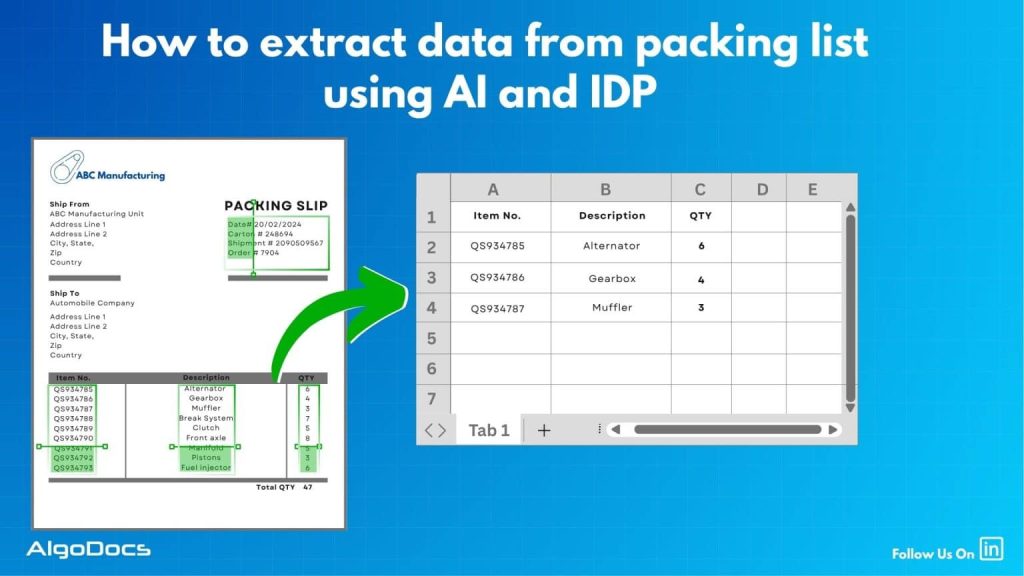
  The world of eCommerce revolves around many types of documents. Some of the major documents include packing lists, purchase orders, bills of lading, sea waybills, etc. Now, extracting data from packing lists is another challenge that requires a proper technological approach. But the question still remains: how to extract data from packing lists? Utilizing technology such as OCR, Intelligent Document Processing, and the new tech revolution such as AI has made data extraction from packing lists very easy, accurate, and efficient for businesses. However, handling packing lists manually is a slow and error-prone task, especially when you’re dealing with hundreds or thousands of shipments every month. The risk of human error is high and can lead to serious business setbacks.In this blog, we will explain in detail how to extract data from packing lists using AI and IDP, how packing lists and SKU lists are two different documents, what challenges you may face with packing list data extraction, top tools for packing list data extraction, and how tools like Algodocs offer an effective solution for packing list data extraction. What Is a Packing List? A packing list is a document that provides details of the products lined up for shipment. This includes details such as product names, product descriptions, product quantities, weight, dimensions, number of boxes, and other relevant information.The packing list is usually prepared by the seller or the warehouse and is included with the shipment process. It serves as a reference for everyone involved in the shipping process, including logistics providers, customs officers, and the buyer.Packing lists are typically generated in digital formats such as PDFs, spreadsheets, or Word documents, but they are often printed or scanned, especially in traditional supply chain settings. Because of this, the quality and format of the document can vary significantly. What Is the Purpose of a Packing List in eCommerce? In the eCommerce industry, the packing list is not just a formality—it’s a crucial document that supports the entire order fulfillment process. Here’s why it matters: What is the Difference Between Packing List vs SKU List? SKU list – A SKU list is created and maintained at the individual business level, which shows how many products are available in their inventory to sell in the market. This list contains product details such as product title, product dimensions, weight, SKU ID, product image URL, and other information. Various types of businesses use different types of SKU lists, which can be for their online or offline business inventory. Try Algodocs Free Forever Plan to Automate Data Extraction From Packing List and Other Logistics Documents In Real Time Try Now Packing list – A packing list is generated to list all items that will be shipped by the shipping or logistics company. A packing list includes various information such as the number of items to be shipped, their quantity, number of boxes, tracking number, etc. It basically serves as a receipt that indicates the number of detailed items. What Is Packing List Data Extraction? Packing list data extraction means extracting key-value information from a packing list document with the help of automated tools such as packing list OCR, intelligent document processing tools, or AI and ML-based tools. A typical packing list document contains details such as item descriptions, quantities, product dimensions and weights, sender and receiver address details, shipping dates, and delivery terms. These extracted data from packing lists are later used for record-keeping, tracking, billing, and other business activities by businesses or shipping companies. Previously, packing list data extraction used to be a tedious process as most of the data extraction was done manually by humans. The manual process took more time and the possibility of human error was high. This resulted in many setbacks for businesses due to slower extraction speed, inaccuracy in extracted data, increased extraction costs, and other challenges.But the modern data extraction approach has shifted from manual methods to AI-based methods, which have significantly improved workflow efficiency for businesses. Challenges With Packing List Data Extraction While packing list documents are major documents for shipping and logistics businesses, extracting and organizing data accurately remains a challenge due to: A packing list document can come in various formats or layouts. Every logistics provider designs packing list formats in their own way. This could be due to region, language, preference, business type, or other external factors. Packing list documents are often generated in unstructured formats, and extracting data from these documents creates many challenges. Document quality is another issue. Poorly scanned documents, documents of very low quality, and skewed fonts create many problems in data extraction. While extracting data from one or two packing list documents seems feasible with manual methods, extracting 100 or sometimes 1000 documents at once isn’t possible manually. It’s slow, full of errors, and inefficient. Multilingual packing list documents create hurdles in data extraction. Extracting data from regional language documents requires specific customization in OCR and data extraction tools. Manual methods require human extractors to have bilingual skills, which are hard to find. Manual data extraction methods are full of errors. Human error can lead to serious consequences like data inaccuracy and mismatched information. How AI and IDP Are Making Packing List Data Extraction Efficient AI and Intelligent Document Processing (IDP) use advanced technologies such as machine learning, template-based OCR, and natural language processing (NLP) to automate data extraction from packing lists. With AI and IDP, you can: Automatic Recognition of Document Structure: With platforms like Intelligent Document Processing and AI, it becomes easier to detect and identify document types and layouts, allowing faster and more accurate data extraction. High-Quality Accurate OCR: While legacy OCR systems lack accuracy, modern OCR integrated with AI offers high-quality, accurate extraction from unstructured documents such as scanned image PDFs, handwritten notes, etc. Multi-Language Support: Modern businesses operate globally, and documents may contain regional languages. AI and IDP can extract data efficiently from regional-language packing lists. Data Classification and Tagging: With modern OCR tools, you can classify and tag specific data, tables, lines, fields, or rows. Technologies

Algodocs

SKU List Data Extraction With Artificial Intelligence and IDP: Benefits, Features, Risks & More

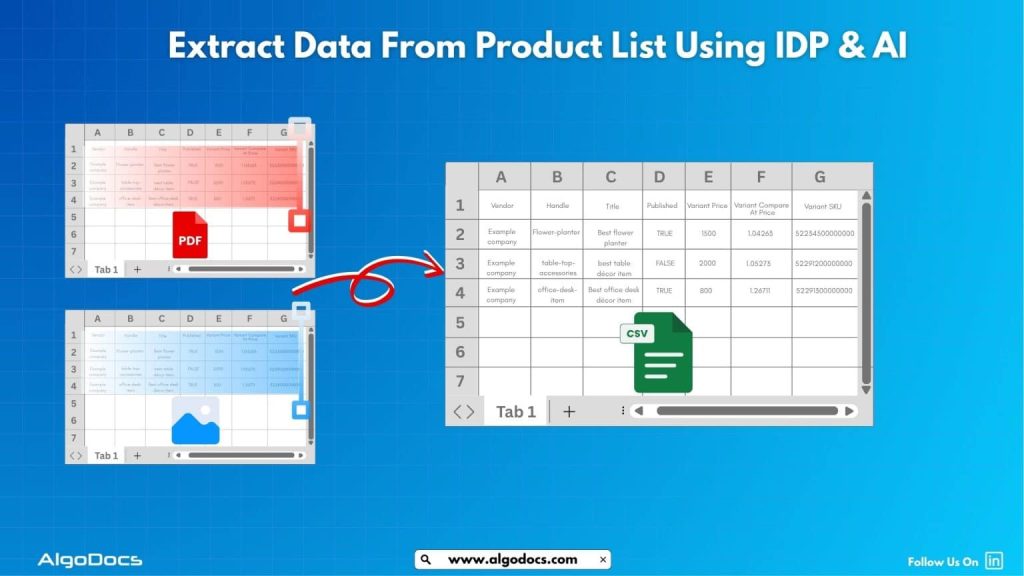
  The paradigm shift of global shoppers has changed from offline to online in recent years. The eCommerce industry is currently a $7.5 trillion economy and is growing at a very fast pace according to a report. This rapidly growing eCommerce economy has given birth to many big platforms as well as small eCommerce businesses. Many traditional retail businesses have transitioned their business model from offline channels to online channels in recent years. And this transition has increased their sales and revenue. Now eCommerce businesses thrive on many factors such as their business model, where their customers are, how they want to target their customers, and how the sold product will be delivered to the customer. Unlike a physical store that is only able to display and market a limited number of inventory items, an online store is able to display and share countless numbers of items without requiring much space and manpower. With such a large number of products and items, businesses need to maintain a list of product data which is known as an SKU list. An SKU list is used in both online and offline channels. But data extraction from an SKU list is a challenging task. Due to the number of items, various fields, and tables, data extraction becomes a challenging task. The old manual data extraction method is prone to human errors and data accuracy remains a big challenge. But with tools such as SKU list OCR, intelligent document processing, and Artificial Intelligence, SKU data extraction has become more accurate, speedy, and efficient. In this blog post, we will discuss various aspects of SKU list data extraction, including its challenges, benefits, and other key considerations. What is An SKU List? An SKU list or Stock Keeping Unit is a list of products that shows the available and sold inventory of a store. An SKU list consists of details such as product name, title, variants, color variants, size variants, SKU number, product URL, price variants, availability, etc.This helps businesses to maintain a record of what products have been sold and what is in stock, with all corresponding details of product types, variants, etc. In both online and offline businesses, the SKU list plays a vital role, but specifically in online and eCommerce businesses, it holds major importance. Difference between SKU List vs. Product List: There are many types of documents used on a day-to-day basis in online and offline businesses for various types of business activities. Documents such as bills, invoices, SKU lists, packing lists, and purchase orders are a few essential documents that are frequently used in business. But every document is different; similarly, an SKU list and a packing list are two different documents. But sometimes people get confused and consider the SKU list as a packing list. Here are the differences: Here’s a comparison of a packing list and an SKU list in table format: Feature Packing List SKU List Purpose Details shipment contents Tracks products in inventory Scope Focuses on shipped items Covers all stock in a system Usage Used in logistics and shipping Used in warehousing and retail Contents Item descriptions, weights, packaging details Product codes, descriptions, stock levels Format Structured for shipping documentation Formatted for inventory databases Tracking Ensures shipment verification Monitors stock movement and availability Customization Focuses on shipment accuracy Includes pricing and supplier details Regulatory Role Required for customs clearance and freight calculations Not required for shipping Verification Helps buyers confirm received goods Helps businesses manage stock levels Integration Linked to shipping and order fulfilment Integrated with inventory management systems What is the Purpose of an SKU List in eCommerce? The real purpose of an SKU list is to keep a record of the items that are available or being sold by a store or business. This helps businesses manage their inventory and keep a record of which products are in stock and which have been sold. Secondly, when an online business or store fulfills an order, they can ensure that the right product has been packed and shipped to the logistics company. The third important role of an SKU list is to help with product listing in both online stores and offline stores. If a business sells its product on multiple online eCommerce platforms, then with a single SKU list, you can manage your product listings across all channels. Analysis and reporting of sold and unsold products can also be done with the SKU list.A well-maintained SKU list is the backbone of smooth eCommerce operations. But extracting and organizing this data can be tricky. What is SKU List Data Extraction? SKU list data extraction means extracting information such as product names, titles, variants, SKU ID, size, color, availability, and other information from an SKU list using automated software. The main purpose of SKU list data extraction is to improve workflow efficiency for logistics, product listing, and other decision-making activities for an online or offline store. A typical SKU list is usually generated in Excel or CSV format, but in some cases, it could be a scanned image PDF, native PDF, handwritten note, or JPG image as well.Extracting data from a long and bulky SKU list manually isn’t efficient, but tools such as SKU list OCR and Intelligent Document Processing have made this task more efficient and smoother. Challenges with SKU List Data Extraction Extracting data from an SKU list manually is not very reliable for a business. Manual SKU list data extraction poses great challenges such as: Multiple Formats:SKU lists generally come in Excel format, but sometimes they can be PDFs, scanned images, or emails as well. Each format creates a different level of challenge. While extracting data from an Excel SKU list may be an easy task manually or automatically, extracting data from unstructured document formats such as PDFs or scanned images is difficult. Human Errors:Manual data extraction methods are prone to human errors. SKU data extraction needs to be accurate, and any error in data extraction can create serious issues. Time-Consuming:SKU list data extraction can be a

Algodocs

How to Extract Data from Image: With 99% Accuracy

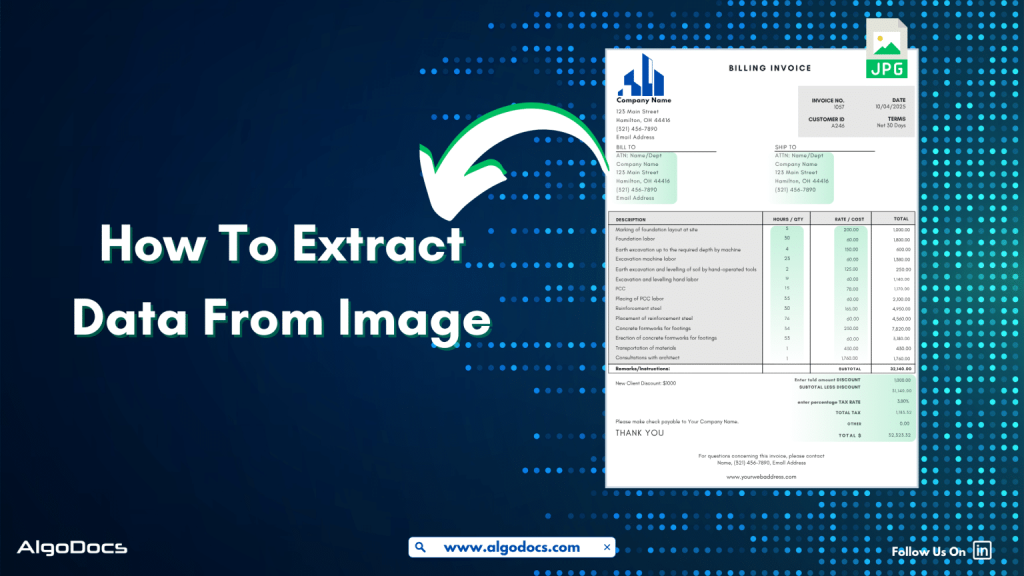
Data in today’s digital age comes in various formats. It could be in an Excel sheet, scanned PDFs, Word documents, scanned images, or more complex formats such as JSON or XML. But extracting data from image feels more challenging than others. Why? Because the unstructured content, skewed letters, and blurry images are difficult to process. If we talk about data extraction from images, then these images are obtained from various sources. These might be a scanned copy of a report from your office scanner, a mobile screenshot of a passport or driving license, or photos taken from your mobile of your certificates. It can be handwritten notes, invoices, bills, etc. As we can see, data in image format can be found in many life scenarios. But data extraction from images remains a challenge for us due to inconsistent document layouts, poorly scanned documents, and skewed letters, which make data extraction difficult. The manual method of data extraction is slow and full of human errors, which reduces work efficiency. But with the rise of advanced technologies such as Artificial Intelligence, Machine Learning, Intelligent Document Processing, and OCR, extracting data from images has become easy. In this blog, we will discuss the challenges associated with image data extraction, tools and technologies for extracting data from images, how manual image data extraction is not reliable, the best tools you can consider for image data extraction, and how Algodocs is the best tool for extracting data from images. Let’s explore. What is Image Data Extraction? Image data extraction means to capture and extract data from an image document using technologies such as AI, IDP, and OCR. These image documents can be in the form of JPG, PNG, or other image formats. The extracted data is later stored in a structured format and utilized for various business activities such as analytics, record keeping, decision-making, etc. One of the crucial aspects of image data extraction is that modern businesses thrive on data. The more accurate data extraction from images is, the better the business results. What Types of Data Can an Image Contain? An image can carry a wide variety of data. Here are some major types: Handwritten Notes (Scanned) –Handwritten notes written on paper and scanned with a scanner or mobile device are very common types of image data. Personal notes, bills, invoices, memos, patient forms, college admission forms, etc., are good examples of images containing valuable data. Scanned Documents –Documents are scanned in various scenarios. This could be in the office, where you need to scan a sales report or an ID card such as passports, driving licenses, etc., for verification purposes or any other documents for business or personal needs. Mobile Screenshot Images –A mobile device has become the backbone of our digital life. Except for any personal images, we also tend to carry lots of documents and screenshots of documents on our mobile devices. In many scenarios, we tend to take lots of screenshots of documents or web pages for business and personal use. Computer Screenshot Images –A screenshot taken from a sales report, dashboard, or document is often in image format. These images contain valuable business information, and processing and extracting data from these images is essential for business activities. Types of Documents That Are in Image Data Format Image files containing valuable data often come in the form of scanned documents, photographed documents, screenshots, etc. These documents can be of various types such as: Invoices –Talking about image data, what can be a more useful example than an invoice? An invoice contains data such as item, price, address, invoice number, etc. Generally, invoices are generated as docs or PDF files. But sometimes the same invoice documents are scanned or their pictures taken for sharing and record-keeping purposes. Extracting data from these types of images becomes important for many reasons. Bills and Receipts –A bill is used in many B2B and B2C settings. It’s a proof of sale from the seller to the customer. This contains details such as vendor name, item description, billing date, payment info, etc. A general bill or receipt document can be a physical copy of the actual bill or receipt generated in PDF or document formats. But sometimes this can be in the form of JPG images or screenshots as well. Certificates –Educational certificates often provided by educational institutions, colleges, or schools are generally available in physical formats. But sometimes we carry them in the form of scanned images or photographs as well. ID Cards –ID cards are crucial documents for various types of KYC verification and other business activities. While a physical identity card such as employee ID, passports, driving licenses, etc., can be found in physical formats, sometimes we need to carry these documents in the form of scanned images, pictures, and other digital formats for ease. Bank Statements, Bills, and Others –We can also see the example of bank statements or various types of bills which are often available in physical paper form and are often carried in image, screenshot, or scanned document formats. Challenges Associated with Image Data Extraction While image data extraction is important, there are many challenges that persist in extracting data from images. The challenges include: Sign up for Algodocs Free-Forever Plan Today & Enjoy Premium Features For Free Create Free Account Poor Image Quality –One of the major problems with image data extraction is poor image quality. Poor-quality image data is difficult to capture by human eyes as well as by automated data extraction software such as OCR and Intelligent Document Processing. This can lead to data errors during extraction. Handwritten Texts –Handwritten notes or text that have been converted into an image file are difficult to extract. Since every individual has unique handwriting patterns—some very clear, some complex—this leads to inaccuracy in data extraction. Complex Layouts –Complex layouts of documents are another challenge where image data extraction becomes more complicated. Factors such as tables, columns, fields with different styles and formats can create issues with data extraction. Language Variability –Image data can be multilingual, and technologies such as OCR can

Algodocs

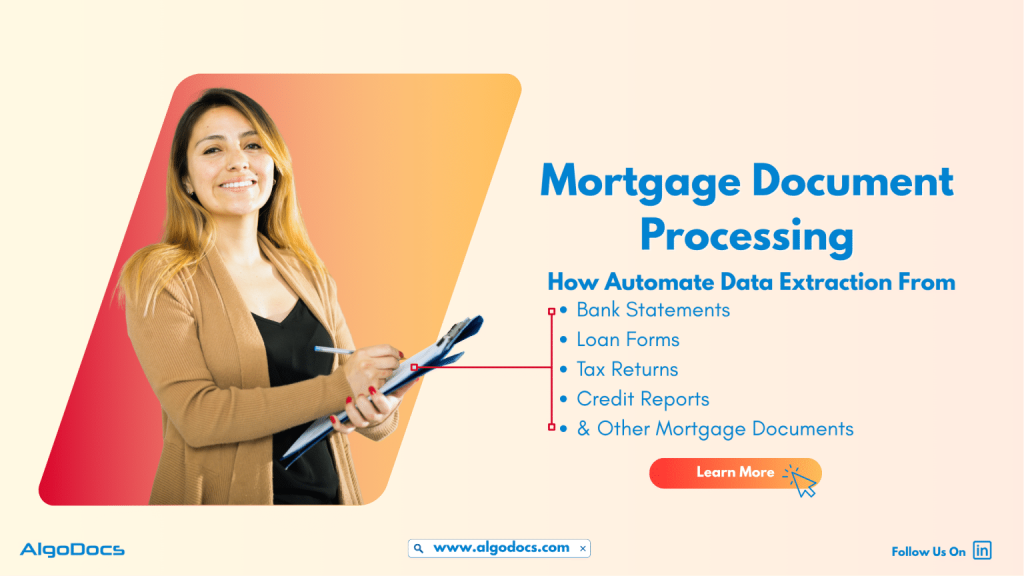
Mortgage Document Processing: How To Automate Data Extraction From Mortgage Documents Using AI

  Tasks such as document processing have always been a challenge for many industries for many years. One of the major industries that has been involved in this never-ending journey is the financial and mortgage industry. With tons of different types of mortgage documents such as loan application forms, bank statements, insurance documents, invoices, and the list goes on. But data extraction from these types of financial or mortgage documents has always been a mundane yet critical aspect of business growth. Why was it a mundane but challenging task? Because of the reliance on outdated data extraction methods like manual data extraction. This form of data extraction method is not only slow but also full of errors and other challenges which slow down data extraction efficiency and business growth. It also hampers the customer experience and the efficiency of the business as well.But the rise of technologies such as AI, ML, and Intelligent Document Processing technology has changed how banks, non-bank lenders, credit unions, and mortgage service providers automate the data extraction process with greater accuracy and speed. In this in-depth blog, we’ll explore what mortgage document processing entails, why it matters in today’s lending ecosystem, the types of documents involved, how AI and intelligent automation play a role, and how SaaS platforms are enabling this transformation. We will also refer to industry benchmarks and studies to offer a fact-driven perspective. Introduction The mortgage lending process involves a complex and time-consuming set of documentation tasks. Every loan application requires the handling of dozens, if not hundreds, of documents — from borrower income verification to title deeds and credit reports. Manually reviewing, validating, and organizing these documents introduces bottlenecks, increases the risk of error, and impacts borrower satisfaction. Mortgage document processing technology is addressing these inefficiencies by bringing automation and intelligence into the document lifecycle. The rise of intelligent document processing (IDP), machine learning (ML), and robotic process automation (RPA) has made it possible to handle large volumes of documents with speed and accuracy. What Is Mortgage Document Processing? Mortgage document processing refers to the digitization, extraction, classification, validation, and storage of documents related to the mortgage lifecycle. This includes automating data capture from scanned paper documents, PDFs, and digital forms, and transforming that unstructured data into structured formats that are machine-readable and easily integrated with loan origination systems (LOS) and customer relationship management (CRM) tools. A robust mortgage document processing system typically involves: It plays a critical role from pre-qualification to underwriting, closing, and post-closing audits. Challenges in Traditional Mortgage Document Workflows Despite advancements in fintech, many mortgage processes still rely on manual workflows. According to a 2023 report by the Mortgage Bankers Association (MBA), more than 40% of lenders still rely on human-based document checks during underwriting. Key challenges include: These inefficiencies result in delayed loan approvals, lost business opportunities, and poor borrower experiences. Key Mortgage Documents Involved Mortgage document processing covers a wide array of documents, including: Each document varies in structure, format, and critical data points, which makes manual processing highly error-prone. The Role of AI in Mortgage Document Processing Artificial Intelligence (AI) has fundamentally changed how mortgage document processing is done. AI-powered solutions use a combination of OCR, machine learning, and NLP to intelligently identify, extract, and validate data from structured and unstructured documents. Try Algodocs Free AI Data Extraction Tool To Automate Data Extraction From Mortgage Document Sign Up How AI Adds Value: Leading SaaS providers now offer AI-enabled platforms with out-of-the-box mortgage document processing capabilities tailored for lending institutions. Benefits of Automated Mortgage Document Processing The impact of automation on mortgage processing is profound. According to a 2024 report by Deloitte, lenders using intelligent automation tools reduce loan processing time by 50% and cut document handling costs by up to 60%. Key benefits include: SaaS Solutions Transforming the Mortgage Landscape SaaS platforms are at the forefront of revolutionizing mortgage document processing. Cloud-based solutions offer real-time access, flexible scalability, and faster implementation compared to legacy on-premise systems. Features of Leading SaaS Mortgage Document Processing Platforms: These solutions are used by top lenders, credit unions, and brokers to create end-to-end digital mortgage workflows. Compliance and Regulatory Considerations Mortgage lending is heavily regulated, and mortgage document processing must align with various compliance frameworks such as: An effective mortgage document processing system must: Market Trends and Future Outlook Mortgage technology is evolving rapidly. According to a 2025 study by PwC, more than 70% of lenders plan to invest in AI-based document processing within the next 18 months. Key Trends: The convergence of automation, cloud computing, and AI is setting the stage for a fully digital mortgage ecosystem. Choosing the Right Mortgage Document Processing Platform Selecting the right platform is essential for maximizing ROI. Key evaluation criteria include: Vendors that offer pre-trained mortgage-specific models, responsive support, and transparent pricing tend to deliver better outcomes. Conclusion Mortgage document processing is no longer a nice-to-have. It’s a strategic necessity in a market where customer expectations, compliance demands, and competition are all intensifying. By leveraging intelligent SaaS platforms, lenders can not only accelerate their mortgage lifecycle but also reduce operational risk and boost customer satisfaction. As the mortgage industry continues to digitize, those who embrace automated mortgage document processing will lead the way in efficiency, accuracy, and agility.

Algodocs

The Role of Intelligent Document Processing for Real Estate Document Management and How AI Is Improving It

The real estate industry deals with lots of document in day-to-day operation. One of the most common documents are lease agreements, loan documents, mortgage documents, property evaluations, occupancy certificates etc. The volume of paperwork involved in managing real estate transactions is huge and Handling all of this with manual approach can be slow, costly, and full of errors. This is where intelligent document processing for real estate comes in to save the day. . Intelligent Document Processing (IDP) is changing how real estate professionals handle documents. It uses artificial intelligence (AI), machine learning (ML), and optical character recognition (OCR) to scan, read, and organize documents automatically. It helps companies process information faster, more accurately, and with less manual effort. In this blog, we will explore the importance of document management in real estate, how intelligent document processing makes it better, what challenges the industry faces, how AI is improving these processes, and why Algodocs is a great tool for managing real estate documents. What is Real Estate Document Management and data processing? Real estate document management is the process of storing, organizing, retrieving, and sharing documents related to real estate transactions. These documents include contracts, purchase agreements, mortgage documents, rental applications, financial records, property titles, insurance forms, and inspection reports. Managing these documents well is important for several reasons. It keeps transactions legal and traceable. It also protects both buyers and sellers by ensuring that information is correct and up-to-date. Proper document management can also improve customer service by making information easy to find and share. Traditionally, document management in real estate has been paper-based. Even when digital storage is used, it often involves scanning documents and saving them in folders without any automation. This approach makes it difficult to search for information, increases the chances of losing documents, and wastes time during every transaction. As real estate firms grow and deal with more clients and properties, manual document management becomes a bottleneck. There is a need for smarter solutions that can handle this workload efficiently. That is why intelligent document processing is becoming more popular in the real estate industry. How IDP Helps with Real Estate Document Management and Data Processing Intelligent document processing for real estate allows companies to manage documents more efficiently by automating the extraction of information from various types of documents. Whether the documents are scanned images, PDFs, or emails, IDP can read, understand, and classify them automatically. For example, when a rental application is received, an IDP platform can extract the tenant’s name, income details, and rental history. It can also identify the type of document and route it to the right person or system. This reduces manual effort, cuts down on errors, and speeds up the decision-making process. Here are a few ways IDP helps real estate professionals: IDP systems can handle many different types of real estate documents, such as: These systems use AI to understand the context of the document and extract key data fields. The extracted data is then passed to a central database, CRM, or enterprise resource planning (ERP) system for further use. Challenges in Real Estate Document Management Even with modern tools, real estate companies still face many challenges when it comes to document management. Some of the most common issues include: 1. High Volume of Documents:Real estate companies deal with hundreds of documents every week. These documents often come from multiple sources such as email, courier, online portals, or clients directly. Organizing all of these files manually is time-consuming. 2. Unstructured Formats:Documents come in many formats. Some are PDFs, some are images, and others are scanned paper documents. Without intelligent tools, extracting data from these formats is hard. 3. Manual Errors:Data entry mistakes can lead to legal problems, lost sales, or financial losses. Manual review processes are slow and prone to human error. 4. Compliance Requirements:Real estate firms must follow legal and financial regulations. Keeping accurate records and audit trails is necessary. Manual systems make this difficult. 5. Storage and Retrieval Issues:Traditional storage systems make it hard to search for or retrieve documents when needed. This can delay transactions and frustrate clients. 6. Security Concerns:Real estate documents often contain sensitive data such as social security numbers, bank information, or credit scores. Storing these securely is a major concern. These challenges show the need for a smarter, more secure, and more scalable solution like intelligent document processing for real estate. What to Consider Before Choosing an IDP Tool for Real Estate Business Before adopting any IDP solution, real estate businesses should consider the following points to make the right choice: 1. Document Variety Support:The IDP tool should be able to process different types of documents, both digital and scanned. It should support PDFs, Word files, images, and email attachments. 2. Accuracy of Data Extraction:Choose a tool that has high accuracy in extracting data from unstructured documents. AI-based platforms improve accuracy over time as they learn from corrections. 3. Integration with Existing Systems:The IDP solution should easily integrate with your existing CRM, ERP, or document management system. This will help automate the entire workflow. 4. Security and Compliance:Look for platforms that follow global security standards such as GDPR or ISO 27001. Make sure the tool provides secure access, encryption, and audit trails. 5. Scalability and Speed:As your business grows, the volume of documents will increase. The IDP tool should be able to scale and handle the extra load without delays. 6. User-Friendly Interface:A clean and simple interface makes it easier for non-technical staff to use the platform effectively. 7. Cost Efficiency:Consider the cost of the tool in relation to the benefits it provides. A good IDP tool will save more money in the long run by reducing labor costs and improving productivity. 8. Customization and Flexibility:Every real estate business has unique workflows. The IDP tool should allow custom rules, templates, or data fields to match your specific needs. How AI is Impacting Document Management and Data Processing for Real Estate Industry Artificial intelligence is changing how real estate businesses process and manage

Algodocs

Best OCR Recognition Software: 10+ Tools You Should Know

In today’s digital world, people and businesses deal with a lot of paperwork. From scanned documents to printed forms and even handwritten notes, all of this data needs to be turned into something useful. That’s where OCR comes in. OCR stands for Optical Character Recognition. It helps read text from images, PDFs, and scanned documents and changes it into real, editable text. OCR technology is useful in many industries like healthcare, banking, logistics, and education. It helps save time, reduce human error, and organize data quickly. In this blog, we will talk about the best OCR recognition software you can use. Whether you are looking for a free tool, a paid one with advanced features, or an open-source option, we’ve got you covered. Let’s look at the top 10+ OCR tools available today. We’ll explain what each tool is, how it works, and what makes it a good choice. 1. Algodocs Algodocs is considered one of the best & most powerful AI based OCR recognition and data extraction tools in the market today. It is a cloud-based platform that helps you to automate data extraction from PDFs, scanned documents, medical reports, invoices, bills, purchase orders, and other documents with accuracy. It is especially helpful for businesses that want to save time and reduce errors while handling large amounts of documents. What makes Algodocs special is its use of AI and machine learning to improve the accuracy of data extraction. You don’t need to write any code to use it. You can create templates for your documents and set up automatic data extraction workflows. Try Algodocs Free Forever Plan Today Sign Up Today Key features of Algodocs: Who should use it: logistics organizations, healthcare professionals, finance teams, legal firms, and businesses that handle complex documents. Algodocs offers a free plan with limited pages and paid options for higher volumes. It is perfect for anyone looking to save time and improve document workflows. 2. Nanonets Nanonets is another AI-powered OCR tool that focuses on smart automation. It helps users extract data from a wide range of documents like ID cards, invoices, purchase orders, and receipts. Features: Nanonets also provides an API, so developers can add OCR to their own apps. It offers a free trial and paid plans for larger use. 3. Docsumo Docsumo is built for businesses that need to handle many documents daily. It works well with financial forms, insurance claims, and KYC documents. Docsumo can extract data even when the documents are not in perfect condition. Features: Docsumo offers a free plan for testing, and its paid plans are good for growing businesses. 4. Docparser Docparser is a great OCR software for extracting data from business documents like invoices, delivery notes, and contracts. It uses rule-based data extraction, meaning you can tell it exactly what to look for in a document. Features: Docparser is suitable  for teams that need full control over their document data. It is easy to use and very reliable. 5. ABBYY FineReader ABBYY FineReader is a well-known name in the OCR world. It offers advanced OCR features and high accuracy. It works with more than 190 languages and supports both printed and handwritten text. Features: ABBYY is best for professionals and organizations that need top-quality OCR. It is a paid tool, but many users say it is worth the cost. 6. Adobe Acrobat Pro Adobe Acrobat Pro is not just a PDF reader. It also includes powerful OCR features. You can scan documents, convert them into searchable PDFs, and even copy the text into Word or Excel. Features: Adobe is great if you already use other Adobe products or want a reliable tool with full PDF support. It offers a free trial and monthly subscription plans. 7. Parseur Parseur is an OCR and document parsing tool for emails, PDFs, and other files. It is ideal for extracting data from incoming messages and scanned documents automatically. Features: Parseur is easy to set up and works well for teams that want to speed up data entry without much effort. 8. Tesseract OCR Tesseract is one of the most popular open-source OCR engines. It is free to use and supports more than 100 languages. It works on Windows, Linux, and macOS. Tesseract is mainly used by developers who want to add OCR to their apps or systems. Features: Tesseract doesn’t come with a user interface, so it’s not for beginners. But it is perfect for tech teams and open-source lovers. 9. Rossum Rossum is an AI-based data extraction tool for business documents. It is made for large teams that need to process documents like invoices, purchase orders, and bills. Features: Rossum is best for companies that need to process thousands of documents every day. It comes with paid plans but also offers a trial version to test. 10. SimpleOCR and OCR Space SimpleOCR is a free tool for scanning and converting printed text. It works best with typed documents, although it also tries to read handwriting. Features of OCR Space: Both of these tools are great for people who want to try OCR without paying. They may not have all the features of paid tools, but they still get the job done. 11. OCR Space is another free online tool. You can upload images or PDFs, and it will give you back the text. It’s fast, easy, and doesn’t need any signup. Features of SimpleOCR: How to Choose the Best OCR Tool Choosing the right OCR software depends on your needs. Here are a few things to think about: If you are a business that handles a lot of documents, Algodocs, Docsumo, or Rossum may be your best choices. If you are a student or small user who just wants to convert a few files, OCR Space or SimpleOCR can work well. For developers and tech teams, Tesseract offers a lot of flexibility. Final Thoughts OCR software has changed how we handle documents. It helps save time, reduce mistakes, and keep data organized. With so many great tools available, there is something for everyone. Algodocs stands

Scroll to Top