Algodocs

intelligent document processing

What intelligent document processing is, and where it goes beyond plain OCR. Compare IDP platforms, see how other teams deployed them, and learn how to pick a solution that matches your document volume and accuracy requirements.
intelligent document processing

IDP Use Case: Transforming Restoration Practices

Earthquakes, hurricanes, mudslides, electrical fires, and burst pipes are some of the natural incidences that are usually unforeseen. Buildings that are often at the receiving end during catastrophic calamities require immense repair work. Any comprehensive structure will, in this respect, indeed call for disaster recovery management, especially if it is a house or a company. It has scaled tremendously to be vital software in the construction industry, but it is notably critical in the catastrophe repair industry, where most companies are small. Table of Contents: But as structures progress, many organizations like yours struggle to cope with change. Often, the driving force of success is in the technology that forms the basis of these organizations. Let us think of the building and restoration industry and see what we come up with. These companies have to estimate all possible costs for a building construction project, including additional costs such as salary for office employees, wear and tear of equipment, office rent and other overhead expenses, and cost of all the materials used and wages to workers. Enhancing Data Management in Restoration Processes Intelligent Document Processing (IDP) tools can capture information from any format that has not been pre-formatted, including images and handwritten writings. This can be of great importance, especially in restoration processes where data could be in large quantities, in the form of field notes and sketches, among other things. The Importance of Accurate Costs and Expenses Some of the factors one needs to understand well to accurately estimate the cost of the project include the building material costs, the requirements, the procedures, and the codes that are to be followed, as well as the need to understand the market trends in terms of pricing. Such information may be found by analyzing a bid package and working through the contingencies and profit inherent in a bid or a given project. Two Significant Challenges: Documentation obstacles: One of the challenges associated with restoration events is collecting all the relevant and non-concocted paperwork. Some of the effects of this cumbersome procedure include the failure to complete some forms or the delay in completing them. Accounts Receivable Delays are attributed primarily to fourteen struggles stemming from a high turnover rate in accounting: payment cycles take longer. This not only impacts cash flow but also definitely causes a lot of headaches for the business’s dealings with its customers. The Impact of Intelligent Document Processing (IDP) Software on Restoration Businesses: Implementing Intelligent Document Processing (IDP) Several Challenges. Here are some of the key ones: Case Study Use case for restoration: The repair company wishes to provide the customer with an overview of line-item estimates for the job. Cost estimates should not be utilized as a list of negotiable items. Supplemental costs may apply if more damage or repair that has not been found or is hidden below present finishes is required. This also enables the client to correct himself or herself if they chose compositions that are not within the estimate or if they need extra work. This is because, in the course of the project implementation, changes will be made to adjust for the revised estimate and present it to the client. Any changes made to these documents will be recorded in a change order and presented to the customer for revision. System: It is a form of advanced digital document processing with natural language processing, multimedia processes, and feature extraction. Primary actor: Accountant/bookkeeper/Customer Scenario: To meet the customer’s request to extract the estimated line-item information from the final amount, the following processes should be considered: They ask for the extracted data to be formatted differently than the original document’s formatting. They clearly explain what should be ignored and what needs to be extracted. There are a total of 11 headers in the PDF; each row value contains three different pieces of information: one is the labor, the second is the material, and the third is the equipment information. They need to extract the labor and material information. For example, the following are the instructions for the needed to be extracted data and how it should look like output: Tabular output with headers and the order they should be in JSON form: ·”ITEM#”, mapped from the label in Yellow (as in the picture above) ·”ROOM”, mapped from the label in dark green (as in the picture above) ·”UNIT”, mapped from the label in Red (as in the picture above) ·”QTY”, mapped from the label in light blue (as in the picture above) ·”UNIT PRICE”, mapped from the label in light green (as in the picture above) ·”TOTAL” mapped from the label in pink/magenta (as in the picture above) However, we still need to extract and differentiate data for Labor and Material information. While mapping the extracted data to the new headers, as requested by the customer. As complicated as it looks and sounds, Algodocs can do exactly this request easily.  How to Use Algodocs to Extract We only need a sample file uploaded to Algodocs to create the extractor. There are many ways to upload a sample document. The user can automate importing files to Algodocs uploading from their device, business email, Gmail, or other cloud storage. Once the documents are uploaded, the system will extract data from your documents using Algodocs’ advanced AI engine without relying on templates or even labeling and training your files.  The results are the actual contents extracted from the sample document according to the rules you specify. We have Rule-based extraction and artificial intelligence mining, which can be integrated to synthesize both extraction methods. This can help you further improve your extracted data by putting it into the correct form and structure.  The system makes it easy to control extracted data from your documents and handle business exceptions. It allows you to export the extracted data directly to an Excel Spreadsheet or, with the integration of Zapier, automate exporting extracted data directly to your email, Google Sheets, or other cloud storage. Example of Output in Excel Key Takeaways This should explain how Algodocs has boosted the restoration business and its experience with the solution to prove that technology can transform any business. Let your team be an example of how adopting effective and progressive concepts can

Best Intelligent Document Processing Software
intelligent document processing

Best Intelligent Document Processing Software in 2025: Features, Benefits & Comparison

Back to Blog Table of contents On this page Best Intelligent Document Processing Software in 2025: Features, Benefits & Comparison Home › Blog › intelligent document processing › Best Intelligent Document Processing Software in 2025: Features, Benefits & Comparison Categories intelligent document processing By Shubhankar Biswas Published September 1, 2025, 07:45 Updated July 23, 2026, 06:23 Imagine having over 10,000 documents on your desk and needing to extract data from all of them within a limited timeframe. How would you manage? Manually processing such a large volume of documents could take weeks or even months, increasing the likelihood of errors along the way and finding best intelligent document processing software can be a real challenge. Fortunately, with AI-powered Intelligent Document Processing (IDP) software, you can extract data from multiple documents with high accuracy and efficiency while automating the entire process—allowing you to focus on more critical tasks. With IDP, you can seamlessly extract data from invoices, contracts, medical records, legal documents, and more, significantly improving speed, accuracy, and efficiency. This not only enhances business performance but also helps organizations achieve their goals more effectively. By leveraging Artificial Intelligence (AI), Machine Learning (ML), and Optical Character Recognition (OCR), IDP automates document classification, data extraction, and processing—making your workflow smoother and more efficient. However, with so many Intelligent Document Processing solutions available in the market, selecting the right tool for your business can be overwhelming. That’s why we’ve created this guide—to help you understand the key factors to consider when choosing an IDP solution and why Algodocs stands out as the best Intelligent Document Processing platform for data extraction for your business. What is Intelligent Document Processing? Intelligent Document Processing (IDP) is an advanced document processing technology that combines Artificial Intelligence (AI) and Machine Learning (ML) with traditional Optical Character Recognition (OCR) to automate the extraction, classification, and organization of data from both structured and unstructured documents. Unlike traditional OCR, which only identifies printed text, IDP solutions leverage Machine Learning and Natural Language Processing (NLP) to understand context, enhance accuracy, and seamlessly integrate with existing enterprise systems. One of the key advantages of Intelligent Document Processing is its ability to extract data even from blurry, skewed, or unstructured documents—capabilities that traditional OCR lacks, as it primarily relies on structured formats. Additionally, IDP software can integrate with third-party applications through APIs or prebuilt integrations, enabling real-time data transfer between external systems and IDP platforms. This not only enhances efficiency but also saves organizations valuable time and operational costs. How Intelligent Document Processing Software Works intelligent Document Processing (IDP) primarily leverages Artificial Intelligence (AI), Machine Learning (ML), and Large Language Models (LLM) combined with Optical Character Recognition (OCR) to extract and process data from PDFs, scanned images, invoices, bills, purchase orders, and other documents. It captures unstructured data from these sources and transforms it into a structured format that is easily readable and interpretable by computers. Additionally, IDP software automates the entire document processing workflow by integrating with third-party applications, significantly reducing the time required for data extraction and processing. The true power of Intelligent Document Processing lies in its AI and ML capabilities, which are trained on vast datasets to recognize complex text formats and document layouts. This enables efficient data extraction from various types of documents, including blurry or low-quality images. The LLM (Large Language Model) within IDP software is continuously trained to enhance extraction accuracy across different document types and file formats, ensuring greater precision and reliability. Key Benefits of IDP Software Intelligent Document Processing (IDP) software empowers businesses to maximize productivity and efficiency by eliminating the repetitive, manual tasks associated with data extraction. Below are the key benefits that make IDP software a valuable investment for organizations: Automation: IDP tools streamline data extraction and preprocessing, eliminating the need for manual work. By automating these processes, businesses save time, resources, and costs while allowing employees to focus on more critical tasks. Accuracy: Manual data extraction is prone to human errors, which can lead to costly mistakes. IDP platforms leverage AI and ML technologies to minimize errors, ensuring high accuracy in data extraction and processing. Scalability: IDP software allows businesses to process large volumes of documents without requiring additional manpower. Organizations can scale their document processing operations up or down based on demand, reducing unnecessary expenses. Seamless Integration: IDP software integrates effortlessly with existing business applications, facilitating smooth data exchange across platforms. With APIs and prebuilt integrations, IDP platforms can connect with ERP, CRM, HR, and other enterprise systems. Data Security: Protecting sensitive business and financial data is crucial. IDP software ensures compliance with security regulations by maintaining encrypted and organized records accessible only to authorized personnel. Best Intelligent Document Processing Software Algodocs: The Leading IDP Solution: Algodocs is the best AI-based Intelligent Document Processing software that enables businesses to automate data extraction from invoices, bills, financial documents, HR forms, purchase orders, and other document types with high accuracy and speed. It leverages AI-driven OCR and ML-based data extraction techniques to streamline workflows and improve operational efficiency. With its new Generative AI feature, users can extract data from invoices, bills, bank statements, and ID cards effortlessly. Key Features of Algodocs: AI-Powered Data Extraction: Extracts tables, fields, selection marks, and key information from structured and unstructured documents. Customizable Workflows: Users can define specific extraction rules to match their business needs. Support for Multiple Formats: Works with PDFs, scanned images, invoices, receipts, contracts, and more. Cloud-Based & Secure: Ensures data security with end-to-end encryption and cloud accessibility. Integration with Other Applications: Seamlessly integrates with ERP, accounting tools, CRMs, and other business software. With its user-friendly interface, high accuracy, and automation capabilities, Algodocs is an ideal solution for businesses looking to enhance their document processing efficiency. Nanonets Nanonets is an IDP platform that allows users to build and train custom models for document processing. It supports automation workflows, integrates with various APIs, and ensures seamless data extraction for industries like finance, healthcare, and logistics. Docsumo Docsumo specializes in processing financial and business documents, such as invoices, bank statements, and tax forms. It offers pre-trained models that enhance data extraction accuracy while

bill of lading, intelligent document processing, passport, PDF

Bank Statement Extraction: How To Revolutionize Financial Data Management with AlgoDocs AI

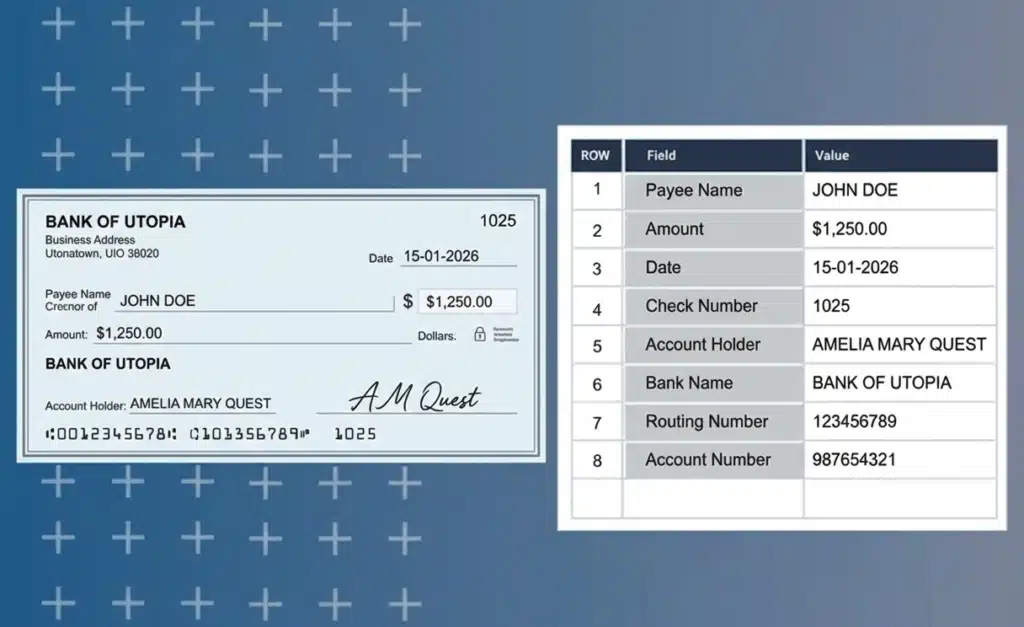
Back to Blog Table of contents On this page Bank Statement Extraction: How To Revolutionize Financial Data Management with AlgoDocs AI Home › Blog › bill of lading › Bank Statement Extraction: How To Revolutionize Financial Data Management with AlgoDocs AI Categories bill of lading intelligent document processing passport PDF Tags agentic ai Invoice Data Extraction passport data extraction pdf to text Purchase Order OCR By Ibrahim Nalbant Published December 31, 2024, 11:13 Updated June 25, 2025, 16:52 Introduction In today’s world, managing financial data quickly and accurately is very important. One task that takes a lot of time is bank statement extraction. Thanks to technology, especially Optical Character Recognition (OCR), and more advanced technology like Intelligent Document Processing (IDP) and AI, this job has become much easier. This blog will explain what bank statement extraction is, why it’s needed, the challenges it presents, and the best tools for the job. We’ll also discuss how AlgoDocs’ Intelligent Document Processing (IDP) tool can make extracting bank statement data easier and more convenient. What is a Bank Statement? A bank statement is a record of all the financial transactions that have occurred in a bank account over a specific period. These bank statements can be personal or corporate financial statements. They provide a detailed overview of all the deposits, withdrawals, and other activities that have impacted the account’s balance. This includes transactions like cash deposits and withdrawals, checks written and cleared, electronic transfers, ATM withdrawals, and even interest earned or fees charged. Essentially, it’s a comprehensive summary of the account’s financial activity, allowing account holders to track their spending, monitor their income, and identify any discrepancies or unauthorized transactions. What is Bank Statement Data Extraction? Bank statement data extraction means extracting data from bank statements. These bank statements can be in PDF files, Excel files, or scanned documents. In a bank statement or a standard financial document, you will find data such as transaction details, account balances, dates, amounts, account holder names, tax details, etc. If you want to extract data from a bank statement, you can either choose the manual data extraction method or pick an online financial data extraction tool to get the job done. However, manual data extraction takes a lot of time and is prone to errors, which can create more problems. That’s why businesses these days often use bank statement OCR to make data extraction easy and effective. Why Bank Statement Extraction is Needed Many businesses handle a large number of financial receipts, bank statements, and financial records as part of their daily operations. Extracting and organizing this vast amount of data can be a challenging task. Here are some key reasons why bank statement extraction is essential: Financial Analysis: Extracting data from bank statements allows businesses to understand their spending patterns, income sources, and overall financial activities. This analysis helps in making informed financial decisions, budgeting, and forecasting future financial needs. Bookkeeping and Accounting: Accurate data extraction simplifies the bookkeeping and accounting processes. By having organized and structured financial data, businesses can maintain accurate records and easily reconcile transactions, ensuring that their financial books are always up-to-date. Audit and Compliance: Extracting data from bank statements is crucial for meeting legal requirements and ensuring transparency in financial reporting. During audits, having organized data makes it easier to demonstrate compliance with financial regulations and standards, such as those set by tax authorities. Fraud Detection: Monitoring financial transactions through data extraction helps in detecting and preventing fraudulent activities. By analyzing bank statement data, businesses can identify suspicious patterns or unauthorized transactions, allowing them to take timely action to mitigate risks. Which Industries Require Bank Statement Extraction Many industries require efficient bank statement extraction, including: Banking and Finance: This industry relies heavily on bank statement extraction for monitoring transactions, processing loans, and managing accounts. Efficient data extraction helps in maintaining accurate records and ensuring compliance with financial regulations. Accounting Firms: Accounting firms use bank statement extraction to prepare financial statements and provide tax services. Accurate data extraction simplifies the accounting process, making it easier to maintain precise financial records and ensure timely tax compliance. Legal Firms: Legal firms need bank statement extraction for forensic accounting and legal support. Extracted data can be crucial in investigating financial discrepancies, supporting legal cases, and providing accurate financial evidence in court. Healthcare: The healthcare industry uses bank statement extraction for handling payments and processing insurance claims. Efficient data extraction helps in managing patient billing, ensuring accurate insurance claim processing, and maintaining financial transparency. E-commerce and Retail: E-commerce and retail businesses rely on bank statement extraction to manage cash flow and vendor payments. Extracted financial data helps in monitoring sales transactions, managing expenses, and ensuring timely payments to suppliers. Challenges with Manual Bank Statement Extraction Manually extracting data from bank statements has several problems: Time-Consuming: Entering data manually is time-consuming. Extracting data from each sheet of a bank statement requires significant time for analysis and capture, making the process even more cumbersome. Error-Prone: Human errors can lead to inaccurate records. Manual data extraction is prone to mistakes, as human eyes can’t always interpret everything correctly. This can result in serious consequences, such as data extraction errors, missed valuable data, and other issues. High Costs: Manual data extraction is costly because it requires employing more personnel to extract data from documents. This ultimately increases the operational costs for the company. Scalability Issues: With manual data extraction, you can’t adjust the number of personnel based on requirements. Therefore, scalability options with manual data extraction are very limited. Data Security: When your data is exposed to human intervention, there is a risk that it can be misused for illegal activities. Bank statement data is very sensitive, and exposure to the wrong hands can lead to serious trouble for individuals or organizations. What is a Bank Statement OCR? Optical Character Recognition (OCR) is a technology that converts various types of documents, such as scanned papers, PDFs, or images, into editable and searchable data. A bank statement OCR specifically

Scroll to Top