Algodocs

KYC

Artificial Intelligence, Data Extraction

AI Data Extraction Checklist: Transform Business with Algodocs

Back to Blog Table of contents On this page AI Data Extraction Checklist: Transform Business with Algodocs Home › Blog › Artificial Intelligence › AI Data Extraction Checklist: Transform Business with Algodocs Categories Artificial Intelligence Data Extraction Tags bank ocr deep learning digital transformation Finance ocr invoice invoice process KYC loan forms packing list ocr pdf to text sea waybill ocr web-based ai platform for data extraction By Shubhankar Biswas Published October 13, 2025, 09:25 Updated July 23, 2026, 07:33 What is AI Data Extraction? Let’s discuss data – a lot of data. Modern-day businesses are losing themselves in the sea of information. Whether it is an invoice, a contract, a weekly report, or a form, paper documents are still part of everyday life. Extracting data from such documents is a tedious, repetitive, and painful process if done manually. This is where AI data extraction comes to the rescue. It is a game-changer for anyone who has to work with several papers. Incorporating AI means data entry activities are done efficiently and there’s an increase in the accuracy and productivity of your business. Algodocs is a perfect example of an AI data extraction tool. Why? Let’s find out. Understanding Your Data: The Foundation for Successful AI Data Extraction Before you set loose the AI on your documents, I thought it’s best to discuss a little about your data. It is essential to know what type of data you are going to extract and what the process is going to be like. Identify Your Data Sources First things first: where do you store your data? The first action plan is to identify this source. Is it hidden in files and papers or dispersed in different online sites as in virtual archives? You’ll find your data in various forms: Manual records or documents that include invoices, contracts, and reports, among others. Documents in PDF files, Word documents, Excel, images, and many others. Databases that store many formats of data about any department in an organization. Assessing Data Quality Data quality is super essential for accuracy in the extraction process. Ensure that you go through your assembled data to determine whether it meets the standard of completeness, consistency, and accuracy. Check that all required data items are included. Check whether the formats, units of measurement, and terms used for data are consistent. Validating steps where errors, inconsistencies, or outliers will affect the outcome must be adopted diligently. Dedicating time to data preparation will enable laying down the key fundamentals of an AI data extraction project. Optimizing the extraction results of Algodocs, the company provides you with tools for evaluating data quality and detecting potential problems. Choosing the Right AI Data Extraction Tool Picking the right tool to extract AI data is critical to the success of any AI project. As we have seen, there are numerous strategies out there; that is why it is crucial to define your requirements precisely and compare tools based on the crucial factors. Critical Considerations for Tool Selection Accuracy: The whole idea of training an AI in the first place is to increase accuracy, isn’t it? Search for the tool with favorable accuracy characteristics, especially in the case of processing intricate and diversely formatted documents. Don’t forget about tables, crazy handwriting, or low-quality pictures. Speed: It’s important, especially in dealing with large numbers of documents that are prevalent in the modern organization. However, time translates to costs, more so when handling big data at hand or any other business. Having a fast and efficient tool can save hours, if not days off of your time. Flexibility is very important, especially for those industries that anticipate expansion. Scalability: The tool should be designed for growth which includes a higher amount of input data and scalability of business over time. Document Types: Think about the countless supported document types with your tool (PDFs, images, Word, Excel, and more). Data Formats: Verify that the tool can export information according to your preferred choice format (CSV, XML, JSON, etc.). Integrations: This is very important as technology should be compatible with the current systems and applications. In other words, a single tool could essentially serve the purpose. But if a tool can integrate with other existing systems, then that’s ideal. It integrates with frequently used business applications such as CRMs, ERPs, and data warehouses. Pricing: Analyze cost distribution for various pricing structures considering your estimated budget. Customer Support: Customer support should be reliable and available for providing technical support and answering questions at all times. Types of AI Data Extraction Tools Cloud-Based Tools AI data extraction in cloud-based is also beneficial since it is scalable, easily accessible, and mostly cheaper. These tools are stored at service providers’ central servers, and users only need an Internet connection to use them. Examples: Google Cloud Document AI, Amazon Textract, ABBYY Cloud OCR, and Algodocs. On-Premise Tools On-premise solutions allow necessary control over infrastructure, but they can be more expensive. These tools are deployed and run on the organization’s own IT systems and infrastructure. It is worth mentioning that Algodocs is a web-based tool; however, it can also be used On-premise. Examples: Kofax, OpenText, and Algodocs. Open-Source Tools Using and adapting open-source AI data extraction tools is more flexible and customizable, but implementing these tools requires technical skills. Examples: Tesseract OCR, OpenCV Mobile Apps Mobile applications usually reside on document capture and basic data mining capabilities. This is perfect for small data snippets or impromptu snapshots of information gathering. However, such tools may not work well when a large quantity of structured content, such as tables, is involved. Not to forget that handwriting style and layout complexities can cause the accuracy of such tools to drop. Examples: Google Lens or Microsoft Office Lens can scan your document and convert the text into a digital format. Making an Informed Decision Considering the following aspects and your organization’s requirements, you can choose the right AI data extraction tool for your organization. Feature Cloud-Based On-Premise Open-Source Mobile Apps Accuracy High High Varies Varies Speed High High Varies

Algodocs

How to Use AI to Improve KYC Document Processing and Data Extraction: Features, Benefits, Challenges, and Tools

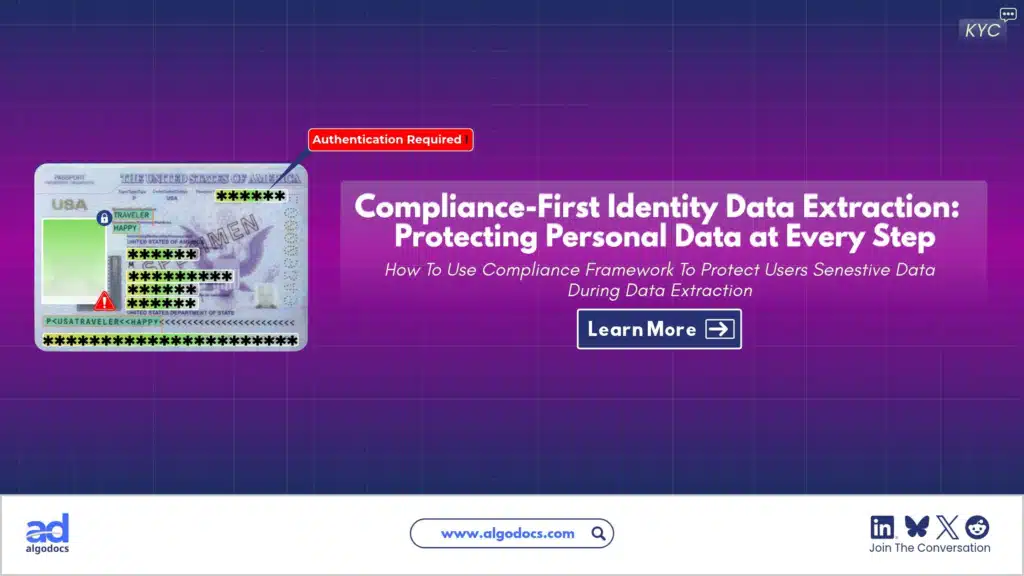
Back to Blog Table of contents On this page How to Use AI to Improve KYC Document Processing and Data Extraction: Features, Benefits, Challenges, and Tools Home › Blog › Algodocs › How to Use AI to Improve KYC Document Processing and Data Extraction: Features, Benefits, Challenges, and Tools Categories Algodocs Tags ai platform for data extraction algodocs KYC machine learning By Shubhankar Biswas Published September 1, 2025, 07:42 Updated July 13, 2026, 09:54 KYC is one of the most important processes in sectors such as banking, finance, travel, and more. With the help of KYC documents, businesses ensure the proper and smooth transaction of services to their customers. However, KYC data extraction and document processing is a delicate and challenging task, and manually performing such a crucial process has many drawbacks, such as data inaccuracy, slow data processing, and human errors, which can create significant problems. But with the help of technologies such as artificial intelligence, machine learning, and intelligent document processing, businesses can improve data extraction accuracy, reduce time, and handle more customers in less time. In this blog, we will explore how AI can improve KYC document verification processing by effectively extracting data from ID cards, passports, and other identity documents. We will also discuss the challenges associated mainly with manual data extraction, how to overcome them with AI and IDP, the best tools available in the market, and how Algodocs is a great tool for KYC document processing and data extraction. Understanding KYC Verification and KYC Document Processing and Data Extraction KYC, or Know Your Customer, is the process of identifying personal details from identity documents such as ID cards, government-issued documents, passports, or other documents used by a company to provide various types of services to its customers. The sole purpose of KYC verification is to check the legitimacy of customer data provided to the company to avail of a service. These services may include approving a bank loan for a customer by a financial institution or granting a visa for travel by some countries’ border agencies. KYC verification or KYC data extraction is used by many organizations and businesses worldwide to access useful information about a person or customer. KYC document processing involves extracting data from identity documents such as ID cards, passports, and government-issued documents. These details include a customer’s name, DOB, address, financial details, age, country, etc. Extracting data can be done either manually or using sophisticated technologies such as intelligent document processing tools, AI, and machine learning to automate the entire process. How AI Enhances KYC Data Extraction and Document Processing With the help of AI, KYC document processing and data extraction can be greatly improved. Below are a few features of AI that help improve KYC data extraction and processing: 1. Document Classification AI can automatically identify and sort documents—passports, utility bills, or tax forms—using ML models trained on vast datasets. This eliminates manual categorization, paving the way for seamless KYC data extraction. 2. Advanced OCR for KYC Data Extraction Traditional OCR technology is limited as it only converts images to text, but AI-powered OCR excels at KYC data extraction by pinpointing specific fields—like names or ID numbers—despite poor image quality or varied layouts. This is especially useful for ID card data extraction, where precision is critical. One of the biggest advantages of AI-powered OCR is that it delivers 100% data accuracy, while traditional OCR fails to do so. 3. Data Validation and Cross-Checking Once KYC data extraction is done, AI can accurately validate the information against databases (e.g., government records or credit bureaus). It flags inconsistencies—like mismatched addresses—ensuring identity data processing is reliable and compliant. This saves time, whereas manual data extraction for KYC takes a significant amount of time. 4. Fraud Detection AI analyzes patterns to detect fraud, such as forged IDs or synthetic identities. Techniques like computer vision scrutinize document details during KYC data extraction, identifying tampering that human reviewers might miss. 5. Continuous Learning AI models adapt over time and are continuously trained on vast amounts of data, which improves accuracy in KYC data extraction and document verification as they process more data. This ensures they stay effective even as document types evolve. 6. Workflow Automation By integrating with robotic process automation (RPA), AI orchestrates the entire KYC pipeline—from ID card data extraction to data entry—reducing human effort and accelerating onboarding. Benefits of AI in KYC Data Extraction AI-driven KYC data extraction delivers significant advantages for businesses, customers, and regulators. Here’s why: Try Algodocs Free KYC Data Extraction Tool For Free 1. Increased Efficiency Manual KYC data extraction can take hours to extract data from a single document, but AI reduces this to minutes. By automating the entire process, organizations can improve the efficiency of KYC document processing and extraction. 2. Enhanced Accuracy The manual approach is prone to errors, which can create big issues with data accuracy. Errors in manual KYC data extraction—like typos in ID numbers—can lead to compliance issues. AI’s precision in ID card data extraction and validation minimizes mistakes, ensuring accurate results. 3. Cost Reduction Hiring staff for document verification and KYC data extraction is costly. AI reduces labor dependency, lowering expenses while maintaining quality—a clear win for scalability. 4. Improved Customer Experience Slow KYC document processing can lead to slow onboarding, frustrating customers, and harming a company’s reputation. AI’s fast KYC data extraction—such as real-time ID card data extraction—creates a seamless process, boosting satisfaction and retention. 5. Stronger Compliance Regulations like those from the Financial Action Task Force (FATF) demand rigorous identity data processing. AI ensures compliance by flagging risks and maintaining auditable records during KYC data extraction. 6. Scalability As customer bases grow, so do KYC demands. AI scales effortlessly, handling thousands of KYC data extraction tasks daily without added overhead. 7. Fraud Prevention With financial crime rising, AI’s ability to authenticate documents during KYC data extraction strengthens security, protecting businesses from fraud-related losses. Challenges of Implementing AI for KYC Data Extraction Despite its promising features and benefits, integrating
PDF Text Extraction
Algodocs

PDF Text Extraction: Our Comprehensive Guide 2024

PDF Text Extraction: Our Comprehensive Guide 2024 In a society filled with advanced technology, Portable Document Formats or PDFs are considered supreme. They retain the structure as well as the format, including graphics and charts of the documents. However, conversion of data from PDF to another format that requires analysis or editing is not easy. Apart from exploring the most vital topic of PDF text extraction, this detailed blog also enables you to learn more about enhancing content through text extraction. Types of PDFs The two primary types of PDFs have a very important distinction that directly impacts how you process texts. Searchable PDFs: These PDFs have text embedded in them. This makes copying, pasting, and searching within a document very simple and hassle-free. Examples of such objects include reports, eBooks, and other documents created in a digital environment. Scanned PDFs: These include electronic images of the actual paper-based documents. They have no text layer and thus must be processed further with Optical Character Recognition technology. Optical Character Recognition (OCR) Optical Character Recognition (OCR) simply translates scanned PDFs into forms you can edit. It is a technology that scans the PDF and carefully analyzes the image data it contains, breaks characters into individual segments, and decrypts them to form a machine-readable text. The degree of variation in OCR technology depends greatly on the readability or quality of the source document scanned. Aspects such as the type of font used, the quality of the image, and whether there are large chunks of text with a complicated layout will affect the OCR outputs. The current generation of OCR engines has become very complex and can handle various kinds of inputs and provide high accuracy rates, which builds up confidence in using the tool. Step-by-Step Functions of OCR: A Multifaceted Approach: Exploring Text Extraction Methods Now that you understand the different types of PDFs and the role of OCR. Let’s explore the various methods available for extracting text: Manual Copy and Paste (Limited Use): This method is capable of extracting a few words from a searchable PDF. Right-click the arrow placed near the desired text passage and click on copy, unlock your word processing software, and paste. This technique is quite useful, but for really big documents, it becomes incredibly tedious and highly impractical. Built-in PDF Reader Export (Searchable PDFs Only): All typical PDF viewers, like Adobe Acrobat Reader, contain the native “Export” feature. This enables you to convert the searchable PDF into a file format you may wish to edit further, such as Word format (.docx). It is ideal for fast conversion of PDFs that are already easily searchable, but for scanned PDFs, it is useless. Online PDF to Text Conversion Tools (Flexibility and Convenience): Many sites on the World Wide Web offer PDF-to-text conversion services. These are online OCR tools that work more like PDF text extraction. You upload your PDF, click on the Convert button, and receive a downloadable text file. Here are some benefits of online PDF to Text conversion tools: Offline PDF Text Extraction Software (Advanced Features): For users who want to extract text from PDFs without an online interface, there are many offline text extraction applications. These programs offer a more comprehensive range of features compared to traditional tools, such as: However, there are also some drawbacks to consider: How to Choose the Right Text Extraction Method The optimal method for text extraction depends on several factors: Volume of PDFs Basic tools that come with MS Office, like the PDF reader export, might be enough if one only occasionally needs to sign several documents. However, if you are likely to process dozens of documents, for example, consider online tools that support batch processing or offline tools with good batch capabilities. Document Type Many methods can parse basic PDF documents with few formatting features. However, if the text layout is complicated or if high precision is needed, one can use stand-alone programs with additional functions, such as OCR, or use online tools that allow for customization. Security Concerns While working with sensitive documents, it is better to search for software that can use data protection principles such as encryption and compliance with industry standards. Budget There is abundant freeware available on the Internet, but certain constraints may limit the number of files processed or the number of features available. The free versions are generally less downloadable and have fewer options than the paid versions. Finding the Perfect Fit: Popular Text Extraction Solutions As mentioned before, extracting text from PDF can be done in many ways and with different levels of effectiveness: Online Text Extraction Tools: For those who may need advanced and high accuracy while processing simple or even advanced scanned files such as the ones with handwritten or tables, there are online applications such as AlgoDocs. Because of their interfaces and the availability of features, they are one of the best choices. Let’s look at the famous tool in detail. AlgoDocs: A Powerful and Secure PDF Text Extraction Tool Those who consider getting a more progressive and quite efficient product can use this advanced web based automated data extraction tool. It is an application designed for different categories of people. The Forever Free plan is more suitable for individuals as well as small companies. It enables one to scrape text from as many as 50 pages per month. This tool is efficient as well for large document libraries since it can process hundreds, if not thousands, of files at a time. How to Use AlgoDocs? Simply open the program and drag and drop the PDF into the tool, or open the file from Google Drive or Dropbox. The rest is done by our tool as it uses its advanced Optical Character Recognition OCR to translate documents into a usable text format. In the following screencast video, AlgoDocs demonstrates steps for extracting data from PDF and image documents in less than a minute. Benefits of Using This PDF Text Extraction Tool Unmatched Accuracy: This handy tool uses

Algodocs, Image Data Extraction

Extract Tables from Images with AlgoDocs

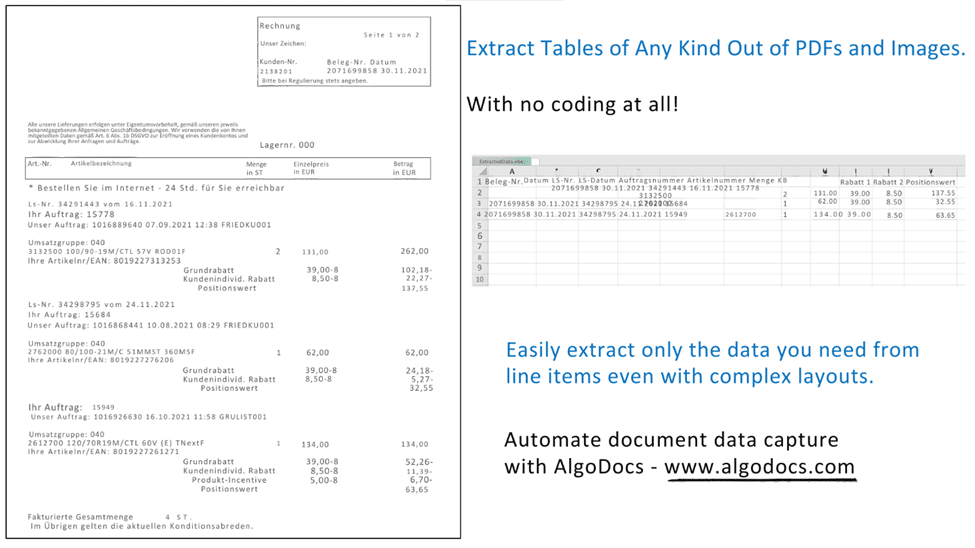
Back to Blog Table of contents On this page Extract Tables from Images with AlgoDocs Home › Blog › Algodocs › Extract Tables from Images with AlgoDocs Categories Algodocs Image Data Extraction Tags bank ocr deep learning Finance ocr invoice invoice process KYC loan forms pdf to text sea waybill ocr web-based ai platform for data extraction By Ibrahim Nalbant Published June 20, 2024, 12:36 Updated July 22, 2026, 09:50 One might find themselves overwhelmed by a deluge of paperwork—orders, checks, articles—all containing valuable data locked up in tables. Extracting this information manually is like looking for a needle in a haystack. What if there was a way to free this data with some simple mouse movements? This is where image to table conversion becomes essential, transforming images into usable data. At AlgoDocs, we pride ourselves on making this process seamless. Sit tight and let the journey to efficient table extraction from images begin! How We Extract Tables from Images (and How Others Do It Too) There are specialized programs that help extract table information from scanned files like images and PDFs. But how does this happen? The All-Seeing Eye of OCR: At the center is Optical Character Recognition (OCR) technology. It functions like a digital magnifying glass, identifying text within the images frame by frame. The Mastermind of Layout Analysis: Sophisticated calculations dissect the layout of the image to understand patterns or lines that form the tables’ structure. AlgoDocs and the Gang: We are not the only entities in this data extraction game, are we? ExtractTable: A web-based table extractor with basic functionalities for grabbing simple tables from websites. (Limited to basic tables and web sources only). Nanonets: Offers a suite of functions specifically designed to convert images containing invoices and receipts into structured tables. (Focuses on a specific document type). Docsumo Pro (Free Feature): Provides a free feature that can identify tables within PDFs and images. (Limited functionality in the free version). Why Choose AlgoDocs? Here’s Your Ticket to Data Freedom While these options exist, this AI-based software stands out as the data extraction champion. Here’s why: Simplicity We prioritize user-friendliness. Table extraction requires little or no effort from the user because our interface is user-friendly regardless of the user’s technical level. Saves Time Data extraction manually is very time-consuming and tiresome. That’s why our tool automates the entire process, freeing you to focus on more strategic tasks. Easy Workflow This tool comes as a feature in your tool chests and is naturally added to your day-to-day approaches seamlessly— Its seamless integration with existing tools and workflows ensures a smooth transition into your data management routine—no more data juggling across different platforms. You can trust our tool to adapt to your needs. Efficiently Extracts Data Designed for various professional fields, it can save hundreds and possibly thousands of hours for researchers, students, and home users. This relieves them from the burden of having to spend hours manipulating data to achieve the required outcome, freeing them up to practice concepts. A Feature-Packed Extraction Powerhouse We offer a robust suite of features designed to streamline your data extraction process and ensure exceptional results: • Cutting-Edge AI Technology: This is why we can state that when it comes to such tasks as tables’ extraction, AI contributes to the process, and therefore, we assure you of high results and fast, profound processing. • Seamless API Integration: It has intrinsic API incorporated, which means that one has the independent power to start them effortlessly with other APIs, and this lays down all the power in the extraction segment. In addition, Zapier allows you to link AlgoDocs to over 2,000 different web services. Automated connections known as Zaps, which can be set up in minutes with no coding, can automate your daily tasks and create workflows between apps that would otherwise be impossible. • Effortless Batch Processing: From thousands of images to many more thousands on a daily basis, or even millions weekly, it can assist you. As for this task, our batch processing capabilities should have no trouble managing it: they work on large sets as a matter of course. • Flexible File Format Support: As for supported file formats we accept images of varying formats and PDF files and are happy to be considered as your ultimate resource for extracting data. • Real-Time Data Access: Wish waiting can be scrapped off as one of the things that has no place in this fashion tale. It is online, which is why our system promptly pulls the tables and gives you access to your important data. • Unmatched Accuracy: We respect data and we strive to make sure that it remains closed to any alterations. Our system has high accuracy rates that it provides documents filled with complete and thorough results for the customers. • Forever Free Forever: It is our firm conviction that all should be able to get hands on some highly efficient data extraction solutions. This is why we provide users with a forever free subscription that enables you to convert up to 50 pages every month- for free! Advanced Functionalities: Conquering Toughest Tables Here’s how AlgoDocs tackles even the most challenging scenarios: Taming Handwritten Challenges: Of course, while writing on paper, people make different mistakes – that’s why we can recognize even the most complex handwritten tables with great success. Conventionally, handwriting oftentimes comes in different forms and our smart AI engine comes ready to deal with all these forms making it easier to convert reports, historical documents among others into usable data. Bye-bye Watermarks and Background Woes: Effectively erases overlays, watermarks, and elaborate backgrounds using sophisticated image pre-processing algorithms. This ensures that regardless of the shapes and forms that the input image came in, the data extracted is easy to manipulate and usable. Security Like Fort Knox: We do appreciate the need to ensure that the data collected and stored in this database is secure at all times. We have adequate security measures that protect the input data

Scroll to Top