Algodocs

web-based ai platform for data extraction

Algodocs

Best OCR Recognition Software: 10+ Tools You Should Know

Back to Blog Table of contents On this page Best OCR Recognition Software: 10+ Tools You Should Know Home › Blog › Algodocs › Best OCR Recognition Software: 10+ Tools You Should Know Categories Algodocs Tags ai platform for data extraction algodocs character recognition web-based ai platform for data extraction By Shubhankar Biswas Published September 1, 2025, 05:28 Updated July 20, 2026, 05:27 In today’s digital world, people and businesses deal with a lot of paperwork. From scanned documents to printed forms and even handwritten notes, all of this data needs to be turned into something useful. That’s where OCR comes in. OCR stands for Optical Character Recognition. It helps read text from images, PDFs, and scanned documents and changes it into real, editable text. OCR technology is useful in many industries like healthcare, banking, logistics, and education. It helps save time, reduce human error, and organize data quickly. In this blog, we will talk about the best OCR recognition software you can use. Whether you are looking for a free tool, a paid one with advanced features, or an open-source option, we’ve got you covered. Let’s look at the top 10+ OCR tools available today. We’ll explain what each tool is, how it works, and what makes it a good choice. 1. Algodocs 1. Algodocs – Best OCR Recognition Software Algodocs is considered one of the best & most powerful AI based OCR recognition and data extraction tools in the market today. It is a cloud-based platform that helps you to automate data extraction from PDFs, scanned documents, medical reports, invoices, bills, purchase orders, and other documents with accuracy. It is especially helpful for businesses that want to save time and reduce errors while handling large amounts of documents. What makes Algodocs special is its use of AI and machine learning to improve the accuracy of data extraction. You don’t need to write any code to use it. You can create templates for your documents and set up automatic data extraction workflows. Try Algodocs Free Forever Plan Today Sign Up Today Key features of Algodocs: Extract data from PDFs, images, medical bills, invoices, and forms. Supports tables, checkboxes, and handwritten text. Easy-to-use interface with no coding required. Exports to Excel, JSON, XML, and Google Sheets. Strong security for handling sensitive data. Who should use it: logistics organizations, healthcare professionals, finance teams, legal firms, and businesses that handle complex documents. Algodocs offers a free plan with limited pages and paid options for higher volumes. It is perfect for anyone looking to save time and improve document workflows. 2. Nanonets Nanonets is another AI-powered OCR tool that focuses on smart automation. It helps users extract data from a wide range of documents like ID cards, invoices, purchase orders, and receipts. Features: Pre-trained models for common document types. Drag-and-drop interface to create custom workflows. Easy integration with Zapier, Google Sheets, and other tools. Works with scanned documents, mobile images, and more. Nanonets also provides an API, so developers can add OCR to their own apps. It offers a free trial and paid plans for larger use. 3. Docsumo Docsumo is built for businesses that need to handle many documents daily. It works well with financial forms, insurance claims, and KYC documents. Docsumo can extract data even when the documents are not in perfect condition. Features: Automatic table extraction. Smart validation and error checking. Easy export to Excel or databases. Drag-and-drop support for uploading files. Docsumo offers a free plan for testing, and its paid plans are good for growing businesses. 4. Docparser Docparser is a great OCR software for extracting data from business documents like invoices, delivery notes, and contracts. It uses rule-based data extraction, meaning you can tell it exactly what to look for in a document. Features: Process documents in bulk. Turn PDFs into structured data like CSV or Excel. Templates for different document types. Cloud-based, so no installation is needed. Docparser is suitable for teams that need full control over their document data. It is easy to use and very reliable. 5. ABBYY FineReader ABBYY FineReader is a well-known name in the OCR world. It offers advanced OCR features and high accuracy. It works with more than 190 languages and supports both printed and handwritten text. Features: Edit, convert, and compare PDFs. Accurate text recognition. Works with scanned books, legal forms, and multi-page documents. Desktop and cloud options available. ABBYY is best for professionals and organizations that need top-quality OCR. It is a paid tool, but many users say it is worth the cost. 6. Adobe Acrobat Pro Adobe Acrobat Pro is not just a PDF reader. It also includes powerful OCR features. You can scan documents, convert them into searchable PDFs, and even copy the text into Word or Excel. Features: Turn scans into searchable and editable text. Works well with multi-page PDFs. Combine and edit documents easily. Trusted by millions of users around the world. Adobe is great if you already use other Adobe products or want a reliable tool with full PDF support. It offers a free trial and monthly subscription plans. 7. Parseur Parseur is an OCR and document parsing tool for emails, PDFs, and other files. It is ideal for extracting data from incoming messages and scanned documents automatically. Features: Email-to-text and PDF-to-data tools. Point-and-click interface for setting up templates. Works in real-time with tools like Google Sheets and Excel. Supports invoices, shipping receipts, and orders. Parseur is easy to set up and works well for teams that want to speed up data entry without much effort. 8. Tesseract OCR Tesseract is one of the most popular open-source OCR engines. It is free to use and supports more than 100 languages. It works on Windows, Linux, and macOS. Tesseract is mainly used by developers who want to add OCR to their apps or systems. Features: Highly accurate for printed text. Supports many languages. Can be trained for custom fonts or languages. Works well with command-line and programming. Tesseract doesn’t come with a user interface, so it’s not for

Data Extraction, purchase order

How to Extract Data from Purchase Orders With AlgoDocs Purchase Order OCR. A Comprehensive Guide For 2025

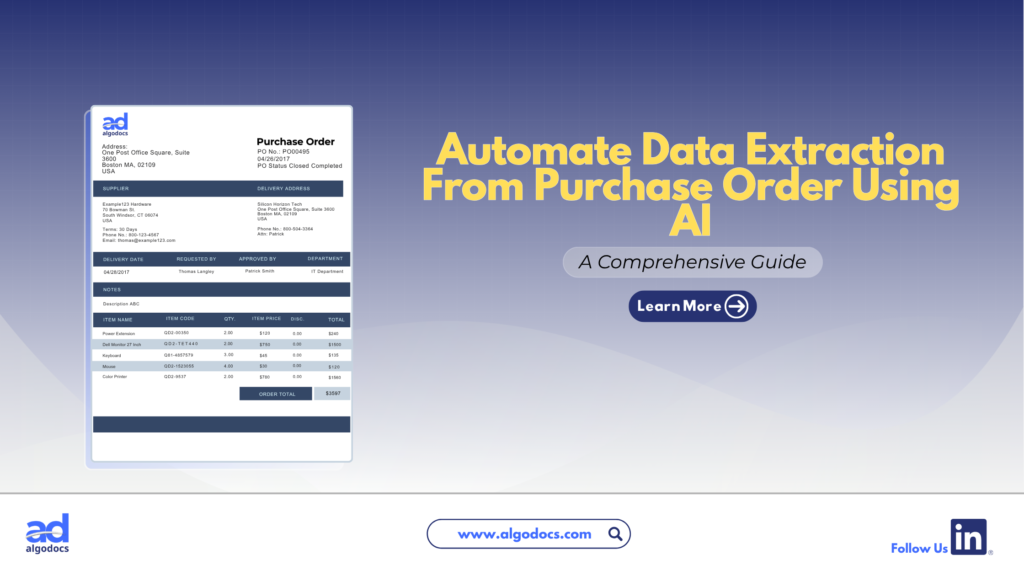
Back to Blog Table of contents On this page How to Extract Data from Purchase Orders With AlgoDocs Purchase Order OCR. A Comprehensive Guide For 2025 Home › Blog › Algodocs › How to Extract Data from Purchase Orders With AlgoDocs Purchase Order OCR. A Comprehensive Guide For 2025 Categories Algodocs Tags algodocs data extraction IDP intelligent document processing machine learning OCR Optical Character Recognition Purchase Order OCR web-based ai platform for data extraction By Ibrahim Nalbant Published January 2, 2025, 07:18 Updated July 10, 2026, 09:25 Purchase orders (POs) are critical documents in business operations, which makes purchase order data extraction and automation an important step in processing purchase orders. They ensure clear communication between buyers and sellers, detailing the goods or services, pricing, and other contractual terms. With the rise of digitization, extracting data from purchase orders efficiently has become essential for modern businesses. Both b2b and b2c business scenarios use a purchase order to facilitate clear communication between two parties. It helps in maintaining important information related to the transaction of goods between two parties. This guide explores how to extract data from purchase orders, focusing on tools like purchase order OCR and strategies to streamline the process. What is a Purchase Order?  A purchase order (PO) is a written document issued by a buyer to a seller that indicates the type, quantity, and agreed price for products or services by two parties. It plays a very crucial role in ensuring smooth procurement operations and is a legally binding document once accepted by the seller. In simple terms, a purchase order (PO) document describes what goods have been requested by the buyer to sellers to confirm their interest in procuring goods and services. Key Elements of a Purchase Order  PO Number: A unique identifier.  Buyer and Seller Information: Contact details and addresses.  Order Details: Description, quantity, and price of items.  Delivery Terms: Shipping method, destination, and date.  Payment Terms: Agreed payment timelines and methods.  Manually managing this information is time consuming, especially for businesses handling large volumes of POs. Challenges of Manually Extracting Data From Purchase Order  Relying on manual methods to extract and process data from purchase orders leads to many challenges for businesses. Time Consuming: Extracting data from a purchase order manually is a time-consuming task. If you have to extract data from a single page document, then manually it can take hours, but using a purchase order app for data extraction only takes 5 to 10 minutes. Error Prone: One of the biggest challenges with manually extracting data from a purchase order is that it is prone to error. The most common human errors, such as typos or missed fields, can disrupt workflows and lead to costly mistakes. Due to the high volume of data, errors tend to happen if data is being extracted with manual method. Scalability Issues: As businesses grow, manually processing hundreds or thousands of purchase orders becomes unsustainable. The manual processing of 100 purchase order documents can slow down the productivity of an organization, which can lead to other challenges, such as loss of profit and time. Resource Intensive Manual methods require significant labour, which leads to a rise in operational costs. To overcome these challenges, businesses are turning to automation tools like purchase order OCR technology. Since the purchase order OCR technology requires very little or no human intervention. What is a Purchase Order OCR Technology  Purchase Order OCR (Optical Character Recognition) is a technology that captures and converts a printed or handwritten text into machine-readable data. This type of OCR technology is built and trained to capture and extract data such as vendor name, buyer name, date, amount, address, and other information from a PO document. You can save this extracted data in Excel, CSV, JSON, or another file format. With the help of purchase order OCR technology, businesses can significantly save time and money and scale their business to greater heights. The advent of AI OCR tools such as AlgoDocs Purchase Order OCR has made data extraction from purchase orders more accurate and productive. How Does Purchase Order OCR Work?  Purchase Order OCR (Optical Character Recognition) is a technology that streamlines the extraction of information from purchase orders. It works by scanning documents in various formats—such as PDFs, images, or scanned papers—and recognizing text to extract key data like order numbers, item descriptions, quantities, prices, and delivery dates. The data is subsequently organized into a structured format, facilitating seamless integration into procurement systems. Automating this process allows Purchase Order OCR to decrease manual data entry, reduce errors, and improve the efficiency of the procurement workflow. Scanning Documents: Paper POs are digitized using scanners.  Data Recognition: The OCR engine identifies text fields such as PO numbers, item descriptions, and quantities.  Data Extraction: The software extracts relevant fields and organizes them into a structured format.  Integration: The extracted data is transferred into systems like ERP or accounting software. What Is AlgoDocs Purchase Order OCR AI App Algodocs is an AI-based purchase order OCR app that extracts data from PO documents. AlgoDocs uses AI technology to automate data extraction from pdfs, scanned documents, and handwritten notes. You can build your own extractor in Algodocs and train the AI model to capture, analyze, and process the data from a document. You can integrate Algodocs with third-party apps for document processing and data extraction. Signup for AlgoDocs Free-Forever plan and access all premium features for free Sign Up Real World Application of Purchase Order OCR Technology A purchase order OCR (Optical Character Recognition) app is a highly beneficial tool for industries of all types. Whether you are operating in a B2B (Business-to-Business) or B2C (Business-to-Consumer) environment, implementing a PO OCR solution can significantly enhance productivity and drive business growth. However, certain industries stand to gain the most from the adoption of OCR technology: Retail and E-commerce: In the fast-paced world of retail and e-commerce, businesses generate a high volume of purchase order documents daily. As customer transactions increase, so does the number

PDF Table Extraction
PDF

Ultimate Guide: How to Extract Tables from PDFs Effortlessly

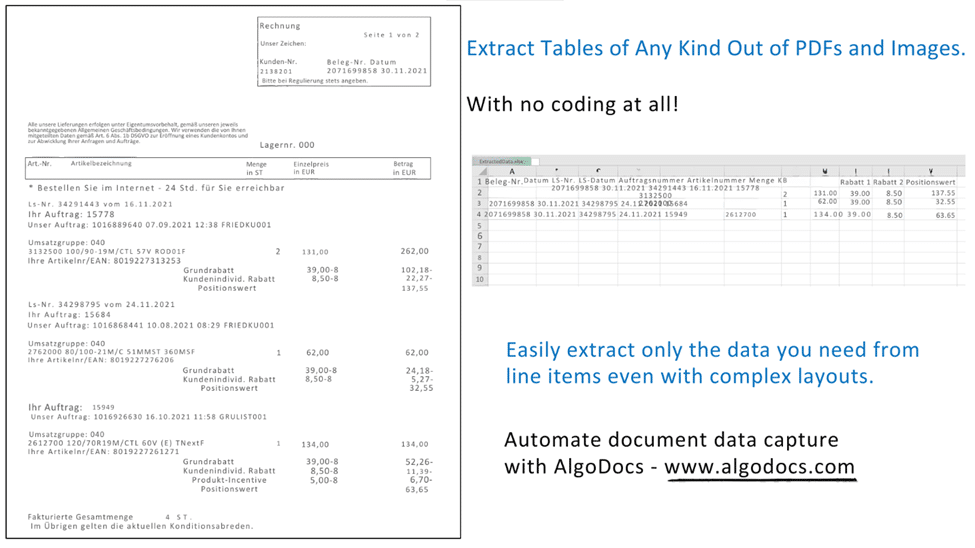
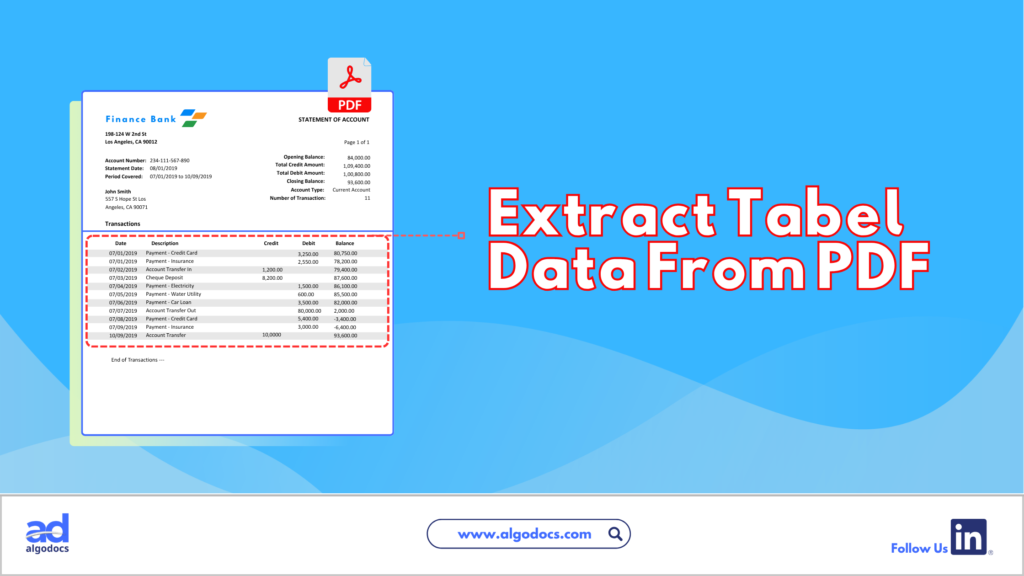
Back to Blog Table of contents On this page Ultimate Guide: How to Extract Tables from PDFs Effortlessly Home › Blog › PDF › Ultimate Guide: How to Extract Tables from PDFs Effortlessly Categories PDF Tags bank ocr deep learning Finance ocr invoice process loan forms packing list ocr pdf to text sea waybill ocr web-based ai platform for data extraction By Shubhankar Biswas Published June 25, 2024, 07:13 Updated July 21, 2026, 04:42 Are you struggling to extract tables from PDFs? If you feel trapped in a text-based jungle, hacking your way through dense PDFs to snag a specific table, you’re not alone. PDFs, while fantastic for preserving document formatting, can be a nightmare when you need to liberate the precious data trapped within their tables. Fear not, fellow data warriors! This guide will equip you with the knowledge and tools to transform those PDFs from unruly beasts into neat, organized spreadsheets. How to Extract Tables from PDFs There are two main approaches to conquering the PDF table extraction challenge: manual and automated. Each method has pros and cons, which can help you choose the right approach for your needs. Manual vs. Automated Extraction Manual Extraction The manual approach involves selecting the table in your PDF viewer and painstakingly copying and pasting each cell into a spreadsheet. While this method is straightforward, it comes with several drawbacks. Pros of Manual Extraction: Free (no software needed) Granular control over the selection area Cons of Manual Extraction: Time-consuming, especially for large PDFs with multiple tables Prone to errors during data entry (copy-pasting mistakes) Not ideal for repetitive tasks Automated Extraction Automated extraction utilizes software to identify and extract tables from PDFs, significantly reducing the time and effort required. Pros of Automated Extraction: Saves a ton of time and effort Reduces data entry errors Often offers additional features like data cleaning and formatting Cons of Automated Extraction: May require software installation (though web-based options exist) Accuracy can vary depending on the tool and PDF complexity Extracting Tables from PDFs: A Guide to Automated Methods Extracting tables from PDFs can be a tedious task. This section explores several popular automated table extraction methods and their strengths and weaknesses to help you choose the right solution for your needs. Common Automated Table Extraction Methods Built-in PDF Export Tools: Most PDF viewers offer a primary “export to Excel” functionality. This can be convenient for occasional use with simple tables. However, accuracy can be unreliable for complex formatting or merged cells. The exported data might also lack structure, requiring further cleaning and organization. Free Online Tools: Several free web-based tools, such as Tabula and Camelot, tackle essential table extraction. While they offer a step up from manual methods, accuracy can be inconsistent, and limitations often exist regarding file size (e.g., maximum 10MB) or processing volume. OCR (Optical Character Recognition) Software: OCR software is a technology that can convert scanned PDFs with non-machine-readable text into searchable text. It works by analyzing the shapes and patterns of characters and matching them to a known character database. However, OCR accuracy can vary depending on the scanned image quality, and tables might require additional formatting adjustments after conversion. OCR also struggles with handwritten documents. Paid PDF Editing Software: High-end PDF editing software like Adobe Acrobat Pro DC offers table extraction features. While effective, these programs often have a hefty price tag and require a learning curve to master their functionalities. AlgoDocs: Automated Extraction Powerhouse Among these methods, AlgoDocs excels at efficient and user-friendly table extraction. Here’s why it stands out: Effortless Automation This web-based tool automates the entire process, eliminating the need for manual selection or wrestling with complex software. Upload your PDF, and the advanced algorithms will intelligently identify and extract tables, ensuring exceptional accuracy. Unmatched Accuracy Powered by advanced algorithms, our tool prioritizes reliable data extraction. You can be confident your extracted tables are ready for further analysis without worrying about errors. Flexibility for All Needs AlgoDocs caters to users of all levels. The Forever Free plan allows you to explore its capabilities at no cost, with a limit of 50 monthly pages. This plan is ideal for small-scale or occasional users. For high-volume needs, we offer affordable paid plans with increased processing capabilities. Seamless Integration Extract your data in various formats like XML, JSON, CSV, or Excel for effortless integration with your existing spreadsheets and data analysis tools. A robust API is also available, allowing developers to programmatically integrate table extraction functionalities into their workflows for a truly automated experience. Cloud-Based Convenience No software downloads or installations are necessary. It can be accessed from any device with an internet connection, making it a perfect choice for on-the-go data analysis. By leveraging this data extraction tool’s automated prowess, you can reclaim your valuable time and ensure the accuracy of your extracted data. Let this tool be your trusted companion in the world of PDF table extraction! Detailed Guide on Using AlgoDocs Let’s delve into the automated PDF table extraction world using our user-friendly and powerful tool. How to Extract Tables from PDFs: Step-by-Step Instructions Step 1: Log in to your account and go to the dashboard, which is the home page. Step 2: Click on the Extractor tab. On the right side of the Extractor tab, you will notice a populated option for choosing what kind of extractor you want to create. Step 3: Click Custom Extractor, and a new window to name the extractor will appear. Step 4: Now, it’s time to upload your sample PDF file. Once you’ve done that, click ‘Create Extractor ‘. The window will close, and you’ll find your newly created extractor in the folder as shown below. Step 5: Click on Manage next to your newly created extractor to go to the field/table creation page. Step 6: Click on the +Add to show the extraction methods options. Step 7: Click on TABLE EXTRACTION. This will launch a new window in which you can preview the sample PDF document you uploaded. Step

PDF Text Extraction
Algodocs

PDF Text Extraction: Our Comprehensive Guide 2024

PDF Text Extraction: Our Comprehensive Guide 2024 In a society filled with advanced technology, Portable Document Formats or PDFs are considered supreme. They retain the structure as well as the format, including graphics and charts of the documents. However, conversion of data from PDF to another format that requires analysis or editing is not easy. Apart from exploring the most vital topic of PDF text extraction, this detailed blog also enables you to learn more about enhancing content through text extraction. Types of PDFs The two primary types of PDFs have a very important distinction that directly impacts how you process texts. Searchable PDFs: These PDFs have text embedded in them. This makes copying, pasting, and searching within a document very simple and hassle-free. Examples of such objects include reports, eBooks, and other documents created in a digital environment. Scanned PDFs: These include electronic images of the actual paper-based documents. They have no text layer and thus must be processed further with Optical Character Recognition technology. Optical Character Recognition (OCR) Optical Character Recognition (OCR) simply translates scanned PDFs into forms you can edit. It is a technology that scans the PDF and carefully analyzes the image data it contains, breaks characters into individual segments, and decrypts them to form a machine-readable text. The degree of variation in OCR technology depends greatly on the readability or quality of the source document scanned. Aspects such as the type of font used, the quality of the image, and whether there are large chunks of text with a complicated layout will affect the OCR outputs. The current generation of OCR engines has become very complex and can handle various kinds of inputs and provide high accuracy rates, which builds up confidence in using the tool. Step-by-Step Functions of OCR: A Multifaceted Approach: Exploring Text Extraction Methods Now that you understand the different types of PDFs and the role of OCR. Let’s explore the various methods available for extracting text: Manual Copy and Paste (Limited Use): This method is capable of extracting a few words from a searchable PDF. Right-click the arrow placed near the desired text passage and click on copy, unlock your word processing software, and paste. This technique is quite useful, but for really big documents, it becomes incredibly tedious and highly impractical. Built-in PDF Reader Export (Searchable PDFs Only): All typical PDF viewers, like Adobe Acrobat Reader, contain the native “Export” feature. This enables you to convert the searchable PDF into a file format you may wish to edit further, such as Word format (.docx). It is ideal for fast conversion of PDFs that are already easily searchable, but for scanned PDFs, it is useless. Online PDF to Text Conversion Tools (Flexibility and Convenience): Many sites on the World Wide Web offer PDF-to-text conversion services. These are online OCR tools that work more like PDF text extraction. You upload your PDF, click on the Convert button, and receive a downloadable text file. Here are some benefits of online PDF to Text conversion tools: Offline PDF Text Extraction Software (Advanced Features): For users who want to extract text from PDFs without an online interface, there are many offline text extraction applications. These programs offer a more comprehensive range of features compared to traditional tools, such as: However, there are also some drawbacks to consider: How to Choose the Right Text Extraction Method The optimal method for text extraction depends on several factors: Volume of PDFs Basic tools that come with MS Office, like the PDF reader export, might be enough if one only occasionally needs to sign several documents. However, if you are likely to process dozens of documents, for example, consider online tools that support batch processing or offline tools with good batch capabilities. Document Type Many methods can parse basic PDF documents with few formatting features. However, if the text layout is complicated or if high precision is needed, one can use stand-alone programs with additional functions, such as OCR, or use online tools that allow for customization. Security Concerns While working with sensitive documents, it is better to search for software that can use data protection principles such as encryption and compliance with industry standards. Budget There is abundant freeware available on the Internet, but certain constraints may limit the number of files processed or the number of features available. The free versions are generally less downloadable and have fewer options than the paid versions. Finding the Perfect Fit: Popular Text Extraction Solutions As mentioned before, extracting text from PDF can be done in many ways and with different levels of effectiveness: Online Text Extraction Tools: For those who may need advanced and high accuracy while processing simple or even advanced scanned files such as the ones with handwritten or tables, there are online applications such as AlgoDocs. Because of their interfaces and the availability of features, they are one of the best choices. Let’s look at the famous tool in detail. AlgoDocs: A Powerful and Secure PDF Text Extraction Tool Those who consider getting a more progressive and quite efficient product can use this advanced web based automated data extraction tool. It is an application designed for different categories of people. The Forever Free plan is more suitable for individuals as well as small companies. It enables one to scrape text from as many as 50 pages per month. This tool is efficient as well for large document libraries since it can process hundreds, if not thousands, of files at a time. How to Use AlgoDocs? Simply open the program and drag and drop the PDF into the tool, or open the file from Google Drive or Dropbox. The rest is done by our tool as it uses its advanced Optical Character Recognition OCR to translate documents into a usable text format. In the following screencast video, AlgoDocs demonstrates steps for extracting data from PDF and image documents in less than a minute. Benefits of Using This PDF Text Extraction Tool Unmatched Accuracy: This handy tool uses

Algodocs, Image Data Extraction

Extract Tables from Images with AlgoDocs

Back to Blog Table of contents On this page Extract Tables from Images with AlgoDocs Home › Blog › Algodocs › Extract Tables from Images with AlgoDocs Categories Algodocs Image Data Extraction Tags bank ocr deep learning Finance ocr invoice invoice process KYC loan forms pdf to text sea waybill ocr web-based ai platform for data extraction By Ibrahim Nalbant Published June 20, 2024, 12:36 Updated July 22, 2026, 09:50 One might find themselves overwhelmed by a deluge of paperwork—orders, checks, articles—all containing valuable data locked up in tables. Extracting this information manually is like looking for a needle in a haystack. What if there was a way to free this data with some simple mouse movements? This is where image to table conversion becomes essential, transforming images into usable data. At AlgoDocs, we pride ourselves on making this process seamless. Sit tight and let the journey to efficient table extraction from images begin! How We Extract Tables from Images (and How Others Do It Too) There are specialized programs that help extract table information from scanned files like images and PDFs. But how does this happen? The All-Seeing Eye of OCR: At the center is Optical Character Recognition (OCR) technology. It functions like a digital magnifying glass, identifying text within the images frame by frame. The Mastermind of Layout Analysis: Sophisticated calculations dissect the layout of the image to understand patterns or lines that form the tables’ structure. AlgoDocs and the Gang: We are not the only entities in this data extraction game, are we? ExtractTable: A web-based table extractor with basic functionalities for grabbing simple tables from websites. (Limited to basic tables and web sources only). Nanonets: Offers a suite of functions specifically designed to convert images containing invoices and receipts into structured tables. (Focuses on a specific document type). Docsumo Pro (Free Feature): Provides a free feature that can identify tables within PDFs and images. (Limited functionality in the free version). Why Choose AlgoDocs? Here’s Your Ticket to Data Freedom While these options exist, this AI-based software stands out as the data extraction champion. Here’s why: Simplicity We prioritize user-friendliness. Table extraction requires little or no effort from the user because our interface is user-friendly regardless of the user’s technical level. Saves Time Data extraction manually is very time-consuming and tiresome. That’s why our tool automates the entire process, freeing you to focus on more strategic tasks. Easy Workflow This tool comes as a feature in your tool chests and is naturally added to your day-to-day approaches seamlessly— Its seamless integration with existing tools and workflows ensures a smooth transition into your data management routine—no more data juggling across different platforms. You can trust our tool to adapt to your needs. Efficiently Extracts Data Designed for various professional fields, it can save hundreds and possibly thousands of hours for researchers, students, and home users. This relieves them from the burden of having to spend hours manipulating data to achieve the required outcome, freeing them up to practice concepts. A Feature-Packed Extraction Powerhouse We offer a robust suite of features designed to streamline your data extraction process and ensure exceptional results: • Cutting-Edge AI Technology: This is why we can state that when it comes to such tasks as tables’ extraction, AI contributes to the process, and therefore, we assure you of high results and fast, profound processing. • Seamless API Integration: It has intrinsic API incorporated, which means that one has the independent power to start them effortlessly with other APIs, and this lays down all the power in the extraction segment. In addition, Zapier allows you to link AlgoDocs to over 2,000 different web services. Automated connections known as Zaps, which can be set up in minutes with no coding, can automate your daily tasks and create workflows between apps that would otherwise be impossible. • Effortless Batch Processing: From thousands of images to many more thousands on a daily basis, or even millions weekly, it can assist you. As for this task, our batch processing capabilities should have no trouble managing it: they work on large sets as a matter of course. • Flexible File Format Support: As for supported file formats we accept images of varying formats and PDF files and are happy to be considered as your ultimate resource for extracting data. • Real-Time Data Access: Wish waiting can be scrapped off as one of the things that has no place in this fashion tale. It is online, which is why our system promptly pulls the tables and gives you access to your important data. • Unmatched Accuracy: We respect data and we strive to make sure that it remains closed to any alterations. Our system has high accuracy rates that it provides documents filled with complete and thorough results for the customers. • Forever Free Forever: It is our firm conviction that all should be able to get hands on some highly efficient data extraction solutions. This is why we provide users with a forever free subscription that enables you to convert up to 50 pages every month- for free! Advanced Functionalities: Conquering Toughest Tables Here’s how AlgoDocs tackles even the most challenging scenarios: Taming Handwritten Challenges: Of course, while writing on paper, people make different mistakes – that’s why we can recognize even the most complex handwritten tables with great success. Conventionally, handwriting oftentimes comes in different forms and our smart AI engine comes ready to deal with all these forms making it easier to convert reports, historical documents among others into usable data. Bye-bye Watermarks and Background Woes: Effectively erases overlays, watermarks, and elaborate backgrounds using sophisticated image pre-processing algorithms. This ensures that regardless of the shapes and forms that the input image came in, the data extracted is easy to manipulate and usable. Security Like Fort Knox: We do appreciate the need to ensure that the data collected and stored in this database is secure at all times. We have adequate security measures that protect the input data

PDF Text Extraction
Algodocs

Extract Invoice Data from PDF with AI: How to Automate Data Extraction

Back to Blog Table of contents On this page Extract Invoice Data from PDF with AI: How to Automate Data Extraction Home › Blog › Algodocs › Extract Invoice Data from PDF with AI: How to Automate Data Extraction Categories Algodocs Tags bank ocr deep learning Finance ocr invoice invoice process KYC loan forms pdf to text sea waybill ocr web-based ai platform for data extraction By Ibrahim Nalbant Published June 14, 2024, 16:25 Updated December 7, 2025, 18:52 An efficient methods of handling Invoices should be applied in the current techniques of business and especially in bureaucratic organizations. AI invoice data extraction is not just about automating data extraction but it is more of an immense power of deriving useful insights for effective financial decision making. Conceive a process where the extraction of data from invoices is efficient and at the same time puts less effort and has better quality. The above is the glimpse of AI in formally extracting data from invoices – the solution that could revolutionize your business. What is Invoice Data Extraction? Invoice data extraction is the capability of operate and render the data correlated to invoices in a form that can be better analyzed. This entails tasks such as the identification of invoice numbers, dates, amounts, vendor details, and lines on paper and electronic invoices. Ideally, it should be in a form that could be input directly into the accounting software, the ERP, or any other system. Common Invoice Data Extraction Methods Some of the widely used techniques for invoice data extraction are discussed below: Manual Data Entry: Picture the tedious process of having to look at each invoice individually and then re-enter the information from it by using a keyboard. However, this method is applicable for only several invoices and very time-consuming, and I am likely to make mistakes when doing this. Thus, it may lead to inaccurate decisions as well as mistakes in financial decisions and, therefore, is inefficient. Automated Data Extraction: Methods, including OCR and AI, accelerate the capturing and processing of invoice data at an incredibly rapid pace. This also saves time and energy and brings convenience in handling the many invoices while at the same time offsetting the workloads of personnel in the department of finance and accounts. With this, they can plan on more significant things, having a sense of power and control over the time and tools they use. OCR-based: These provide a near-perfect solution because they enable the user to convert PDFs to other editable formats quickly. It mainly employs the OCR simple techniques for the identification of text within a document. Probably, it can be helpful for working with texts in the simplest formats, while it would be hardly fair to consider it to show high efficiency when dealing with complex structures, low-quality scanned or written by hand. AI-based: Nonetheless, it is vital to note how the technology has developed in the last several years in the context of data extraction, especially with AI and machine learning. Recognition of invoice data: It is possible to train the principles of modality analysis and data extraction on the current methods of AI systems, electronic invoicing formats, PDFs, scanned images, or updated versions of handwritten notes. These mechanisms are oriented to the identification of the document layout and intricate data structure with a high degree of accuracy, which may be considered one of the major benefits for a business. This ensures that the financial data, which is used in arriving at the figures is accurate so that you can make proper decisions. Benefits of Extract Invoice Data Improved Accuracy: The use of AI in data extraction minimizes the possibility of human error, and hence, the probabilities of having wrong data are eliminated by the use of AI, which is suitable for financial data. Time and Cost Savings: This leads to time-saving in the process and also ensures low costs since it eliminates the need for manual treatment of data. This reduces the work of your team and allows the employees to work on more productive activities, which makes work easier. It also helps the decision-makers to fund optimistically as bottom-line time and cost, realized by the intelligent extraction, could be redeployed effectively to other key business concerns. Enhanced Data Quality: Automatic Data Processing (ADP) guarantees that it provides accurate and standard data, which creates an environment for making strategic business decisions based on pertinent data and regulations. Boost your invoice processing with AlgoDocs, an AI-powered one-stop solution. If PDF is causing you grief, AlgoDocs, specializing in invoice parsing, uses AI and OCR to make light work of parsing data in this format, as well as scanned and handwritten text. This invoice data extraction software works like a charm since it has a well-developed user interface that will allow even a new user to perform most operations. Batch processing and automatic transmission of data also further increase the speed and ease of data conversion over manual processing. It is time to migrate to a smarter automatic invoice procurement system that operates on Artificial Intelligence technology. As seen, employing this tool to extract data from an invoice involves a few easy steps. Step-By-Step Guide: Step 1: Log in to your account and go to the home page, which is the Dashboard. Step 2: Click on the Extractor tab. On the right side of the Extractor tab, you will notice a populated option for choosing what kind of extractor you want to create. Step 3: Click on Invoices from the above screen, and it will pop up a new window to name the extractor. Step 4: After you have named the extractor, click on Create Extractor . The Window will close, and you will be able to see your extractor in the folder as below, Step 5: Click on the File Manager tab , and you will notice just on the right side of the File Manage tab, there is an icon labeled root. Step 6: Right-click on the root

Scroll to Top