Algodocs

web-based ai platform for data extraction

intelligent document processing

IDP Use Case: Transforming Restoration Practices

Earthquakes, hurricanes, mudslides, electrical fires, and burst pipes are some of the natural incidences that are usually unforeseen. Buildings that are often at the receiving end during catastrophic calamities require immense repair work. Any comprehensive structure will, in this respect, indeed call for disaster recovery management, especially if it is a house or a company. It has scaled tremendously to be vital software in the construction industry, but it is notably critical in the catastrophe repair industry, where most companies are small. Table of Contents: But as structures progress, many organizations like yours struggle to cope with change. Often, the driving force of success is in the technology that forms the basis of these organizations. Let us think of the building and restoration industry and see what we come up with. These companies have to estimate all possible costs for a building construction project, including additional costs such as salary for office employees, wear and tear of equipment, office rent and other overhead expenses, and cost of all the materials used and wages to workers. Enhancing Data Management in Restoration Processes Intelligent Document Processing (IDP) tools can capture information from any format that has not been pre-formatted, including images and handwritten writings. This can be of great importance, especially in restoration processes where data could be in large quantities, in the form of field notes and sketches, among other things. The Importance of Accurate Costs and Expenses Some of the factors one needs to understand well to accurately estimate the cost of the project include the building material costs, the requirements, the procedures, and the codes that are to be followed, as well as the need to understand the market trends in terms of pricing. Such information may be found by analyzing a bid package and working through the contingencies and profit inherent in a bid or a given project. Two Significant Challenges: Documentation obstacles: One of the challenges associated with restoration events is collecting all the relevant and non-concocted paperwork. Some of the effects of this cumbersome procedure include the failure to complete some forms or the delay in completing them. Accounts Receivable Delays are attributed primarily to fourteen struggles stemming from a high turnover rate in accounting: payment cycles take longer. This not only impacts cash flow but also definitely causes a lot of headaches for the business’s dealings with its customers. The Impact of Intelligent Document Processing (IDP) Software on Restoration Businesses: Implementing Intelligent Document Processing (IDP) Several Challenges. Here are some of the key ones: Case Study Use case for restoration: The repair company wishes to provide the customer with an overview of line-item estimates for the job. Cost estimates should not be utilized as a list of negotiable items. Supplemental costs may apply if more damage or repair that has not been found or is hidden below present finishes is required. This also enables the client to correct himself or herself if they chose compositions that are not within the estimate or if they need extra work. This is because, in the course of the project implementation, changes will be made to adjust for the revised estimate and present it to the client. Any changes made to these documents will be recorded in a change order and presented to the customer for revision. System: It is a form of advanced digital document processing with natural language processing, multimedia processes, and feature extraction. Primary actor: Accountant/bookkeeper/Customer Scenario: To meet the customer’s request to extract the estimated line-item information from the final amount, the following processes should be considered: They ask for the extracted data to be formatted differently than the original document’s formatting. They clearly explain what should be ignored and what needs to be extracted. There are a total of 11 headers in the PDF; each row value contains three different pieces of information: one is the labor, the second is the material, and the third is the equipment information. They need to extract the labor and material information. For example, the following are the instructions for the needed to be extracted data and how it should look like output: Tabular output with headers and the order they should be in JSON form: ·”ITEM#”, mapped from the label in Yellow (as in the picture above) ·”ROOM”, mapped from the label in dark green (as in the picture above) ·”UNIT”, mapped from the label in Red (as in the picture above) ·”QTY”, mapped from the label in light blue (as in the picture above) ·”UNIT PRICE”, mapped from the label in light green (as in the picture above) ·”TOTAL” mapped from the label in pink/magenta (as in the picture above) However, we still need to extract and differentiate data for Labor and Material information. While mapping the extracted data to the new headers, as requested by the customer. As complicated as it looks and sounds, Algodocs can do exactly this request easily.  How to Use Algodocs to Extract We only need a sample file uploaded to Algodocs to create the extractor. There are many ways to upload a sample document. The user can automate importing files to Algodocs uploading from their device, business email, Gmail, or other cloud storage. Once the documents are uploaded, the system will extract data from your documents using Algodocs’ advanced AI engine without relying on templates or even labeling and training your files.  The results are the actual contents extracted from the sample document according to the rules you specify. We have Rule-based extraction and artificial intelligence mining, which can be integrated to synthesize both extraction methods. This can help you further improve your extracted data by putting it into the correct form and structure.  The system makes it easy to control extracted data from your documents and handle business exceptions. It allows you to export the extracted data directly to an Excel Spreadsheet or, with the integration of Zapier, automate exporting extracted data directly to your email, Google Sheets, or other cloud storage. Example of Output in Excel Key Takeaways This should explain how Algodocs has boosted the restoration business and its experience with the solution to prove that technology can transform any business. Let your team be an example of how adopting effective and progressive concepts can
bill of lading

How Algodocs enhances bill of lading processing

Back to Blog Table of contents On this page How Algodocs enhances bill of lading processing Home › Blog › bill of lading › How Algodocs enhances bill of lading processing Categories bill of lading Tags ai platform for data extraction algodocs Bill of Lading data extraction from images ocr api web-based ai platform for data extraction By Shubhankar Biswas Published October 13, 2025, 12:24 Updated July 23, 2026, 07:35 A bill of lading, shortened as BL or BoL, is a legal document given by a carrier (a company that provides transportation) to the shipper. It outlines the particulars of the goods being transported, including the kind, quantity, and destination of the goods. In addition, a bill of lading functions as a shipping receipt when the carrier finalizes the delivery of the goods after a given destination. This document must accompany the shipped products, no matter the form of transportation, and must be signed by an authorized representative from the carrier, shipper, and receiver. What Is the Purpose of a Bill of Lading? A bill of lading has three primary purposes. First, it is a document of title to the goods described in the bill of lading. Second, it is a receipt for the shipped products. Finally, it represents the agreed terms and conditions for the transportation and eventual release of the shipped goods. What Is in A Bill of Lading? Typically, a bill of lading will include the names and addresses of the shipper (consignor) and the receiver (consignee), shipment date, quantity, exact weight, value, and freight classification. Also included is a complete description of the items, including whether they are classified as hazardous, the type of packaging used, any specific instructions for the carrier, and any special-order tracking numbers. Why Is a Bill of Lading Important? A bill of lading is a legally binding document. The carrier and the shipper are given all the essential details to help them process a shipment correctly. Hence, it can be used in litigation if the situation requires it. The parties to it will be highly knowledgeable about the document as required by the law to ensure that there is no compromise in the safety and security of your goods. A bill of lading is undisputed proof of shipment. Furthermore, it allows for segregating duties, a vital part of a firm’s internal control structure, to prevent theft. Different Types of Bills of Lading Some of the most common include: Inland bill of lading Ocean bill of lading Through bill of lading Negotiable bill of lading Uniform bill of lading Challenges With Manual Processing Some of the known challenges are: Logistics companies are confronted with vast volumes of data through files in document form, such as invoices, airline bills, price lists, HR forms and payrolls, customs forms, and so on. Manual data management is time-consuming and error-prone. Human data entry errors can lead to costly consequences. Implementing Intelligent Document Processing (IDP) Much of the information needed to execute logistics and supply chain operations is manually extracted from data sources such as the Bill of Lading. Automating the processing of instructions for the Bill of Lading proves to be crucial in increasing back-office productivity and, consequently, improving customer service performance. If traditionally conducting these activities by manually copying and pasting data carries the risk of errors and is an obstacle to maximizing operational efficiency, the value of automation must be highlighted. Benefits Of Intelligent Document Processing (IDP) Accuracy: AI-driven IDP has the advantage of minimizing human factors and error occurrence, which in return produces more quality. Continuous Learning: AI models can learn from humans, thus enabling them to get better results even without human assistance. Cost Savings: Laboratory test costs decrease when data is not appropriately edited, prevented by IDP. Data Extraction: IDP excels in extracting names, dates, addresses, and amounts from BoLs. Quality Assurance: Human interaction ensures precision modeling. Guaranteed Quality: The IDP introduced AI computing and on-demand data collection to achieve valid results. CASE STUDY Imagine XYZ company, which is a logistics firm. It receives the shipment. The manager determines the type and amount of goods that need to be ordered. They then fill out a purchase order (PO), and XYZ’s owner reviews and initials each PO before it is emailed to the vendor. The vendor gathers the orders and signs a bill of lading along with a representative from the overnight carrier. The forwarder then supplies products to the ship and provides the invoice to the manager, who compares the bill of lading details with what was mentioned on the PO. If the information matches, the PO and the bill of lading are sent to the owner, who reviews the documents and writes a check payable to the vendor. Fields That Can Be Extracted: OT PRO Number Consignee City Consignee State Consignee Zip Total Weight Handling Unit Description The list goes on and on. Example of extract data output: Enhancing Accuracy with Automated Data Extraction Algodocs can extract data automatically from the Bills of Lading. This step dramatically improves efficiency and offers new prospects for success in logistics. Applying Algodocs to the Bill of Lading allows the necessary data to be automatically extracted from the PDFs and images of the handwritten document received from the carrier and a new document structure from the Bill of Lading to be created quickly, eliminating the need for repetitive and error-prone manual work. Improving Efficiency with Algodocs AI Algorithms Bill of Lading instructions are often accompanied by various documents in different formats, as each company chooses the format best suited to its needs when sending instructions to the carrier. Algodocs represents a breakthrough in managing Bill of Lading data extraction because Algodocs AI algorithms process text recognition; this process not only speeds up processing but also minimizes the possibility of errors. KEY TAKEAWAYS Algodocs is a potent system that combines OCR, NLP, and ML technologies to provide a tool capable of extracting data from heterogeneous documents. It is particularly useful in creating a Bill of Lading. With Algodocs, you can automatically extract any field

Algodocs, Data Extraction, Image Data Extraction

How to Extract Handwritten Data from PDFs with Algodocs?

Back to Blog Table of contents On this page How to Extract Handwritten Data from PDFs with Algodocs? Home › Blog › Algodocs › How to Extract Handwritten Data from PDFs with Algodocs? Categories Algodocs Data Extraction Image Data Extraction Tags ai platform for data extraction algodocs character recognition data extraction from images handwritten pdf How to Extract Handwritten Data from PDFs web-based ai platform for data extraction By Shubhankar Biswas Published October 13, 2025, 12:19 Updated July 23, 2026, 07:36 Want to learn how to extract handwritten data from PDFs easily for your business documents? Algodocs is a powerful AI platform developed based on the latest technologies to streamline your processes and free your team from annoying and error-prone manual data entry by offering fast, secure, and accurate document data extraction. It helps you get rid of your workforce from repetitive, time-consuming, and error-prone manual data entry tasks such as extracting handwritten data. With its AI capabilities, Algodocs gives one of, if not the best, user experiences and interfaces. Areas and applications of Algodocs include extracting handwriting, tables, key-value pairs, marks, and signatures from PDFs and image files. Algodocs offers a forever free subscription, with 50 pages processed every month. What is OCR? Optical Character Recognition (OCR) engines are primarily focused on machine-printed text and may produce low accuracy for handwritten text. Intelligent Character Recognition (ICR) is an advanced recognition system that is used to recognize handwritten text. This allows the automatic conversion of text in an image into letter codes that are usable within computer and text-processing applications. Although many processes involve computer-based operations and are implemented in a digital environment, paper is still widely used across most core business processes such as mortgage origination, order fulfillment, contracts, and other documents that usually require handwritten input and signatures. Nowadays, the digitalization of paper documents plays an important role, and deciding on the right data capture software is critical since handwriting recognition, unlike printed text recognition is a more complex task that usually involves advanced deep learning algorithms. How Does Algodocs Do It? Handwritten data extraction from PDFs is implemented by converting handwritten text into machine-printed text with high accuracy. With the Intelligent Character Recognition (ICR) of Algodocs, you can automate your document processing workflow and get rid of manual data entry. Scan your paper documents with handwritten text and let Algodocs automatically extract data and convert it to Excel or JSON. Let’s consider the following portion of a scanned document, which contains a table of five columns filled with handwritten numbers. If you upload this image to your account at Algodocs, you will see the following output, which has 100% accuracy. Algodocs uses advanced ICR engines trained with Artificial Intelligence algorithms and Deep Learning. Extracting data from various document formats could be a challenging task, especially when it comes to the necessity to extract specific data sets from files containing different types of documents that span across multiple pages. In these quick materials, we will list key features that are available in Algodocs, and which will help you to extract data from your documents using the Algodocs advanced AI engine without relying on templates or even labeling and training your files. What Are the Supported File Formats for Data Extraction? You may upload to Algodocs different types of files of different Image formats for data recognition and data extraction: Portable Document Format (PDF) Joint Photographic Experts Group (JPEG) Portable Graphics Format (PNG) Tagged Image File Format (TIFF) What Are the Supported Languages for Data Recognition? Algodocs supports data extraction from documents with Arabic, Armenian, Belorussian, Bulgarian, Catalan, Chinese, Croatian, Czech, Danish, Dutch, English, Estonian, Filipino, Finnish, French, German, Greek, Hebrew, Hindi, Icelandic, Indonesian, Italian, Japanese, Korean, Lao, Latvian, Lithuanian, Macedonian, Nepali, Norwegian, Persian, Polish, Portuguese, Russian, Serbian, Slovak, Slovenian, Spanish, Swedish, Telugu, Thai, Turkish, Ukrainian, Vietnamese, and many other up to 200 languages. How to Extract Handwritten Data from PDFs Using Algodocs Step 1: Log in to your Algodocs account and go to the home page which is the Dashboard. Step 2: Click on the Extractors tab, where you can see the Create button on the top right side, click on it. Step 3: Choose the Custom Extractor, for getting structured data from your documents as you need it. Step 4: A pop-up window will appear, upload your sample file to extract data from. Click on the Choose file, to locate the document from your device storage folder, then assign a name to the extractor. Once done, click on the Create Extractor button. It will populate under Extractors as below; in this article, our example is called “Sample1.” Step 5: Click on the blue button labeled “Manage”, to create the data to be extracted. Step 6: Click on Add to choose what type of extraction method you want, here, you may use rule-based and AI extraction. In this example, we will choose the AI extraction method, “Form Data Extraction.” After clicking on “Form data extraction”, the page that you want to extract data from will appear on a new page. On the Top Right corner click on” Continue”. Step 7:  The raw data from your document is displayed. Now use available filters to select certain data, and update, or format the extracted data as you like. Once done, write the Field/Table name on the Left side inside the blank text box, and click the SAVE button on the right side. Step 8:  Now go to the extracted date and choose the extractor name, from the first drop-down menu. The extractor will populate the extracted date information. To view the extracted data, click on the Rows, and the data will populate as below.  Then choose to download the data as Excel, JSON, or XML Final Thoughts As we can see Algodocs performs well in handwritten text extraction from scanned documents. Feel free to start a free subscription right now and test your handwritten scanned documents. You can use Algodocs for free forever, and you will have 50 pages per month. If you need to process a higher number of pages, then please see our affordable pricing plans. Please contact

Data Extraction, PDF

What is a PDF Parser?

Back to Blog Table of contents On this page What is a PDF Parser? Home › Blog › Data Extraction › What is a PDF Parser? Categories Data Extraction PDF Tags ai platform for data extraction algodocs character recognition data extraction from images deep learning export extracted data to excel invoice process machine learning ocr api web-based ai platform for data extraction By Shubhankar Biswas Published October 13, 2025, 12:03 Updated July 29, 2026, 02:32 A PDF Parser is a program or a library that enables end-users and organizations to parse data from native PDF documents. Often, organizations need to parse PDF documents for specific fields such as Account Number, Date, Address, Bill to/from information, or parse tabular data. PDF Parsers are usually needed and used for processing and parsing data from large amounts of documents. On the other hand, when you have a handful of documents you simply go and copy the data you need from PDF documents manually and paste it to Excel or anywhere you need it to be. PDF Parsers enable end-users to get data from hundreds and thousands of PDF documents in real time by saving huge amounts of time and, thus, money. Parsing pdf documents isn’t an easy task. There are various ways native pdf documents are generated and parsing data from such pdf documents requires smart approaches. Parsed data from PDF documents greatly varies depending on the industry, which means the data parsed might also greatly change, which complicates the task. Parsing PDF medical forms, which contain specific fields such as First, Middle, and Last names, Sex, Date of Birth, etc. are very different from PDF purchase orders that contain mainly the items in the tabular form with such columns as Item No, Code, Quantity, Item Price, Amount, etc. Therefore, if PDF Parser produces just a bunch of text from a PDF document it does not make much sense for the end-user. What end-users or organizations require is the structured data parsed from PDF documents. In other words, PDF Parser should extract from PDF documents only the data the end-user needs and in the right structured format. For this, the PDF Parser must be smart and flexible enough to parse PDF documents with various layouts and data types. How to parse PDF documents with various layouts? Algodocs allows you to parse PDF documents of any complexity in their layouts and type of data. With the flexible extracting rules of Algodocs, you can parse data from PDFs with different layouts. It is very easy and quick to set up extractors in Algodocs for your PDF documents. We provide 100% free technical support and are ready to set up extractors for you. While we provide free support for creating extracting rules, you may check our help and support section if you wish to learn how to create extracting rules in Algodocs. Watch the following introductory video to get an idea of how it works in Algodocs. Feel free to start a free subscription right now and parse your pdf documents. You can use Algodocs free forever with 50 pages per month. If you need to process a higher number of pages, then please see our affordable pricing plans. If you have specific requirements and need a custom solution, please contact us. You Might Also Like PDF Data Extraction: The Best Tool and Techniques PDFs are ubiquitous in every organization, serving as the go-to format for sharing and exchanging business data. However, extracting, editing, or… Shubhankar Biswas October 13, 2025 PDF Image Extraction: A Comprehensive Guide To Extracting Image Data From Scanned Pdf Files In 2025 PDF image extraction is a challenging process. Without proper tools and technology, this process can be tedious and prone to errors, which can… Shubhankar Biswas September 1, 2025 Convert PDF to JSON – Convert PDF Documents to Structured JSON Objects Table of Contents Introduction Organizations in various industries widely use PDF documents, since no doubt PDF is a common document format for… Shubhankar Biswas October 13, 2025 Start extracting your data today No credit card required. Process up to 50 pages per month on the Forever Free plan. Book a Demo Get Started for Free

PDF

Convert PDF to JSON – Convert PDF Documents to Structured JSON Objects

Back to Blog Table of contents On this page Convert PDF to JSON – Convert PDF Documents to Structured JSON Objects Home › Blog › PDF › Convert PDF to JSON – Convert PDF Documents to Structured JSON Objects Categories PDF Tags ai platform for data extraction algodocs character recognition data extraction from images deep learning export extracted data to excel invoice process machine learning ocr api web-based ai platform for data extraction By Shubhankar Biswas Published October 13, 2025, 11:59 Updated July 21, 2026, 05:15 Introduction Organizations in various industries widely use PDF documents, since no doubt PDF is a common document format for businesses to transfer data. Purchase orders, Invoices, Agreements, and many more document types are interchanged in PDF formats. On the other hand, JSON is another format that represents data in a structured format, which is widely used in transferring data between web applications. As a result, Working with JSON is much easier than with PDF. Therefore, in this article, we will talk about PDF and JSON formats and how you can convert your PDF documents to JSON format. What is a PDF? PDF (Portable Document Format) was initially developed by Adobe® Systems in 1992 and is standardized as ISO 32000. What makes PDF so popular is it is independent of the application software, hardware, and operating system. Other than text and images PDF files may contain a variety of content such as annotations, form fields, layers, etc. There are many advantages of PDF format such as multi-dimensionality, which we have already mentioned – being able to contain various types of content, text, images, videos, vector graphics, interactive fields, hyperlinks, and buttons. Moreover, PDF documents are easily created and viewed on different devices.  Security in PDF was one of the primary concerns of Adobe® Systems. Therefore, PDFs have different access levels to protect the content and the whole document, such as passwords, digital signatures, and watermarks. However, some of the downsides of a PDF are the complexity of editing and especially extracting data from it. Moreover, PDFs are not generated in the same way, so different PDF files can be created in various ways, which complicates the task of extracting data from PDF documents. What is a JSON? JSON (JavaScript Object Notation) is a very popular data format, which appeared in the early 2000s. JSON is a language-independent data format and is used to transfer data between software applications, particularly web applications, usually between server and client.  Most of the API integrations are realized using JSON format for data transfer since it is very easy to work with JSON. Consider a JSON object called person, which contains the following information:{   “name”: “John”,   “surname”: “Doe”,   “age”: 25} Accessing fields of a JSON object is as simple as using the name of the object and the field name you want to access by separating them with a dot as follows: To access a person’s name we use person.name, which will give us “John” as a result. Similarly, we do for surname and age fields: person.surname, person.age Note how easy it is to access any field of a JSON object, which is definitely not compared to accessing specific information in the PDF document. How does JSON differ from PDF? Although PDF and JSON are both widely spread and used, there is a huge difference between PDF and JSON. The difference between them is simply in the purpose of their usage. PDF is mainly used for exchanging information between humans, since it contains text, graphics, illustrations such as images and videos, etc. On the other hand, JSON is mainly used between computer programs and different applications for communicating and exchanging data between each other. It is not an easy task for a human to read information from a JSON file, especially if it is a compressed one, but it is a perfect way to access information from JSON for a software application. The opposite goes for the PDF. Therefore, PDF and JSON become important, useful, and helpful only when they are used in the right place and for the right purpose. How to Convert PDF to JSON? Often, organizations need to transfer data to other programs for further processing. This data is often stored in PDF documents since businesses often speak to each other in a “PDF language”. However, extracting information from PDF documents can be challenging.  The simplest solution is that you can always copy and paste text from a PDF and send it to where it belongs. However, this simple approach has many problems, since first of all this will work only with native PDF files (not scans) for which you can even use some free PDF Parsers. Another problem even if your PDF documents are all native, it is not easy to copy the entire table from a PDF by maintaining its format, especially if the table spans over multiple pages, for example, 100 or 1000 pages. Additionally, often organizations need to extract specific data from PDFs, for example not the entire table, but instead specific rows or columns based on some conditions. Last, but not least, it is not worth spending your valuable time on menial data entry! Convert PDF documents to JSON with Algodocs Algodocs offers a perfect solution to extract any type of data from PDF documents and transfer it to other programs in real-time. Algodocs can extract fields and tables of any complexity from native as well as scanned PDF documents. You can convert your PDF documents to JSON in three steps with Algodocs. First, start by creating an extractor in Algodocs. Algodocs has some preprocessing operations that take some time depending on the number of pages your PDF document contains; usually, it is around 15-20 seconds. Then, go to the ‘Extracting Rules’ editor to create your extracting rules for every field you need to extract from your PDF documents. Similarly, if you need to extract tables from your PDF documents you can create extracting rules for tables by selecting ‘Table’ as the data type. After you are done with creating and extracting rules,

Algodocs

Extract handwritten text from scanned PDFs and images

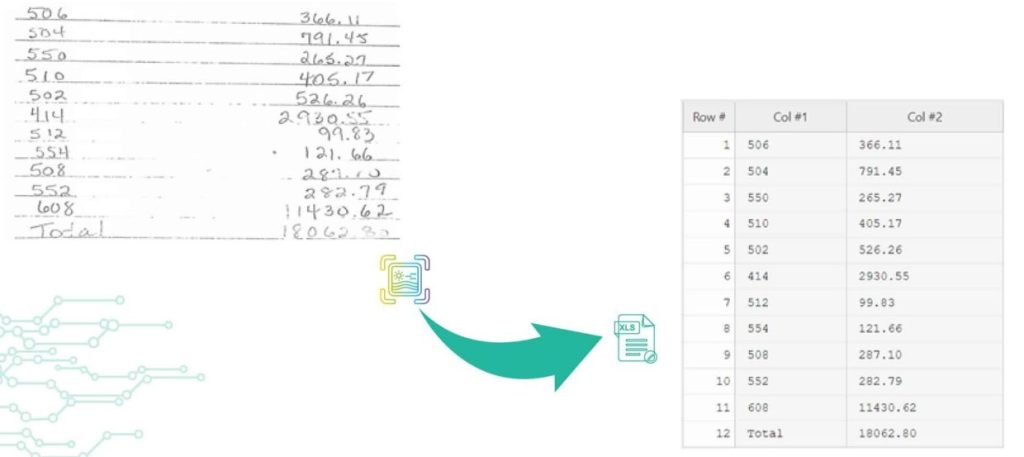
Back to Blog Table of contents On this page Extract handwritten text from scanned PDFs and images Home › Blog › Algodocs › Extract handwritten text from scanned PDFs and images Categories Algodocs Tags ai platform for data extraction algodocs character recognition data extraction from images deep learning export extracted data to excel invoice process machine learning ocr api web-based ai platform for data extraction By Shubhankar Biswas Published October 13, 2025, 11:56 Updated November 10, 2025, 13:34 Optical Character Recognition (OCR) engines are primarily focused on machine-printed text and may produce low accuracy for handwritten text. Intelligent Character Recognition (ICR) is an advanced recognition system that is used to recognize handwritten text. This allows the automatic conversion of text in an image into letter codes that are usable within computer and text-processing applications. Although many processes involve computer-based operations and are implemented in a digital environment, paper is still vastly used across most core business processes such as mortgage origination, order fulfillment, contracts, and other documents that usually require handwritten input and signatures. Nowadays, the digitalization of paper documents plays an important role, and deciding on the right data capture software is critical since handwriting recognition unlike printed text recognition is a more complex task that usually involves advanced deep learning algorithms. Algodocs: Deep Learning Handwriting Recognizer Algodocs is capable of converting handwritten text into machine-printed text with high accuracy. With the ICR of Algodocs, you can automate your document processing workflow and get rid of manual data entry. Scan your paper documents with handwritten text and let Algodocs automatically extract data and convert it to Excel or JSON. Let’s consider the following portion of a scanned document, which contains a table of two columns filled with handwritten numbers. If you upload this image to your account at Algodocs, you will see the following output, which has 100% accuracy. Algodocs uses advanced ICR engines trained with Artificial Intelligence algorithms and Deep Learning. The above example includes mostly digits. Another example with characters is given below. The following is the extracted text by Algodocs from the above image. As we can see Algodocs performs well in handwritten text extraction from scanned documents. Feel free to start a free subscription right now and test your handwritten scanned documents. You can use Algodocs free forever with 50 pages per month. If you need to process a higher number of pages, then please see our affordable pricing plans. If you have specific requirements and need a custom solution, please contact us. You Might Also Like How to Extract Handwritten Data from PDFs with Algodocs? Table of Contents Want to learn how to extract handwritten data from PDFs easily for your business documents? Algodocs is a powerful AI platform… Shubhankar Biswas October 13, 2025 Conquer Multilingual Data Extraction: A Step-by-Step Guide with Algodocs Introduction Sick of spending hours manually extracting data from multilingual PDFs and images? It could be more efficient, prone to mistakes, and,… Shubhankar Biswas October 12, 2025 Why convert PDF to Word on MacBook (Mac)? Picture this: You have a PDF file that needs to be revised or a scanned document that you wish to convert into an editable format like an MS Word… Shubhankar Biswas October 12, 2025 Start extracting your data today No credit card required. Process up to 50 pages per month on the Forever Free plan. Book a Demo Get Started for Free

Image Data Extraction

A Guide on Extracting Tables From Low-Quality Scanned Documents

Back to Blog Table of contents On this page A Guide on Extracting Tables From Low-Quality Scanned Documents Home › Blog › Image Data Extraction › A Guide on Extracting Tables From Low-Quality Scanned Documents Categories Image Data Extraction Tags ai platform for data extraction algodocs character recognition data extraction from images deep learning export extracted data to excel invoice process machine learning ocr api web-based ai platform for data extraction By Shubhankar Biswas Published October 13, 2025, 11:52 Updated July 22, 2026, 09:54 Many companies deal with thousands of documents every month. Document workflow automation becomes vital for such companies as the number of documents increases. One of the most frequent and at the same time tedious operations when processing documents is reading data from tables, especially when documents are scanned PDFs or images. Automating table extraction from scanned documents and exporting them into Excel or JSON within seconds is a dream for every company dealing with manual data entry. Automating table data extraction from scanned documents and images reduces operational costs and saves a lot of time. In this article, we will talk about table extraction from scanned documents or images with low quality. You, most probably, came across some online tools that can extract tabular data from documents. However, there are a few that really work with low-quality scanned documents or images taken by a mobile device. Optical Character Recognition (OCR) is the technology used for converting scanned images into text. However, standard OCR tools require you to apply certain image processing operations on the images before you can apply OCR on them. Without manual pre-processing, OCR will fail in most cases, and accuracy will be low. Unfortunately, even with pre-processing operations free OCR tools produce poor performance. How to extract tables from scanned PDFs and images with low quality? Algodocs has an advanced AI-powered OCR engine that automatically handles any type of scanned PDF or image with a low quality. Algodocs accepts either colorful scanned images, black and white, or any other settings and extracts data with high accuracy. Algodocs can process scanned images with as low a dpi as 75. If you have scanned PDFs or images with low quality, then Algodocs is the right solution for you. You may start a free subscription right now and test your own scanned documents since we offer a free subscription (forever) with 50 pages per month. If you need to process a higher number of pages, then please see our affordable pricing plans. Please read our article on the basic steps for table extraction from documents here: Extract tables from PDF and scanned documents Algodocs: the best software tool to extract tables from scanned PDFs and images Consider the portions of the scanned documents below and the tables that Algodocs extracted from them. Example #1 Sample scanned image with low-quality (black and white) Extracted table by Algodocs. Example #2 Extracted table by Algodocs As you can see, the accuracy of Algodocs is perfect even with low-quality scans. However, there are cases when scanned images may cause Algodocs to make mistakes concerning small characters such as punctuation or other symbols (points, commas, date separators, etc.). Let’s have a look at the example below with a scanned image and see what Algodocs could extract from it. The extracted table from the above-scanned image is shown below. As you can see, there are numbers that are extracted with wrong decimal separators (indicated in red circles), i.e. a decimal point is mistakenly recognized as a comma. This is due to the dark background that some rows have on the image. With the help of flexible extracting rules of Algodocs, the workaround is quick and simple. Whenever you have low-quality scanned PDFs of images, we always advise you to follow the steps explained below. Step1. Remove all points and commas from the numbers We apply the ‘Search & Replace’ filter in Algodocs by using regular expressions as the search type. We apply this rule to all the columns in the example below, but you can restrict this rule to a specific column when needed. In order to find all dots or commas we use .|, as the search term and we leave empty the second field (replace by this), since we simply want to remove them. Step 2. Convert all numbers to their previous format Since we removed all points and commas from numbers, they actually increased, i.e. multiplied by 100 we can say (2,378.63 became 237863). Therefore, since we know that our numbers had 2 decimal places, we can divide all numbers by 100 to get the original numbers. The ‘Arithmetic Operation’ filter helps us implement exactly this. We divide numbers by 100 in the last column as shown in the example below. You may apply this filter to other columns too. That’s it. We got numbers in their original form with 100% accuracy! The same approach can be applied to other symbols when you have documents with a low quality. Please, contact us if you need any assistance. You Might Also Like How to Extract Handwritten Data from PDFs with Algodocs? Table of Contents Want to learn how to extract handwritten data from PDFs easily for your business documents? Algodocs is a powerful AI platform… Shubhankar Biswas October 13, 2025 Data Extraction for Legal Industry : How Intelligent Document Processing (IDP) Can Transform Legal Industry Document Workflow The global law and legal services industry is expected to reach $1,591.56 billion by the end of 2032, according to a report. The legal industry… Shubhankar Biswas October 12, 2025 Extract Tables from Images with AlgoDocs Extract Tables from Images with AlgoDocs One might find themselves overwhelmed by a deluge of paperwork—orders, checks, articles—all containing… Ibrahim Nalbant June 20, 2024 Start extracting your data today No credit card required. Process up to 50 pages per month on the Forever Free plan. Book a Demo Get Started for Free

Artificial Intelligence, Data Extraction

AI Data Extraction Checklist: Transform Business with Algodocs

Back to Blog Table of contents On this page AI Data Extraction Checklist: Transform Business with Algodocs Home › Blog › Artificial Intelligence › AI Data Extraction Checklist: Transform Business with Algodocs Categories Artificial Intelligence Data Extraction Tags bank ocr deep learning digital transformation Finance ocr invoice invoice process KYC loan forms packing list ocr pdf to text sea waybill ocr web-based ai platform for data extraction By Shubhankar Biswas Published October 13, 2025, 09:25 Updated July 23, 2026, 07:33 What is AI Data Extraction? Let’s discuss data – a lot of data. Modern-day businesses are losing themselves in the sea of information. Whether it is an invoice, a contract, a weekly report, or a form, paper documents are still part of everyday life. Extracting data from such documents is a tedious, repetitive, and painful process if done manually. This is where AI data extraction comes to the rescue. It is a game-changer for anyone who has to work with several papers. Incorporating AI means data entry activities are done efficiently and there’s an increase in the accuracy and productivity of your business. Algodocs is a perfect example of an AI data extraction tool. Why? Let’s find out. Understanding Your Data: The Foundation for Successful AI Data Extraction Before you set loose the AI on your documents, I thought it’s best to discuss a little about your data. It is essential to know what type of data you are going to extract and what the process is going to be like. Identify Your Data Sources First things first: where do you store your data? The first action plan is to identify this source. Is it hidden in files and papers or dispersed in different online sites as in virtual archives? You’ll find your data in various forms: Manual records or documents that include invoices, contracts, and reports, among others. Documents in PDF files, Word documents, Excel, images, and many others. Databases that store many formats of data about any department in an organization. Assessing Data Quality Data quality is super essential for accuracy in the extraction process. Ensure that you go through your assembled data to determine whether it meets the standard of completeness, consistency, and accuracy. Check that all required data items are included. Check whether the formats, units of measurement, and terms used for data are consistent. Validating steps where errors, inconsistencies, or outliers will affect the outcome must be adopted diligently. Dedicating time to data preparation will enable laying down the key fundamentals of an AI data extraction project. Optimizing the extraction results of Algodocs, the company provides you with tools for evaluating data quality and detecting potential problems. Choosing the Right AI Data Extraction Tool Picking the right tool to extract AI data is critical to the success of any AI project. As we have seen, there are numerous strategies out there; that is why it is crucial to define your requirements precisely and compare tools based on the crucial factors. Critical Considerations for Tool Selection Accuracy: The whole idea of training an AI in the first place is to increase accuracy, isn’t it? Search for the tool with favorable accuracy characteristics, especially in the case of processing intricate and diversely formatted documents. Don’t forget about tables, crazy handwriting, or low-quality pictures. Speed: It’s important, especially in dealing with large numbers of documents that are prevalent in the modern organization. However, time translates to costs, more so when handling big data at hand or any other business. Having a fast and efficient tool can save hours, if not days off of your time. Flexibility is very important, especially for those industries that anticipate expansion. Scalability: The tool should be designed for growth which includes a higher amount of input data and scalability of business over time. Document Types: Think about the countless supported document types with your tool (PDFs, images, Word, Excel, and more). Data Formats: Verify that the tool can export information according to your preferred choice format (CSV, XML, JSON, etc.). Integrations: This is very important as technology should be compatible with the current systems and applications. In other words, a single tool could essentially serve the purpose. But if a tool can integrate with other existing systems, then that’s ideal. It integrates with frequently used business applications such as CRMs, ERPs, and data warehouses. Pricing: Analyze cost distribution for various pricing structures considering your estimated budget. Customer Support: Customer support should be reliable and available for providing technical support and answering questions at all times. Types of AI Data Extraction Tools Cloud-Based Tools AI data extraction in cloud-based is also beneficial since it is scalable, easily accessible, and mostly cheaper. These tools are stored at service providers’ central servers, and users only need an Internet connection to use them. Examples: Google Cloud Document AI, Amazon Textract, ABBYY Cloud OCR, and Algodocs. On-Premise Tools On-premise solutions allow necessary control over infrastructure, but they can be more expensive. These tools are deployed and run on the organization’s own IT systems and infrastructure. It is worth mentioning that Algodocs is a web-based tool; however, it can also be used On-premise. Examples: Kofax, OpenText, and Algodocs. Open-Source Tools Using and adapting open-source AI data extraction tools is more flexible and customizable, but implementing these tools requires technical skills. Examples: Tesseract OCR, OpenCV Mobile Apps Mobile applications usually reside on document capture and basic data mining capabilities. This is perfect for small data snippets or impromptu snapshots of information gathering. However, such tools may not work well when a large quantity of structured content, such as tables, is involved. Not to forget that handwriting style and layout complexities can cause the accuracy of such tools to drop. Examples: Google Lens or Microsoft Office Lens can scan your document and convert the text into a digital format. Making an Informed Decision Considering the following aspects and your organization’s requirements, you can choose the right AI data extraction tool for your organization. Feature Cloud-Based On-Premise Open-Source Mobile Apps Accuracy High High Varies Varies Speed High High Varies

Data Extraction

Mastering AI Data Extraction: A Comprehensive Guide to Unlocking Valuable Insights

Back to Blog Table of contents On this page Mastering AI Data Extraction: A Comprehensive Guide to Unlocking Valuable Insights Home › Blog › Data Extraction › Mastering AI Data Extraction: A Comprehensive Guide to Unlocking Valuable Insights Categories Data Extraction Tags data extraction web-based ai platform for data extraction By Shubhankar Biswas Published October 13, 2025, 09:14 Updated July 20, 2026, 04:44 What is AI Data Extraction? According to a Forbes 2024 study, 2.5 quintillion bytes of data are generated every single day. By 2025, this figure is expected to balloon to 463 exabytes daily [1]. Businesses and individuals alike are drowning in a sea of information. Deriving insights from this raw data is no longer a luxury—it’s a necessity. Manually extracting data from documents like scanned files, PDFs, and images is incredibly time-consuming and error-prone. This is where data extraction tools steps in. Think of AI data extraction as having a genius robot at your disposal.  It can sift through mountains of documents, read and understand their content, and then pinpoint and extract the information you need.  Whether it’s text, tables, marks, or signatures, the AI understands your requirements and delivers the results in a flash. This powerful combination of machine learning and natural language processing is revolutionizing the way businesses manage data. Imagine the time and energy you could save by automating this tedious task. Let’s explore how AI data extraction works and the benefits it can bring. Understanding the AI Data Extraction Process So, how does this AI magic actually happen? Let’s break it down. You start by providing the data extraction tool with your own documents, whether they are scanned papers, PDFs, or images. This is where the technology starts its work. That data is fed to the AI using Optical character recognition (OCR), which converts all those uneditable formats(images) into text that AI can understand. But it doesn’t stop there. Natural language processing (NLP) now takes over, enabling the AI model to grasp the meaning behind its own words. It is somewhat like teaching a computer to read, think, and speak like a human–but faster! Here’s where true cleverness lies. Whether you are looking for names, dates, or addresses, the AI will look for the specifics. It can even handle complicated data structures like tables and handwritten; it’s like having a digital assistant that can accurately extract the exact data you need. Once your required data is extracted and transformed into a structured format, it is ready for analysis or integration within your systems, such as a CSV file, an Excel spreadsheet, or even directly into your CRM / accounting software. Benefits of AI Data Extraction Why is AI Data Extraction Essential for Your Business? Let us imagine the following: We can spend less time on data entry and more time unraveling insights. That is the magic of AI data extraction. It can even automate this time-consuming process, freeing up human resources to work on the more important and critical tasks—making informed decisions. AI data extraction is your business superpower. It increases productivity by processing a large amount of data in shorter intervals and with greater accuracy. Humans make mistakes and are inconsistent! Armed with accurate extracted data, you will be able to uncover new patterns and trends that may significantly impact your business. In other words, AI data extraction gives companies in industries—finance, healthcare, and any industry that depends on information to operate their business—that leverage big data an efficient way of automating boring tasks while speeding up processes geared at accelerating growth rate. This is not only a question of saving time and money but rather allowing your data to fulfill its potential. Challenges and Considerations Overcoming AI Data Extraction Challenges AI data extraction might be very powerful, but that does not mean that we will not face some challenges. One of the primary challenges in AI data extraction is handling inconsistent data formats. Documents vary in layout, font, and structure, which can pose difficulties for AI data extraction systems. Additionally, extracting handwriting from scanned files can be a tricky puzzle, especially if the handwriting is messy or illegible. But fear not! With the right automated data extraction tool, we can easily overcome such problems. Advanced data extraction tools like Algodocs are equipped to handle these challenges. Algodocs employs sophisticated algorithms and machine learning models that can adapt to diverse document types and decipher even the most challenging handwriting. Data Preparation: The Key to Accuracy The accuracy of any data extraction model hinges on the quality of the input data. Data cleaning and normalization—removing errors, inconsistencies, and irrelevant information—are crucial steps in ensuring optimal results. Here, Algodocs allows users to optionally fine-tune (train) the model on their specific document types for enhanced accuracy. Ethical Considerations in AI Data Extraction Like any computer-based technology, AI-automated data extraction has raised some ethical questions. Privacy is a major concern in handling data responsibly, and following regulations is essential. Keeping crucial data secure is an utmost priority. Bias is another ethical consideration. AI models learn from data; any biases in the training set can lead to biased output. You should implement some important steps to avoid those biases. Algodocs takes the integrity of your data very seriously. They are ISO 27001 (Information Security Management System) and ISO 9001 (Quality Management System) certified and GDPR ready. Furthermore, Algodocs models are trained on diverse and representative datasets to ensure fairness and equity in the data extraction process. AI Data Extraction Tools and Platforms Choosing the right AI data extraction tool is crucial for your success. Due to the numerous alternatives available, it may be difficult to find the best fit. However, the following factors should get immediate attention: the kind of documents you deal with, accuracy, availability, the complexity of the data, the price, and the desired level of customization. A number of tools are designed for specialized applications, while others offer a more general approach. Algodocs: Your Trusted AI Data Extraction Partner Algodocs is one of the best AI

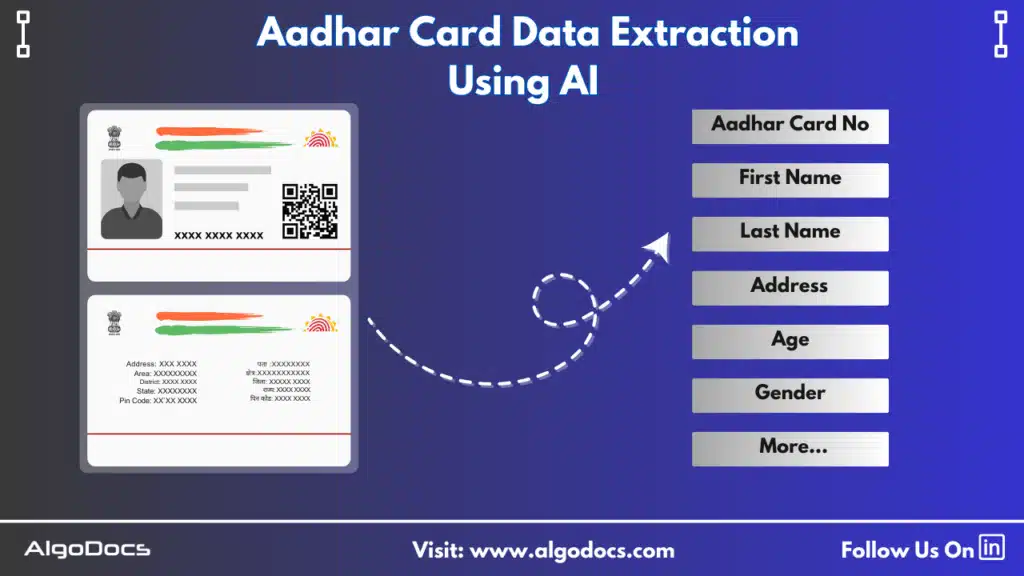
Aadhar Card Data Extraction using AI
Algodocs

Aadhar Card OCR: Extracting Data From Aadhar Card Using AI

Back to Blog Table of contents On this page Aadhar Card OCR: Extracting Data From Aadhar Card Using AI Home › Blog › Algodocs › Aadhar Card OCR: Extracting Data From Aadhar Card Using AI Categories Algodocs Tags ai platform for data extraction algodocs data extraction from images id card extraction id card ocr machine learning ocr api web-based ai platform for data extraction By Shubhankar Biswas Published September 1, 2025, 08:50 Updated July 20, 2026, 05:40   In today’s fast-paced digital era, automation and artificial intelligence (AI) have transformed data extraction processes across various industries. One of the most critical use cases in India is Aadhar Card data extraction, where Optical Character Recognition (OCR) and AI technology are used to extract data from Aadhar cards with higher accuracy. Since the Aadhar card serves as a crucial identity document (ID) for Indian citizens, automating data extraction can significantly enhance work efficiency in many industries such as finance, telecom, healthcare, and e-governance. With the growing need for faster and more reliable document processing, AI-powered OCR solutions (IDP) are becoming essential tools for businesses in India. By eliminating manual data entry, businesses can reduce errors, enhance efficiency, and improve data management. In this blog, we will explore how Aadhar Card OCR works, its advantages, and how AI-driven solutions like Algodocs streamline the data extraction process. So What is Aadhar Card OCR? Aadhar Card OCR is an Optical Character Recognition (OCR) technology used to capture and extract details from a scanned image or PDF format of an Aadhar card. The key details extracted through this process include the 12-digit Aadhar card number, the full name of the cardholder, date of birth, gender, address, and QR code data. Extracting this information manually can be time-consuming and prone to errors. However, an AI-based OCR app can easily capture, extract, and sort the data with the help of AI, allowing you to automate the entire process. The best part of AI-based OCR tools is that they improve accuracy, speed, and efficiency by using sophisticated algorithms that analyze, recognize, and extract text even from low-quality images, which is not possible with manual data extraction approaches. Unlike traditional OCR systems, AI-powered solutions are trained on vast datasets, allowing them to recognize different fonts, complex formats, and text placements with greater precision and speed. How AI Elevates  Aadhar Card Data Extraction Efficiency Traditional OCR solutions often struggle with poor-quality images, handwritten text, or complex document layouts. However, AI-powered OCR can overcome these challenges by using machine learning (ML), natural language processing (NLP), artificial intelligence (AI), and advanced image preprocessing techniques. Machine learning algorithms and artificial intelligence enable OCR tools to recognize and extract text from Aadhar cards with a high degree of accuracy. These algorithms are trained to learn from large volumes of data, allowing them to improve their performance over time. Natural language processing (NLP) helps in interpreting and structuring the extracted information correctly, ensuring that fields such as names and addresses are properly identified. Image preprocessing techniques further enhance accuracy by removing background noise, adjusting contrast, and correcting distortions in scanned or photographed documents. This ensures that even low-quality images can be processed with minimal errors. Another significant advantage of AI-powered OCR is fraud detection. The system can identify forged or tampered Aadhar cards by analyzing patterns and inconsistencies within the document, thus ensuring data authenticity. The Aadhar Card Data Extraction Process Extracting data from an Aadhar card using AI-based OCR involves several key steps. The process begins with image acquisition, where a scanned copy or photograph of the Aadhar card is uploaded; the file can be a PDF as well. The AI-driven OCR software then processes the image to enhance readability by removing any background noise and correcting distortions. Once the image is pre-processed, the OCR engine scans the document and recognizes the text using deep learning algorithms. The extracted data is then structured into predefined fields, ensuring that each piece of information, such as the Aadhar number, name, age, gender, and address, is correctly categorized. After the text is extracted, the system validates the information by cross-checking it with predefined data formats. Finally, the structured data is exported for integration into various applications, such as customer onboarding systems, KYC verification processes, and digital record management solutions. Benefits of AI-Powered Aadhar Card OCR platforms AI-powered Aadhar Card OCR apps offer numerous advantages over manual data entry or traditional OCR apps. One of the primary benefits of AI-powered Aadhar Card OCR apps is their enhanced data extraction accuracy and increased extraction speed. AI models trained specifically for Aadhar card data extraction ensure precision, minimizing errors that could occur due to manual input. This high accuracy is particularly beneficial for businesses that require large-scale data processing, such as banks, telecom companies, and government agencies. Try Algodocs AI-based Aadhar Card OCR for all types of ID card data extraction and KYC document data extraction work for free. Another key advantage is speed. The automation of data extraction significantly reduces processing times, allowing businesses to complete customer verifications, document submissions, and other administrative tasks much faster. This improved efficiency translates into cost savings, as organizations no longer need to rely on extensive human labour for data entry tasks. One of the most important benefits of AI-powered Aadhar Card data extraction is fraud prevention and data security, which are crucial factors in safeguarding personal information as the Aadhar card is an important ID card. Unauthorized access to this information can lead to many negative consequences for users and the organization. AI-powered OCR systems can detect forged or tampered documents by analyzing subtle inconsistencies in text alignment, font variations, and background patterns. This ensures that only genuine Aadhar card data is processed, enhancing security and compliance. Furthermore, AI-based OCR tools integrate seamlessly with existing systems. Whether it’s a CRM platform, banking application, or government database, the extracted data can be automatically transferred to ensure smooth workflow automation. Applications of Aadhar Card OCR Across Industries Though Aadhar Card OCR has a wide range of applications across

Scroll to Top