Algodocs

Data Extraction

Practical guides on getting structured data out of documents at scale. Learn how AI and OCR handle invoices, receipts, contracts and scanned files, what to look for when choosing an extraction tool, and how to build a workflow that removes manual data entry for good.
Data Extraction, Image Data Extraction, Legal Document Extraction

Data Extraction for Legal Industry : How Intelligent Document Processing (IDP) Can Transform Legal Industry Document Workflow

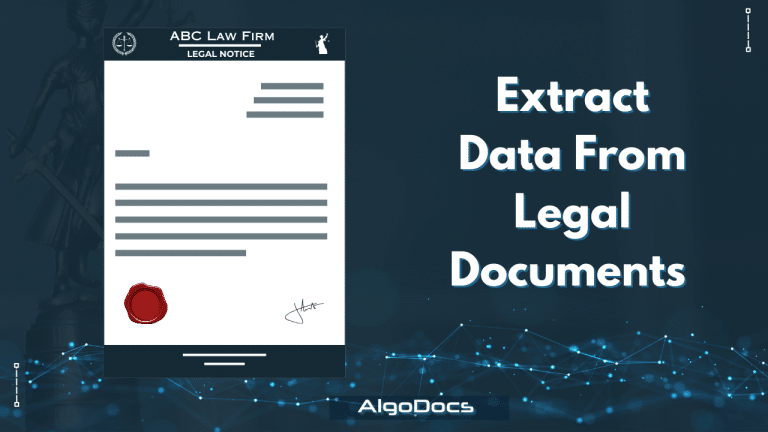
Back to Blog Table of contents On this page Data Extraction for Legal Industry : How Intelligent Document Processing (IDP) Can Transform Legal Industry Document Workflow Home › Blog › Data Extraction › Data Extraction for Legal Industry : How Intelligent Document Processing (IDP) Can Transform Legal Industry Document Workflow Categories Data Extraction Image Data Extraction Legal Document Extraction Tags AI algodocs data extraction IDP intelligent document processing Legal Industry machine learning By Shubhankar Biswas Published October 12, 2025, 16:36 Updated July 22, 2026, 10:08 The global law and legal services industry is expected to reach $1,591.56 billion by the end of 2032, according to a report. The legal industry primarily relies on information, with activities such as contracts, court filings, discovery documents, and legal research forming the foundation of every case and legal process. These tasks involve a significant amount of documentation and data. However, managing this mountain of data has always been a challenge for the legal industry. Traditional methods of manual review and data entry are time-consuming, expensive, and prone to human error. Fortunately, technologies such as Artificial Intelligence (AI) and Intelligent Document Processing (IDP) have revolutionized how law firms and legal departments handle data extraction from multiple documents and files, significantly improving their work efficiency. In this blog, we will discuss how IDP (Intelligent Document Processing) can enhance document processing efficiency for the legal industry and why Algodocs AI is an ideal document processing solution that can elevate data extraction and document management for legal service business owners. Data Extraction for Legal Industry : A Major Challenge for Law Firms and Legal Service Providers Data is the lifeblood of the legal profession and law firms. Whether it involves extracting key clauses from contracts, identifying vital information in discovery documents, or analyzing legal precedents, the ability to quickly and accurately extract data is critical. This is where IDP (Intelligent Document Processing) for the legal industry comes into play. IDP automates the process of identifying and extracting relevant information from various legal documents, transforming unstructured data into a structured, usable format. This process is vital for several reasons: Efficiency: Manual data extraction is notoriously slow and labor-intensive. IDP and AI automate this process, freeing legal professionals to focus on higher-value tasks like strategy and client interaction. Accuracy: Human error is inevitable when manually extracting data. IDP and AI solutions, such as Algodocs, significantly reduce errors, ensuring data integrity and reliability. Cost Savings: Manual data extraction is not cost-effective, especially when dealing with bulk documents, which are abundant in the legal industry. By automating data extraction, law firms and legal departments can reduce overhead costs and improve their bottom line. Improved Decision-Making: Extracted data can be analyzed to provide valuable insights, enabling lawyers to make more informed decisions and develop stronger legal strategies. The Limitations of Traditional Data Extraction Methods Before the advent of technologies like IDP, AI, or OCR, legal professionals relied heavily on manual methods for data extraction. These methods, while sometimes necessary, come with significant challenges: Time-Consuming: Sifting through hundreds or thousands of pages of legal documents to locate and extract specific information is tedious and time-intensive. Error-Prone: Manual data entry is susceptible to human error, which can have severe consequences in legal matters. Inconsistent: Manually extracted data can vary in format and accuracy depending on the individual performing the task, leading to inconsistencies and difficulties in analysis. Costly: Labor costs associated with manual data extraction can be significant, particularly for large-scale legal projects. These limitations highlight the need for a more efficient, accurate, and cost-effective solution for data extraction in the legal industry. This is where IDP steps in. How IDP Works IDP leverages the power of artificial intelligence (AI) technologies such as machine learning (ML), natural language processing (NLP), computer vision, and OCR to automate data extraction from legal documents. Here’s how it works: Document Ingestion: IDP solutions can ingest various document formats, including PDFs, scanned images, Word documents, handwritten notes, and emails. Pre-Processing: Documents undergo pre-processing steps like optical character recognition (OCR) to convert scanned images into machine-readable text and remove noise. Data Extraction: NLP and ML algorithms identify and extract relevant information based on pre-defined rules or learned patterns, such as clauses, dates, names, addresses, and financial figures. Data Validation: Extracted data is validated using techniques like cross-referencing and pattern matching to ensure accuracy. Output: The validated data is exported into a structured format, such as a spreadsheet or database, for easy analysis and use. The Benefits of IDP for Legal Data Extraction IDP offers numerous benefits for legal professionals seeking to streamline data extraction: Increased Efficiency: Automates the data extraction process, significantly reducing time and effort. Improved Accuracy: Minimizes human intervention, reducing errors and ensuring greater precision. Enhanced Consistency: Provides consistent data extraction across all documents, regardless of complexity. Reduced Costs: Cuts labor costs by automating repetitive tasks. Better Risk Management: Identifies potential risks and liabilities within documents. Improved Compliance: Ensures adherence to legal and regulatory requirements. Enhanced Client Service: Enables legal professionals to deliver faster, more accurate services. Use Cases of IDP in the Legal Industry Contract Analysis: Automatically extracts key details like parties, dates, payment terms, and clauses. Due Diligence: Speeds up the review process for mergers and acquisitions by analyzing contracts and financial statements. Discovery: Analyzes vast amounts of discovery data to identify relevant information and patterns. Legal Research: Automatically extracts relevant information from case law, statutes, and legal journals. Compliance Monitoring: Ensures documents adhere to regulations and internal policies. Choosing the Right IDP Solution To maximize its benefits, selecting the right IDP solution is crucial. Consider factors such as accuracy, scalability, integration, security, user-friendliness, and vendor support when making your choice. Algodocs: A Leading IDP Solution for Legal Industry Algodocs is a powerful IDP solution tailored to address the challenges of data extraction in the legal field. It automates document processing, ensures high accuracy, offers customizable data extraction, and integrates seamlessly with existing systems. By implementing Algodocs, law firms and legal departments can enhance efficiency, accuracy, and cost-effectiveness, enabling better outcomes for clients. Conclusion Intelligent Document Processing is transforming the legal industry by automating critical processes. By improving efficiency, accuracy, and cost-effectiveness, IDP empowers law firms and legal departments to

Data Extraction, PDF

PDF Image Extraction: A Comprehensive Guide To Extracting Image Data From Scanned Pdf Files In 2025

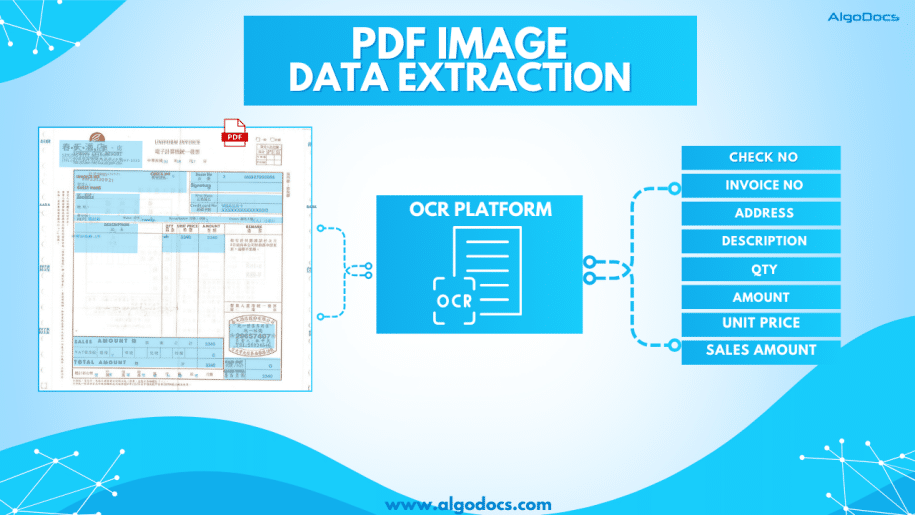
Back to Blog Table of contents On this page PDF Image Extraction: A Comprehensive Guide To Extracting Image Data From Scanned Pdf Files In 2025 Home › Blog › Data Extraction › PDF Image Extraction: A Comprehensive Guide To Extracting Image Data From Scanned Pdf Files In 2025 Categories Data Extraction PDF Tags ai platform for data extraction algodocs image data extraction pdf image extraction By Shubhankar Biswas Published September 1, 2025, 09:19 Updated July 23, 2026, 05:45 PDF image extraction is a challenging process. Without proper tools and technology, this process can be tedious and prone to errors, which can eventually lead to a loss of money and time for an organization. PDFs have always been one of the most convenient and reliable ways to store, carry, and share information with others. However, lots of data in PDFs is locked as scanned images. When you have multiple images or scanned documents to deal with, it becomes easy for a person to bind all these multiple image documents into one with the PDF format.The PDF document format is widely used for business communication and personal document sharing as well.Unlike other document formats such as. doc, CSV, or TXT formats, PDFs are considered much safer because they can be locked with a password, or data can’t be edited or altered unless you allow it. However, one of the most common challenges faced when dealing with PDFs is extracting data from scanned PDF images. Scanned PDFs are essentially images of text, making it difficult to directly copy or edit the content. This is where the concept of PDF image extraction comes into play. In this blog, we’ll explore how to extract data from scanned PDF images, the tools and techniques involved, and why this process is crucial for efficient data management. What is PDF Image Extraction? PDF image extraction refers to the process of extracting text, images, or other data from scanned PDF documents. Unlike standard PDFs, which contain selectable and editable text, scanned PDFs are essentially pictures of pages. This means that the text within these documents is not machine-readable unless processed using Optical Character Recognition (OCR) technology.The ability to perform PDF image extraction is essential for businesses that deal with large volumes of scanned documents, such as invoices, contracts, or historical records. By converting these images into editable and searchable text, organizations can streamline their workflows, improve data accuracy, and enhance accessibility. Why is Extracting Data from Scanned PDFs Important? Improved Data Accessibility: Scanned PDFs are often unsearchable, making it difficult to locate specific information. Extracting data from these documents makes the content searchable and easier to navigate. Enhanced Productivity: Manually typing out text from scanned documents is time-consuming and prone to errors. Automated extraction tools save time and reduce the risk of mistakes. Data Integration: Extracted data can be integrated into databases, spreadsheets, or other software systems, enabling better data analysis and decision-making. Compliance and Record-Keeping: Many industries require digital records for compliance purposes. Extracting data from scanned PDFs ensures that information is stored in a usable and retrievable format. How Does PDF Image Extraction Work? Image PreprocessingBefore extracting text, the scanned image may need to be pre-processed to improve OCR accuracy. This can include tasks like: Deskewing: Correcting the alignment of the image. Noise Reduction: Removing background noise or artifacts. Binarization: Converting the image to black and white for better contrast. Optical Character Recognition (OCR)OCR is the core technology behind PDF image extraction. It analyzes the scanned image and identifies characters, words, and sentences. Modern OCR tools are highly accurate and can recognize text in multiple languages and fonts. Text Extraction and FormattingOnce the OCR process is complete, the extracted text is formatted to match the original document’s layout. This includes preserving headings, paragraphs, tables, and other structural elements. Data Validation and CorrectionWhile OCR technology has advanced significantly, it’s not perfect. Extracted data may require manual validation and correction to ensure accuracy. Tools for PDF Image Extraction Algodocs: A powerful data extraction tool that combines the power of AI and OCR technology. It lets you extract data from scanned PDF images. ABBYY FineReader: Known for its good accuracy and support for multiple languages. Tesseract OCR: An open-source OCR engine that can be integrated into custom workflows. Online OCR Tools: Websites like Smallpdf and ILovePDF offer quick and easy solutions for occasional users. Python Libraries: For developers, libraries like PyTesseract and PDFPlumber provide flexibility for custom solutions. You can automate bulk PDF image extraction with Algodocs’ advanced AI app. Our app can extract data from blurry and distorted scanned PDF images with 10X speed without making any errors. Access For Free Best Practices for PDF Image ExtractionTo achieve the best results when extracting data from scanned PDF images, consider the following tips: Use High-Quality Scans: The quality of the scanned image directly impacts OCR accuracy. Ensure that the document is scanned at a high resolution (300 DPI or higher). Choose the Right Tool: Select an OCR tool that meets your specific needs, whether it’s a one-time extraction or a large-scale automation project. Validate Extracted Data: Always review the extracted text for errors, especially when dealing with handwritten or poorly scanned documents. Leverage Automation: For businesses handling large volumes of scanned PDFs, consider automating the extraction process using scripts or software. Protect Sensitive Data: Ensure that any tools or services used for PDF image extraction comply with data privacy regulations. Applications of PDF Image Extraction The ability to extract data from scanned PDF images has a wide range of applications across industries. Here are a few industries where PDF image extraction is widely used: Healthcare: Digitizing patient records and medical forms for easier access and analysis. Legal: Converting scanned contracts, case files, and legal documents into editable formats. Finance: Extracting data from invoices, receipts, and financial statements for accounting purposes. Education: Digitizing textbooks, research papers, and handwritten notes. Archives and Libraries: Preserving historical documents and making them searchable for researchers. Challenges in PDF Image ExtractionWhile PDF image extraction offers numerous benefits, it’s not without its challenges: Handwritten

Data Extraction, Optical Character Recognition

What Is Zonal OCR? An Easy Guide to Understanding Zonal OCR and How It Works.

Back to Blog Table of contents On this page What Is Zonal OCR? An Easy Guide to Understanding Zonal OCR and How It Works. Home › Blog › Data Extraction › What Is Zonal OCR? An Easy Guide to Understanding Zonal OCR and How It Works. Categories Data Extraction Optical Character Recognition Tags character recognition ocr api By Shubhankar Biswas Published September 1, 2025, 07:27 Updated July 20, 2026, 11:11   Processing data from bulk documents can be an annoying and time-consuming task if you have to extract this data manually. But with the help of modern technology such as optical character recognition, you can extract data from these documents easily. There is another part of OCR technology known as zonal OCR, which lets you extract specific data from specific sections of a PDF or scanned image. That is known as zonal OCR. So, what is Zonal OCR, and how does it work? We will discuss more in detail below. Understanding the Basics: OCR VS Zonal OCR? Before we explain what zonal OCR is, we first need to understand what OCR technology is and how it works.OCR stands for Optical Character Recognition. It was developed in the late 70s and started to gain traction in the late 80s. One of the main reasons it gained popularity in the 80s was because it started to be used by banks to extract data from various types of documents, which helped them save time and improve data extraction quality. Later, OCR was adopted in business, marketing, and other industries all around the world.The main function of traditional OCR technology is to convert different types of documents such as scanned paper documents, PDFs, or images into editable and searchable data. An OCR tool “reads” text on an image and turns it into digital letters that are editable on a computer. For example, if you scan a printed invoice and use OCR software, the software can pull out the name, address, and price from that scanned image and turn it into usable text. But classic OCR tools extract all the presented data in a document, and you can’t control what to extract and what not to—that’s where zonal OCR comes into play. What Is Zonal OCR? Now that we know what OCR is, let’s answer the main question—what is zonal OCR?Zonal OCR is a more focused and intelligent version of regular OCR. Instead of scanning an entire document and pulling out all the text, zonal OCR extracts data from specific areas or “zones” of a document. That’s why it is called zonal OCR or is known as template OCR as well. These zones are predefined sections where certain types of information always appear.Think of it like this: if every invoice you receive has the “Invoice Number” in the top right corner, Zonal OCR can be trained to look at just that area and pull the number out automatically. It ignores everything else and goes straight to the point. That makes it incredibly efficient and reliable for high-volume document processing. One of the major highlights of zonal OCR is that it is more accurate compared to traditional OCR. So, How Does Zonal OCR Work? Let’s break down how Zonal OCR works in a step-by-step process: Template Definition: First, you define zones on a document template. These zones are rectangular areas where key data lives—like names, dates, invoice numbers, etc. Document Scanning: When a new document comes in, it is scanned or uploaded to the system. Zone Detection: The Zonal OCR engine locates the defined zones on the document. Data Extraction: The engine reads the text from those zones and extracts it into a structured format like CSV, JSON, or directly into a database. Post-Processing: Extracted data can be validated, verified, or even pushed into downstream workflows like CRMs, ERPs, or RPA systems. Features of Zonal OCR What makes zonal OCR so powerful is its accuracy. Traditional OCR might pick up irrelevant text or make errors when faced with complex layouts. But zonal OCR knows exactly where to look because we have already defined the zone from where data needs to be picked and extracted. That means fewer errors, faster processing, and smoother workflows. Real-World Example: Zonal OCR For Medical Billing Imagine a hospital that receives thousands of medical bills every month. These documents have patient names, billing codes, diagnosis details, health insurance info, and payment terms.Using zonal OCR, the hospital can define zones on its standard bill layout:• Top left for patient name• Top right for bill number• Centre zone for treatment codes and costs• Bottom section for insurance informationEach incoming bill gets processed automatically. The software reads just those parts and enters the data into the hospital’s billing system. No manual typing. No human errors. Just fast, accurate data extraction. Where Zonal OCR Is Used Zonal OCR is widely used in different industries that handle large volumes of documents with structured layouts. Here are some common use cases:• Healthcare: Extracting patient data, diagnosis reports, medical codes, and insurance details from forms and bills.• Finance: Pulling out transaction info, invoice numbers, and payment dates from bank statements or receipts.• Logistics: Reading shipping labels, barcodes, and delivery addresses.• Legal: Extracting case numbers, parties involved, or dates from legal filings.• Retail: Processing receipts and purchase orders for inventory management. Why Businesses Need Zonal OCR Now that you understand what zonal OCR is, let’s explore why it’s such a vital tool for modern businesses.Saves TimeManual data entry is slow and expensive. Zonal OCR does in seconds what might take a person several minutes or hours.Reduces ErrorsHumans make mistakes, especially when tired or rushed. Zonal OCR provides consistent and accurate results.Scales EasilyWhether you process 10 or 10,000 documents a day, zonal OCR can handle it. It grows with your needs.Easy IntegrationMost zonal OCR systems can plug right into your existing software—like CRMs, ERP tools, or cloud databases.Improves ComplianceAccurate document processing means better audit trails, stronger recordkeeping, and improved compliance with industry regulations. Zonal OCR vs Full-Page OCR You might be wondering, “Why not just use

Data Extraction

OCR In Healthcare: Revolutionizing Medical Document Processing for Better Patient Care

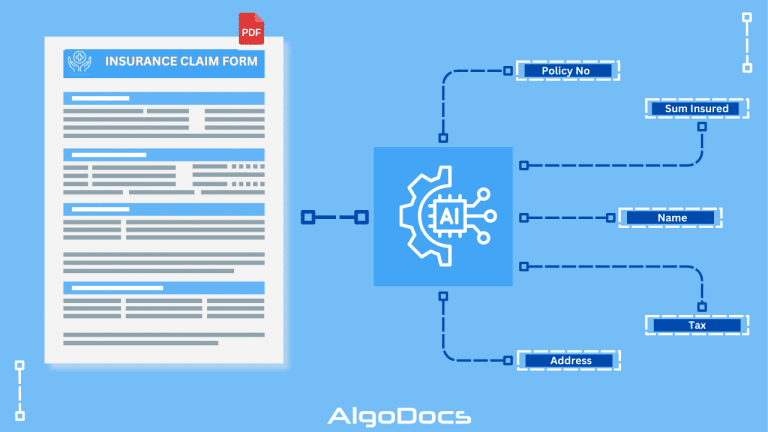
Back to Blog Table of contents On this page OCR In Healthcare: Revolutionizing Medical Document Processing for Better Patient Care Home › Blog › Data Extraction › OCR In Healthcare: Revolutionizing Medical Document Processing for Better Patient Care Categories Data Extraction Tags algodocs healthcare data extraction healthcare ocr By Shubhankar Biswas Published September 1, 2025, 07:14 Updated July 20, 2026, 05:04 Imagine working at a hospital and having to extract and organize data from various types of hospital and healthcare documents such as patient forms, health insurance documents, lab reports, etc. How will you do it? Not manually, for sure. That’s where OCR for healthcare comes in. These important documents can be in the form of PDFs, scanned images, docs, or handwritten notes. Extracting data from these manually can be challenging for human eyes. Also, extracting data from a document manually is a slow process and full of errors. But with the help of healthcare OCR technologies, we can improve the healthcare document workflow and provide better healthcare service to patients. In this article, we will discuss the benefits of OCR for the healthcare industry, how OCR and AI are improving healthcare document processing and serving the patients in real-time, the challenges with manually extracting data from healthcare documents, and how AI is improving the healthcare document workflow with OCR technologies. So, before we jump into OCR for healthcare, we need to understand what OCR is. So, what is OCR? Optical Character Recognition or OCR is a technology that extracts data and converts it into machine-readable format so that computers can understand it. Simply put, it converts data from PDFs, scanned images, and docs to editable formats. OCR technology is a very old technology that has been used by many different industries for different purposes. One of the main advantages of using OCR technology for data extraction is that it can extract data from PDFs, scanned images, and documents with great speed and higher accuracy compared to the manual data extraction approach. The old manual data extraction approach is slow and full of human errors, which oftentimes leads to data discrepancies and high error rates. But on the other hand, OCR eliminates these challenges by providing data extraction with greater precision and faster speed from documents. What is OCR in Healthcare? We have covered what OCR technology is—now let’s talk about what OCR in healthcare means. OCR in healthcare is a technology that extracts data from healthcare documents such as patient forms, medical prescriptions, insurance documents, lab reports, and other healthcare documents. We can refer to this as a customized OCR tool that is specifically fine-tuned to automate and extract data from healthcare documents.The benefit of healthcare OCR tools is that they automate data extraction from documents with great speed and accuracy, which isn’t possible with manual data extraction approaches. This eventually improves document workflow efficiency, staff productivity, and serves patients in a more efficient and timely manner. Why OCR Technology is Essential for Healthcare We all understand the importance of data accuracy and time when it comes to serving a patient with greater care. Doctors, pathologists, labs, and other hospital departments need to access data in a very timely manner. But if we go with the manual data approach, delays in data extraction and collaboration can be fatal for a patient’s life. One of the main advantages of OCR for the healthcare industry is: Faster data retrieval – For better clinical decisions, doctors and healthcare providers need to access patient data quickly. Healthcare OCR helps by automating data extraction and organizing it for faster retrieval. Enhanced patient experiences – When it comes to treating a disease or a medical emergency, everyone wants access to treatment quickly and accurately. Accessibility of patient data improves the overall treatment experience for a patient. Lower administrative burden – You can achieve more by automating basic tasks and reducing the administrative burden on hospitals and their staff. Higher billing accuracy and faster claim processing – Technologies such as OCR and Healthcare OCR offer great data extraction accuracy and speed, which help improve billing and accelerate the claims process for hospitals and healthcare institutions. Compliance with health data regulations – Healthcare OCR offers greater security for patients’ sensitive data, which is a big factor in offering quality healthcare services. Ultimately, OCR in healthcare empowers organizations to focus more on patient care and less on paperwork. Core Use Cases of OCR for Healthcare Medical Record DigitizationOCR in healthcare can transform handwritten or printed patient records into structured Electronic Health Records (EHRs). This allows hospitals, labs, and healthcare providers quick access to past diagnoses, lab results, prescriptions, and treatment histories. Insurance Claims ProcessingOne crucial process in healthcare institutions and hospitals is the extraction of key information such as policy numbers, diagnosis codes, patient demographics, and billing details from insurance forms, which can be easily done with healthcare OCR tools. This improves and accelerates the claims process and approval. Patient Intake Form AutomationCapturing patient data instantly from intake forms can be a tricky task as many patient intake forms are handwritten. But OCR in healthcare reduces manual entry errors and improves front-desk efficiency by speeding up this process. Medical Bills and Invoice ManagementOCR extracts service codes, billing amounts, and payment details from invoices, making audits and reconciliations faster and more reliable. Diagnosis and Lab Report ExtractionWith the help of OCR, you can turn complex diagnostic documents into searchable, structured digital formats for easy integration with hospital systems. Clinical Trial Data CollectionOCR speeds up clinical research by extracting structured data from consent forms, reports, and survey responses, helping researchers meet tight timelines. Key Benefits of Using OCR in Healthcare Try Algodocs Free Healthcare OCR app to automate data extraction for patient forms, lab report, dignosis report and other healthcare documents for free. Operational EfficiencyHealthcare OCR platforms can automate data extraction for various types of healthcare documents such as patient forms, lab reports, diagnosis reports, etc. This can reduce repetitive tasks and give healthcare professionals more time to focus on patients. Accuracy and ComplianceAccuracy is one

Data Extraction, invoice extraction

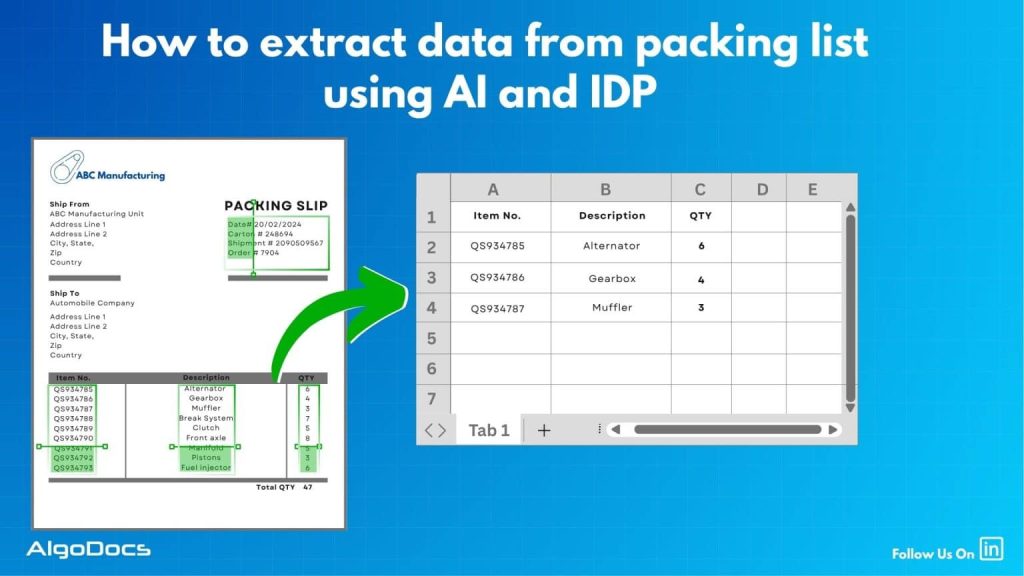
How To Extract Data From Packing List With AI And Intelligent Document Processing (Complete Guide)

Back to Blog Table of contents On this page How To Extract Data From Packing List With AI And Intelligent Document Processing (Complete Guide) Home › Blog › Data Extraction › How To Extract Data From Packing List With AI And Intelligent Document Processing (Complete Guide) Categories Data Extraction invoice extraction Tags ai platform for data extraction invoice extraction packing list data extraction By Shubhankar Biswas Published September 1, 2025, 06:50 Updated July 20, 2026, 10:02 The world of eCommerce revolves around many types of documents. Some of the major documents include packing lists, purchase orders, bills of lading, sea waybills, etc. Now, extracting data from packing lists is another challenge that requires a proper technological approach. But the question still remains: how to extract data from packing lists? Utilizing technology such as OCR, Intelligent Document Processing, and the new tech revolution such as AI has made data extraction from packing lists very easy, accurate, and efficient for businesses. However, handling packing lists manually is a slow and error-prone task, especially when you’re dealing with hundreds or thousands of shipments every month. The risk of human error is high and can lead to serious business setbacks.In this blog, we will explain in detail how to extract data from packing lists using AI and IDP, how packing lists and SKU lists are two different documents, what challenges you may face with packing list data extraction, top tools for packing list data extraction, and how tools like Algodocs offer an effective solution for packing list data extraction. What Is a Packing List? A packing list is a document that provides details of the products lined up for shipment. This includes details such as product names, product descriptions, product quantities, weight, dimensions, number of boxes, and other relevant information.The packing list is usually prepared by the seller or the warehouse and is included with the shipment process. It serves as a reference for everyone involved in the shipping process, including logistics providers, customs officers, and the buyer.Packing lists are typically generated in digital formats such as PDFs, spreadsheets, or Word documents, but they are often printed or scanned, especially in traditional supply chain settings. Because of this, the quality and format of the document can vary significantly. What Is the Purpose of a Packing List in eCommerce? In the eCommerce industry, the packing list is not just a formality—it’s a crucial document that supports the entire order fulfillment process. Here’s why it matters: Order Verification: Helps verify that the correct items and quantities are shipped. Prevents order mismatches and customer complaints. Inventory Management: Supports stock tracking and inventory control. Assists in identifying discrepancies between what was picked and what was shipped. Logistics Coordination: Enables warehouse teams and shipping providers to organize packages efficiently. Streamlines dispatch and delivery operations. Customs and Regulatory Compliance: Helps international shipments clear customs smoothly by providing product details. Ensures compliance with import/export regulations. Returns and Disputes Handling: Used to confirm the contents of returned shipments. Acts as proof in case of disputes regarding missing or damaged items. What is the Difference Between Packing List vs SKU List? SKU list – A SKU list is created and maintained at the individual business level, which shows how many products are available in their inventory to sell in the market. This list contains product details such as product title, product dimensions, weight, SKU ID, product image URL, and other information. Various types of businesses use different types of SKU lists, which can be for their online or offline business inventory. Try Algodocs Free Forever Plan to Automate Data Extraction From Packing List and Other Logistics Documents In Real Time Try Now Packing list – A packing list is generated to list all items that will be shipped by the shipping or logistics company. A packing list includes various information such as the number of items to be shipped, their quantity, number of boxes, tracking number, etc. It basically serves as a receipt that indicates the number of detailed items. What Is Packing List Data Extraction? Packing list data extraction means extracting key-value information from a packing list document with the help of automated tools such as packing list OCR, intelligent document processing tools, or AI and ML-based tools. A typical packing list document contains details such as item descriptions, quantities, product dimensions and weights, sender and receiver address details, shipping dates, and delivery terms. These extracted data from packing lists are later used for record-keeping, tracking, billing, and other business activities by businesses or shipping companies. Previously, packing list data extraction used to be a tedious process as most of the data extraction was done manually by humans. The manual process took more time and the possibility of human error was high. This resulted in many setbacks for businesses due to slower extraction speed, inaccuracy in extracted data, increased extraction costs, and other challenges.But the modern data extraction approach has shifted from manual methods to AI-based methods, which have significantly improved workflow efficiency for businesses. Challenges With Packing List Data Extraction While packing list documents are major documents for shipping and logistics businesses, extracting and organizing data accurately remains a challenge due to: Document Format Variation: A packing list document can come in various formats or layouts. Every logistics provider designs packing list formats in their own way. This could be due to region, language, preference, business type, or other external factors. Unstructured or Poorly Formatted Data: Packing list documents are often generated in unstructured formats, and extracting data from these documents creates many challenges. Scanned or Low-Quality Documents: Document quality is another issue. Poorly scanned documents, documents of very low quality, and skewed fonts create many problems in data extraction. High Volume of Documents: While extracting data from one or two packing list documents seems feasible with manual methods, extracting 100 or sometimes 1000 documents at once isn’t possible manually. It’s slow, full of errors, and inefficient. Language Barriers: Multilingual packing list documents create hurdles in data extraction. Extracting data from regional language documents

Data Extraction

SMB Document Automation & Processing Using IDP and AI

Back to Blog Table of contents On this page SMB Document Automation & Processing Using IDP and AI Home › Blog › Data Extraction › SMB Document Automation & Processing Using IDP and AI Categories Data Extraction Tags algodocs data extraction data extraction from images deep learning image recognition By Shubhankar Biswas Published September 1, 2025, 05:13 Updated July 23, 2026, 06:53 Growing a business in today’s hyper-competitive world can be a real challenge for small and medium enterprises (SMEs). One of the reasons that hinders their progress is the lack of resources to invest in essential services such as smb document automation services etc. One of these essential and important services is processing data from various types of documents, which can come in the form of invoices, bills, receipts, contacts, etc. While larger corporations often have solid resources to invest in extensive digital transformation initiatives, many SMBs feel left behind, struggling with manual processes that drain valuable time and resources from the organization. But what if there were a way to scale your business beyond the grips of manual data entry and unlock the true potential of your information? Yes, it is possible with an AI-powered Intelligent Document Processing (IDP) platform. IDP is emerging as a game-changer for SMBs, offering a powerful blend of artificial intelligence (AI), machine learning (ML), and optical character recognition (OCR) to transform how documents are processed. In this blog, we will delve deep into the world of IDP, exploring its mechanics, its immense benefits for SMBs, the challenges it addresses, and what to consider when choosing the right solution to propel your business forward. What is Intelligent Document Processing (IDP)? At its core, Intelligent Document Processing (IDP) is an AI- and ML-based data extraction tool that helps automate data extraction from various types of documents. It can classify, extract, validate, and organize data from both structured and unstructured documents. These documents can be invoices, bills, HR forms, medical bills, shipping documents, etc. Unlike traditional OCR, which merely converts standard images or documents into machine-readable formats, IDP goes beyond basic data extraction. It leverages advanced technologies such as AI and ML algorithms to understand the context of the information, identify relevant data fields, and even handle variations in document layouts and formats. Think of it as a computer program that has the ability to “read” and “understand” documents in a way that mimics human cognition, but at a speed and accuracy level far beyond human capabilities. This means it can process everything from standardized forms and invoices (structured data) to emails, contracts, and even handwritten notes (unstructured and semi-structured data) with 10 times more speed and accuracy. One of the major advantages of intelligent document processing tools is that they can be integrated with desired third-party platforms and business apps. This makes data exchange and processing smooth and saves time. IDP’s automation capability makes repetitive tasks more productive and cost-effective for the organization. How Intelligent Document Processing Works Intelligent document processing is a multistep process, from capturing, processing, and classifying to extracting the final data. We have written a detailed blog on how intelligent document processing works Meanwhile, you can learn how intelligent document processing works: Document Ingestion: The journey begins with ingesting documents into the IDP system. This can be done through various channels, including scanners for physical documents, email attachments, network folders, or direct integrations with business applications. The system can handle a wide array of file formats, such as PDFs, images (JPEG, PNG, TIFF), Word documents, and more. Pre-processing and Enhancement: Once ingested, documents undergo a pre-processing phase to optimize them for accurate data extraction. This involves techniques like de-skewing (straightening crooked images), noise reduction (removing specks and imperfections), binarization (converting to black and white for better text recognition), and de-speckling. These steps significantly improve the quality of the document image, ensuring higher accuracy in subsequent stages. Document Classification: This is where the “intelligent” aspect truly shines. The IDP solution uses AI and ML algorithms, often incorporating Natural Language Processing (NLP), to automatically classify the ingested documents. For instance, it can distinguish between an invoice, a purchase order, a customer complaint, or an HR application. This classification is crucial for routing documents to the appropriate processing workflows and applying the correct extraction rules. The system learns from historical data and user feedback, becoming increasingly accurate over time in its classification abilities. Data Extraction: Once a document is classified, the IDP system employs sophisticated algorithms to identify and extract specific data points. This is where OCR works in tandem with AI and ML. For structured documents, it might use pre-defined templates. However, for semi-structured and unstructured documents, it uses contextual understanding to locate key-value pairs (e.g., “Invoice Number: 12345”, “Total Amount: $500.00”), dates, names, addresses, and other relevant information, regardless of their position on the page. Machine learning continuously refines the extraction models, leading to higher accuracy with each processed document. Data Validation and Verification: To ensure data integrity, extracted information undergoes a rigorous validation process. This can involve: Rule-based validation: Checking against pre-defined business rules (e.g., ensuring a total amount matches the sum of line items). Cross-referencing: Validating extracted data against existing databases or internal systems (e.g., verifying a vendor’s name against a vendor master list). Human-in-the-Loop (HITL): For uncertain or low-confidence extractions, the system flags the data for human review and correction. This human feedback is invaluable, as it feeds back into the machine learning models, enabling continuous improvement and higher automation rates over time. Data Export and Integration: The final, validated data is then exported in a structured format (e.g., CSV, JSON, XML) and seamlessly integrated into your existing business applications. This could include Enterprise Resource Planning (ERP) systems, Customer Relationship Management (CRM) software, accounting platforms, document management systems, or any other critical business application, ensuring a unified and accessible data flow. Benefits of Intelligent Document Processing for Small and Medium Enterprises Small and Medium size business can greatly benefit from intelligent document processing as it give more power to small scale business owners to do more with versatile IDP tool.

Data Extraction, purchase order

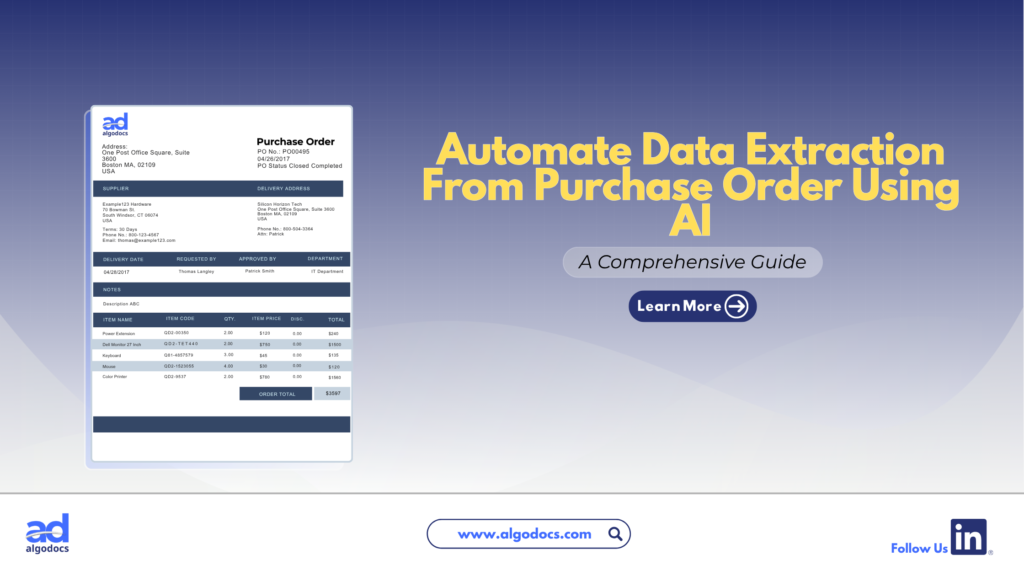
How to Extract Data from Purchase Orders With AlgoDocs Purchase Order OCR. A Comprehensive Guide For 2025

Back to Blog Table of contents On this page How to Extract Data from Purchase Orders With AlgoDocs Purchase Order OCR. A Comprehensive Guide For 2025 Home › Blog › Algodocs › How to Extract Data from Purchase Orders With AlgoDocs Purchase Order OCR. A Comprehensive Guide For 2025 Categories Algodocs Tags algodocs data extraction IDP intelligent document processing machine learning OCR Optical Character Recognition Purchase Order OCR web-based ai platform for data extraction By Ibrahim Nalbant Published January 2, 2025, 07:18 Updated July 10, 2026, 09:25 Purchase orders (POs) are critical documents in business operations, which makes purchase order data extraction and automation an important step in processing purchase orders. They ensure clear communication between buyers and sellers, detailing the goods or services, pricing, and other contractual terms. With the rise of digitization, extracting data from purchase orders efficiently has become essential for modern businesses. Both b2b and b2c business scenarios use a purchase order to facilitate clear communication between two parties. It helps in maintaining important information related to the transaction of goods between two parties. This guide explores how to extract data from purchase orders, focusing on tools like purchase order OCR and strategies to streamline the process. What is a Purchase Order?  A purchase order (PO) is a written document issued by a buyer to a seller that indicates the type, quantity, and agreed price for products or services by two parties. It plays a very crucial role in ensuring smooth procurement operations and is a legally binding document once accepted by the seller. In simple terms, a purchase order (PO) document describes what goods have been requested by the buyer to sellers to confirm their interest in procuring goods and services. Key Elements of a Purchase Order  PO Number: A unique identifier.  Buyer and Seller Information: Contact details and addresses.  Order Details: Description, quantity, and price of items.  Delivery Terms: Shipping method, destination, and date.  Payment Terms: Agreed payment timelines and methods.  Manually managing this information is time consuming, especially for businesses handling large volumes of POs. Challenges of Manually Extracting Data From Purchase Order  Relying on manual methods to extract and process data from purchase orders leads to many challenges for businesses. Time Consuming: Extracting data from a purchase order manually is a time-consuming task. If you have to extract data from a single page document, then manually it can take hours, but using a purchase order app for data extraction only takes 5 to 10 minutes. Error Prone: One of the biggest challenges with manually extracting data from a purchase order is that it is prone to error. The most common human errors, such as typos or missed fields, can disrupt workflows and lead to costly mistakes. Due to the high volume of data, errors tend to happen if data is being extracted with manual method. Scalability Issues: As businesses grow, manually processing hundreds or thousands of purchase orders becomes unsustainable. The manual processing of 100 purchase order documents can slow down the productivity of an organization, which can lead to other challenges, such as loss of profit and time. Resource Intensive Manual methods require significant labour, which leads to a rise in operational costs. To overcome these challenges, businesses are turning to automation tools like purchase order OCR technology. Since the purchase order OCR technology requires very little or no human intervention. What is a Purchase Order OCR Technology  Purchase Order OCR (Optical Character Recognition) is a technology that captures and converts a printed or handwritten text into machine-readable data. This type of OCR technology is built and trained to capture and extract data such as vendor name, buyer name, date, amount, address, and other information from a PO document. You can save this extracted data in Excel, CSV, JSON, or another file format. With the help of purchase order OCR technology, businesses can significantly save time and money and scale their business to greater heights. The advent of AI OCR tools such as AlgoDocs Purchase Order OCR has made data extraction from purchase orders more accurate and productive. How Does Purchase Order OCR Work?  Purchase Order OCR (Optical Character Recognition) is a technology that streamlines the extraction of information from purchase orders. It works by scanning documents in various formats—such as PDFs, images, or scanned papers—and recognizing text to extract key data like order numbers, item descriptions, quantities, prices, and delivery dates. The data is subsequently organized into a structured format, facilitating seamless integration into procurement systems. Automating this process allows Purchase Order OCR to decrease manual data entry, reduce errors, and improve the efficiency of the procurement workflow. Scanning Documents: Paper POs are digitized using scanners.  Data Recognition: The OCR engine identifies text fields such as PO numbers, item descriptions, and quantities.  Data Extraction: The software extracts relevant fields and organizes them into a structured format.  Integration: The extracted data is transferred into systems like ERP or accounting software. What Is AlgoDocs Purchase Order OCR AI App Algodocs is an AI-based purchase order OCR app that extracts data from PO documents. AlgoDocs uses AI technology to automate data extraction from pdfs, scanned documents, and handwritten notes. You can build your own extractor in Algodocs and train the AI model to capture, analyze, and process the data from a document. You can integrate Algodocs with third-party apps for document processing and data extraction. Signup for AlgoDocs Free-Forever plan and access all premium features for free Sign Up Real World Application of Purchase Order OCR Technology A purchase order OCR (Optical Character Recognition) app is a highly beneficial tool for industries of all types. Whether you are operating in a B2B (Business-to-Business) or B2C (Business-to-Consumer) environment, implementing a PO OCR solution can significantly enhance productivity and drive business growth. However, certain industries stand to gain the most from the adoption of OCR technology: Retail and E-commerce: In the fast-paced world of retail and e-commerce, businesses generate a high volume of purchase order documents daily. As customer transactions increase, so does the number

Scroll to Top