Healthcare Data Extraction: Improving Healthcare Document Workflow with AI and IDP In 2025: A Case Study
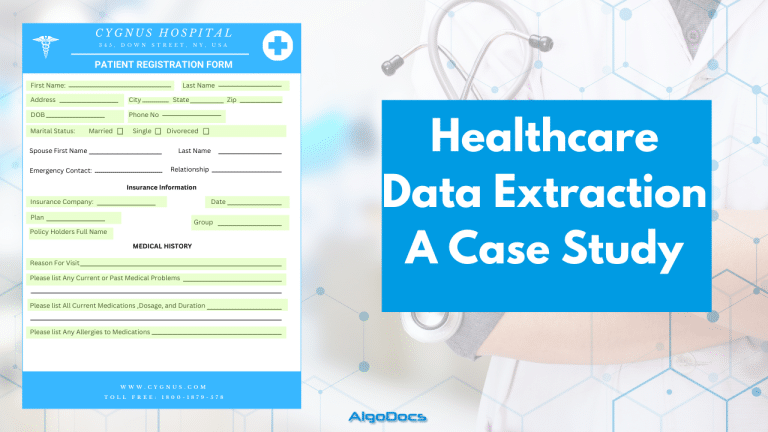
Back to Blog Table of contents On this page Healthcare Data Extraction: Improving Healthcare Document Workflow with AI and IDP In 2025: A Case Study Home › Blog › Healthcare › Healthcare Data Extraction: Improving Healthcare Document Workflow with AI and IDP In 2025: A Case Study Categories Healthcare Tags algodocs data extraction deep learning healthcare intelligent document processing machine learning ocr api By Shubhankar Biswas Published October 12, 2025, 16:30 Updated July 20, 2026, 10:11 Healthcare data extraction has always been a challenge for hospitals, healthcare providers, and insurance companies. Extracting data from multiple documents was a complex task. However, the advent of AI and Intelligent Document Processing (IDP) technologies has significantly impacted how the healthcare industry processes data from various healthcare documents. The healthcare industry is a vast sea of data. Every patient interaction, medical procedure, and insurance claim relies on information. This data, locked within various document formats, holds immense potential to improve patient care, streamline healthcare operations, and drive innovation. However, extracting this valuable information from diverse healthcare documents has traditionally been laborious, error-prone, costly, and inefficient. This is where technologies like IDP, AI, Machine Learning (ML), Large Language Models (LLM), and Optical Character Recognition (OCR) come into play. With these innovative technologies, we have improved data extraction for the healthcare industry. According to a recent report, the healthcare industry is a USD 5,862.1 billion industry and is expected to reach USD 9,245.8 billion by 2033. Another report by Deloitte suggests that AI technologies can save USD 360 billion in costs in the USA by next year. The healthcare industry generated up to 2.3 zettabytes of data worldwide in 2020. In this blog, we will discuss how AI is changing data extraction for the healthcare industry across the globe and the technologies and tools behind this technological advancement. The Diverse Landscape of Healthcare Documents The healthcare industry is inundated with various documents, each containing critical information crucial for patient care, administration, and research. Understanding these documents is the first step in effectively leveraging data extraction. Let’s delve into the key document types: Medical Bills Medical bills are more than just invoices; they are detailed records of services rendered to a patient. They contain crucial information, including: Patient Demographics: First Name, Last Name, address, date of birth, insurance, and other crucial details. Provider Information: Name, address, National Provider Identifier (NPI), etc. Service Details: Procedure codes (CPT/HCPCS), diagnosis codes (ICD-10), dates of service, quantities, and descriptions. Charges and Payments: Itemized charges, adjustments, insurance payments, patient responsibility, payment methods, tax details, etc. Efficiently extracting data from medical bills is vital for revenue cycle management, claims processing, cost analysis, and identifying trends in healthcare spending. Accurate data extraction ensures timely reimbursements, reduces claim denials, and provides insights into cost-effective care delivery. Handwritten Bills Despite the growing adoption of Electronic Health Records (EHRs), handwritten bills persist in many healthcare settings, particularly in smaller practices or during field visits. Many developing Asian countries, as well as developed countries, still rely on handwritten bills. These bills often contain information such as: Patient Information: Basic details like first name, last name, sometimes age or contact information, dates, etc. Treatment Details: Brief descriptions of services provided, often in abbreviated form. Charges: Handwritten amounts for each service or an overall total. Extracting data from handwritten bills presents a unique challenge due to variations in handwriting styles, abbreviations, and the potential for smudges or illegible entries. Advanced OCR coupled with Natural Language Processing (NLP) is essential for accurate data extraction from these documents. Patient Forms Patient forms are the cornerstone of patient intake and data collection. They gather essential information that forms the basis of a patient’s medical record. Sometimes these forms are filled with handwritten data, which presents a challenge for data extraction. Though the majority of patient forms are computer-generated, in many cases, they are handwritten. Common types of patient forms include: Registration Forms: Collect basic demographics, insurance information, and emergency contacts. Medical History Forms: Document past illnesses, surgeries, allergies, medications, and family history. Consent Forms: Obtain patient authorization for treatment, procedures, or release of information. HIPAA Forms: Ensure compliance with the Health Insurance Portability and Accountability Act regarding patient privacy. These forms often contain valuable information such as first name, last name, address, body weight, blood group details, current health issues, and previous diagnoses. They often contain a mix of structured (checkboxes, multiple-choice) and unstructured (free-text) data. Effective data extraction from these forms relies on advanced form recognition and NLP techniques to capture both types of information accurately. Health Insurance Documents Health insurance documents, including Explanation of Benefits (EOBs) and insurance cards, are crucial for understanding a patient’s coverage, verifying eligibility, and processing claims. They contain: Insurance Cards: Provide member ID, group number, plan type, contact details, and other information. Explanation of Benefits (EOBs): Detail how a claim was processed, including allowed amounts, co-pays, deductibles, and reasons for any denials. Data extraction from insurance documents enables accurate billing, reduces claim rejections, and helps patients understand their financial responsibilities. It also provides valuable data for insurance companies to analyze utilization patterns and manage risk. Other Vital Documents Beyond these core document types; the healthcare ecosystem encompasses a multitude of other documents: Lab Reports: Contain results of diagnostic tests, including blood work, imaging, and pathology reports. Prescription Forms: Detail medication name, dosage, frequency, and refill information. Referral Forms: Facilitate specialist consultations and continuity of care. Discharge Summaries: Provide a comprehensive overview of a patient’s hospital stay, including diagnosis, treatment, and follow-up instructions. Clinical Notes: Document physician observations, assessments, and treatment plans. Each document plays a unique role in patient care and administration. This diverse range provides a holistic view of a patient’s journey, enabling better care coordination, research, and population health management. How AI, ML, and IDP Leverage Healthcare Data Extraction The traditional approach to extracting data from these diverse healthcare documents has been manual data entry, a process fraught with challenges. However, the emergence of AI, ML, and IDP has revolutionized data extraction, offering a more efficient, accurate, and scalable solution. Try Algodocs AI data extraction platform to extract data from variou types of documents. Sign up