Algodocs

ai platform for data extraction

Algodocs

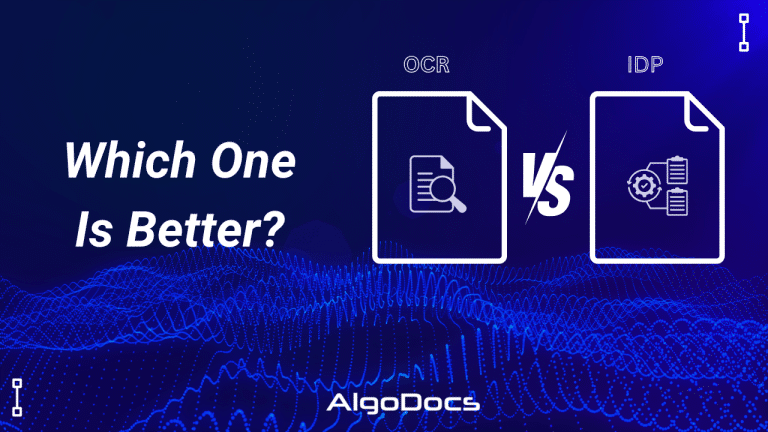
OCR vs IDP: Which one is better? How to choose the right technology to elevate your business.

Back to Blog Table of contents On this page OCR vs IDP: Which one is better? How to choose the right technology to elevate your business. Home › Blog › Algodocs › OCR vs IDP: Which one is better? How to choose the right technology to elevate your business. Categories Algodocs Tags AI ai platform for data extraction algodocs IDP ML OCR By Shubhankar Biswas Published October 12, 2025, 18:41 Updated July 13, 2026, 08:04 The debate OCR VS IDP—often sparks conflicting opinions, as the choice depends on the specific needs and nature of the technology required. Both technologies serve the purpose of extracting data from various types of documents for business and personal use. In today’s data-driven world, businesses face the challenge of managing vast amounts of information stored in physical and digital documents. Efficient and accurate data extraction has become essential for streamlining operations, enhancing decision-making, and maintaining a competitive edge. Two technologies are leading this data extraction revolution: Optical Character Recognition (OCR) and Intelligent Document Processing (IDP). Although often used interchangeably, these technologies offer distinct capabilities and serve different purposes. This comprehensive guide will explore the key differences between OCR and IDP, their ideal use cases, and how to determine the right solution for your business needs. What is OCR? Optical Character Recognition (OCR) is a technology that converts images into machine-readable text data. These documents can be handwritten notes, typed, or printed in the form of PDFs, word documents, or image files. It works by analyzing the visual patterns of characters and comparing them to stored character sets. Once recognized, the text can be edited, searched, and stored electronically. Think of it as a digital eye that scans a document and translates visual characters into a digital language that computers can understand. OCR technology helps save time, reduce human errors during data extraction, and lower operational costs. Although OCR technology has been around for a long time, it has gained significant traction in recent years. Businesses increasingly rely on OCR-based tools for various data extraction and document processing tasks, driven by the growing need to manage and extract large volumes of data efficiently. What is IDP? Intelligent Document Processing (IDP) is a revolutionary advancement that leverages Artificial Intelligence (AI) and Machine Learning (ML) to enhance document processing workflows. Unlike OCR, which is limited to reading and extracting text from documents, IDP takes things a step further by analyzing, filtering, sorting, and automating data extraction from a variety of sources, including emails and other digital platforms. IDP builds on OCR by integrating AI and ML to automate the entire document processing lifecycle. It doesn’t just recognize characters; it understands the context and meaning of the extracted information. IDP systems can classify documents, extract specific data fields (such as names, dates, or invoice numbers), validate the data, and seamlessly integrate with other business systems. Think of it as a digital assistant that not only reads documents but also comprehends their purpose and extracts the most relevant information, making your workflows smarter and more efficient. Key Differences Between OCR Vs IDP The fundamental difference lies in their level of intelligence and automation. OCR focuses solely on character recognition, while IDP handles the entire document processing lifecycle. Here’s a breakdown: Feature OCR IDP Core Function Converts images of text to machine-readable text Automates the entire document processing workflow, including classification, data extraction, validation, and integration. Intelligence Basic character recognition Advanced AI and ML algorithms for context understanding, data validation, and learning from new document types. Automation Limited to text extraction High level of automation, capable of handling complex document layouts and variations. Data Extraction Extracts all text present in the image Extracts specific data points based on predefined rules or machine learning models. Document Types Simple, structured documents with consistent layouts Complex, semi-structured, and unstructured documents with varying layouts and formats. Error Handling Prone to errors with low-quality images or complex layouts More robust error handling through data validation and human-in-the-loop verification. Scalability Limited scalability for complex document processing Highly scalable for large volumes of diverse documents. When is OCR a Good Choice? OCR is a suitable solution when dealing with: Simple, structured documents: Forms, scanned letters, or printed reports with consistent layouts. High-quality images: Clear, well-scanned documents with minimal noise or distortion. Basic text extraction: When the primary goal is to convert images to searchable text without the need for specific data extraction. Low document volume: When processing a small number of documents. When is IDP a Good Choice? IDP is the preferred choice for: Complex, semi-structured, and unstructured documents: Invoices, contracts, medical records, passports, and other documents with varying layouts and formats. Specific data extraction: When extracting key information like dates, names, addresses, or financial figures is crucial. High document volume: When processing large quantities of diverse documents. Automated workflows: When integrating document processing into existing business systems. Improved accuracy: When high accuracy is essential due to the use of AI and ML. Types of Documents Can Be Processed by OCR OCR excels at processing: Scanned documents Printed reports Typed letters Simple forms Images containing text Types of Documents Can Be Processed By IDP IDP can handle a wider range of documents, including: Invoices Purchase orders Contracts Medical records Financial statements Legal documents Emails Handwritten notes (with varying accuracy) Industries Benefiting from OCR Industries that can benefit from OCR include: Libraries and archives: Digitizing historical documents. Publishing: Converting printed books and articles into digital formats. Data entry: Automating basic data entry tasks. Industries Benefiting from IDP IDP offers significant advantages to industries dealing with large volumes of complex documents: Finance: Automating invoice processing, loan applications, and KYC (Know Your Customer) procedures. Healthcare: Managing patient records, processing insurance claims, and extracting data from medical reports. Legal: Reviewing contracts, managing legal documents, and conducting e-discovery. Insurance: Processing claims, managing policy documents, and automating underwriting. Logistics: Processing shipping documents, tracking shipments, and automating customs clearance. How To Choosing Between OCR Vs IDP Confusion The choice between OCR and IDP depends on your specific business needs and document processing requirements. OCR is a suitable option for small businesses that handle a

Algodocs

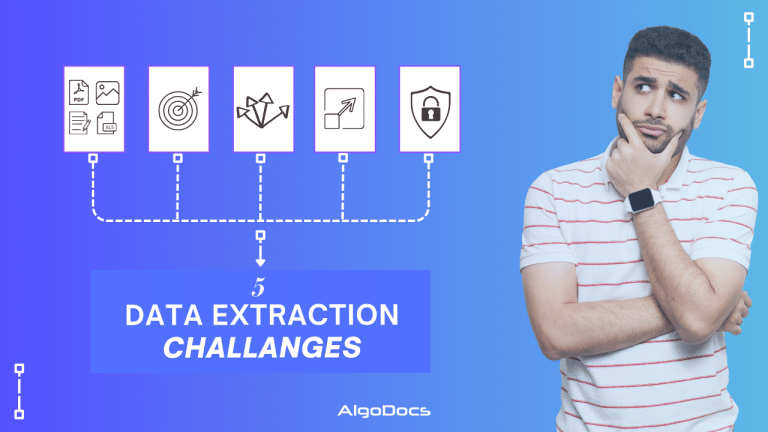
Top 5 Challenges in Document Data Extraction and How to Overcome Them With Algodocs

Back to Blog Table of contents On this page Top 5 Challenges in Document Data Extraction and How to Overcome Them With Algodocs Home › Blog › Algodocs › Top 5 Challenges in Document Data Extraction and How to Overcome Them With Algodocs Categories Algodocs Tags AI Data Extraction ai platform for data extraction algodocs data extraction Document Automation IDP OCR By Shubhankar Biswas Published October 12, 2025, 18:32 Updated July 13, 2026, 06:37 In today’s fast-paced digital world, document data extraction has become an essential process for businesses across various industries. Whether it’s extracting data from invoices, medical records, contracts, or financial reports, the need for efficient and accurate document processing has never been greater. As the need for data in business grows, so does the requirement for intelligent document processing platforms and other AI technologies for document data extraction. However, the path to seamless document data extraction is not without its challenges. In this blog, we will explore the top five challenges in document data extraction and how Algodocs can help overcome them. By the end, you’ll gain a comprehensive understanding of how to streamline your workflows and achieve better efficiency. What is Document Data Extraction? Document data extraction refers to the process of extracting structured or unstructured data from various document formats, such as PDFs, scanned images, or handwritten forms. This data is often critical for making business decisions, automating workflows, or maintaining accurate records. With advancements in technology, many organizations rely on automated tools for data extraction. However, the complexity of handling diverse document formats and ensuring data accuracy remains a significant hurdle. Before we dive into the top challenges faced by businesses in this domain, we need to understand the two major types of data extraction from documents. Types of Document Data Extraction: Manual Vs Automated Extracting data from documents is a complex task with both advantages and disadvantages. In recent years, the advent of artificial intelligence and machine learning has made data extraction smoother and more accurate. When it comes to data extraction, you have two options: manual data extraction and automated data extraction. Manual Document Data Extraction: In manual document data extraction, we copy and paste data from one document to another file. This basic method is considered very time-consuming and prone to errors. Manual data extraction is limited to a few document types and cannot process data from a variety of document formats. Automated Document Data Extraction: Automated document data extraction uses technologies such as OCR and Intelligent Document Processing (IDP) to automate the extraction of data from various types of documents and data sources. This method employs advanced technologies such as AI, ML, and NLP to capture and process data from both structured and unstructured document types. One key feature of automated data extraction is the speed and accuracy of the technology, and it can be scaled according to operational needs. Algodocs is an excellent example of an automated data extraction tool that allows you to extract data from both structured and unstructured documents. The Top 5 Challenges in Document Data Extraction Diverse Document Formats: Businesses deal with a wide range of document types, including PDFs, images, scanned forms, and handwritten notes. Each document format comes with its own set of challenges. For example: PDFs may contain hidden text layers or embedded images that are difficult to extract. The complexity of PDFs can vary greatly depending on how they were created, making it challenging to extract data accurately. Scanned documents often suffer from poor quality or inconsistent alignment. Issues such as low resolution, skewed scans, and variations in lighting can all affect the accuracy of data extraction from scanned documents. Handwritten documents pose significant challenges due to varying handwriting styles and legibility. The diversity in handwriting can lead to errors in recognizing characters and extracting correct information. These issues make it difficult to standardize data extraction processes and require tools that can adapt to diverse formats. Advanced technologies like AI and Machine Learning are essential to handle these variations effectively, ensuring that the extracted data is accurate and reliable. Solution: Algodocs’ AI-powered algorithms are designed to handle diverse document formats seamlessly. It uses Artificial Intelligence (AI) and Machine Learning to extract text from images and scanned documents while maintaining high accuracy. The platform’s adaptability ensures that even complex documents are processed efficiently. 2. Data Accuracy and Consistency Accuracy is paramount in document data extraction, especially when dealing with critical information like medical records, financial statements, or legal documents. Errors in data extraction can lead to serious consequences, including financial loss or compliance issues. While manual data extraction is one of the most common methods prone to data inaccuracies, basic OCR extraction tools sometimes fail to extract data accurately, leading to various operational issues. Common causes of inaccuracy include: Poor Document Quality: Poor document quality, such as smudged or faded text, often creates issues when scanned documents are in PDF or image formats. Scanning documents with scanners frequently results in blurry images, making data extraction from these documents a significant challenge.   Misinterpretation of Symbols, Fonts, or Layouts: Misinterpretation of symbols, fonts, or layouts in documents is one of the reasons why inaccuracies in data extraction occur. OCR technology or manual data extraction methods sometimes can’t read and understand these complex symbols or fonts, leading to errors. Variations in Document Templates and Structure: Variations in document templates and structure can also create issues with data extraction accuracy and consistency. Different formats such as PDF, Image, and Word documents offer different layouts, and extracting data from these varying layouts can sometimes cause accuracy issues. Maintaining consistency across multiple documents or batches is another challenge. Without a reliable system, errors can propagate and undermine data integrity. Solution: Algodocs employs advanced machine learning models that continuously improve accuracy by learning from data patterns. Its robust validation features allow users to cross-check extracted data against predefined templates, ensuring consistency and reliability. 3. Dealing with Unstructured Data One of the major challenges businesses face when extracting data from documents is dealing with unstructured

insurance data extraction
Data Extraction, Insurance Data Extraction

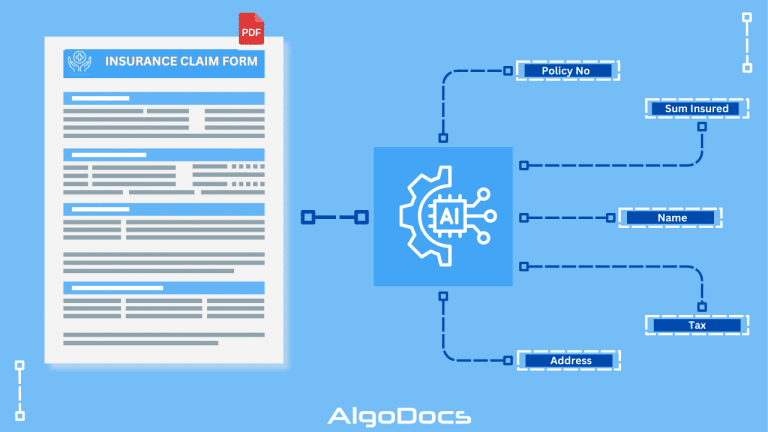
Insurance Data Extraction: Automating Policy and Claim Processing with AI

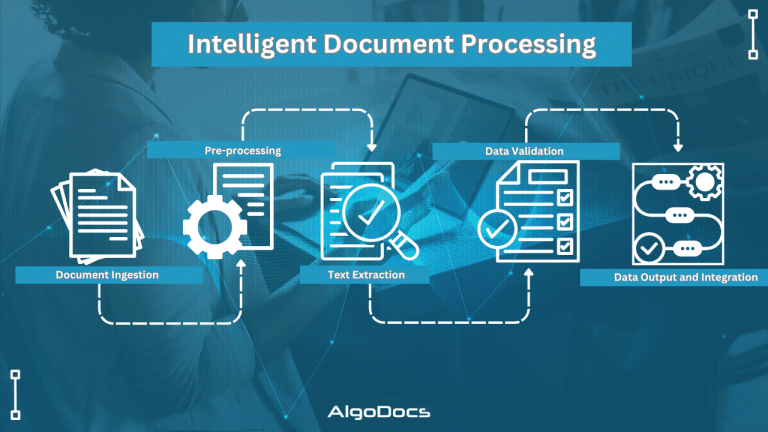
Back to Blog Table of contents On this page Insurance Data Extraction: Automating Policy and Claim Processing with AI Home › Blog › Data Extraction › Insurance Data Extraction: Automating Policy and Claim Processing with AI Categories Data Extraction Insurance Data Extraction Tags ai platform for data extraction algodocs character recognition deep learning IDP Insurances Data Extraction intelligent document processing By Shubhankar Biswas Published October 12, 2025, 18:20 Updated July 23, 2026, 05:31 The modern insurance sector operates on massive volumes of information and insurance data extraction is a crucial part of insurance industry business process. Every single day, insurance carriers, third-party administrators, brokers, and agencies process thousands of files. These files range from policy applications and loss notices to medical bills, repair estimates, legal notices, and property appraisal reports. Within this ocean of paperwork lies the essential information required to underwrite risks, calculate premiums, settle claims, detect fraud, and maintain regulatory compliance. However, a significant challenge facing the insurance industry today is that up to eighty percent of this critical information arrives in unstructured or semi-structured formats. Scanned PDF files, digital images, physical paper forms, email attachments, and handwritten adjuster notes cannot be directly read or processed by traditional enterprise databases. Historically, companies relied heavily on manual data entry to transfer details from incoming documents into core operational platforms like claims management systems or policy administration suites. Manual processing creates severe bottlenecks. It inflates operational expenses, slows down service delivery, introduces human error, and frustrates policyholders who expect immediate digital service. To overcome these challenges, progressive insurance providers are transitioning toward automated insurance data extraction. Driven by advances in AI OCR, Machine Learning, and Intelligent Document Processing, modern extraction tools allow organizations to transform messy, unformatted files into structured, machine-readable digital data in seconds. This comprehensive guide explores the fundamentals of automated insurance data extraction, examining the types of documents processed, the hidden costs of manual workflows, the business benefits of artificial intelligence, and the leading software solutions shaping the market. What is Insurance Data Extraction? Insurance data extraction is the automated technology process of reading, identifying, capturing, and converting information from paper or digital insurance records into structured digital data formats. Instead of requiring human workers to manually read documents and type values into software screens, an automated insurance data extraction workflow ingests files, interprets their contents, extracts specific data fields, and exports clean data directly into core databases or enterprise applications. The insurance data extraction workflow relies on an integrated stack of advanced technologies: Document Ingestion: The system collects inbound files from multiple channels, including email inboxes, mobile application uploads, scanned physical mail, cloud storage, or secure web portals. Optical Character Recognition (OCR) and AI OCR: Legacy OCR converts scanned document images into text strings. Next generation AI OCR goes further by recognizing complex handwriting, low-resolution scans, and non-standard typography. Intelligent Document Processing (IDP): Combining artificial intelligence with natural language processing, Intelligent Document Processing understands the context and semantic meaning of words. It recognizes that a dollar figure located next to the word deductible represents a specific financial field rather than a premium payment. Machine Learning and Field Validation: Machine learning algorithms continuously improve extraction accuracy over time. Automated validation rules cross check extracted policy numbers, dates, and mathematical totals against internal enterprise databases to verify accuracy. Data Export: Clean, structured data is formatted into structured payloads such as JSON, XML, or CSV, and delivered directly to core policy or claims platforms via APIs. Through AI insurance data extraction, carriers can automate repetitive administrative steps, reduce turnaround times, and establish seamless insurance workflow automation across every department. Types of Documents Used in Insurance Industry for Insurance Data Extraction Insurance carriers handle a vast assortment of forms, reports, and contracts. Each document type possesses unique layouts, terminology, and data extraction requirements. Automated insurance document processing systems are designed to process diverse document types efficiently. 1. Policy Documents and Applications Policy applications and insurance binders represent the foundational agreements between policyholders and carriers. Extracting accurate data during policy origination is crucial for setting terms and issuing coverage. Key documents include: ACORD 125 Applications: The standard commercial insurance application form containing applicant business details, policy effective dates, location details, and requested coverage limits. Policy Schedules and Declarations Pages: Summary pages detailing coverage types, policy numbers, named insureds, endorsement listings, and premium amounts. Endorsement Forms: Amendments to existing policy contracts that modify coverage terms, add new insured assets, or change liability limits. Accurate policy data extraction ensures that customer profiles, coverage clauses, and premium figures match internal records without requiring manual entry. 2. Insurance Claims and Loss Notices When policyholders suffer a loss, rapid claims intake is essential for customer satisfaction. Automated insurance claims data extraction parses critical details from early claims documentation: First Notice of Loss (FNOL) Reports: Initial notifications submitted by policyholders or agents detailing how, when, and where an incident occurred. ACORD Loss Notices: Standardized notices such as the ACORD 2 Automobile Loss Notice or ACORD 3 Property Loss Notice, capturing policy details, driver information, and loss descriptions. Incident and Police Reports: Official law enforcement collision records containing narrative descriptions, driver statements, weather conditions, and citations. Automating insurance claims data extraction accelerates claim registration, enabling immediate assignment to claims adjusters or automated decisioning engines. 3. Medical Records and Healthcare Billing Forms Health, workers compensation, and personal injury protection claims involve complex clinical and billing records. These documents combine typed text, medical terminology, complex codes, and handwritten notes: CMS-1500 and UB-04 Forms: Standard medical billing claim forms used by physicians, medical practices, and institutional healthcare providers. Explanation of Benefits (EOB): Statements sent by health plans explaining covered services, approved amounts, deductible applications, and patient responsibility. Clinical Discharge Summaries and Doctor Notes: Narrative medical charts containing diagnoses, treatment histories, and surgical notes. Automated extraction engines capture critical diagnostic codes such as ICD-10, procedure codes such as CPT, billing line items, and provider identification numbers to streamline health claims auditing. 4. Underwriting Documents and Financial Statements Underwriters must review complex

ID Card Data Extraction
Algodocs

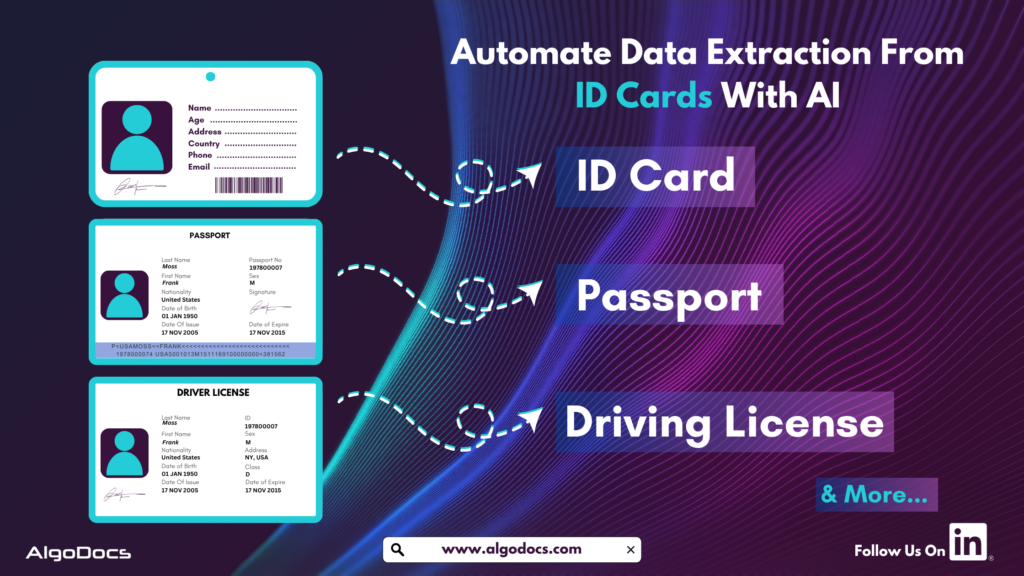
ID Card Data Extraction: Transforming Identity Verification with AI and OCR In 2025

Back to Blog Table of contents On this page ID Card Data Extraction: Transforming Identity Verification with AI and OCR In 2025 Home › Blog › Algodocs › ID Card Data Extraction: Transforming Identity Verification with AI and OCR In 2025 Categories Algodocs Tags ai platform for data extraction algodocs character recognition data extraction from images id card data extraction machine learning ocr api By Shubhankar Biswas Published September 1, 2025, 09:46 Updated July 10, 2026, 11:57 ID cards are crucial for individuals and corporate organizations for various reasons. In today’s fast-paced digital world, businesses and organizations need efficient ways to extract data from various types of identity cards for KYC, security, compliance, and customer onboarding. However, manual data entry is slow and prone to errors. This is where Artificial Intelligence (AI) and Optical Character Recognition (OCR) come into play, making the process faster, more accurate, and seamless across different industries. This blog explores the essentials of ID card data extraction, how it works, the technologies behind it, its real-world applications, challenges, and how Algodocs AI is leading the way in intelligent data extraction. What is ID Card Data Extraction? ID card data extraction involves capturing and extracting information from various types of identity documents, such as passports, driver’s licenses, national ID cards, employee badges, and student IDs. These extracted data are later used for identity verification, KYC (Know Your Customer), automated form-filling, and record management in different organizations. Businesses use ID card data extraction to enhance security, improve and streamline customer interactions, and boost operational efficiency. Some of the key data points extracted from an ID card include: Full Name Date of Birth Address Identification Number Expiry Date Issuing Authority Signature QR Codes or Barcodes Biometric Data (such as Photos) ID card data extraction is a multi-step process designed to deliver accurate and efficient results. It begins with capturing a clear image of the ID card using a scanner, smartphone camera, or document upload. Next, AI enhances the image through preprocessing by improving contrast, reducing noise, and correcting any distortions or angles. OCR technology then detects and extracts the text from the image, followed by AI-powered algorithms that organize the extracted text into structured fields like name, date of birth, and ID number. The data is then verified by cross-checking it against predefined parameters to ensure accuracy. Finally, the structured data is securely stored or seamlessly integrated into business applications, making it readily available for use with precision and reliability. What Types of ID Card and what types of data Can Be Extracted with AI and OCR? You can extract data from passports, driving licenses, and corporate ID cards using AI OCR apps. The following information can be extracted with ID card OCR apps, including: Personal Details: Full name, gender, date of birth. Document Information: ID number, issue and expiry date. Address Information: Residential or office address. Biometric Data: Signatures and photos. Security Features: Watermarks, holograms, QR codes, and barcodes. Organizational Details: Employer name, student ID, and membership numbers. Signup for Algodocs AI free ID card data extraction app today and access all the paid features for free. Sign Up Now Extracting these details helps businesses with verification, compliance, fraud prevention, and automated onboarding. Technology Behind ID Card Data Extraction: OCR & AI To achieve high accuracy and efficiency, ID card data extraction relies on a combination of Optical Character Recognition (OCR) and Artificial Intelligence (AI). These technologies work together to automate the process of identifying, extracting, and digitizing data from ID cards, eliminating the need for manual data entry and reducing human errors. How OCR Works for ID Card Data Extraction Optical Character Recognition (OCR) is a sophisticated technology designed to scan and convert printed or handwritten text into machine-readable digital data. It is the backbone of ID card data extraction, enabling businesses, financial institutions, and government agencies to streamline identity verification and document processing. The OCR Process for ID Card Data Extraction OCR follows a structured workflow to ensure accurate and efficient extraction of text from ID cards. The process involves multiple steps, as outlined below: Capturing an Image of the ID Card The process begins with scanning or photographing the ID card using a scanner, mobile camera, or document imaging device. High-quality images with proper lighting and minimal glare improve OCR accuracy. Image preprocessing techniques, such as noise reduction, contrast enhancement, and skew correction, are applied to improve readability. Detecting Text Regions Using AI AI-powered OCR systems analyze the scanned image to identify and segment text areas from graphical elements such as logos, watermarks, and holograms. Machine learning models help differentiate between text and non-text elements, ensuring only relevant data is extracted. Recognizing Character Patterns & Extracting Data OCR algorithms process each text segment, identifying individual characters, numbers, and symbols. AI-powered pattern recognition improves accuracy, allowing the system to recognize different fonts, languages, and even stylized text. Some advanced OCR solutions incorporate Intelligent Character Recognition (ICR), enabling the extraction of handwritten text. Converting the Text into a Structured Digital Format The extracted text is converted into structured digital formats such as JSON, CSV, XML, or databases. This allows businesses to easily integrate ID card data with customer management systems, banking applications, HR platforms, and other databases. Validating Extracted Data for Accuracy AI-powered post-processing techniques are used to validate and correct any potential errors in the extracted text. This step ensures that information such as names, ID numbers, and expiration dates are correctly interpreted and formatted. AI models compare extracted data with predefined templates, helping detect discrepancies or inconsistencies. Capabilities of Modern OCR Solutions With the rapid advancements in AI and machine learning, modern OCR solutions have evolved to offer greater accuracy and versatility. Some key capabilities include: Multi-Language Recognition: OCR can extract data from ID cards in various languages, including complex scripts such as Arabic, Chinese, and Cyrillic. Support for Different Fonts & Formats: Advanced OCR models can handle various font styles, text orientations, and formatting styles commonly found in global ID cards. Handwriting Recognition (ICR): Intelligent Character Recognition (ICR) enables the extraction of handwritten details, such as signatures or handwritten notes on IDs. Fraud Detection & Security Enhancements: AI-driven OCR can detect altered or fraudulent

Data Extraction, PDF

PDF Image Extraction: A Comprehensive Guide To Extracting Image Data From Scanned Pdf Files In 2025

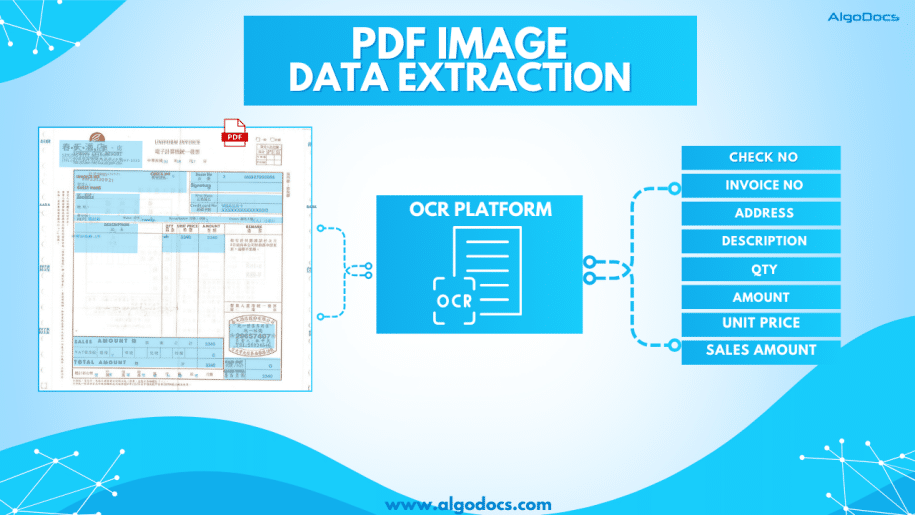
Back to Blog Table of contents On this page PDF Image Extraction: A Comprehensive Guide To Extracting Image Data From Scanned Pdf Files In 2025 Home › Blog › Data Extraction › PDF Image Extraction: A Comprehensive Guide To Extracting Image Data From Scanned Pdf Files In 2025 Categories Data Extraction PDF Tags ai platform for data extraction algodocs image data extraction pdf image extraction By Shubhankar Biswas Published September 1, 2025, 09:19 Updated July 23, 2026, 05:45 PDF image extraction is a challenging process. Without proper tools and technology, this process can be tedious and prone to errors, which can eventually lead to a loss of money and time for an organization. PDFs have always been one of the most convenient and reliable ways to store, carry, and share information with others. However, lots of data in PDFs is locked as scanned images. When you have multiple images or scanned documents to deal with, it becomes easy for a person to bind all these multiple image documents into one with the PDF format.The PDF document format is widely used for business communication and personal document sharing as well.Unlike other document formats such as. doc, CSV, or TXT formats, PDFs are considered much safer because they can be locked with a password, or data can’t be edited or altered unless you allow it. However, one of the most common challenges faced when dealing with PDFs is extracting data from scanned PDF images. Scanned PDFs are essentially images of text, making it difficult to directly copy or edit the content. This is where the concept of PDF image extraction comes into play. In this blog, we’ll explore how to extract data from scanned PDF images, the tools and techniques involved, and why this process is crucial for efficient data management. What is PDF Image Extraction? PDF image extraction refers to the process of extracting text, images, or other data from scanned PDF documents. Unlike standard PDFs, which contain selectable and editable text, scanned PDFs are essentially pictures of pages. This means that the text within these documents is not machine-readable unless processed using Optical Character Recognition (OCR) technology.The ability to perform PDF image extraction is essential for businesses that deal with large volumes of scanned documents, such as invoices, contracts, or historical records. By converting these images into editable and searchable text, organizations can streamline their workflows, improve data accuracy, and enhance accessibility. Why is Extracting Data from Scanned PDFs Important? Improved Data Accessibility: Scanned PDFs are often unsearchable, making it difficult to locate specific information. Extracting data from these documents makes the content searchable and easier to navigate. Enhanced Productivity: Manually typing out text from scanned documents is time-consuming and prone to errors. Automated extraction tools save time and reduce the risk of mistakes. Data Integration: Extracted data can be integrated into databases, spreadsheets, or other software systems, enabling better data analysis and decision-making. Compliance and Record-Keeping: Many industries require digital records for compliance purposes. Extracting data from scanned PDFs ensures that information is stored in a usable and retrievable format. How Does PDF Image Extraction Work? Image PreprocessingBefore extracting text, the scanned image may need to be pre-processed to improve OCR accuracy. This can include tasks like: Deskewing: Correcting the alignment of the image. Noise Reduction: Removing background noise or artifacts. Binarization: Converting the image to black and white for better contrast. Optical Character Recognition (OCR)OCR is the core technology behind PDF image extraction. It analyzes the scanned image and identifies characters, words, and sentences. Modern OCR tools are highly accurate and can recognize text in multiple languages and fonts. Text Extraction and FormattingOnce the OCR process is complete, the extracted text is formatted to match the original document’s layout. This includes preserving headings, paragraphs, tables, and other structural elements. Data Validation and CorrectionWhile OCR technology has advanced significantly, it’s not perfect. Extracted data may require manual validation and correction to ensure accuracy. Tools for PDF Image Extraction Algodocs: A powerful data extraction tool that combines the power of AI and OCR technology. It lets you extract data from scanned PDF images. ABBYY FineReader: Known for its good accuracy and support for multiple languages. Tesseract OCR: An open-source OCR engine that can be integrated into custom workflows. Online OCR Tools: Websites like Smallpdf and ILovePDF offer quick and easy solutions for occasional users. Python Libraries: For developers, libraries like PyTesseract and PDFPlumber provide flexibility for custom solutions. You can automate bulk PDF image extraction with Algodocs’ advanced AI app. Our app can extract data from blurry and distorted scanned PDF images with 10X speed without making any errors. Access For Free Best Practices for PDF Image ExtractionTo achieve the best results when extracting data from scanned PDF images, consider the following tips: Use High-Quality Scans: The quality of the scanned image directly impacts OCR accuracy. Ensure that the document is scanned at a high resolution (300 DPI or higher). Choose the Right Tool: Select an OCR tool that meets your specific needs, whether it’s a one-time extraction or a large-scale automation project. Validate Extracted Data: Always review the extracted text for errors, especially when dealing with handwritten or poorly scanned documents. Leverage Automation: For businesses handling large volumes of scanned PDFs, consider automating the extraction process using scripts or software. Protect Sensitive Data: Ensure that any tools or services used for PDF image extraction comply with data privacy regulations. Applications of PDF Image Extraction The ability to extract data from scanned PDF images has a wide range of applications across industries. Here are a few industries where PDF image extraction is widely used: Healthcare: Digitizing patient records and medical forms for easier access and analysis. Legal: Converting scanned contracts, case files, and legal documents into editable formats. Finance: Extracting data from invoices, receipts, and financial statements for accounting purposes. Education: Digitizing textbooks, research papers, and handwritten notes. Archives and Libraries: Preserving historical documents and making them searchable for researchers. Challenges in PDF Image ExtractionWhile PDF image extraction offers numerous benefits, it’s not without its challenges: Handwritten

supply chain data extraction
Logistics Data Extraction

Supply Chain Data Extraction: How IDP and AI can Transform Data Extraction and Enhance Work Efficiency

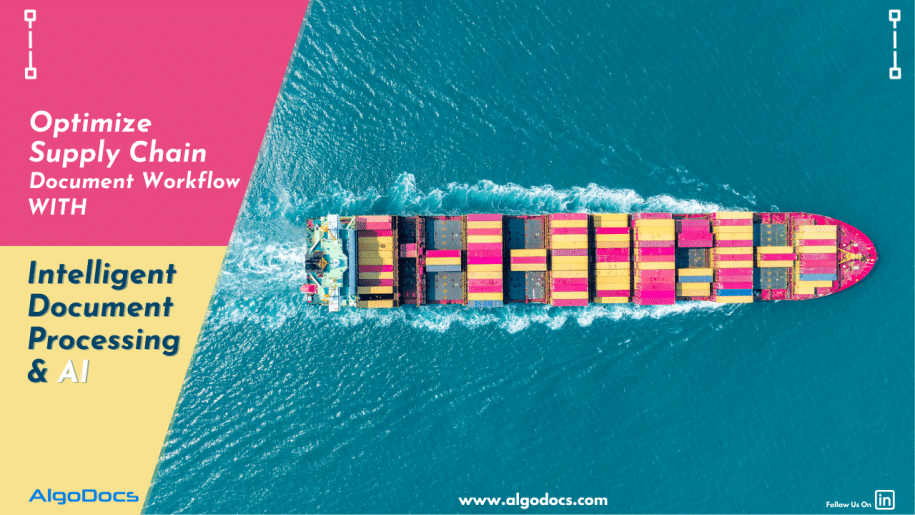
Back to Blog Table of contents On this page Supply Chain Data Extraction: How IDP and AI can Transform Data Extraction and Enhance Work Efficiency Home › Blog › Logistics Data Extraction › Supply Chain Data Extraction: How IDP and AI can Transform Data Extraction and Enhance Work Efficiency Categories Logistics Data Extraction Tags ai platform for data extraction algodocs IDP intelligent document processing Logistics Supply Chain By Shubhankar Biswas Published September 1, 2025, 09:12 Updated July 23, 2026, 06:41 The global supply chain industry is expected to reach $30.91 billion by the end of 2030, according to a report. As it continues to grow rapidly worldwide, so do the challenges of supply chain data extraction, due to the rise in business activities and the diversity of document formats and styles. In today’s dynamic global market, supply chain management is crucial for any business’s success. Companies face a constant stream of paperwork, such as invoices, purchase orders, shipping documents, and compliance reports. Manually handling this overwhelming volume of documents is not only time-consuming and tedious but also susceptible to human error. These inefficiencies increase operational costs and hinder overall productivity. This is where Intelligent Document Processing (IDP) emerges as a game-changer for the supply chain industry. By harnessing the power of Artificial Intelligence (AI), Optical Character Recognition (OCR), and Machine Learning (ML), IDP enhances the efficiency, speed, and accuracy of supply chain document data extraction. It automates document workflows with AI and ML, leading to significant improvements in data extraction accuracy, work efficiency, and ultimately, decision-making capabilities for organizations. Understanding Intelligent Document Processing (IDP) and AI for Logistics and Supply Chain Intelligent Document Processing (IDP) is an AI- and ML-driven data extraction and document workflow process that automates data extraction from various types of documents without errors. It can efficiently automate the extraction, classification, and validation of data from a wide range of documents such as bills of lading, purchase orders, invoices, shipping labels, warehouse receipts, and reports. Unlike traditional OCR, which simply converts printed text into machine-readable text, IDP leverages AI and ML to interpret, analyze, and extract meaningful data with utmost accuracy. Key Components of IDP AI and Machine Learning: These technologies empower IDP systems to learn from data patterns and continuously improve data extraction accuracy over time. This adaptive learning capability is crucial for handling diverse document formats and layouts. Optical Character Recognition (OCR): OCR serves as the foundation by converting scanned documents and images into machine-readable text, making the information accessible for further processing. Natural Language Processing (NLP): NLP enables IDP solutions to understand and categorize data within unstructured documents, such as contracts or emails, extracting key information from complex textual content. Robotic Process Automation (RPA): RPA complements IDP by automating repetitive tasks, such as data entry and validation, further streamlining workflows and reducing manual intervention. Cloud Integration: Cloud integration ensures seamless document access and processing across multiple locations and devices, fostering collaboration and accessibility. The Vital Role of IDP in Supply Chain Data Extraction Supply chain management is a critical network involving multiple stakeholders, from manufacturers and suppliers to logistics providers and retailers. Efficient document processing is essential for a seamless workflow, yet manual data extraction lacks efficiency, speed, accuracy, and cost-effectiveness when handling large volumes of supply chain documents. IDP plays a pivotal role in automating document-heavy tasks, ensuring data accuracy, and accelerating operations. Key Benefits of IDP in Supply Chain Data Extraction and Document Workflow Management Enhanced Data Accuracy: Data is the backbone of every business, and accuracy is crucial. In the supply chain sector, where data is gathered from multiple sources, extracting, sorting, and analyzing this data with precision is paramount. Manual data extraction is prone to errors, but IDP eliminates this issue with AI- and ML-driven technology, ensuring improved data integrity and reliability. Increased Operational Efficiency: Manual data extraction is inefficient and lacks scalability. IDP streamlines document processing by automating data extraction and validation, accelerating workflows, and freeing up valuable human resources for strategic tasks, significantly enhancing operational efficiency. Cost Reduction: Automation minimizes labour costs associated with manual data entry and document handling. IDP performs these tasks with little to no human intervention, optimizing costs for organizations. Improved Compliance and Data Security: Data security and compliance are critical for businesses. Many countries have enacted strict data security laws to protect user and business data. IDP ensures compliance with regulatory requirements by automating document verification and storage, minimizing the risk of compliance breaches, and protecting data from unauthorized access. Seamless Integration: IDP solutions integrate with existing ERP and supply chain management systems, creating a unified and efficient digital ecosystem, which is not feasible with manual data extraction methods. IDP Use Cases in Supply Chain Data Extraction IDP technology significantly optimizes supply chain operations by automating various document-intensive processes, including: Invoice Processing: Manual invoice data extraction is time-consuming and prone to errors. IDP automates invoice data extraction, validation, and entry into ERP systems, reducing processing time and improving accuracy. Purchase Order Management: IDP extracts critical data from purchase orders, ensuring alignment with supplier invoices and delivery receipts, preventing discrepancies, enhancing procurement efficiency, and minimizing order fulfilment issues. Bill of Lading and Shipping Documents: IDP automates data extraction from Bill of Lading, which contain crucial shipment details, reducing processing delays and improving logistics efficiency, leading to faster deliveries and better customer satisfaction. Compliance and Regulatory Documents: IDP automates document verification and storage, ensuring adherence to industry regulations and minimizing the risk of penalties and legal issues. Supplier and Vendor Management: IDP streamlines vendor onboarding by automating document verification, contract management, and performance tracking, fostering stronger vendor relationships. Packing List Processing: IDP extracts essential data such as item descriptions, quantities, weights, and dimensions from packing lists, ensuring accurate and efficient processing. Proof of Delivery (POD): IDP enhances POD data extraction by digitizing documents, extracting key details such as delivery dates, recipient signatures, addresses, and item descriptions, ensuring accurate record-keeping and improved supply chain efficiency. Implementing IDP in Supply Chain Document Workflow and Data Extraction To fully leverage the benefits of IDP for supply chain document data extraction, companies should follow a structured implementation process: Identify Document Processing Needs: Assess current

Aadhar Card Data Extraction using AI
Algodocs

Aadhar Card OCR: Extracting Data From Aadhar Card Using AI

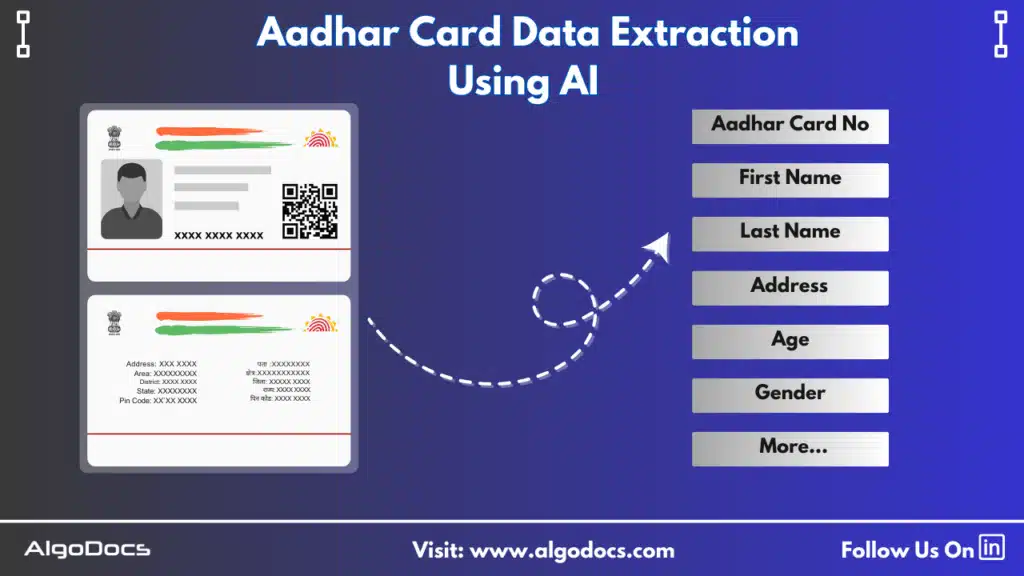
Back to Blog Table of contents On this page Aadhar Card OCR: Extracting Data From Aadhar Card Using AI Home › Blog › Algodocs › Aadhar Card OCR: Extracting Data From Aadhar Card Using AI Categories Algodocs Tags ai platform for data extraction algodocs data extraction from images id card extraction id card ocr machine learning ocr api web-based ai platform for data extraction By Shubhankar Biswas Published September 1, 2025, 08:50 Updated July 20, 2026, 05:40   In today’s fast-paced digital era, automation and artificial intelligence (AI) have transformed data extraction processes across various industries. One of the most critical use cases in India is Aadhar Card data extraction, where Optical Character Recognition (OCR) and AI technology are used to extract data from Aadhar cards with higher accuracy. Since the Aadhar card serves as a crucial identity document (ID) for Indian citizens, automating data extraction can significantly enhance work efficiency in many industries such as finance, telecom, healthcare, and e-governance. With the growing need for faster and more reliable document processing, AI-powered OCR solutions (IDP) are becoming essential tools for businesses in India. By eliminating manual data entry, businesses can reduce errors, enhance efficiency, and improve data management. In this blog, we will explore how Aadhar Card OCR works, its advantages, and how AI-driven solutions like Algodocs streamline the data extraction process. So What is Aadhar Card OCR? Aadhar Card OCR is an Optical Character Recognition (OCR) technology used to capture and extract details from a scanned image or PDF format of an Aadhar card. The key details extracted through this process include the 12-digit Aadhar card number, the full name of the cardholder, date of birth, gender, address, and QR code data. Extracting this information manually can be time-consuming and prone to errors. However, an AI-based OCR app can easily capture, extract, and sort the data with the help of AI, allowing you to automate the entire process. The best part of AI-based OCR tools is that they improve accuracy, speed, and efficiency by using sophisticated algorithms that analyze, recognize, and extract text even from low-quality images, which is not possible with manual data extraction approaches. Unlike traditional OCR systems, AI-powered solutions are trained on vast datasets, allowing them to recognize different fonts, complex formats, and text placements with greater precision and speed. How AI Elevates  Aadhar Card Data Extraction Efficiency Traditional OCR solutions often struggle with poor-quality images, handwritten text, or complex document layouts. However, AI-powered OCR can overcome these challenges by using machine learning (ML), natural language processing (NLP), artificial intelligence (AI), and advanced image preprocessing techniques. Machine learning algorithms and artificial intelligence enable OCR tools to recognize and extract text from Aadhar cards with a high degree of accuracy. These algorithms are trained to learn from large volumes of data, allowing them to improve their performance over time. Natural language processing (NLP) helps in interpreting and structuring the extracted information correctly, ensuring that fields such as names and addresses are properly identified. Image preprocessing techniques further enhance accuracy by removing background noise, adjusting contrast, and correcting distortions in scanned or photographed documents. This ensures that even low-quality images can be processed with minimal errors. Another significant advantage of AI-powered OCR is fraud detection. The system can identify forged or tampered Aadhar cards by analyzing patterns and inconsistencies within the document, thus ensuring data authenticity. The Aadhar Card Data Extraction Process Extracting data from an Aadhar card using AI-based OCR involves several key steps. The process begins with image acquisition, where a scanned copy or photograph of the Aadhar card is uploaded; the file can be a PDF as well. The AI-driven OCR software then processes the image to enhance readability by removing any background noise and correcting distortions. Once the image is pre-processed, the OCR engine scans the document and recognizes the text using deep learning algorithms. The extracted data is then structured into predefined fields, ensuring that each piece of information, such as the Aadhar number, name, age, gender, and address, is correctly categorized. After the text is extracted, the system validates the information by cross-checking it with predefined data formats. Finally, the structured data is exported for integration into various applications, such as customer onboarding systems, KYC verification processes, and digital record management solutions. Benefits of AI-Powered Aadhar Card OCR platforms AI-powered Aadhar Card OCR apps offer numerous advantages over manual data entry or traditional OCR apps. One of the primary benefits of AI-powered Aadhar Card OCR apps is their enhanced data extraction accuracy and increased extraction speed. AI models trained specifically for Aadhar card data extraction ensure precision, minimizing errors that could occur due to manual input. This high accuracy is particularly beneficial for businesses that require large-scale data processing, such as banks, telecom companies, and government agencies. Try Algodocs AI-based Aadhar Card OCR for all types of ID card data extraction and KYC document data extraction work for free. Another key advantage is speed. The automation of data extraction significantly reduces processing times, allowing businesses to complete customer verifications, document submissions, and other administrative tasks much faster. This improved efficiency translates into cost savings, as organizations no longer need to rely on extensive human labour for data entry tasks. One of the most important benefits of AI-powered Aadhar Card data extraction is fraud prevention and data security, which are crucial factors in safeguarding personal information as the Aadhar card is an important ID card. Unauthorized access to this information can lead to many negative consequences for users and the organization. AI-powered OCR systems can detect forged or tampered documents by analyzing subtle inconsistencies in text alignment, font variations, and background patterns. This ensures that only genuine Aadhar card data is processed, enhancing security and compliance. Furthermore, AI-based OCR tools integrate seamlessly with existing systems. Whether it’s a CRM platform, banking application, or government database, the extracted data can be automatically transferred to ensure smooth workflow automation. Applications of Aadhar Card OCR Across Industries Though Aadhar Card OCR has a wide range of applications across

sea waybill ocr
Algodocs

Sea Waybill OCR: Revolutionizing Maritime Logistics With AI-Powered Document Processing

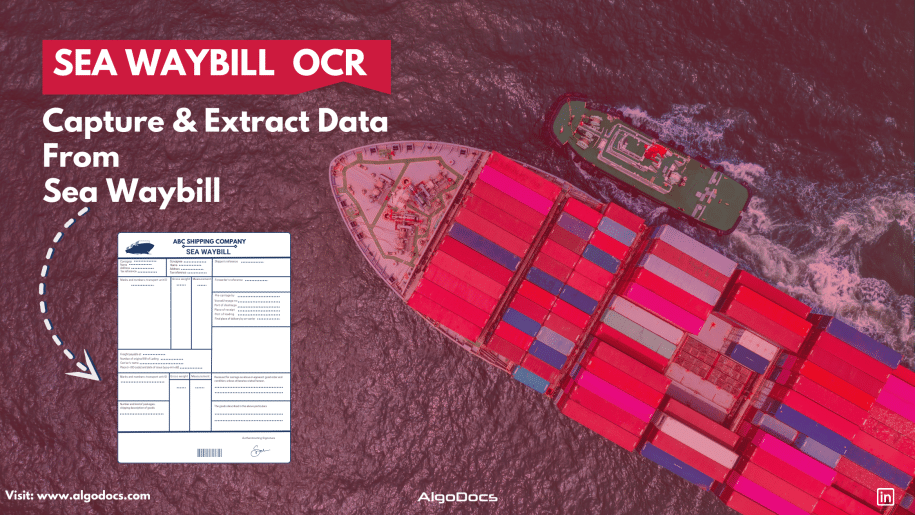
Back to Blog Table of contents On this page Sea Waybill OCR: Revolutionizing Maritime Logistics With AI-Powered Document Processing Home › Blog › Algodocs › Sea Waybill OCR: Revolutionizing Maritime Logistics With AI-Powered Document Processing Categories Algodocs Tags ai platform for data extraction algodocs character recognition image to text invoice process sea waybill ocr By Shubhankar Biswas Published September 1, 2025, 08:39 Updated July 20, 2026, 08:08 Introduction Maritime logistics plays a crucial role in global trade, with millions of shipping documents processed daily. Among them, the sea waybill is a critical document in ocean freight digitalization, facilitating cargo movement and ensuring smooth supply chain operations. However, manually extracting and processing bulk sea waybills is time-consuming, prone to errors, and inefficient. With the advent of OCR (Optical Character Recognition) technology, businesses can now automate data extraction from shipping documents, streamlining operations and reducing human intervention. Sea Waybill OCR is a transformative technology that helps logistics companies by providing fast, accurate, and scalable data extraction solutions for document processing and automation. In this blog, we will explore how OCR technology is revolutionizing the maritime industry, along with its benefits, use cases, and future trends. Understanding the Sea Waybill A sea waybill is a shipping document issued by a carrier that acts as a contract of carriage but does not confer title to the goods. Unlike a bill of lading (BOL), a sea waybill is non-negotiable, meaning that the consignee can take delivery of goods without presenting the original document. This makes it a preferred choice for faster and more efficient transactions. Key Differences: Sea Waybill vs. Bill of Lading What is a Sea Waybill? A Sea Waybill is a commonly used document in international shipping that simplifies the transportation process. Why is it important? Acts as a Receipt – Confirms that the carrier has received the goods for shipment. Specifies the Destination – Clearly indicates where the shipment is headed. Does Not Transfer Ownership – Unlike a Bill of Lading, it does not grant ownership rights to the holder. Simplifies Delivery – Reduces paperwork and speeds up the shipping process. Ideal for Established Trade Relationships – Best suited for situations where: Ownership remains unchanged during transit. There is no need for a document to control the transfer of goods. By streamlining logistics, the Sea Waybill helps freight forwarders and businesses ensure faster, hassle-free deliveries. What is a Bill of Lading? A Bill of Lading (BOL) is a crucial document in international trade that serves multiple purposes in the shipping process. Why is it Important? Acts as a Primary Shipping Document – It is the key document required for importing and exporting goods. Identifies Key Parties – It specifies the sender (shipper), the carrier (transport company), and the recipient (consignee). Serves as a Receipt – It confirms that the shipping company has received the goods in proper condition. Establishes Legal Ownership – The BOL proves who owns the goods during transit. Grants Control Over the Shipment – The person holding the original BOL has the right to: Claim the goods upon arrival. Transfer ownership to another party in the supply chain. By clearly defining roles and responsibilities, the Bill of Lading ensures smooth coordination among all parties involved in the shipment process. Feature Sea Waybill Bill of Lading (BOL) Negotiability Non-negotiable Negotiable Document Requirement No original required for delivery Original required for cargo release Speed of Transaction Faster, direct delivery Slower due to title transfer Risk of Fraud Lower risk Higher risk Since sea waybills are widely used in automated document processing, integrating OCR solutions can significantly improve efficiency. What is Sea Waybill OCR? Sea Waybill OCR technology is designed to automatically capture and extract data from scanned sea waybill images and PDFs. You don’t need to set up custom extractors or rules, as the system automatically recognizes document types, layouts, and data fields, extracting values with precision. This OCR model is trained on vast amounts of data using AI and machine learning, allowing it to understand patterns, layouts, and data types in sea waybill documents. By leveraging the power of AI and ML, Sea Waybill OCR seamlessly digitizes and automates data extraction from shipping documents, making the process faster and more efficient. By using machine learning-based OCR, businesses can accurately capture essential information such as: Shipper and consignee details Cargo descriptions Freight terms Port of loading and discharge Carrier and vessel details This eliminates the need for manual data entry and enhances the accuracy and efficiency of logistics operations. The Role of AI in OCR for Sea Waybills Modern AI-powered OCR solutions go beyond simple text recognition. They incorporate advanced natural language processing (NLP), deep learning, and computer vision to extract structured data from unstructured documents. Here’s how AI enhances OCR capabilities: Intelligent Data Extraction – AI models can recognize different fields in sea waybills and classify information accurately. Handwritten and Printed Text Recognition – AI-powered OCR can process both typed and handwritten text, improving versatility. Multi-Language Support – Maritime trade is global, and AI-driven OCR supports multiple languages for seamless operations. Automated Data Validation – AI cross-checks extracted information with databases to ensure accuracy. Seamless Integration with ERP and TMS – OCR solutions integrate with transportation management systems (TMS) and enterprise resource planning (ERP) software for real-time data processing. Benefits of Implementing Sea Waybill OCR 1. Increased Efficiency & Speed Manual data entry is slow and labor-intensive. OCR enables instant data extraction, reducing processing time from hours to minutes. 2. Cost Reduction Automated document processing minimizes labour costs and operational expenses by reducing manual intervention. 3. Improved Accuracy & Data Integrity Human errors in shipping documents can lead to costly delays. AI-powered OCR enhances accuracy and ensures compliance with shipping regulations. 4. Better Compliance & Security OCR solutions can flag inconsistencies and prevent fraud, ensuring better regulatory compliance in maritime trade. 5. Scalability Businesses can process large volumes of documents effortlessly, making it ideal for shipping companies, freight forwarders, and customs agencies. Use Cases of OCR in Maritime Logistics 1. Digitization of Shipping Documents OCR converts physical sea waybills into digital formats, making them searchable and easy to retrieve. 2. Automated Freight Auditing AI-powered

PDF

How To Convert PDF to Text Using AI: A Comprehensive Guide For 2025

Back to Blog Table of contents On this page How To Convert PDF to Text Using AI: A Comprehensive Guide For 2025 Home › Blog › PDF › How To Convert PDF to Text Using AI: A Comprehensive Guide For 2025 Categories PDF Tags ai platform for data extraction algodocs data extraction from images deep learning pdf to text By Shubhankar Biswas Published September 1, 2025, 08:25 Updated July 21, 2026, 07:03 Challenges of Converting How To Convert PDF to Text Using AI: A Comprehensive Guide For 2025PDF to Text Using AI PDF files remain the backbone of sharing textual data across various departments in businesses today. From contracts and invoices to research papers and reports, they are the preferred format for information storage and exchange. However, extracting valuable text from these documents can be a tedious and time-consuming task. This is where AI-powered solutions revolutionize PDF to text conversion. A PDF can exist in different formats, such as scanned documents, scanned images, or native PDFs that are easily searchable. Extracting data from scanned images or documents requires advanced AI technology to ensure accuracy and efficiency. In today’s business landscape, AI-based OCR technology is transforming how we interact with PDFs by offering seamless text extraction, enhanced accuracy, and increased efficiency. This guide explores the complexities and challenges of converting PDF to text using AI, along with its benefits, applications, and future advancements. Challenges of Converting PDF to Text Using AI PDF files come in different types: Native PDFs: These files allow easy editing and copying of text. Scanned PDFs: These contain embedded images of text, making manual extraction difficult.The challenge arises when dealing with scanned PDFs or image-based documents, where data cannot be directly copied or edited. Extracting information manually from thousands of PDFs is time-consuming, prone to errors, and inefficient. Traditional OCR tools offer basic character recognition but struggle with complex layouts, varied fonts, and handwritten text, often leading to inaccurate results. This highlights the need for an advanced AI-powered solution to convert PDF to text using AI efficiently. AI-Based OCR: Transforming PDF to Text Conversion Intelligent Document Processing (IDP) combines Artificial Intelligence (AI), Natural Language Processing (NLP), and Machine Learning (ML) to enhance traditional OCR capabilities. Instead of merely recognizing characters, AI-powered solutions understand document structures, identifying elements like headings, paragraphs, tables, and images while preserving formatting and ensuring high accuracy. AI-powered OCR tools convert PDFs to text with unmatched precision, making document processing easier and more efficient. How AI-Based OCR Works to Convert PDF to Text The efficiency of AI-based OCR lies in its sophisticated algorithms. Here’s how it works: Document Preprocessing: The PDF undergoes enhancement to remove noise, correct skew, and improve readability. Layout Analysis: AI analyzes the document structure, recognizing sections, columns, and tables. Enhanced OCR with AI: Unlike traditional OCR, AI-driven engines recognize a wide range of fonts, styles, and even handwritten text with high precision. Natural Language Processing (NLP): AI interprets the extracted text, corrects errors, and ensures contextual accuracy. Text Extraction & Formatting: The extracted text is presented in readable formats like plain text, HTML, or structured data (e.g., JSON) while preserving its original formatting. Benefits of Using AI to Convert PDF to Text With our Algodocs Generative AI Feature You Can Convert PDF To Text With Few Prompts. Try Our Free App Today AI-powered solutions provide numerous advantages, including: High Accuracy: Minimizes errors and reduces the need for manual corrections. Efficiency: Automates extraction, saving time and resources. Enhanced Data Accessibility: Converts PDFs into text for easy analysis and decision-making. Scalability: Processes large volumes of PDFs quickly and efficiently. Cost Savings: Reduces labor costs and boosts productivity. Seamless Integration: Extracted text can be integrated into various applications and systems. Applications of AI-Based PDF to Text Conversion AI-powered OCR tools are used across industries: Legal: Extracts text from contracts and case files. Finance: Processes invoices and financial reports. Healthcare: Extracts data from medical records and patient forms. Education: Converts research papers and textbooks into accessible formats. Government: Processes official documents and forms. Research: Extracts insights from scientific publications. Data Entry Automation: Automates data extraction from forms and documents. Content Management: Makes PDF content searchable and accessible. Key Challenges and Considerations in Converting PDF to Text Using AI While AI-based OCR significantly improves PDF to text conversion, some challenges remain: Complex Layouts: Multi-column formats and tables can still pose difficulties. Low-Quality Scans: Poorly scanned documents and handwritten text may require additional processing. Security & Privacy: Choose AI tools that prioritize data security. Cost: Pricing varies based on features and processing volume. Choosing the Right AI Tool to Convert PDF to Text When selecting an AI solution, consider: Accuracy: High precision in text extraction. Speed: Quick and efficient processing. Scalability: Ability to handle large document volumes. Features: Support for table extraction, formatting preservation, and multiple languages. Security: Strong data protection measures. Cost: Budget-friendly pricing models. Integration: Compatibility with existing workflows and systems. Algodocs AI: Simplifying PDF to Text Conversion One of the most powerful AI-based OCR tools is Algodocs AI. It combines AI and traditional OCR to extract data from various document types, including PDFs, scanned images, and complex layouts. Algodocs AI ensures high accuracy and efficiency, allowing users to extract text, tables, and structured data with ease. It simplifies PDF to text conversion, making it effortless to unlock valuable information within your documents. Algodocs AI makes it easier than ever to convert PDFs to text using AI, streamlining business workflows. The Future of AI in PDF to Text Conversion The field of AI-based OCR is constantly evolving. Future advancements will further enhance accuracy, efficiency, and functionality. With the integration of Robotic Process Automation (RPA) and cloud computing, AI solutions will enable seamless automation and data analysis across industries. Conclusion Converting PDFs to text using AI is a game-changing innovation, streamlining workflows, reducing errors, and improving data accessibility. With applications across multiple industries, AI-powered solutions like Algodocs AI are leading the way in automated document processing. As businesses become increasingly data-driven, leveraging AI to convert PDF to text will remain a crucial tool for unlocking and utilizing

Algodocs

How to Use AI to Improve KYC Document Processing and Data Extraction: Features, Benefits, Challenges, and Tools

Back to Blog Table of contents On this page How to Use AI to Improve KYC Document Processing and Data Extraction: Features, Benefits, Challenges, and Tools Home › Blog › Algodocs › How to Use AI to Improve KYC Document Processing and Data Extraction: Features, Benefits, Challenges, and Tools Categories Algodocs Tags ai platform for data extraction algodocs KYC machine learning By Shubhankar Biswas Published September 1, 2025, 07:42 Updated July 13, 2026, 09:54 KYC is one of the most important processes in sectors such as banking, finance, travel, and more. With the help of KYC documents, businesses ensure the proper and smooth transaction of services to their customers. However, KYC data extraction and document processing is a delicate and challenging task, and manually performing such a crucial process has many drawbacks, such as data inaccuracy, slow data processing, and human errors, which can create significant problems. But with the help of technologies such as artificial intelligence, machine learning, and intelligent document processing, businesses can improve data extraction accuracy, reduce time, and handle more customers in less time. In this blog, we will explore how AI can improve KYC document verification processing by effectively extracting data from ID cards, passports, and other identity documents. We will also discuss the challenges associated mainly with manual data extraction, how to overcome them with AI and IDP, the best tools available in the market, and how Algodocs is a great tool for KYC document processing and data extraction. Understanding KYC Verification and KYC Document Processing and Data Extraction KYC, or Know Your Customer, is the process of identifying personal details from identity documents such as ID cards, government-issued documents, passports, or other documents used by a company to provide various types of services to its customers. The sole purpose of KYC verification is to check the legitimacy of customer data provided to the company to avail of a service. These services may include approving a bank loan for a customer by a financial institution or granting a visa for travel by some countries’ border agencies. KYC verification or KYC data extraction is used by many organizations and businesses worldwide to access useful information about a person or customer. KYC document processing involves extracting data from identity documents such as ID cards, passports, and government-issued documents. These details include a customer’s name, DOB, address, financial details, age, country, etc. Extracting data can be done either manually or using sophisticated technologies such as intelligent document processing tools, AI, and machine learning to automate the entire process. How AI Enhances KYC Data Extraction and Document Processing With the help of AI, KYC document processing and data extraction can be greatly improved. Below are a few features of AI that help improve KYC data extraction and processing: 1. Document Classification AI can automatically identify and sort documents—passports, utility bills, or tax forms—using ML models trained on vast datasets. This eliminates manual categorization, paving the way for seamless KYC data extraction. 2. Advanced OCR for KYC Data Extraction Traditional OCR technology is limited as it only converts images to text, but AI-powered OCR excels at KYC data extraction by pinpointing specific fields—like names or ID numbers—despite poor image quality or varied layouts. This is especially useful for ID card data extraction, where precision is critical. One of the biggest advantages of AI-powered OCR is that it delivers 100% data accuracy, while traditional OCR fails to do so. 3. Data Validation and Cross-Checking Once KYC data extraction is done, AI can accurately validate the information against databases (e.g., government records or credit bureaus). It flags inconsistencies—like mismatched addresses—ensuring identity data processing is reliable and compliant. This saves time, whereas manual data extraction for KYC takes a significant amount of time. 4. Fraud Detection AI analyzes patterns to detect fraud, such as forged IDs or synthetic identities. Techniques like computer vision scrutinize document details during KYC data extraction, identifying tampering that human reviewers might miss. 5. Continuous Learning AI models adapt over time and are continuously trained on vast amounts of data, which improves accuracy in KYC data extraction and document verification as they process more data. This ensures they stay effective even as document types evolve. 6. Workflow Automation By integrating with robotic process automation (RPA), AI orchestrates the entire KYC pipeline—from ID card data extraction to data entry—reducing human effort and accelerating onboarding. Benefits of AI in KYC Data Extraction AI-driven KYC data extraction delivers significant advantages for businesses, customers, and regulators. Here’s why: Try Algodocs Free KYC Data Extraction Tool For Free 1. Increased Efficiency Manual KYC data extraction can take hours to extract data from a single document, but AI reduces this to minutes. By automating the entire process, organizations can improve the efficiency of KYC document processing and extraction. 2. Enhanced Accuracy The manual approach is prone to errors, which can create big issues with data accuracy. Errors in manual KYC data extraction—like typos in ID numbers—can lead to compliance issues. AI’s precision in ID card data extraction and validation minimizes mistakes, ensuring accurate results. 3. Cost Reduction Hiring staff for document verification and KYC data extraction is costly. AI reduces labor dependency, lowering expenses while maintaining quality—a clear win for scalability. 4. Improved Customer Experience Slow KYC document processing can lead to slow onboarding, frustrating customers, and harming a company’s reputation. AI’s fast KYC data extraction—such as real-time ID card data extraction—creates a seamless process, boosting satisfaction and retention. 5. Stronger Compliance Regulations like those from the Financial Action Task Force (FATF) demand rigorous identity data processing. AI ensures compliance by flagging risks and maintaining auditable records during KYC data extraction. 6. Scalability As customer bases grow, so do KYC demands. AI scales effortlessly, handling thousands of KYC data extraction tasks daily without added overhead. 7. Fraud Prevention With financial crime rising, AI’s ability to authenticate documents during KYC data extraction strengthens security, protecting businesses from fraud-related losses. Challenges of Implementing AI for KYC Data Extraction Despite its promising features and benefits, integrating

Scroll to Top