
Algodocs

deep learning

Algodocs

IDP Use Case: Transforming Restoration Practices

Earthquakes, hurricanes, mudslides, electrical fires, and burst pipes are some of the natural incidences that are usually unforeseen. Buildings that are often at the receiving end during catastrophic calamities require immense repair work. Any comprehensive structure will, in this respect, indeed call for disaster recovery management, especially if it is a house or a company. It has scaled tremendously to be vital software in the construction industry, but it is notably critical in the catastrophe repair industry, where most companies are small. Table of Contents: But as structures progress, many organizations like yours struggle to cope with change. Often, the driving force of success is in the technology that forms the basis of these organizations. Let us think of the building and restoration industry and see what we come up with. These companies have to estimate all possible costs for a building construction project, including additional costs such as salary for office employees, wear and tear of equipment, office rent and other overhead expenses, and cost of all the materials used and wages to workers. Enhancing Data Management in Restoration Processes Intelligent Document Processing (IDP) tools can capture information from any format that has not been pre-formatted, including images and handwritten writings. This can be of great importance, especially in restoration processes where data could be in large quantities, in the form of field notes and sketches, among other things. The Importance of Accurate Costs and Expenses Some of the factors one needs to understand well to accurately estimate the cost of the project include the building material costs, the requirements, the procedures, and the codes that are to be followed, as well as the need to understand the market trends in terms of pricing. Such information may be found by analyzing a bid package and working through the contingencies and profit inherent in a bid or a given project. Two Significant Challenges: Documentation obstacles: One of the challenges associated with restoration events is collecting all the relevant and non-concocted paperwork. Some of the effects of this cumbersome procedure include the failure to complete some forms or the delay in completing them. Accounts Receivable Delays are attributed primarily to fourteen struggles stemming from a high turnover rate in accounting: payment cycles take longer. This not only impacts cash flow but also definitely causes a lot of headaches for the business’s dealings with its customers. The Impact of Intelligent Document Processing (IDP) Software on Restoration Businesses: Implementing Intelligent Document Processing (IDP) Several Challenges. Here are some of the key ones: Case Study Use case for restoration: The repair company wishes to provide the customer with an overview of line-item estimates for the job. Cost estimates should not be utilized as a list of negotiable items. Supplemental costs may apply if more damage or repair that has not been found or is hidden below present finishes is required. This also enables the client to correct himself or herself if they chose compositions that are not within the estimate or if they need extra work. This is because, in the course of the project implementation, changes will be made to adjust for the revised estimate and present it to the client. Any changes made to these documents will be recorded in a change order and presented to the customer for revision. System: It is a form of advanced digital document processing with natural language processing, multimedia processes, and feature extraction. Primary actor: Accountant/bookkeeper/Customer Scenario: To meet the customer’s request to extract the estimated line-item information from the final amount, the following processes should be considered: They ask for the extracted data to be formatted differently than the original document’s formatting. They clearly explain what should be ignored and what needs to be extracted. There are a total of 11 headers in the PDF; each row value contains three different pieces of information: one is the labor, the second is the material, and the third is the equipment information. They need to extract the labor and material information. For example, the following are the instructions for the needed to be extracted data and how it should look like output: Tabular output with headers and the order they should be in JSON form: ·”ITEM#”, mapped from the label in Yellow (as in the picture above) ·”ROOM”, mapped from the label in dark green (as in the picture above) ·”UNIT”, mapped from the label in Red (as in the picture above) ·”QTY”, mapped from the label in light blue (as in the picture above) ·”UNIT PRICE”, mapped from the label in light green (as in the picture above) ·”TOTAL” mapped from the label in pink/magenta (as in the picture above) However, we still need to extract and differentiate data for Labor and Material information. While mapping the extracted data to the new headers, as requested by the customer. As complicated as it looks and sounds, Algodocs can do exactly this request easily.  How to Use Algodocs to Extract We only need a sample file uploaded to Algodocs to create the extractor. There are many ways to upload a sample document. The user can automate importing files to Algodocs uploading from their device, business email, Gmail, or other cloud storage. Once the documents are uploaded, the system will extract data from your documents using Algodocs’ advanced AI engine without relying on templates or even labeling and training your files.  The results are the actual contents extracted from the sample document according to the rules you specify. We have Rule-based extraction and artificial intelligence mining, which can be integrated to synthesize both extraction methods. This can help you further improve your extracted data by putting it into the correct form and structure.  The system makes it easy to control extracted data from your documents and handle business exceptions. It allows you to export the extracted data directly to an Excel Spreadsheet or, with the integration of Zapier, automate exporting extracted data directly to your email, Google Sheets, or other cloud storage. Example of Output in Excel Key Takeaways This should explain how Algodocs has boosted the restoration business and its experience with the solution to prove that technology can transform any business. Let your team be an example of how adopting effective and progressive concepts can
Algodocs

What is a PDF Parser?

A PDF Parser is a program or a library that enables end-users and organizations to parse data from native PDF documents. Often, organizations need to parse PDF documents for specific fields such as Account Number, Date, Address, Bill to/from information, or parse tabular data. PDF Parsers are usually needed and used for processing and parsing data from large amounts of documents. On the other hand, when you have a handful of documents you simply go and copy the data you need from PDF documents manually and paste it to Excel or anywhere you need it to be. PDF Parsers enable end-users to get data from hundreds and thousands of PDF documents in real time by saving huge amounts of time and, thus, money. Parsing pdf documents isn’t an easy task. There are various ways native pdf documents are generated and parsing data from such pdf documents requires smart approaches. Parsed data from PDF documents greatly varies depending on the industry, which means the data parsed might also greatly change, which complicates the task. Parsing PDF medical forms, which contain specific fields such as First, Middle, and Last names, Sex, Date of Birth, etc. are very different from PDF purchase orders that contain mainly the items in the tabular form with such columns as Item No, Code, Quantity, Item Price, Amount, etc. Therefore, if PDF Parser produces just a bunch of text from a PDF document it does not make much sense for the end-user. What end-users or organizations require is the structured data parsed from PDF documents. In other words, PDF Parser should extract from PDF documents only the data the end-user needs and in the right structured format. For this, the PDF Parser must be smart and flexible enough to parse PDF documents with various layouts and data types. How to parse PDF documents with various layouts? Algodocs allows you to parse PDF documents of any complexity in their layouts and type of data. With the flexible extracting rules of Algodocs, you can parse data from PDFs with different layouts. It is very easy and quick to set up extractors in Algodocs for your PDF documents. We provide 100% free technical support and are ready to set up extractors for you. While we provide free support for creating extracting rules, you may check our help and support section if you wish to learn how to create extracting rules in Algodocs. Watch the following introductory video to get an idea of how it works in Algodocs. Feel free to start a free subscription right now and parse your pdf documents. You can use Algodocs free forever with 50 pages per month. If you need to process a higher number of pages, then please see our affordable pricing plans. If you have specific requirements and need a custom solution, please contact us.

Algodocs

Convert PDF to JSON – Convert PDF Documents to Structured JSON Objects

Table of Contents Introduction Organizations in various industries widely use PDF documents, since no doubt PDF is a common document format for businesses to transfer data. Purchase orders, Invoices, Agreements, and many more document types are interchanged in PDF formats. On the other hand, JSON is another format that represents data in a structured format, which is widely used in transferring data between web applications. As a result, Working with JSON is much easier than with PDF. Therefore, in this article, we will talk about PDF and JSON formats and how you can convert your PDF documents to JSON format. What is a PDF? PDF (Portable Document Format) was initially developed by Adobe® Systems in 1992 and is standardized as ISO 32000. What makes PDF so popular is it is independent of the application software, hardware, and operating system. Other than text and images PDF files may contain a variety of content such as annotations, form fields, layers, etc. There are many advantages of PDF format such as multi-dimensionality, which we have already mentioned – being able to contain various types of content, text, images, videos, vector graphics, interactive fields, hyperlinks, and buttons. Moreover, PDF documents are easily created and viewed on different devices.  Security in PDF was one of the primary concerns of Adobe® Systems. Therefore, PDFs have different access levels to protect the content and the whole document, such as passwords, digital signatures, and watermarks. However, some of the downsides of a PDF are the complexity of editing and especially extracting data from it. Moreover, PDFs are not generated in the same way, so different PDF files can be created in various ways, which complicates the task of extracting data from PDF documents. What is a JSON? JSON (JavaScript Object Notation) is a very popular data format, which appeared in the early 2000s. JSON is a language-independent data format and is used to transfer data between software applications, particularly web applications, usually between server and client.  Most of the API integrations are realized using JSON format for data transfer since it is very easy to work with JSON. Consider a JSON object called person, which contains the following information:{   “name”: “John”,   “surname”: “Doe”,   “age”: 25} Accessing fields of a JSON object is as simple as using the name of the object and the field name you want to access by separating them with a dot as follows: To access a person’s name we use person.name, which will give us “John” as a result. Similarly, we do for surname and age fields: person.surname, person.age Note how easy it is to access any field of a JSON object, which is definitely not compared to accessing specific information in the PDF document. How does JSON differ from PDF? Although PDF and JSON are both widely spread and used, there is a huge difference between PDF and JSON. The difference between them is simply in the purpose of their usage. PDF is mainly used for exchanging information between humans, since it contains text, graphics, illustrations such as images and videos, etc. On the other hand, JSON is mainly used between computer programs and different applications for communicating and exchanging data between each other. It is not an easy task for a human to read information from a JSON file, especially if it is a compressed one, but it is a perfect way to access information from JSON for a software application. The opposite goes for the PDF. Therefore, PDF and JSON become important, useful, and helpful only when they are used in the right place and for the right purpose. How to Convert PDF to JSON? Often, organizations need to transfer data to other programs for further processing. This data is often stored in PDF documents since businesses often speak to each other in a “PDF language”. However, extracting information from PDF documents can be challenging.  The simplest solution is that you can always copy and paste text from a PDF and send it to where it belongs. However, this simple approach has many problems, since first of all this will work only with native PDF files (not scans) for which you can even use some free PDF Parsers. Another problem even if your PDF documents are all native, it is not easy to copy the entire table from a PDF by maintaining its format, especially if the table spans over multiple pages, for example, 100 or 1000 pages. Additionally, often organizations need to extract specific data from PDFs, for example not the entire table, but instead specific rows or columns based on some conditions. Last, but not least, it is not worth spending your valuable time on menial data entry! Convert PDF documents to JSON with Algodocs Algodocs offers a perfect solution to extract any type of data from PDF documents and transfer it to other programs in real-time. Algodocs can extract fields and tables of any complexity from native as well as scanned PDF documents. You can convert your PDF documents to JSON in three steps with Algodocs. Feel free to start a free subscription right now and convert your PDF documents to JSON. You can use Algodocs free forever with 50 pages per month. If you need to process a higher number of pages, then please see our affordable pricing plans.

Algodocs

Extract handwritten text from scanned PDFs and images

Optical Character Recognition (OCR) engines are primarily focused on machine-printed text and may produce low accuracy for handwritten text. Intelligent Character Recognition (ICR) is an advanced recognition system that is used to recognize handwritten text. This allows the automatic conversion of text in an image into letter codes that are usable within computer and text-processing applications. Although many processes involve computer-based operations and are implemented in a digital environment, paper is still vastly used across most core business processes such as mortgage origination, order fulfillment, contracts, and other documents that usually require handwritten input and signatures. Nowadays, the digitalization of paper documents plays an important role, and deciding on the right data capture software is critical since handwriting recognition unlike printed text recognition is a more complex task that usually involves advanced deep learning algorithms. Algodocs: Deep Learning Handwriting Recognizer Algodocs is capable of converting handwritten text into machine-printed text with high accuracy. With the ICR of Algodocs, you can automate your document processing workflow and get rid of manual data entry. Scan your paper documents with handwritten text and let Algodocs automatically extract data and convert it to Excel or JSON. Let’s consider the following portion of a scanned document, which contains a table of two columns filled with handwritten numbers. If you upload this image to your account at Algodocs, you will see the following output, which has 100% accuracy. Algodocs uses advanced ICR engines trained with Artificial Intelligence algorithms and Deep Learning. The above example includes mostly digits. Another example with characters is given below. The following is the extracted text by Algodocs from the above image. As we can see Algodocs performs well in handwritten text extraction from scanned documents. Feel free to start a free subscription right now and test your handwritten scanned documents. You can use Algodocs free forever with 50 pages per month. If you need to process a higher number of pages, then please see our affordable pricing plans. If you have specific requirements and need a custom solution, please contact us.

Algodocs

A Guide on Extracting Tables From Low-Quality Scanned Documents

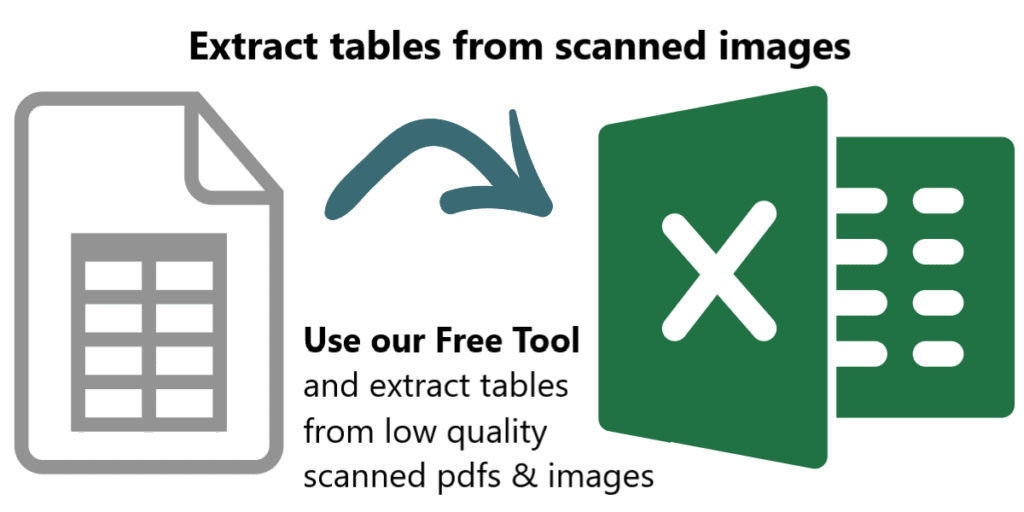
Many companies deal with thousands of documents every month. Document workflow automation becomes vital for such companies as the number of documents increases. One of the most frequent and at the same time tedious operations when processing documents is reading data from tables, especially when documents are scanned PDFs or images. Automating table extraction from scanned documents and exporting them into Excel or JSON within seconds is a dream for every company dealing with manual data entry. Automating table data extraction from scanned documents and images reduces operational costs and saves a lot of time. In this article, we will talk about table extraction from scanned documents or images with low quality. You, most probably, came across some online tools that can extract tabular data from documents. However, there are a few that really work with low-quality scanned documents or images taken by a mobile device. Optical Character Recognition (OCR) is the technology used for converting scanned images into text. However, standard OCR tools require you to apply certain image processing operations on the images before you can apply OCR on them. Without manual pre-processing, OCR will fail in most cases, and accuracy will be low. Unfortunately, even with pre-processing operations free OCR tools produce poor performance. How to extract tables from scanned PDFs and images with low quality? Algodocs has an advanced AI-powered OCR engine that automatically handles any type of scanned PDF or image with a low quality. Algodocs accepts either colorful scanned images, black and white, or any other settings and extracts data with high accuracy. Algodocs can process scanned images with as low a dpi as 75. If you have scanned PDFs or images with low quality, then Algodocs is the right solution for you. You may start a free subscription right now and test your own scanned documents since we offer a free subscription (forever) with 50 pages per month. If you need to process a higher number of pages, then please see our affordable pricing plans. Please read our article on the basic steps for table extraction from documents here: Extract tables from PDF and scanned documents Algodocs: the best software tool to extract tables from scanned PDFs and images Consider the portions of the scanned documents below and the tables that Algodocs extracted from them. Example #1 Example #2 Extracted table by Algodocs As you can see, the accuracy of Algodocs is perfect even with low-quality scans. However, there are cases when scanned images may cause Algodocs to make mistakes concerning small characters such as punctuation or other symbols (points, commas, date separators, etc.). Let’s have a look at the example below with a scanned image and see what Algodocs could extract from it. The extracted table from the above-scanned image is shown below. As you can see, there are numbers that are extracted with wrong decimal separators (indicated in red circles), i.e. a decimal point is mistakenly recognized as a comma. This is due to the dark background that some rows have on the image. With the help of flexible extracting rules of Algodocs, the workaround is quick and simple. Whenever you have low-quality scanned PDFs of images, we always advise you to follow the steps explained below. Step1. Remove all points and commas from the numbers We apply the ‘Search & Replace’ filter in Algodocs by using regular expressions as the search type. We apply this rule to all the columns in the example below, but you can restrict this rule to a specific column when needed. In order to find all dots or commas we use \.|, as the search term and we leave empty the second field (replace by this), since we simply want to remove them. Step 2. Convert all numbers to their previous format Since we removed all points and commas from numbers, they actually increased, i.e. multiplied by 100 we can say (2,378.63 became 237863). Therefore, since we know that our numbers had 2 decimal places, we can divide all numbers by 100 to get the original numbers. The ‘Arithmetic Operation’ filter helps us implement exactly this. We divide numbers by 100 in the last column as shown in the example below. You may apply this filter to other columns too. That’s it. We got numbers in their original form with 100% accuracy! The same approach can be applied to other symbols when you have documents with a low quality. Please, contact us if you need any assistance.

Algodocs

AI Data Extraction Checklist: Transform Business with Algodocs

What is AI Data Extraction? Let’s discuss data – a lot of data. Modern-day businesses are losing themselves in the sea of information. Whether it is an invoice, a contract, a weekly report, or a form, paper documents are still part of everyday life. Extracting data from such documents is a tedious, repetitive, and painful process if done manually. This is where AI data extraction comes to the rescue. It is a game-changer for anyone who has to work with several papers. Incorporating AI means data entry activities are done efficiently and there’s an increase in the accuracy and productivity of your business. Algodocs is a perfect example of an AI data extraction tool. Why? Let’s find out. Understanding Your Data: The Foundation for Successful AI Data Extraction Before you set loose the AI on your documents, I thought it’s best to discuss a little about your data. It is essential to know what type of data you are going to extract and what the process is going to be like. Identify Your Data Sources First things first: where do you store your data? The first action plan is to identify this source. Is it hidden in files and papers or dispersed in different online sites as in virtual archives? You’ll find your data in various forms: Assessing Data Quality Data quality is super essential for accuracy in the extraction process. Ensure that you go through your assembled data to determine whether it meets the standard of completeness, consistency, and accuracy. Dedicating time to data preparation will enable laying down the key fundamentals of an AI data extraction project. Optimizing the extraction results of Algodocs, the company provides you with tools for evaluating data quality and detecting potential problems. Choosing the Right AI Data Extraction Tool Picking the right tool to extract AI data is critical to the success of any AI project. As we have seen, there are numerous strategies out there; that is why it is crucial to define your requirements precisely and compare tools based on the crucial factors. Critical Considerations for Tool Selection Accuracy: The whole idea of training an AI in the first place is to increase accuracy, isn’t it? Search for the tool with favorable accuracy characteristics, especially in the case of processing intricate and diversely formatted documents. Don’t forget about tables, crazy handwriting, or low-quality pictures. Speed: It’s important, especially in dealing with large numbers of documents that are prevalent in the modern organization. However, time translates to costs, more so when handling big data at hand or any other business. Having a fast and efficient tool can save hours, if not days off of your time. Flexibility is very important, especially for those industries that anticipate expansion. Scalability: The tool should be designed for growth which includes a higher amount of input data and scalability of business over time. Document Types: Think about the countless supported document types with your tool (PDFs, images, Word, Excel, and more). Data Formats: Verify that the tool can export information according to your preferred choice format (CSV, XML, JSON, etc.). Integrations: This is very important as technology should be compatible with the current systems and applications. In other words, a single tool could essentially serve the purpose. But if a tool can integrate with other existing systems, then that’s ideal. It integrates with frequently used business applications such as CRMs, ERPs, and data warehouses. Pricing: Analyze cost distribution for various pricing structures considering your estimated budget. Customer Support: Customer support should be reliable and available for providing technical support and answering questions at all times. Types of AI Data Extraction Tools Cloud-Based Tools AI data extraction in cloud-based is also beneficial since it is scalable, easily accessible, and mostly cheaper. These tools are stored at service providers’ central servers, and users only need an Internet connection to use them. Examples: Google Cloud Document AI, Amazon Textract, ABBYY Cloud OCR, and Algodocs. On-Premise Tools On-premise solutions allow necessary control over infrastructure, but they can be more expensive. These tools are deployed and run on the organization’s own IT systems and infrastructure. It is worth mentioning that Algodocs is a web-based tool; however, it can also be used On-premise. Examples: Kofax, OpenText, and Algodocs. Open-Source Tools Using and adapting open-source AI data extraction tools is more flexible and customizable, but implementing these tools requires technical skills. Examples: Tesseract OCR, OpenCV Mobile Apps Mobile applications usually reside on document capture and basic data mining capabilities. This is perfect for small data snippets or impromptu snapshots of information gathering. However, such tools may not work well when a large quantity of structured content, such as tables, is involved. Not to forget that handwriting style and layout complexities can cause the accuracy of such tools to drop. Examples: Google Lens or Microsoft Office Lens can scan your document and convert the text into a digital format. Making an Informed Decision Considering the following aspects and your organization’s requirements, you can choose the right AI data extraction tool for your organization. Feature Cloud-Based On-Premise Open-Source Mobile Apps Accuracy High High Varies Varies Speed High High Varies High Cost Low High Low Low to Medium Scalability High Medium Medium Low Integrations High Medium Low Varies Security High High Medium Varies Support High High Low Varies Accessibility High Low Medium High Algodocs: Your AI-Powered Data Extraction Partner Algodocs is an AI-powered web application to helps you extract data from PDFs and images with ease. Our main strength is identifying and converting handwriting, tables, key-value pairs, marks, and signatures. After the extraction process, data can be exported into CSV, XML, or Excel formats. You can also start extracting data for free, but you are limited to processing 50 pages per month. We have created an efficient and easy-to-navigate system that helps you achieve the desired outcomes. Utilizing the latest AI technology, our application efficiently processes your documents and retrieves the required data without delay. Algodocs is more than a tool; it’s your data extraction partner. Experience the Algodocs difference: It has an impressive accuracy of 99% of data

Algodocs

What Is Intelligent Document Processing (IDP) and How Can It Revolutionize Your Business in 2025?

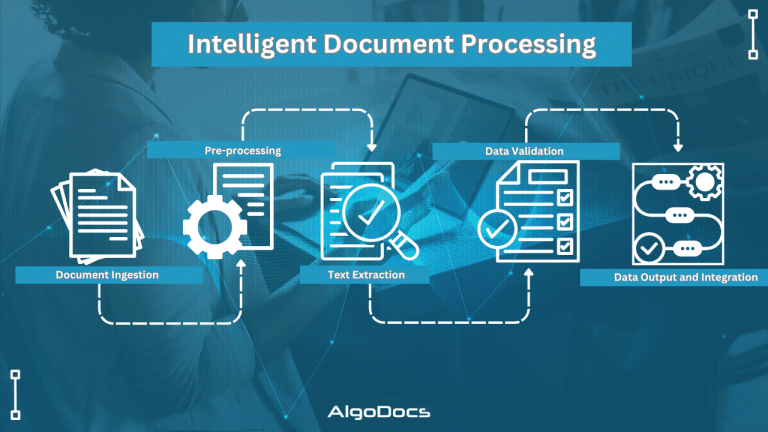
In today’s digital age, data is crucial for every organization. However, a significant portion of this data resides within unstructured documents, such as contracts, invoices, forms, emails, and more. Manually processing data from these documents is time-consuming, error-prone, and costly for any business. Intelligent Document Processing (IDP) has emerged as a game-changing solution by leveraging the power of artificial intelligence (AI) and machine learning (ML). Document workflows and data extraction from these unstructured documents have become very easy. This comprehensive guide will explore the landscape of IDP platforms, their benefits, how they can be applied across various industries, key considerations for choosing an IDP solution, emerging trends, and how Algodocs can empower your business. What is Intelligent Document Processing (IDP)? A Deep Dive The IDP (Intelligent Document Processing) market is expected to reach $46.59 billion USD by the end of 2035, according to a report. As businesses heavily rely on, extraction, sorting, and managing data. These types of operations require a robust and reliable tool to that can provide useful insights about business metrics. That’s why the need for intelligent document processing tools is rising day by day. So, what is intelligent document processing? IDP is a sophisticated technology that automates the extraction, classification, and processing of data from various document types, regardless of format or structure. It achieves this by combining several core technologies: Optical Character Recognition (OCR): OCR converts images of text into machine-readable text. Modern OCR, often referred to as Intelligent Character Recognition (ICR), goes beyond basic character recognition by using deep learning models like Convolutional Neural Networks (CNNs) and Recurrent Neural Networks (RNNs). This allows it to handle complex layouts, handwritten text, low-quality images, multiple languages, and specialized fonts used in industries like healthcare (medical prescriptions) and law (legal documents). Accuracy is often measured using metrics like character error rate (CER) and word error rate (WER), with advanced systems achieving very low error rates. Natural Language Processing (NLP): NLP analyzes the extracted text to understand its meaning and context. It employs techniques like tokenization (breaking text into individual words or phrases), stemming and lemmatization (reducing words to their root form), Named Entity Recognition (NER) (identifying specific entities like names, dates, and locations), Part-of-Speech (POS) tagging (identifying the grammatical role of each word), sentiment analysis (determining the emotional tone of the text), topic modelling (discovering underlying topics within a collection of documents), text summarization (creating concise summaries of longer texts), relationship extraction (identifying relationships between entities), and semantic analysis (understanding the meaning of words and phrases in context). Machine Learning (ML): ML is the engine that drives IDP’s adaptability and continuous improvement. Supervised learning involves training the system on labelled data to recognize specific document types and extract relevant fields. Unsupervised learning helps discover patterns and structures in unlabelled data for improved classification and clustering. Reinforcement learning allows the system to learn through feedback and iterative improvement. Training data quality and quantity are crucial for model accuracy. Techniques like cross-validation and hyperparameter tuning are used to optimize model performance. Active learning allows the system to request human input for ambiguous cases, further improving its accuracy over time. Computer Vision: Computer vision enables IDP to “see” and interpret visual elements within documents. Techniques like image classification (categorizing images), object detection (identifying specific objects within images), image segmentation (dividing an image into multiple segments), table and form extraction (accurately extracting data from structured tables and forms), barcode and QR code recognition (automating data capture from barcodes and QR codes), signature verification (authenticating signatures), and logo detection (identifying company logos) are used. Robotic Process Automation (RPA): RPA acts as the orchestrator for IDP workflows, automating downstream processes based on the extracted data. It integrates IDP with other enterprise systems like CRM, ERP, and ECM, automating data validation, routing documents to appropriate departments, and triggering subsequent actions. IDP Workflow: A Detailed Breakdown: Document Ingestion: Documents are ingested through various channels: scanning, uploading files, APIs, email attachments, and more. Pre-processing: Images are optimized for OCR through techniques like noise reduction, skew correction, and image enhancement. OCR and Text Extraction: OCR extracts text from the document. NLP and Data Understanding: NLP analyzes the extracted text. Data Extraction and Validation: Relevant data is extracted and validated against predefined rules or databases. Human-in-the-Loop (HITL): Human reviewers handle exceptions and complex cases where the system has low confidence. Data Output and Integration: Extracted data is delivered in structured formats (CSV, JSON, XML) or directly integrated into business applications. The Benefits of IDP: Quantifiable Impacts Efficiency Gains: IDP can dramatically reduce document processing time, often by up to 90%. For example, processing hundreds of invoices that previously took several days can be completed in just a few minutes or hours. This increased throughput allows businesses to handle higher volumes of documents without increasing staffing. Cost Reduction: By eliminating manual data entry and reducing errors, IDP can lower operational costs by up to 70%. Reduced rework, fewer errors requiring correction, and optimized resource utilization contribute to significant cost savings. Accuracy Improvement: IDP achieves data extraction accuracy rates of 99% or higher, significantly minimizing data entry errors and improving data quality and consistency. This reduces costly downstream errors and improves compliance. Enhanced Security and Compliance: IDP systems offer robust security features like data encryption, access control, and audit trails, ensuring compliance with data privacy regulations like GDPR, HIPAA, and others. Improved Customer Experience: Faster processing times translate to quicker service delivery, leading to improved customer satisfaction. For example, faster loan approvals or insurance claims processing can significantly enhance the customer experience. IDP Use Cases Across Industries: Real-World Applications Banking and Financial Services: Loan Processing: Automating the review of financial documents, verifying income and employment, and streamlining the loan approval process. Mortgage Origination: Automating the processing of mortgage applications, including appraisals, title documents, and financial statements. KYC/AML Compliance: Automating the verification of customer identities and detecting suspicious transactions. Fraud Detection: identifying fraudulent activities by analyzing patterns in documents and transactions. Account Opening: Automating the collection and verification of customer

Algodocs

Insurance Data Extraction: Automating Policy and Claim Processing with AI

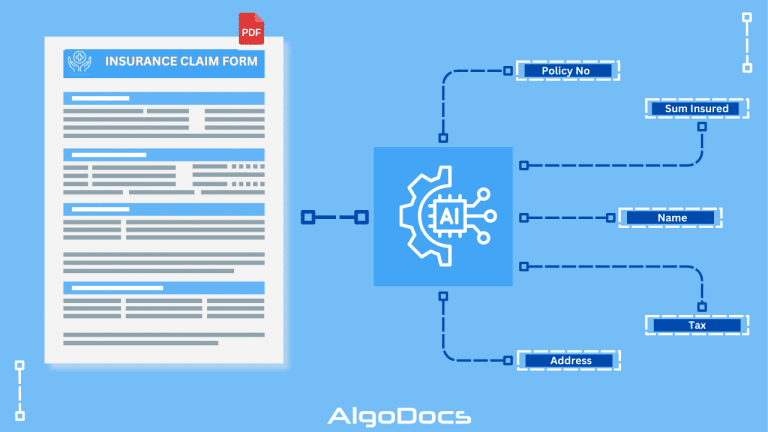
The modern insurance industry swims in a sea of data. This data, essential for everything from underwriting to claims processing, comes in many forms: policy applications, medical records, accident reports, legal documents, and customer interactions. These can be physical papers, scanned PDFs, images, emails, or even handwritten notes. Manually managing this mountain of information is slow, expensive, and prone to errors. In today’s competitive landscape, efficient data handling is crucial for success. This is where automation, especially using Artificial Intelligence (AI), becomes essential. This article explains how AI-driven data extraction is revolutionizing insurance operations, making them more efficient, accurate, customer-focused, and ultimately, more profitable. The Problem with Manual Data Extraction Historically, insurance companies have relied on manual data entry and processing. This traditional approach faces several significant challenges: Time-Consuming Manual Review: Underwriters, claims adjusters, and other staff spend countless hours manually reviewing documents, both physical and digital. Interpreting handwritten forms, understanding medical jargon, and cross-referencing information are labor-intensive tasks that take valuable time away from more strategic work. High Risk of Human Error: Manual data entry is inherently error-prone. Simple typos or misinterpretations can lead to serious consequences, such as incorrect claim payouts or policy issuance. Even with careful review, consistent accuracy is difficult to achieve. Slow Processing Speeds: Manual processing creates bottlenecks, slowing down policy issuance, claim settlements, and customer service responses. This can lead to customer dissatisfaction and increased operational costs. Inability to Scale: Manual processes struggle to handle increasing data volumes and the complexities of modern insurance products. This limits growth potential and the ability to adapt to changing market demands. AI-Powered Automated Data Extraction: A Game Changer AI-driven data extraction technologies are transforming how insurers handle data. These technologies, including Optical Character Recognition (OCR), Intelligent Document Processing (IDP), Natural Language Processing (NLP), and Machine Learning (ML), offer several key advantages: Automated Data Capture: AI algorithms automatically extract essential information from various sources, significantly reducing manual effort. This includes: Policy Applications: Extracting applicant details, coverage options, and premium information. Medical Records: Extracting diagnoses, treatments, and other relevant data for claims and underwriting. Accident Reports: Extracting details like dates, times, locations, and witness statements. Claims Documents: Extracting claim types, dates of loss, policy numbers, and supporting document details. Improved Accuracy: By minimizing human intervention, AI ensures greater data accuracy, reduces fraudulent claims, and improves decision-making. Increased Efficiency: Automated data extraction speeds up processing times, leading to faster handling of policies and claims, improved customer satisfaction, and reduced operational costs. Better Scalability: AI-powered solutions can easily handle large data volumes and adapt to changing demands, allowing insurers to manage peak periods and accommodate growth. Actionable Insights: Analyzing extracted data helps insurers identify customer behavior patterns, detect fraud, and make informed decisions to optimize processes and improve products. How the AI Works: Key Technologies Optical Character Recognition (OCR): OCR converts images of text (scanned documents, PDFs, handwritten forms) into machine-readable text that computers can process. Intelligent Document Processing (IDP): IDP combines OCR with AI and machine learning to capture and extract data from documents. It goes beyond simple text extraction to understand the context and meaning of the information. IDP can also automate entire document processing workflows and integrate with other systems. Natural Language Processing (NLP): NLP allows computers to understand human language. It extracts meaning and context from unstructured data like emails, medical reports, and legal documents. Machine Learning (ML): ML allows systems to learn from data and improve their accuracy over time. ML algorithms can be trained to recognize patterns and improve data extraction, document classification, and fraud detection. Real-World Applications in Insurance Streamlined Underwriting: AI automates underwriting by extracting relevant information from applications and medical records, enabling faster and more accurate risk assessment and premium determination. Faster Claims Processing: AI speeds up claim processing by automating data extraction from various claim-related documents. Robust Fraud Detection: AI identifies potentially fraudulent claims by analyzing data patterns and detecting anomalies. Enhanced Customer Service: AI-powered chatbots use NLP to assist customers, answer questions, and guide them through processes. Proactive Risk Assessment: AI analyzes data from various sources to predict potential risks and help insurers mitigate losses. Benefits for Insurance Companies Increased Operational Efficiency: Faster processing times streamline operations, reduce costs, and free up staff for more strategic tasks. Improved Accuracy: Reduced errors improve compliance and minimize costly mistakes. Enhanced Customer Experience: Faster service, improved accuracy, and personalized interactions boost customer satisfaction and loyalty. Cost Savings: Automation reduces reliance on manual labour and other resources, leading to long-term cost savings. Competitive Advantage: AI-driven data extraction provides a competitive edge by enabling faster, more efficient, and personalized services. Challenges and Considerations Data Quality: Accurate results depend on clean, consistent, and well-structured input data. Data Security and Privacy: Robust security measures and compliance with regulations (like GDPR and CCPA) are crucial. System Integration: AI solutions must integrate seamlessly with existing IT systems. Transparency: Explainable AI (XAI) is important for ensuring transparency and compliance. How Algodocs AI Enhances Data Extraction Algodocs is a cloud-based platform that uses AI and ML to extract data from various documents, including insurance claims, bank statements, and invoices. It helps insurers automate data extraction from claim forms, medical records, policy applications, and more, even from handwritten notes and images. Conclusion Data extraction, particularly when powered by AI, is a game-changer for the insurance industry. By automating data capture, processing, and analysis, insurers can achieve significant improvements in efficiency, accuracy, customer satisfaction, and profitability. As AI technology continues to advance, we can expect even more transformative applications of data extraction, shaping a more data-driven, customer-centric, and efficient future for the insurance industry.

Algodocs

Healthcare Data Extraction: Improving Healthcare Document Workflow with AI and IDP In 2025: A Case Study

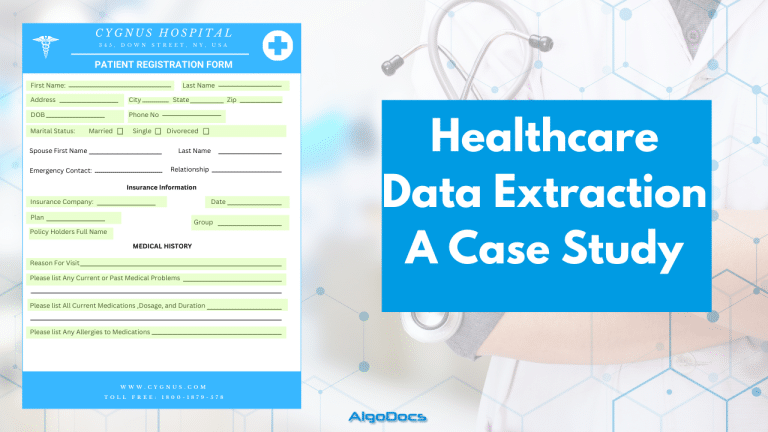
Healthcare data extraction has always been a challenge for hospitals, healthcare providers, and insurance companies. Extracting data from multiple documents was a complex task. However, the advent of AI and Intelligent Document Processing (IDP) technologies has significantly impacted how the healthcare industry processes data from various healthcare documents. The healthcare industry is a vast sea of data. Every patient interaction, medical procedure, and insurance claim relies on information. This data, locked within various document formats, holds immense potential to improve patient care, streamline healthcare operations, and drive innovation. However, extracting this valuable information from diverse healthcare documents has traditionally been laborious, error-prone, costly, and inefficient. This is where technologies like IDP, AI, Machine Learning (ML), Large Language Models (LLM), and Optical Character Recognition (OCR) come into play. With these innovative technologies, we have improved data extraction for the healthcare industry. According to a recent report, the healthcare industry is a USD 5,862.1 billion industry and is expected to reach USD 9,245.8 billion by 2033. Another report by Deloitte suggests that AI technologies can save USD 360 billion in costs in the USA by next year. The healthcare industry generated up to 2.3 zettabytes of data worldwide in 2020. In this blog, we will discuss how AI is changing data extraction for the healthcare industry across the globe and the technologies and tools behind this technological advancement. The Diverse Landscape of Healthcare Documents The healthcare industry is inundated with various documents, each containing critical information crucial for patient care, administration, and research. Understanding these documents is the first step in effectively leveraging data extraction. Let’s delve into the key document types: Medical bills are more than just invoices; they are detailed records of services rendered to a patient. They contain crucial information, including: Efficiently extracting data from medical bills is vital for revenue cycle management, claims processing, cost analysis, and identifying trends in healthcare spending. Accurate data extraction ensures timely reimbursements, reduces claim denials, and provides insights into cost-effective care delivery. Despite the growing adoption of Electronic Health Records (EHRs), handwritten bills persist in many healthcare settings, particularly in smaller practices or during field visits. Many developing Asian countries, as well as developed countries, still rely on handwritten bills. These bills often contain information such as: Extracting data from handwritten bills presents a unique challenge due to variations in handwriting styles, abbreviations, and the potential for smudges or illegible entries. Advanced OCR coupled with Natural Language Processing (NLP) is essential for accurate data extraction from these documents. Patient forms are the cornerstone of patient intake and data collection. They gather essential information that forms the basis of a patient’s medical record. Sometimes these forms are filled with handwritten data, which presents a challenge for data extraction. Though the majority of patient forms are computer-generated, in many cases, they are handwritten. Common types of patient forms include: These forms often contain valuable information such as first name, last name, address, body weight, blood group details, current health issues, and previous diagnoses. They often contain a mix of structured (checkboxes, multiple-choice) and unstructured (free-text) data. Effective data extraction from these forms relies on advanced form recognition and NLP techniques to capture both types of information accurately. Health insurance documents, including Explanation of Benefits (EOBs) and insurance cards, are crucial for understanding a patient’s coverage, verifying eligibility, and processing claims. They contain: Data extraction from insurance documents enables accurate billing, reduces claim rejections, and helps patients understand their financial responsibilities. It also provides valuable data for insurance companies to analyze utilization patterns and manage risk. Beyond these core document types; the healthcare ecosystem encompasses a multitude of other documents: Each document plays a unique role in patient care and administration. This diverse range provides a holistic view of a patient’s journey, enabling better care coordination, research, and population health management. How AI, ML, and IDP Leverage Healthcare Data Extraction The traditional approach to extracting data from these diverse healthcare documents has been manual data entry, a process fraught with challenges. However, the emergence of AI, ML, and IDP has revolutionized data extraction, offering a more efficient, accurate, and scalable solution. Try Algodocs AI data extraction platform to extract data from variou types of documents. Sign up for a free-forever plan today. AI, at its core, is the ability of a computer system to mimic human intelligence. In healthcare data extraction, AI drives the entire process. It encompasses various subfields, including ML and NLP, to enable machines to understand, interpret, and process healthcare documents with human-like accuracy. ML is a subset of AI that focuses on enabling machines to learn from data without explicit programming. In healthcare data extraction, ML algorithms are trained on vast datasets of labelled documents to recognize patterns, identify key data points, and extract information with increasing accuracy over time. This is crucial as it adapts to various document formats. IDP is a comprehensive approach that combines AI, ML, OCR, and other technologies to automate document processing workflows. In healthcare data extraction, IDP systems can: The Challenges of Manual Data Extraction in Healthcare Manual data entry has long been the standard for extracting information from healthcare documents. However, this approach has several significant challenges: How AI, IDP, and ML Can Solve These Challenges Adopting AI, IDP, and ML in healthcare data extraction offers a powerful solution to the challenges of manual methods: Case Studies: Real-World Examples of AI-Driven Data Extraction Let’s examine real-world examples of how AI, ML, and IDP are transforming data extraction in the healthcare industry: Case Study 1: Automating Claims Processing for a Large Hospital Network Case Study 2: Streamlining Patient Intake for a Multi-Specialty Clinic Case Study 3: Enhancing Clinical Research with Automated Data Abstraction Algodocs AI: A Leading Solution for Healthcare Data Extraction Algodocs AI is a cutting-edge IDP platform that leverages AI, ML, and NLP to automate data extraction from variou types of medical documents. It offers a comprehensive solution for healthcare organizations looking to streamline document processing workflows, improve data accuracy, and unlock the potential of their data.

Algodocs

How To Convert PDF to Text Using AI: A Comprehensive Guide For 2025

    PDF files remain the backbone of sharing textual data across various departments in businesses today. From contracts and invoices to research papers and reports, they are the preferred format for information storage and exchange. However, extracting valuable text from these documents can be a tedious and time-consuming task. This is where AI-powered solutions revolutionize PDF to text conversion. A PDF can exist in different formats, such as scanned documents, scanned images, or native PDFs that are easily searchable. Extracting data from scanned images or documents requires advanced AI technology to ensure accuracy and efficiency. In today’s business landscape, AI-based OCR technology is transforming how we interact with PDFs by offering seamless text extraction, enhanced accuracy, and increased efficiency. This guide explores the complexities and challenges of converting PDF to text using AI, along with its benefits, applications, and future advancements. Challenges of Converting PDF to Text Using AI PDF files come in different types: AI-Based OCR: Transforming PDF to Text Conversion Intelligent Document Processing (IDP) combines Artificial Intelligence (AI), Natural Language Processing (NLP), and Machine Learning (ML) to enhance traditional OCR capabilities. Instead of merely recognizing characters, AI-powered solutions understand document structures, identifying elements like headings, paragraphs, tables, and images while preserving formatting and ensuring high accuracy. AI-powered OCR tools convert PDFs to text with unmatched precision, making document processing easier and more efficient. How AI-Based OCR Works to Convert PDF to Text The efficiency of AI-based OCR lies in its sophisticated algorithms. Here’s how it works: Benefits of Using AI to Convert PDF to Text With our Algodocs Generative AI Feature You Can Convert PDF To Text With Few Prompts. Try Our Free App Today AI-powered solutions provide numerous advantages, including: Applications of AI-Based PDF to Text Conversion AI-powered OCR tools are used across industries: Key Challenges and Considerations in Converting PDF to Text Using AI While AI-based OCR significantly improves PDF to text conversion, some challenges remain: Choosing the Right AI Tool to Convert PDF to Text When selecting an AI solution, consider: Algodocs AI: Simplifying PDF to Text Conversion One of the most powerful AI-based OCR tools is Algodocs AI. It combines AI and traditional OCR to extract data from various document types, including PDFs, scanned images, and complex layouts. Algodocs AI ensures high accuracy and efficiency, allowing users to extract text, tables, and structured data with ease. It simplifies PDF to text conversion, making it effortless to unlock valuable information within your documents. Algodocs AI makes it easier than ever to convert PDFs to text using AI, streamlining business workflows. The Future of AI in PDF to Text Conversion The field of AI-based OCR is constantly evolving. Future advancements will further enhance accuracy, efficiency, and functionality. With the integration of Robotic Process Automation (RPA) and cloud computing, AI solutions will enable seamless automation and data analysis across industries. Conclusion Converting PDFs to text using AI is a game-changing innovation, streamlining workflows, reducing errors, and improving data accessibility. With applications across multiple industries, AI-powered solutions like Algodocs AI are leading the way in automated document processing. As businesses become increasingly data-driven, leveraging AI to convert PDF to text will remain a crucial tool for unlocking and utilizing information efficiently.          

Scroll to Top